AutoIT Dealer Tools WP Registry grade C-. High-severity findings · 1 findingWP RegistryHigh-severity findings · 1 findingOpen the reportC-
Install
This is the repository archive. It installs, but the folder name will carry the branch suffix and updates will not flow.
Install straight from GitHub with WP-CLI:
wp plugin install https://github.com/autoitweb/autoit-dealer-tools/archive/refs/heads/master.zipAdds Vehicle search, Vehicle list and Vehicle Detail Page.
Features
- Integration to AutoDesktop
- Car search
- Show car-data
- Send leads to AutoDesktop
Requirements
For versions 2.x.x PHP 7.1+ is required!
A theme (does not work with themeless builders like Oxygen)
!There's currently issues with Divi 4.10.x - if you plan on using Divi please avoid using Divi 4.10.x!
Credits
Developed by AutoIT A/S
Other Notes
License
To be able to shown your own cars from AutoDesktop you must contact AutoIT Support, so we can create your personal API Key.
Contact & Feedback
Please let us know if you like the plugin or you hate it or whatever... Please fork it, add an issue for ideas and bugs.
3rd party connections
This plugin is internally using our proprietary JSON/REST API http://api-v1.biltorvet.as - this API connects to AutoIT A/S services, and proxies other 3rd party services as necessary to reduce the complexity of implementation. This server is located in Denmark and is thereby liable to the Danish law. This API operates with personal data. You can find our privacy policy at https://www.biltorvet.as/media/1389/privatlivspolitik-biltorvet-as.pdf
Changelog
See the release tab in this repository to see the latest changes.
Installing and using the plugin
It's very important to follow the installation guide closely in order to make the plugin work. We advice against installing the plugin directly from Wordpress. Instead download the files from this repository. Make sure the plugin folder is called autoit-dealer-tools.
The plugin GitHub Updater makes updating this plugin easier: https://github.com/afragen/github-updater
Caching
All the custom pages can be cached but it's important to purge the cache of the vehicle details page often (The vehicle feed that's used get's updated each 15min).
Sharing the vehicle detailspage on socialmedia / SEO
The vehicle detailspage is created dynamically and so are the different tags that are used when sharing the page on socialmedia. It's important to disable Wordpress standard canonical url tag on this page and if Yoast Seo (or any other SEO plugin) plugin is used, either disable the autogenerated tags completely or for the vehicle detailspage only.
Create a wordpress landingpages for the following:
- A page for the car search and result list
- A page for the car detail
- A page for the form to book testdrive
- A page for the form to send purchase request
(List of shortcodes and implementation guide found at the bottom of this page)
Head over to the settings page of the plugin:
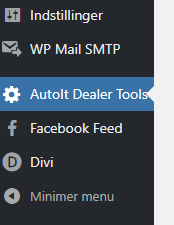
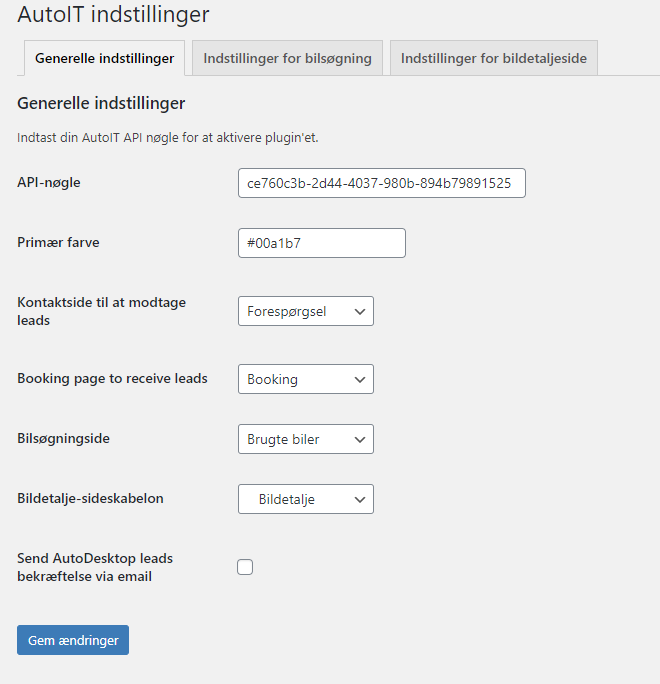
- Fill out the api-key that has been provided by AutoIT A/S.
- Choose you primary color (This will be used in multiple places)
- Configure the rest of the settings if needed.
Save the settings in all three tabs (if not the plugin might throw errors).
Shortcodes
You are now ready to place the shorcodes on the landingpages
A shortcode is a piece of syntax that can be inserted anywhere in the WordPress text editor, and will then be processed into some kind of functionality. You can imagine shortcodes as building blocks you can move around. Shortcodes have optionally attributes, that change their output.
A shortcode is delimited by square brackets, for example __[bdt_cta type="TestDrive"]
Examples of building the searchpage / resultlist and vehicledetailspage are shown at the end of this section__
Global shortcodes
These shortcodes should work anywhere in WordPress.
__bdt_vehicletotalcount__
shows a total count of vehicles for the current dealer.
bdt_vehicle_search
Print out the vehicle search filter.
__bdt_vehicle_search_results__
Print out the search results - list of cars.
__bdt_vehicle_search_frontpage__
Specialized search for use on the frontpage (or any other landingpage that is not the main search and result page)
(Lots of possible ways to tweak what is shown and how it looks. See the setting "Forsidesøgning" in the plugin settings)
bdt_vehicle_card
Print out a vehicle "card" - a box with short informations about the vehicle. This is equal to one search result item from the vehicle search results.
Attributes:
- vehicle - specifies the vehicle ID. If omitted, it will look for bdt_vehicle_id URL parameter.
Labels
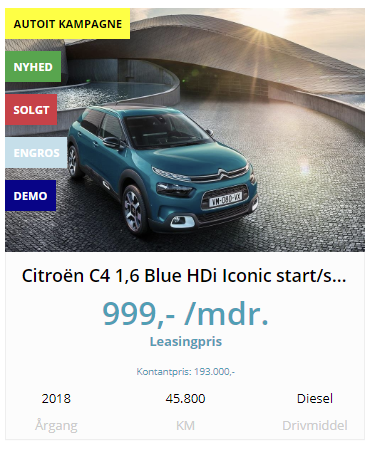
If statuscodes are used in AutoDekstop (statuscode are set in the tab "Status, annoncering og leasing") they will be shown on top of the vehicle image on the vehiclecards. A total of five labels can be shown on a vehiclecard at any given time. A special dealer specific label (Dynamic label, which can be change via the plugin settings) can be activated (Please contact our Support deparment for further information) and set in the settings menu.

__bdt_featuredvehicles__
Shows a list of vehicles that had been marked as "In focus" in AutoDesktop. This allows sold cars to show until removed from the index.
Attributes:
- type - Set the vehicle type. Valid types: Motorcycle, Car, Truck and Van.
- show - Set the amount of featured vehicles shown.
Example 1: __[bdt_featuredvehicles show="3"]__ - 3 vehicles with the statuscode "I fokus" are shown.
Example 2: __[bdt_featuredvehicles show="3" type="Car"]__ - 3 cars with the statuscode "I fokus" are shown.
bdt_get_vehicles
Creates a list of cars from specific filters
Attributes:
- make
- model
- companyid
- propellant
- bodytype
- vehicletype (Personbil, Varebil, Motorcykel, Lastbil)
- vehiclestate (Fabriksny, Brugt)
- hidesoldvehicles (true)
- minprice
- maxprice
- orderby
- show (Max amount of vehicles to show)
- ascending (true, defaults to false)
Both minprice and maxprice are needed in order to use the price filter (See example 4) and both values needs to be integers.
When using the attribute "orderby" the follwing values are valid: "(”DateEdited”, ”Mileage”, ”FirstRegistrationYear”, ”Consumption”, ”Make”, “Price”.
Example 1: [bdt_get_vehicles make="Audi"] - lists all cars with the make "Audi".
Example 2: [bdt_get_vehicles make="Audi" model="A5"] - lists all cars with the make "Audi" and model "A5".
Example 3: [bdt_get_vehicles make="Audi" model="A5" propellant="diesel"] - lists all cars with the make "Audi", model "A5" and uses diesel as propellant.
Example 3: [bdt_get_vehicles minprice=0 maxprice=50000 orderby="Price"] - lists all cars with with a cash price between 0,- and 50000,-. The list is order by price (descending).
__bdt_get_vehicles_by_status_code__
Creates a list of cars from status codes set in AutoDesktop (In order to use this shortcodes the dealer has to list cars using AutoDesktop. BilInfo cars are currently not supported as it's specific fields set in AutoDesktop).
Required attribute:
- status
Optional attributes:
- state
- make
- show (Max amount of vehicles to show)
- orderby
- ascending
The following status codes are currently supported:
- Sold - Shows all cars with the label "Solgt".
- New - Shows all cars with the label "Nyhed".
- Leasing - Shows all cars with the label "Leasing".
- Warehousesale - Shows all cars with the label "Lagersalg".
- Flexleasing - Shows all cars with the label "Flexleasing".
- Export - Shows all cars with the label "Eksport".
- Upcoming - Shows all cars with the label "På vej ind".
- Rental - Shows all cars with the label "Udlejning".
- Commision - Shows all cars with the label "Kommision".
- Wholesale - Shows all cars with the label "Kun engros".
- Demo - Shows all cars with the label "Demonstration".
- NewCar - Shows all cars with "Fabriksny" checked in AutoDesktop.
- Carlite Dealer Label - Shows all vehicles with "CarLite forhandler label" checked in AutoDesktop.
- Trailer - Show all vehicles with the "Trailer" statuscode checked in AutoDesktop.
- NoTax - Show all vehicles with the "Uden afgift" statuscide checked in AutoDesktop.
Example 1: __[bdt_get_vehicles_by_status_code status="Sold"]__ - lists all cars marked as "Solgt".
bdt_get_vehicles_by_type
Creates a list of cars from their type.
Required attribute:
- type
- show (Max amount of vehicles to show)
Optional attributes:
- make
The following types are currently supported:
- Car - Shows all vehicles of the type "Car".
- Van - Shows all vehicles of the type "Van".
- Motorcycle - Shows all vehicles of the type "Motorcycle".
- Truck - Shows all vehicles of the type "Truck".
The following states are currently supported:
- BrandNew - only vehicles with "Fabriksny" checked in AutoDesktop.
- Used - Used vehicles.
Example 1: [bdt_get_vehicles_by_type type="Car"] - lists all vehicles with the type "Personbil".
__[bdt_map]__
It's only possible to use this shortcode once on every page!
To activate the map go to the plugin settings as check "Activate map". The rest of the settings can be left as they are or changed if needed. Add the following CSS to get a full-width map with a height of 400px:
map {
height: 400px;
width: 100%;
}
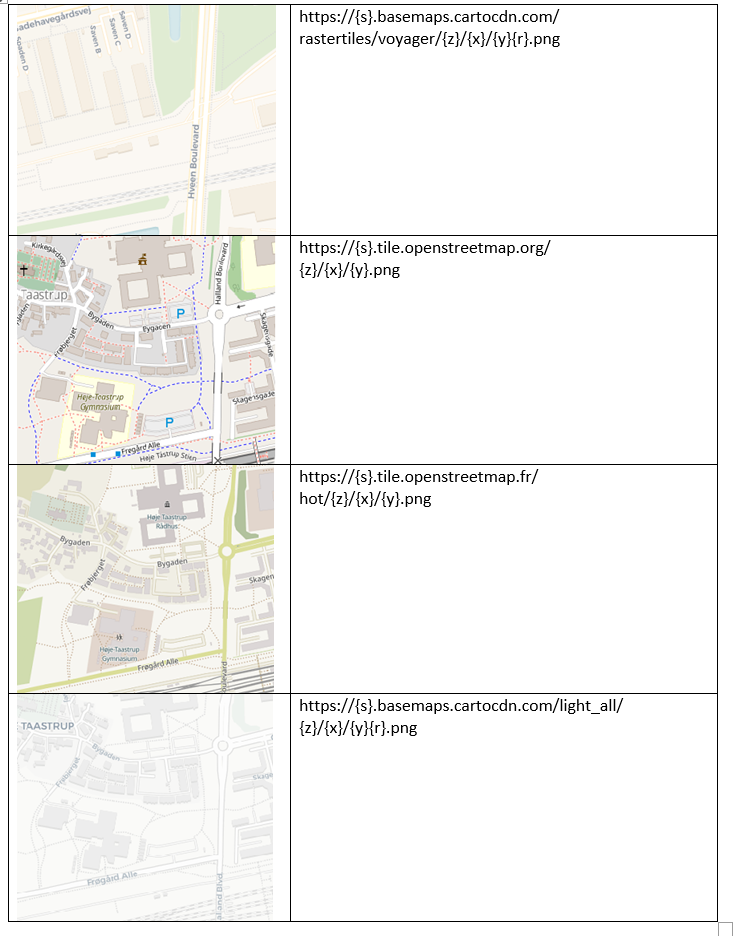
Custom tiles and markers are support by adding them in the plugin settings. Below is a list of a few free tiles that can be used:
- https://{s}.basemaps.cartocdn.com/rastertiles/voyager/{z}/{x}/{y}{r}.png
- https://{s}.tile.openstreetmap.org/{z}/{x}/{y}.png
- https://{s}.tile.openstreetmap.fr/hot/{z}/{x}/{y}.png
- __https://{s}.basemaps.cartocdn.com/light_all/{z}/{x}/{y}{r}.png__
if the shortcode is used on the vehicle detailspage use the attribute "detailspage" with the value "true" ([bdt_map detailspage="true"]) the department where the vehicle is located will automatically be marked on the map.
Vehicle detail shortcodes
These will work only on a vehicle detail template page.
__bdt_cta__
This will generate a CTA button, with a link to the contact page or booking page with parameters that facilitate the leads functionality. It can be opened and content inserted will become wrapped in a link element.
Attributes:
- color - hexadeximal color with a hash, or a color name that colors the CTA text and icon. If omitted, the CTA takes on the primary color.
Attributes:
- type - one of the five following types:
- TestDrive - book test drive
- PhoneCall - call me back
- Purchase - buy the car
- Email - send email
- Contact - general contact
Example 1: [bdt_cta type="TestDrive"]
Example 2: [bdt_cta type="TestDrive"] This content will be shown instead of the icon and predefind text.[/bdt_cta]
__bdt_prop__
Fetch a property of a car - currently needs to be the danish caption. These are directly matched from the database, so this list may be
incomplete/obsolete.
Attributes:
- p - see the list below.
- nona="-" - text to show when no match was found. If omitted, returns "Ikke angivet".
- raw="true" - returns the unformated value. Useful in cases where the value needs to be further processed or used.
Example: __[bdt_prop p="0-100"]__
Properties:
- Company,
- BodyType,
- Mileage,
- ModelYear,
- Price,
- XVat - Without VAT(MOMS) Ja/Nej,
- Acceleration,
- FirstRegistrationDate,
- AirbagCount,
- CylinderCount,
- DoorCount,
- GearCount,
- GearType,
- SeatCount,
- AnnualOwnerTax,
- PropellantType,
- Width,
- Color,
- Height,
- Kmx1l - kilometers per liter,
- Whx1km,
- Length,
- DeliveryCost,
- MaxTorque,
- MaxHorsepower,
- EngineSize,
- RegistrationNumber,
- VIN,
- LastChangedDate,
- TopSpeed,
- TotalWeight,
- TankCapacity,
- AllowedTrailerWeightWithBrakes,
- AllowedTrailerWeightWithoutBrakes,
- DealersReferenceNumber,
- EquipmentItem - A general type for all equipment. Equipment is not mapped, i.e. you cannot fetch a particular equipment item.
- LeasingDeal,
- LeasingBusiness,
- LeasingFirstPayment,
- LeasingFirstPaymentVAT,
- LeasingRunTime,
- LeasingMonthlyPayment,
- LeasingMonthlyPaymentVAT,
- LeasingRemainingValue,
- FinancingAnnualLoanFeesInPercents,
- FinancingAnnualDebitorInterest,
- FinancingFixedInterest,
- FinancingMonthlyPrice,
- FinancingLoanTransfer,
- FinancingRunTime,
- FinancingInterestRate,
- FinancingTotalCreditFees,
- FinancingTotalFeesToPay,
- FinancingTotalSetupFees,
- FinancingDownpayment,
- FinancingDownpaymentInPercent
__bdt_specifications__
Print out a table of the specifications.
__[bdt_prop p="description"]__
Print out the car description.
__bdt_equipment__
Print out a table of equipment
bdt_additional_equipment
Print out a table of additional equipment set in AutoDesktop.
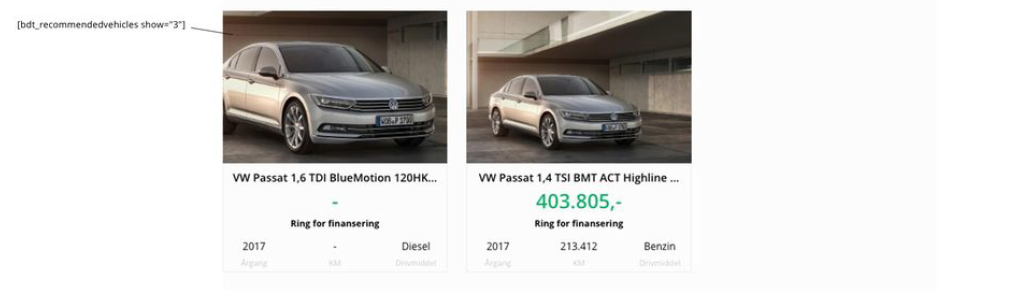
__bdt_recommendedvehicles__ Print out three recommended unsold vehicles, related to the current vehicle.
__bdt_slideshow__
Print out a slideshow of current vehicle's images.
bdt_vehicle_labels
Print out a list of labels asociated with the given car. Labels come in predefined colors, that can be overwritten with CSS in your child theme:
- .bdt .badge-primary - used as default label color,
- .bdt .badge-danger - used for sold label,
- .bdt .badge-success - used for new label,
- .bdt .badge-warning - used for reserved label,
- .bdt .badge-info - used for leasing label
- .bdt .badge-orange - used for "I fokus" label
- .bdt .badge-secondary - used for "Lagersalg" label
- .bdt .badge-dark - used for "Uden afgift" label
- .bdt .badge-purple - used for "Udlejning" label
Attributes:
- allowed="" - comma separated list of labels that are allowed to be shown. Use this if there are too many labels available, and you don't necessarily want to show them all. If ommited, all labels will be returned.
Example 1: [bdt_vehicle_labels allowed="Nyhed,Solgt,Leasing,Reserveret,Demonstration,Fabriksny,Kun engros"
__bdt_vehicle_search_backtoresults__
Prints out a "smart" back button, that returns you to the vehicle search results if available, or car search if not.
bdt_vehicle_price
Shows intelligently the "most attractive" price of a vehicle - i.e. financing or leasing if available, or the cash price as fallback.
__bdt_sharethis__
Shows icons for Facebook-sharing, sharing by mail and printing.
Setup your forms to send leads to AutoDesktop
To be able to send leads to AutoDesktop you need to create forms on the pages that you have specified on the settingspage of the AutoIt plugin.
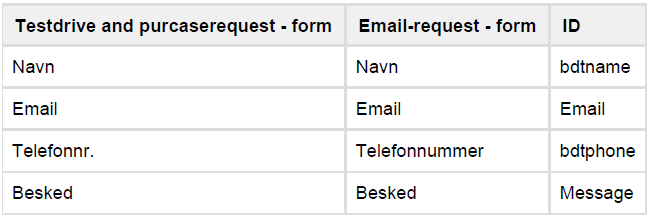
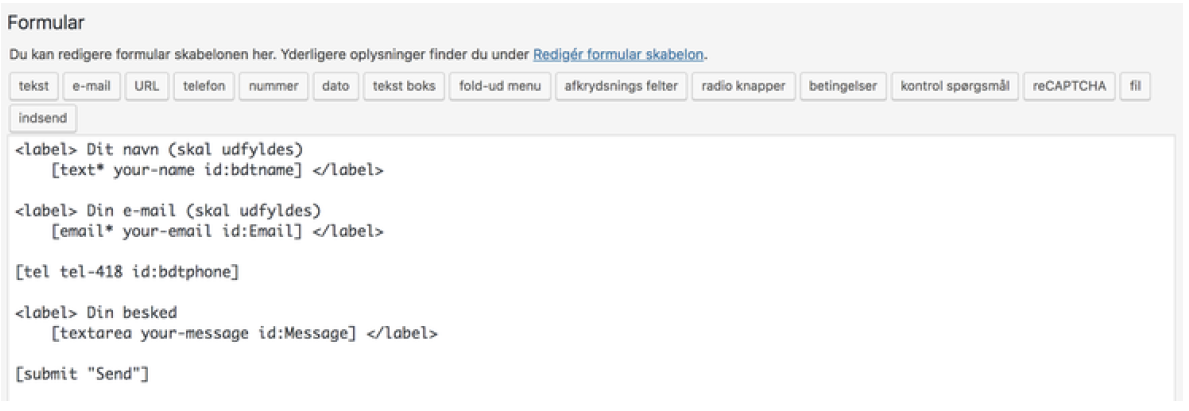
To be able to send leads when the forms get submitted, you need to set the ID’ to the specific inputs fields. Se example below to see an example with the Contact Form 7 plugin.
To show a car-card next to the form, as showed below, use this shortcode: [bdt_vehicle_card]
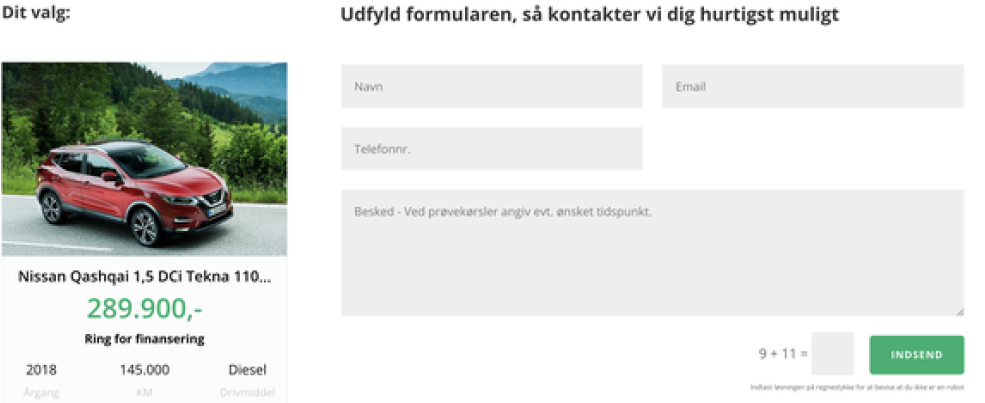
NB The vehicle-card will only be visible, when a client comes directly from a vehicle detailspage.
Widgets
__[bdt_widget]__ Required attribute:
- type
Supported widget-types:
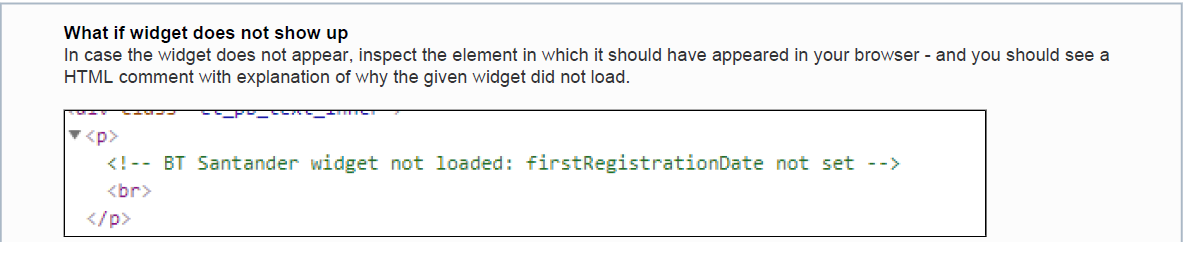
- Santander - Santander widget. WORKS ONLY ON THE VEHICLE DETAIL PAGE.
The widgets should work without any additional parameters, as the usual clientID parameter is resolved automatically by association to the companyId associated with the current API key. Widgets can be used anywhere in your WordPRess installation, except for Santander widget that can only be used on a vehicle detail page, because it requires some inputs about a vehicle to be displayed.
The [bdt_widget] shortcode can be opened in order to insert some content and put a link on it. In such case, the widget won'd be embedded; but when the link is clicked, a new window opens with a widget inside. In case that your desired widget type doesn't show up, make sure that it had been activated for your company - contact Biltorvet A/S support to get a widget activated for your API key. Additionaly, you may want to reuse a specific widget ID instead of relying on automatic resolve. For that, use externalid attribute, for example [bdt_widget externalid="XXXXXX-XXXX-XXXX-XXXXXX"].
Widget attributes
All widgets have following common attributes, that you can use to tweak their appearance for your particullar instance:
- color - sets the primary theme color for the given widget.
- logourl - sets the URL for the logo to be displayed inside.
- fontcolor - sets the primary theme color for the font inside.
- fontfamily - sets the google font to be loaded for the whole widget. (not implemented yet)
Example 1: [bdt_widget type="Santander" color="#ff0000"]
Widget type specific attributes
Some widgets allow you to specific attributes.
Santander:
- hideVehiclePrice="true" - hides the vehicle price in the widget, which is useful in the vehicle detail page, where there's probably price in some other place already.
- brandingid - some dealers have a specific branding.
Partner integrations
FindLeasing
Jyffi
FindLeasing
Shortcode:
[bdt_findleasing_calculator] renders a FindLeasing widget if the current vehicle has the relevant leasing calculations from FindLeasing (FindLeasing external id).
Note: This widget only works on the vehicle details page
Jyffi
Currently in dev mode.
Building the searchpage / resultlist page and vehicle detailspage
How the search, result and detailspage can be build.
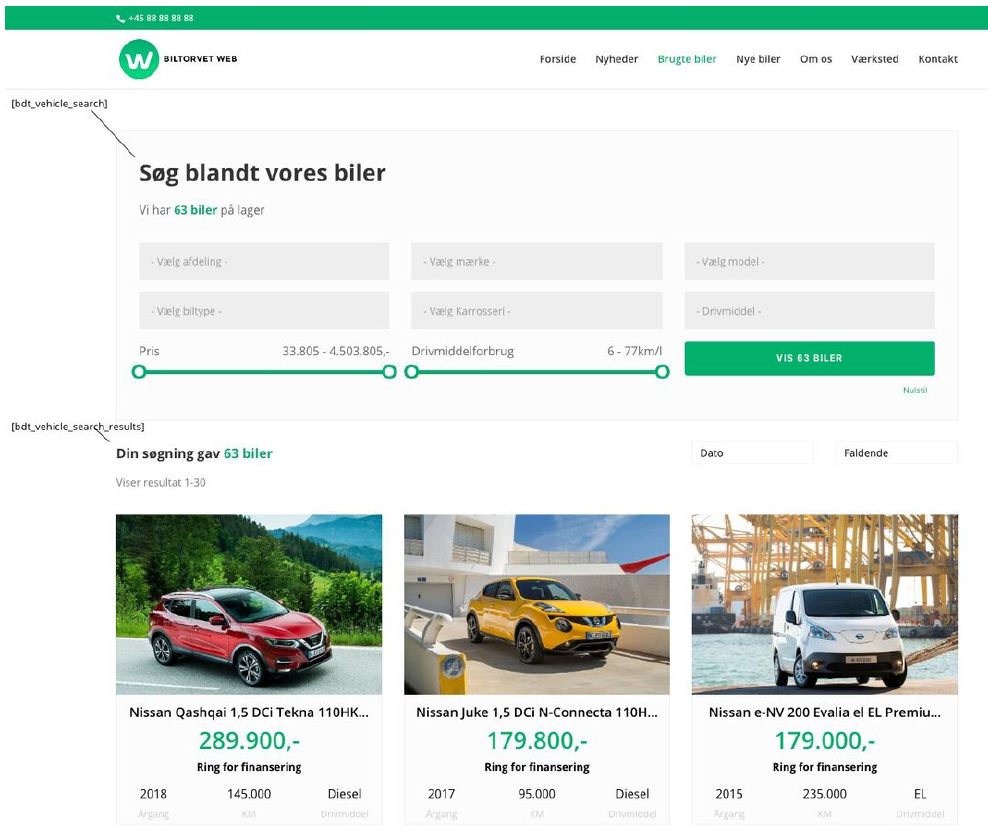
Car search / resultlist
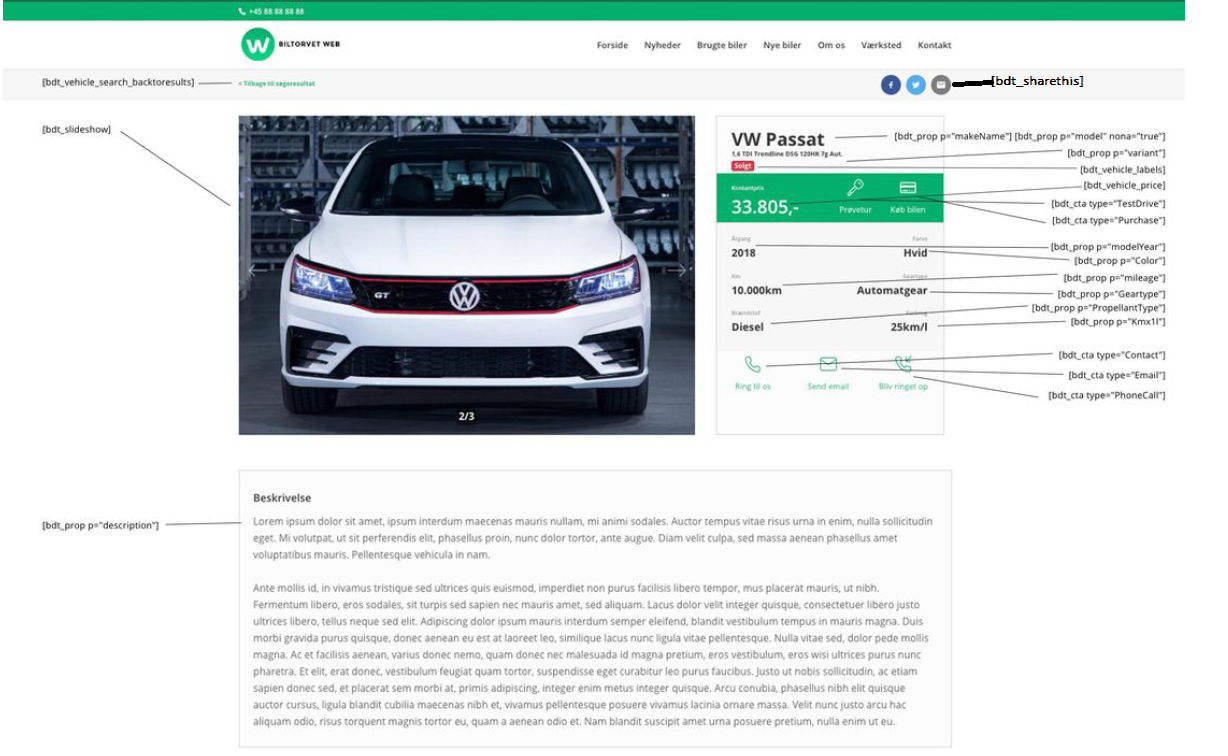
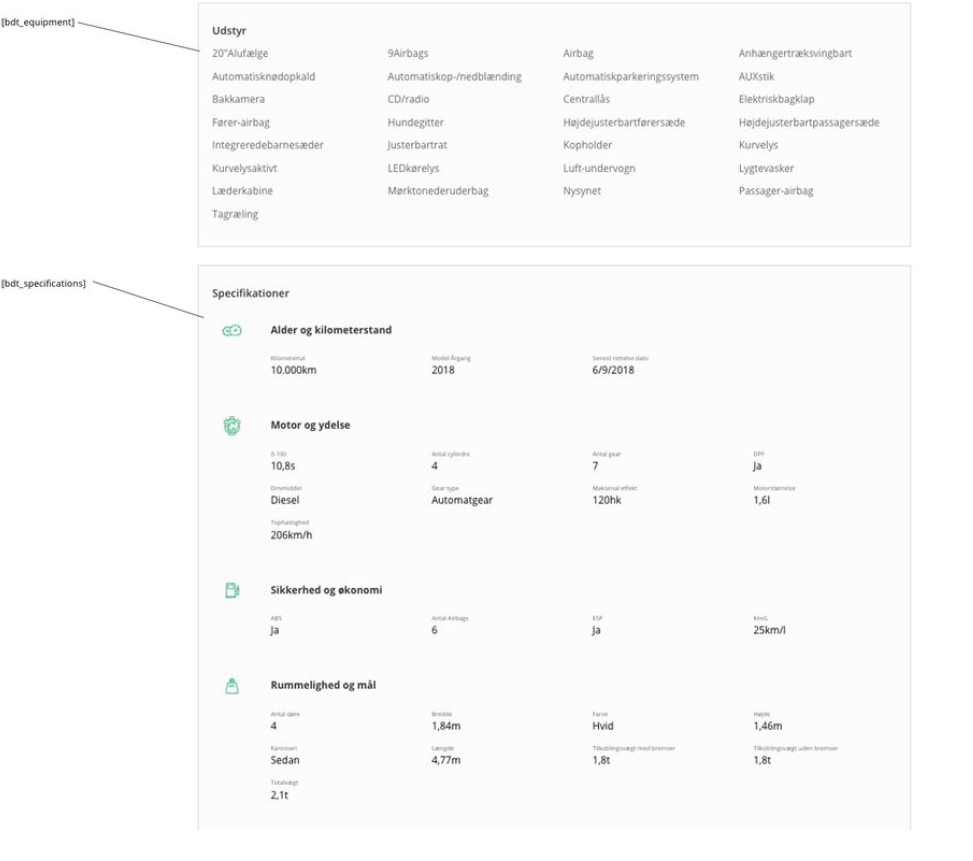
Vehicle detailspage
Searchpage and resultlist
When using the plugin it's important to notice that the searchpage and resultlist won't work optiomal unless the landingpage used for the shortcodes is placed in the root of the domain.
Example 1: demo1.biltorvet.as/brugte-biler - Everything will work justfine.
Example 2: demo1.biltorvet.as/out-new-homepage/brugte-biler - Filtering options, pagination and such won't work as it should.
Be sure to remember this when creating a website using this plugin.
ShortCodes list for easy implemention
Car search / resultlist
[bdt_vehicletotalcount]
[bdt_vehicle_search]
[bdt_vehicle_search_results]
Vehicle detailspage
[bdt_vehicle_search_backtoresults]
[bdt_sharethis]
[bdt_slideshow]
[bdt_prop p="makeName"]
[bdt_prop p="model" nona="true"]
[bdt_prop p="variant"]
[bdt_vehicle_labels allowed="Nyhed,Solgt,Leasing,Reserveret,Demonstration"]
[bdt_vehicle_price]
[bdt_cta type="TestDrive" color="#ffffff"] (Change the color if needed)
[bdt_cta type="Purchase" color="#ffffff"]
[bdt_prop p="FirstRegYear"]
[bdt_prop p="Color"]
[bdt_prop p="mileage"]
[bdt_prop p="Geartype"]
[bdt_prop p="PropellantType"]
[bdt_prop p="Kmx1l"]
[bdt_cta type="Contact"]
[bdt_cta type="Email"]
[bdt_cta type="PhoneCall"]
[bdt_prop p="company"]
[bdt_prop p="description"]
[bdt_equipment]
[bdt_specifications]
[bdt_additional_equipment]
[bdt_recommendedvehicles show="3"]
Bookingspage
[bdt_vehicle_card nona="Ingen bil valgt"]
Releases
Newest 25 of 60 recorded releases.
These releases are tags only. The author does not attach a packaged zip, so there are no download counts to report.