Install
This is the repository archive. It installs, but the folder name will carry the branch suffix and updates will not flow.
Install straight from GitHub with WP-CLI:
wp plugin install https://github.com/aryanjasala/axle-category-tag-trash/archive/refs/heads/main.zip
Axle Category & Tag Trash







A trash for WordPress categories, tags and custom terms. Undo a delete in one click, or restore it later with its posts, child terms and menu links.
Axle Category & Tag Trash" width="880">
Posts and pages go to the trash when you delete them. Categories and tags don't: one click and the term is gone, its posts move to Uncategorized, its child categories move up a level and its menu links disappear. Axle Category & Tag Trash keeps every deleted term for 30 days and puts all of that back on restore, under the same ID.
[!NOTE] Free and open source under the GPL. No pro version, no upsells, no ads in wp-admin, no tracking. And it stays that way.
Part of Axle by AryanX, a family of free plugins for running WordPress sites safely.
Features
- Undo right after a delete, on every term screen, for single and bulk deletes
- Same ID on restore, so navigation blocks, widgets and shortcodes that store the ID work again
- Everything comes back: term meta, posts (in the same order), child terms and menu links in their menu position
- Posts that only got Uncategorized because of the delete lose it again
- Tools > Axle Category & Tag Trash: taxonomy tabs, search, bulk restore and delete, Empty trash, and what each restore brings back
- Kept for 7, 30, 90 or 365 days, then a daily task deletes them for good
- Categories, tags, WooCommerce product categories and attributes, and any custom taxonomy with an admin screen
Install
- Download
axle-category-tag-trash.zipfrom the latest release. - In WordPress, go to Plugins > Add New Plugin > Upload Plugin, choose the zip and activate it.
Or with WP-CLI:
wp plugin install https://github.com/aryanjasala/axle-category-tag-trash/releases/latest/download/axle-category-tag-trash.zip --activateNeeds WordPress 6.6+ and PHP 7.4+. To try it first, try.axlewp.com/axle-category-tag-trash opens a private WordPress in your browser with the latest release and some demo content. Nothing to install.
Quick look
Everything on the screen is also on WP-CLI:
wp axle-category-tag-trash list --taxonomy=category
wp axle-category-tag-trash restore 42
wp axle-category-tag-trash delete --all
Screenshots
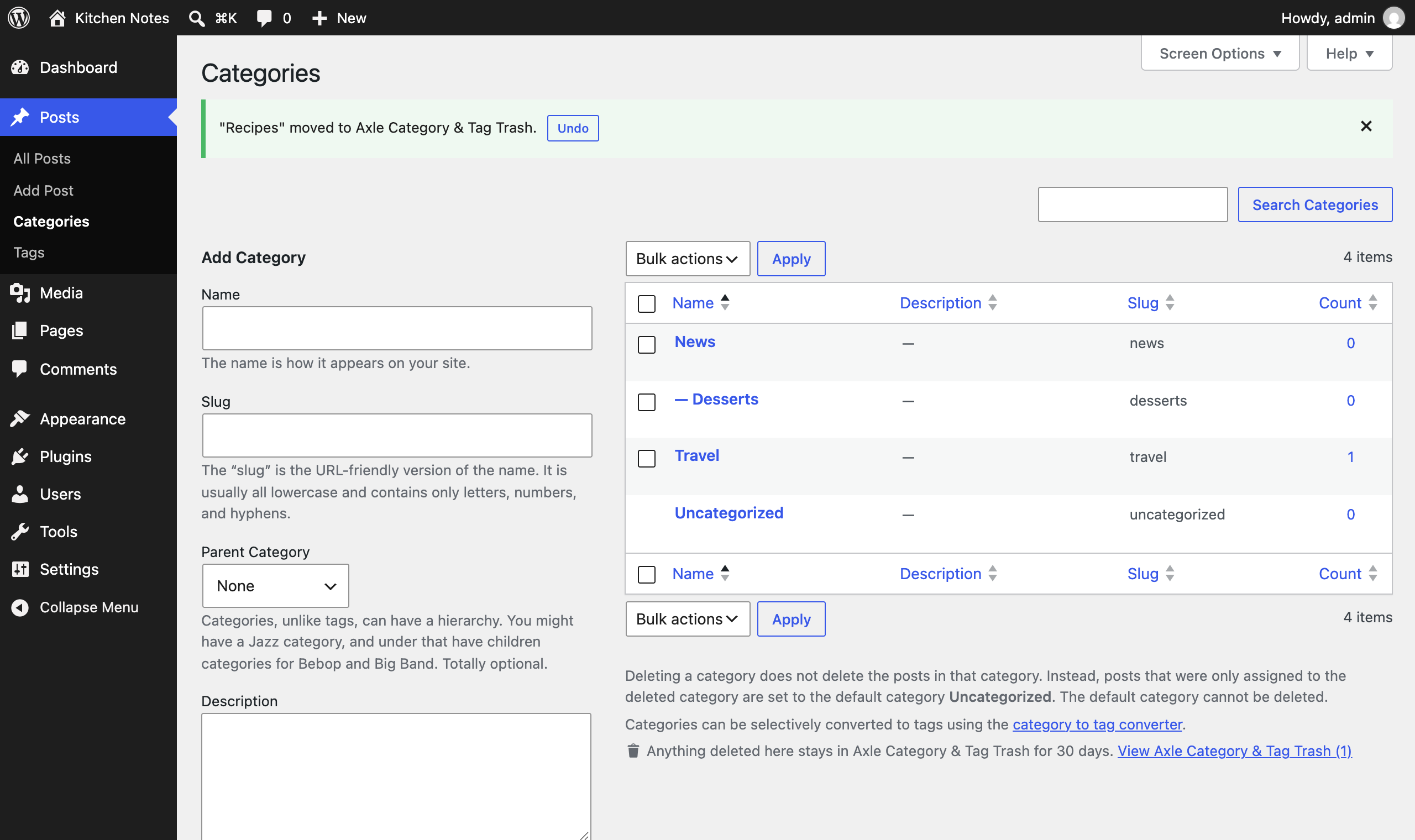 Undo right after deleting a category |
Tools > Axle Category & Tag Trash |
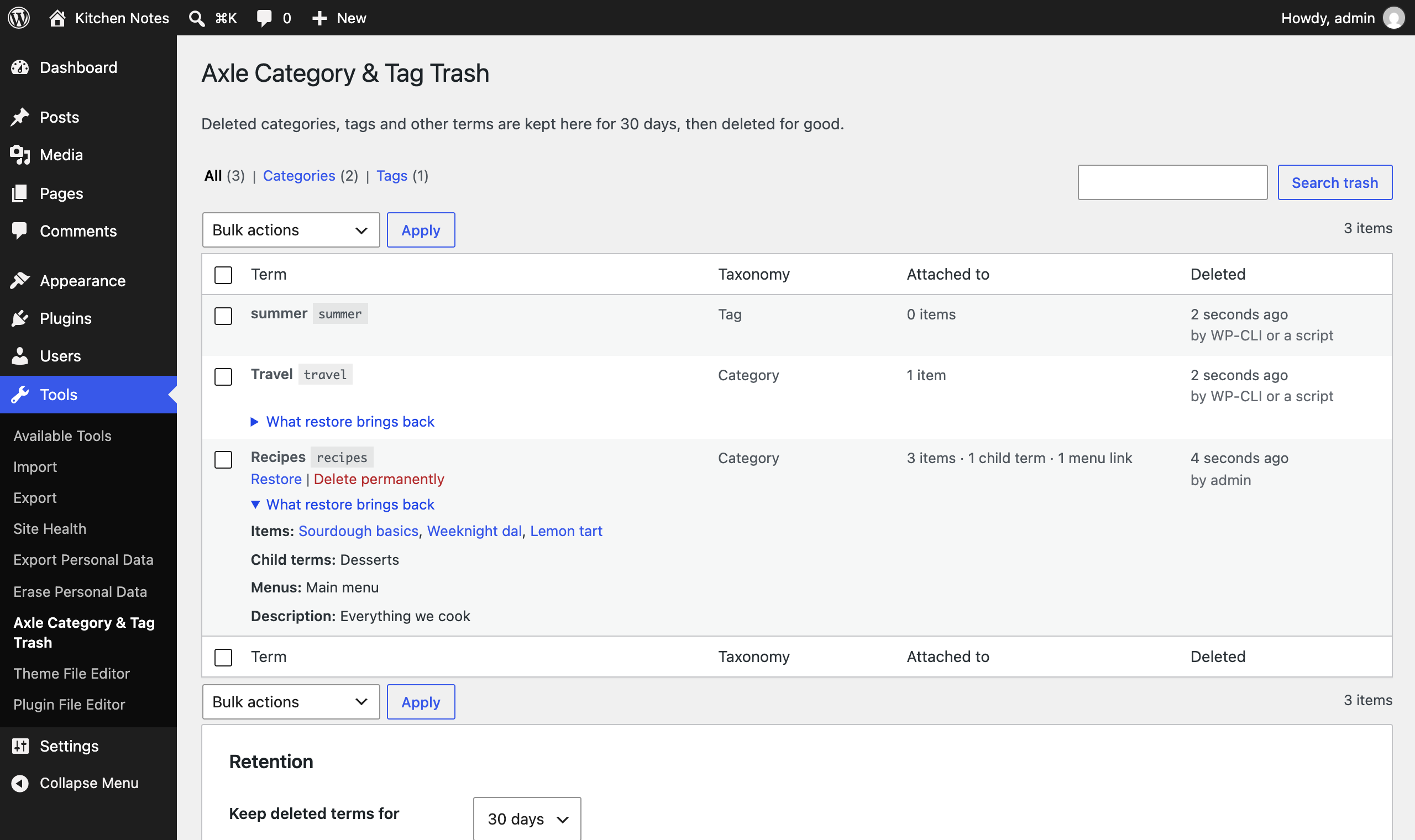 What a restore brings back |
Documentation
| Doc | What it covers |
|---|---|
| Reference | Hooks, WP-CLI, the PHP API and what is stored |
| Development | Local setup, commands and tests |
| Contributing | Pull requests, required checks and PR titles |
| Releasing | How merged pull requests become releases |
| Security | Reporting a vulnerability |
| readme.txt | What WordPress.org shows, with the FAQ and changelog |
Project structure
axle-category-tag-trash.php           plugin header and PSR-4 autoloader
src/
├── Plugin.php           creates the services
├── Snapshot.php         everything about a term at the moment it was deleted
├── Snapshotter.php      captures terms on pre_delete_term, saves on delete_term
├── Restorer.php         puts a term, its posts, children and menu links back
├── Trash.php            storage (a hidden post type) and queries
├── Purger.php           daily cleanup after the retention period
├── Admin/               trash screen, list table, Undo notices
└── Cli/Command.php      wp axle-category-tag-trash
assets/                  term screen script and styles
tests/
├── Unit/                PHPUnit
└── e2e/                 Playwright specs and the Docker site
.wordpress-org/          screenshots
docs/                    reference, development, contributing, releasing
More free plugins
Small plugins that each fill one gap in WordPress, all free with no pro version. Try them all together at demo.axlewp.com.
| Plugin | What it does | |
|---|---|---|
 |
Page Template Usage | See which template every page uses, and fix the pages on a missing template |
 |
Axle Staging Guard | Stops staging copies from emailing real people or getting indexed |
 |
Axle Read-Only Mode | Read-only mode for WordPress during migrations and deploys |
 |
Axle Block Restore | Restore a single block from an old revision, not the whole post |
 |
Activity Log with Undo | An activity log where every change you can reverse has an Undo button |
 |
Agent Governance | Hold risky AI agent calls for approval, preview what they change, and roll back a session |
 |
Axle AI Guard | See and control every AI call your plugins make: cost, data sent, budgets and a kill switch |
 |
Axle Config Sync | Keep settings in git, diff them against the live site, apply with a preview and undo |
 |
Axle Headers | Security headers and a Content Security Policy that learns what your site loads, then enforces it with nonces |
 |
Axle Leftovers | Find what deleted plugins left behind, see who owns it and why, and clean it up with undo |
 |
Axle License Tracker | See which premium plugins are licensed, which lapsed and stopped getting updates, and what renews when |
 |
Axle Review | Share drafts through private links and collect outside feedback as block Notes |
 |
Axle Runtime Doctor | Check OPcache coverage, the object cache, PHP support and limits, cron and more, with the fix for your host |
 |
Axle Smoke Test | Check key pages after every update or deploy, see what broke and roll it back |
 |
Block Doctor | Scan the whole site for invalid and broken blocks and fix them in bulk, with undo |
 |
Block Theme Ops | Find Site Editor changes that override your theme files, see the diff, reset them or send them to Git |
 |
Role Right-Sizer | Recommends the smallest role each user needs, from what they actually do |
 |
Update Rehearsal | Try plugin, theme, core and PHP updates on a disposable copy of your site in WordPress Playground first |
 |
User Session Manager | See every device signed in, sign out one, and limit sessions per role |
License
Copyright Aryan Jasala. Licensed under GPL-2.0-or-later.