Install
This is the repository archive. It installs, but the folder name will carry the branch suffix and updates will not flow.
Install straight from GitHub with WP-CLI:
wp plugin install https://github.com/aryanjasala/axle-block-restore/archive/refs/heads/main.zip
Axle Block Restore







Restore a single block from an old revision instead of rolling back the whole post.
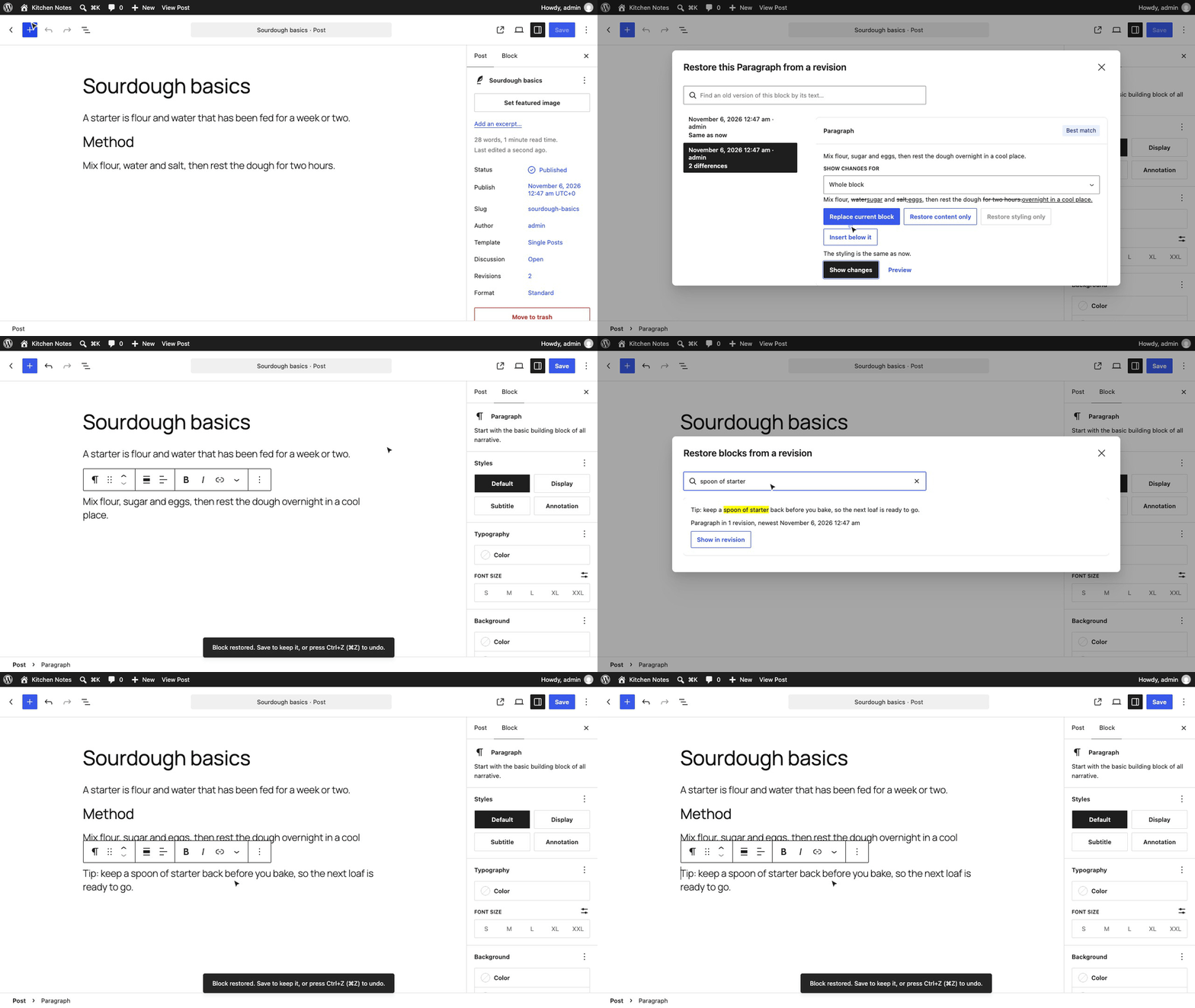
WordPress revisions are all or nothing. If someone deleted a paragraph last week and the post has been edited ten times since, restoring the revision brings the paragraph back and throws away the ten edits. Axle Block Restore works inside the editor and restores single blocks, with all their settings, as a normal undoable change.
[!NOTE] Free and open source under the GPL. No pro version, no upsells, no ads in wp-admin, no tracking. And it stays that way.
Part of Axle by AryanX, a family of free plugins for running WordPress sites safely.
Features
- Block menu > Restore from a revision…: that block's versions in each revision, best match first
- Editor menu > Restore blocks from a revision: every block marked Same as now, Changed since or Not in the post now
- Restore it here puts a deleted block back where it was
- Show changes highlights the words that differ from the current block
- Find text in old revisions searches every revision and jumps to the block that had it
- Revision authors, difference counts, autosaves labelled, arrow-key navigation
- Any block, including blocks from other plugins and blocks inside groups and columns
- Ctrl+Z undoes a restore, and nothing is saved until you update the post
- Restore content only and Restore styling only for one block, with the changes preview following the choice
- Groups and columns come back with everything inside, in one undo step. The list counts what differs inside, and can restore one inner block
- Works in the Site Editor on templates, template parts and synced patterns
- Removed blocks view lists blocks that were in the last 20 revisions and are gone now, newest removal first, with who saved the revision, a preview, and where to put each back
- Another post view copies a block from any post or page you can edit, from its current version or one of its revisions
- Block history: select a block and see every version it had, newest first, with who saved it, when, and the words that changed. Removed and added back are shown as such
- Insert below as a copy next to every restore, so you can compare the old version with the current block before you choose. The copy gets new IDs and never repeats an anchor
- After a restore a notice offers Undo, and for a copy also Compare, which scrolls to the new block
- Command palette: Restore blocks from a revision, Restore selected block from a revision, Show history of selected block, Find text in old revisions, Show removed blocks
- WP-CLI (
wp axle-block-restore), abilities for agents including the history of a block, and a Site Health test for post types that keep no revisions
Install
- Download
axle-block-restore.zipfrom the latest release. - In WordPress, go to Plugins > Add New Plugin > Upload Plugin, choose the zip and activate it.
Or with WP-CLI:
wp plugin install https://github.com/aryanjasala/axle-block-restore/releases/latest/download/axle-block-restore.zip --activateNeeds WordPress 6.6+ and PHP 7.4+. To try it first, try.axlewp.com/axle-block-restore opens a private WordPress in your browser with the latest release and some demo content. Nothing to install.
Quick look
Select a block, open its menu (⋮) and choose Restore from a revision…. The closest older version is marked Best match, and Show changes shows exactly what a restore would change before you click Replace current block.
There is no build step and nothing is stored: revisions are read through the REST API with _fields=content.raw, so the server never renders them just to list them.
Screenshots
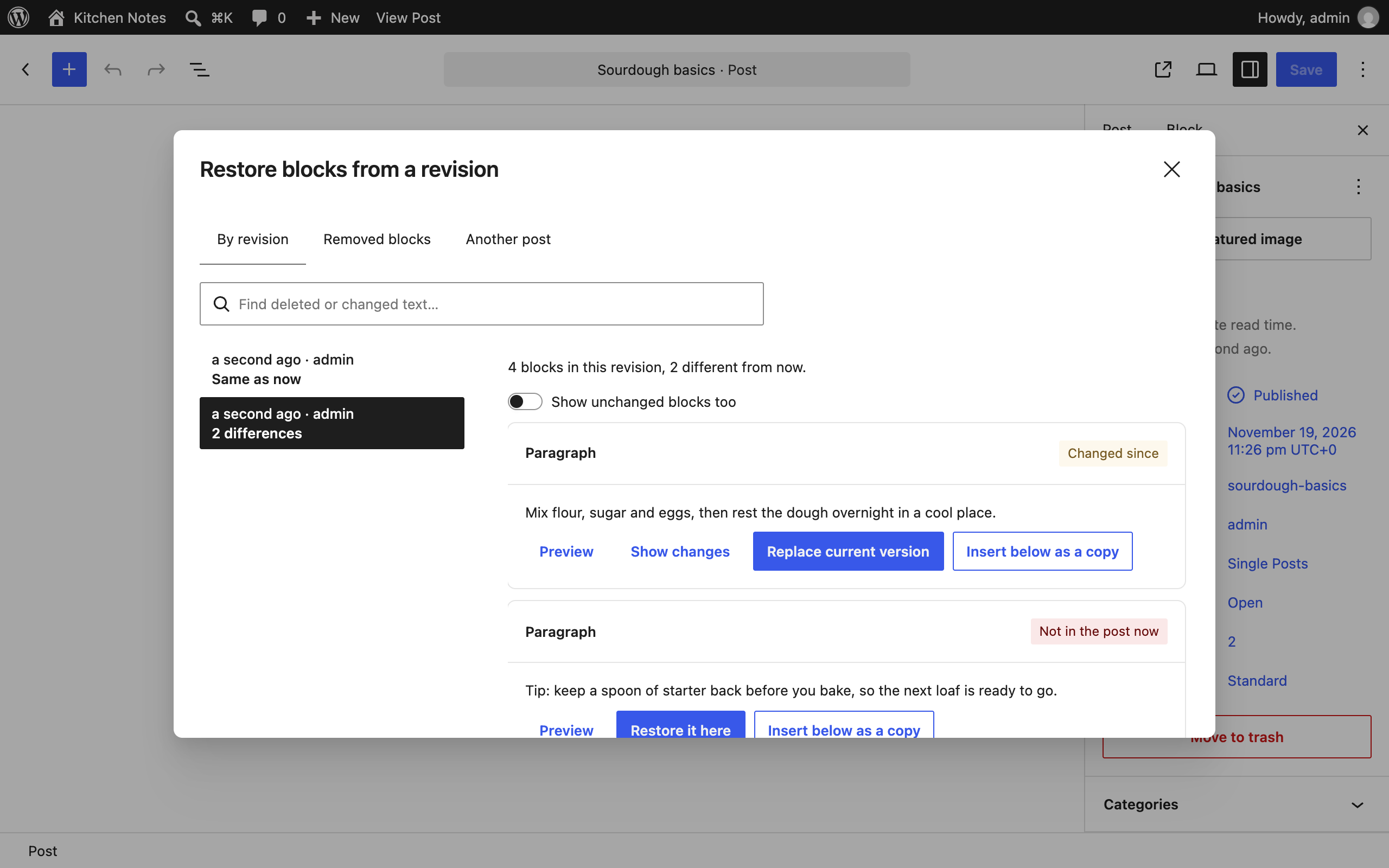 Restoring a deleted paragraph from a revision |
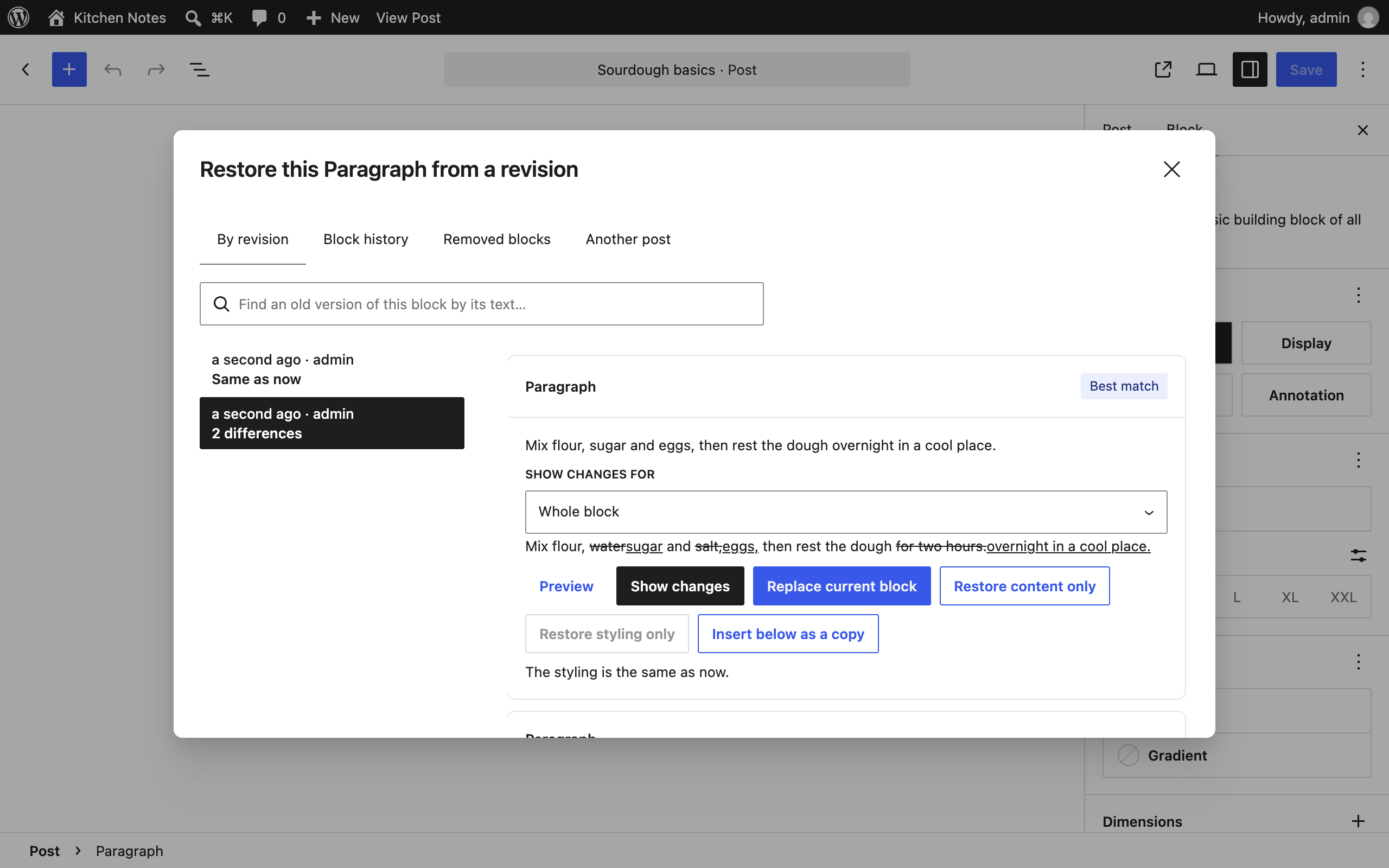 Picking an earlier version of one block, with its changes highlighted |
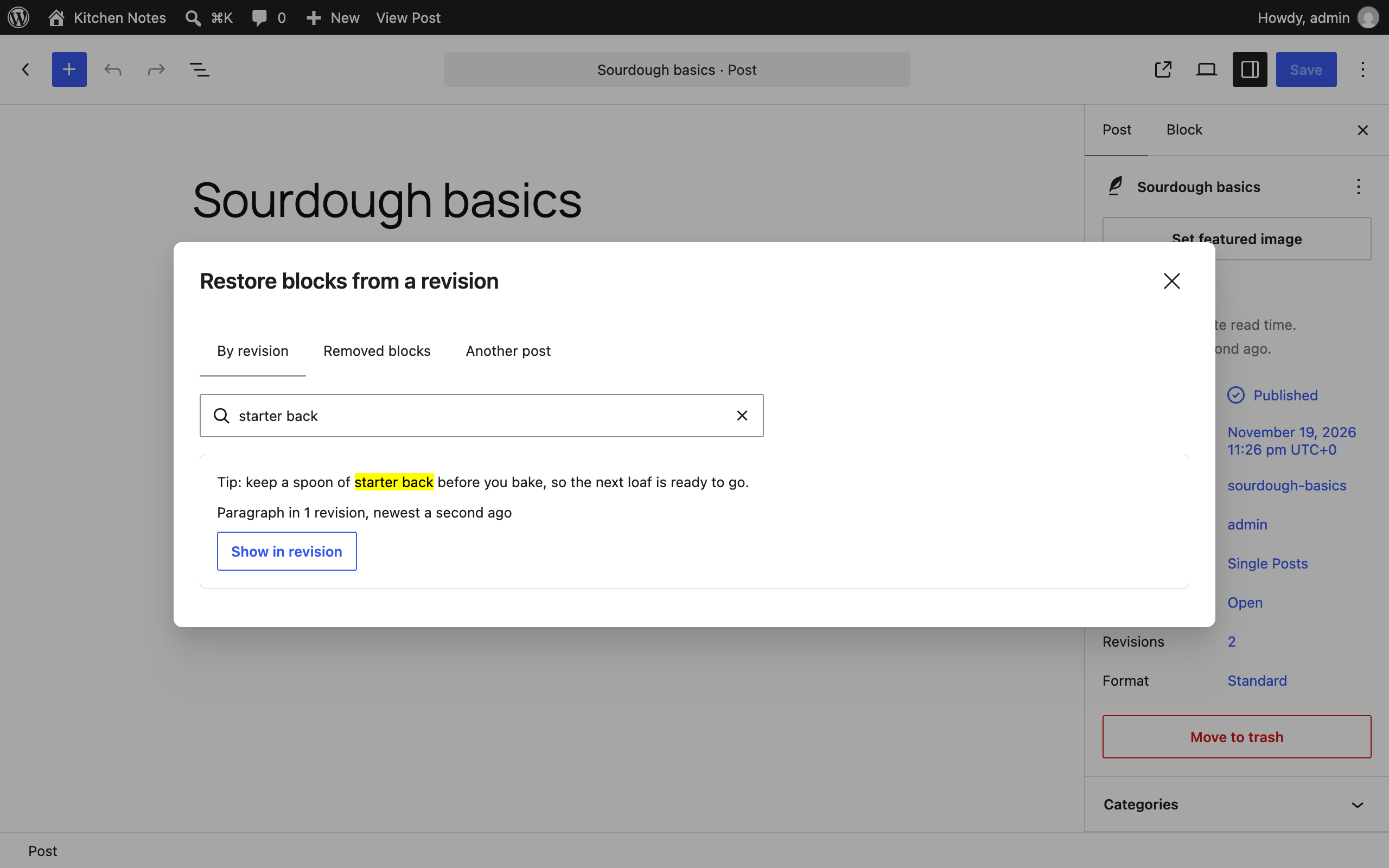 Finding deleted text across revisions |
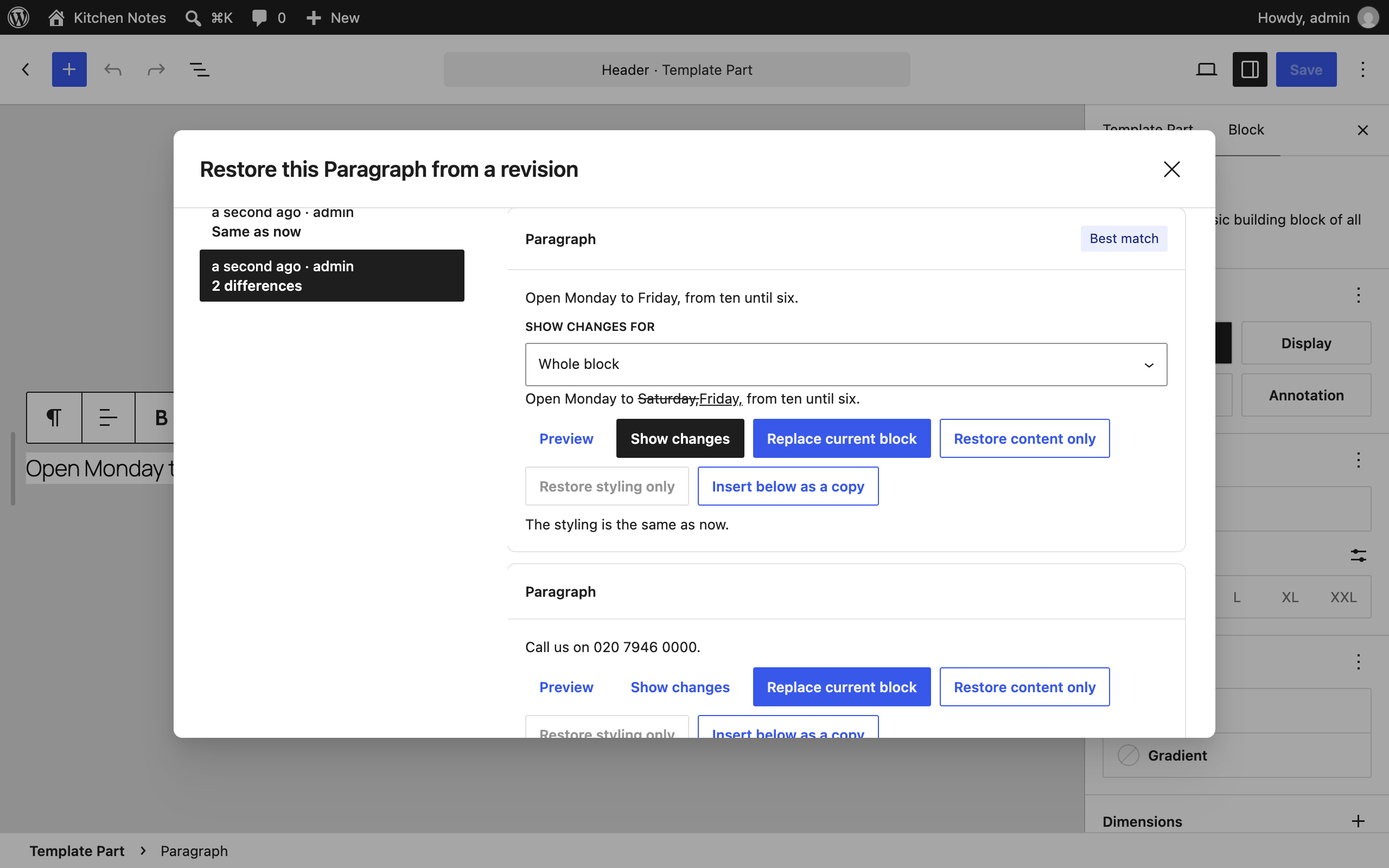 Restoring a block of a template part in the Site Editor |
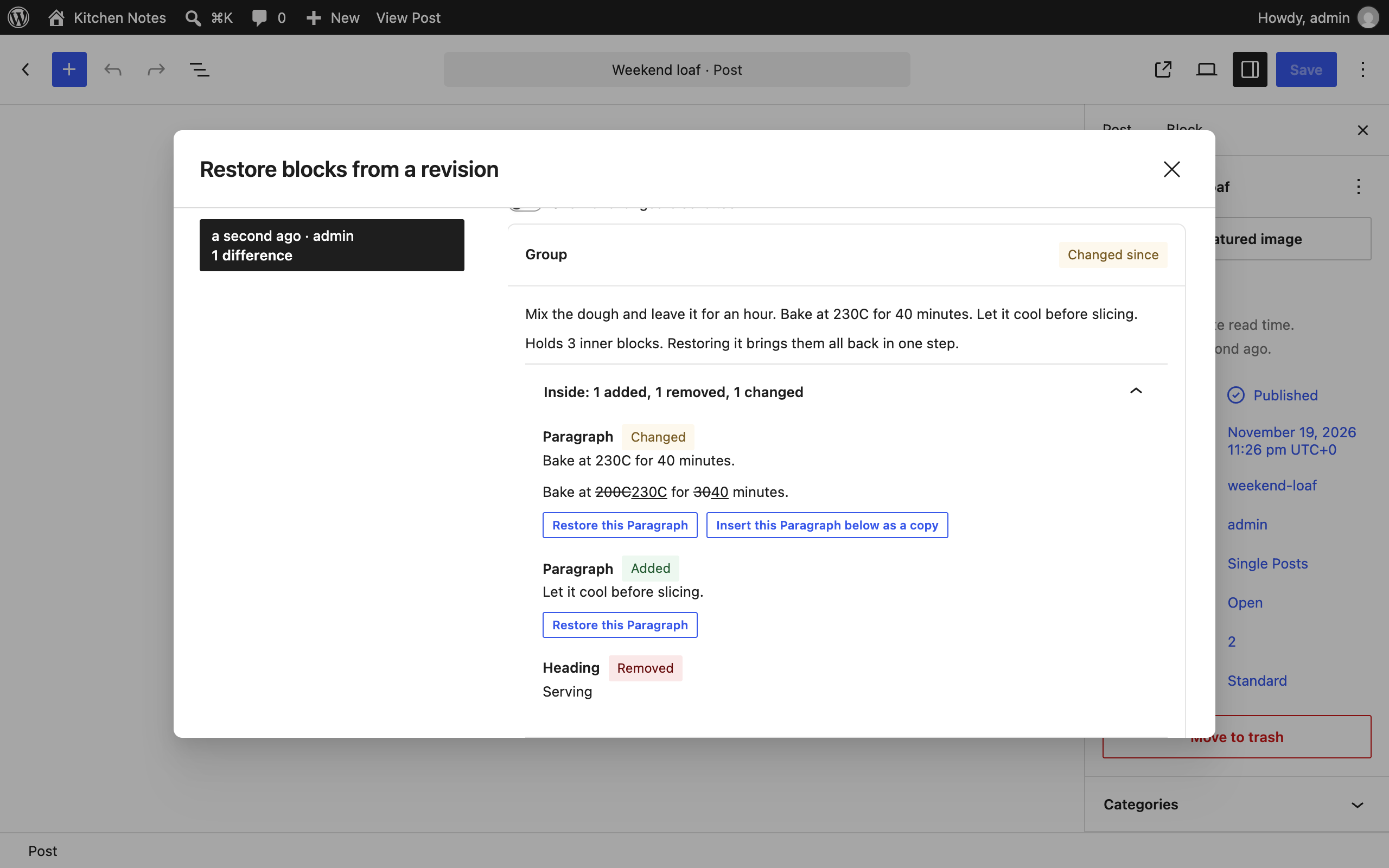 Restoring a group, with what differs inside it |
Documentation
| Doc | What it covers |
|---|---|
| Reference | How matching works, the scripts, and the REST field |
| Development | Local setup, commands and tests |
| Contributing | Pull requests, required checks and PR titles |
| Releasing | How merged pull requests become releases |
| Security | Reporting a vulnerability |
| readme.txt | What WordPress.org shows, with the FAQ and changelog |
Project structure
axle-block-restore.php     plugin header and PSR-4 autoloader
src/
├── Plugin.php            registers the services, lists supported post types
├── Abilities.php         abilities for agents
├── Timeline.php          the history of one block, in PHP
├── Cli/Command.php       wp axle-block-restore
├── Health/Revisions.php  Site Health test
├── Editor/Assets.php     loads the editor scripts
└── Rest/                 author name on revisions, search of posts to copy from
assets/
├── js/matching.js        matching, diff and search (no WordPress dependency)
├── js/components.js      the restore window
├── js/index.js           the menu entries
└── editor.css
tests/
├── Unit/                 PHPUnit
├── js/                   Node unit tests
└── e2e/                  Playwright specs and the Docker site
.wordpress-org/           screenshots
docs/                     reference, development, contributing, releasing
More free plugins
Small plugins that each fill one gap in WordPress, all free with no pro version. Try them all together at demo.axlewp.com.
| Plugin | What it does | |
|---|---|---|
 |
Axle Page Template Usage | See which template every page uses, and fix the pages on a missing template |
 |
Axle Staging Guard | Stops staging copies from emailing real people, calling live APIs or getting indexed |
 |
Axle Category & Tag Trash | A trash for categories, tags and custom terms, with undo and full restore |
 |
Axle Read-Only Mode | Read-only mode for WordPress during migrations and deploys |
 |
Activity Log with Undo | An activity log where every change you can reverse has an Undo button |
 |
Agent Governance | Hold risky AI agent calls for approval, preview what they change, and roll back a session |
 |
Axle AI Guard | See and control every AI call your plugins make: cost, data sent, budgets and a kill switch |
 |
Axle Config Sync | Keep settings in git, diff them against the live site, apply with a preview and undo |
 |
Axle Leftovers | Find what deleted plugins and themes left behind, see who owns it and why, and clean it up with undo |
 |
Axle License Tracker | See which premium plugins are licensed, which lapsed and stopped getting updates, and what renews when |
 |
Axle Review | Share drafts through private links, collect outside feedback as block Notes, and know when an approval is out of date |
 |
Axle Runtime Doctor | Check OPcache coverage, the object cache, PHP support and limits, cron and more, with the fix for your host |
 |
Axle Smoke Test | Check key pages after every update or deploy, see what broke and roll it back |
 |
Block Doctor | Scan the site for broken blocks and fix them in bulk, with undo. See which posts use each block before you switch a plugin off |
 |
Block Theme Ops | Find Site Editor changes that override your theme files, see the diff, reset them or send them to Git |
 |
Role Right-Sizer | Recommends the smallest role each user needs, from what they actually do |
 |
Update Rehearsal | Try plugin, theme, core and PHP updates, a new plugin, or life without one, on a disposable copy of your site in WordPress Playground first |
 |
User Session Manager | See every device signed in, sign out one, and limit sessions per role |
License
Copyright Aryan Jasala. Licensed under GPL-2.0-or-later.