Install
Upload it under Plugins → Add New Plugin → Upload Plugin, then activate.
Install straight from GitHub with WP-CLI:
wp plugin install https://github.com/artifoxie/leadflow-chat/releases/download/v0.1.0/leadflow-chat.zipLeadFlow Chat is a configurable WordPress chatbot for answering common customer questions and converting unanswered enquiries into quote requests.
It uses a deterministic knowledge-base matcher rather than an external AI service. Website administrators can manage questions, alternative phrases, keywords, categories, chatbot messages, and leads directly from WordPress.
Features
- Floating customer-facing chat widget
- WordPress-managed knowledge base
- Alternative question phrases
- Keyword-based answer matching
- Match priority controls
- Hierarchical knowledge categories
- Quote request flow for unanswered questions
- Lead storage in a dedicated database table
- Lead management in WordPress admin
- Lead statuses: New, Contacted, and Closed
- Email notifications for new leads
- Configurable welcome and fallback messages
- Configurable notification recipient
- REST API for chatbot answers and lead submissions
- Honeypot spam protection
- IP-based rate limiting with hashed identifiers
- Responsive and accessible frontend interface
- No external AI API or third-party chatbot subscription required
Screenshots
Customer experience
| Knowledge-base answer | Quote request flow |
|---|---|
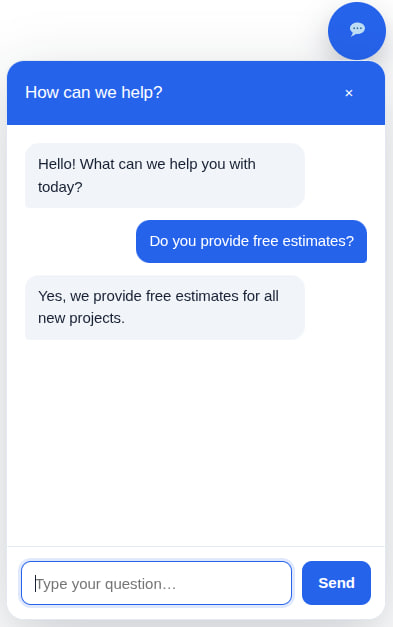 |
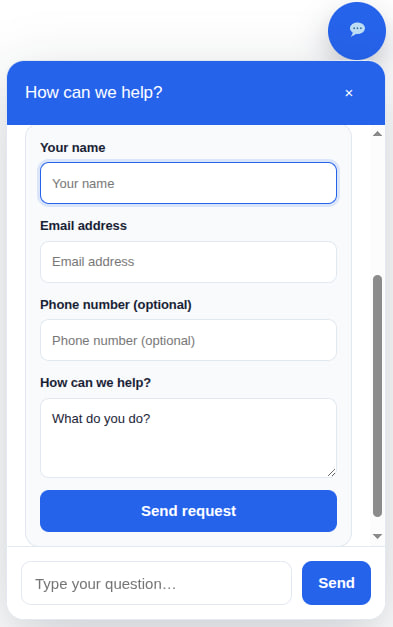 |
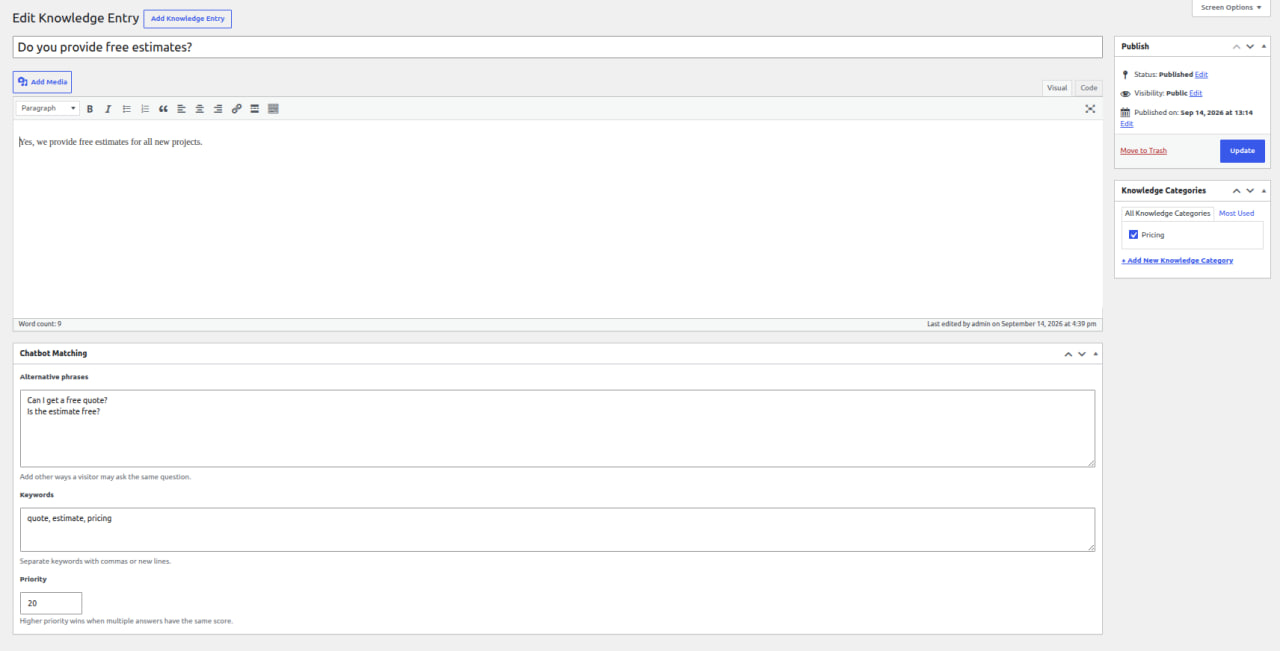
WordPress management
Knowledge entry
Lead management

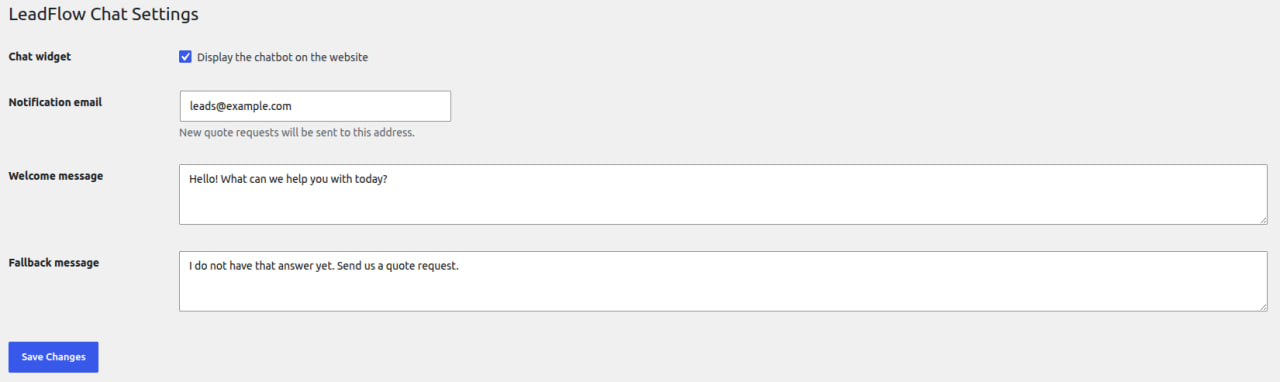
Plugin settings
Requirements
- WordPress 6.5 or newer
- PHP 8.1 or newer
- Composer 2
Installation
Development installation
Clone the repository into the WordPress plugins directory:
git clone git@github.com:artifoxie/leadflow-chat.git leadflow-chat
cd leadflow-chat
composer install
Activate LeadFlow Chat from the WordPress Plugins screen.
Production installation
Install optimized production dependencies:
composer install \
    --no-dev \
    --classmap-authoritative
Package the plugin directory and install the resulting ZIP through:
WordPress Admin → Plugins → Add New → Upload PluginConfiguration
After activation, open:
WordPress Admin → LeadFlow Chat → SettingsAvailable settings:
- Enable or disable the frontend widget
- Notification email for new quote requests
- Welcome message
- Fallback message for unanswered questions
Knowledge Base
Open:
WordPress Admin → LeadFlow Chat → Knowledge BaseEach knowledge entry contains:
- Question
- Answer
- Alternative phrases
- Keywords
- Category
- Priority
The matcher evaluates entries in this order:
- Exact question match
- Exact alternative phrase match
- Keyword coverage
- Priority as a tie-breaker
Knowledge content can be updated without modifying plugin code.
Lead Management
When the chatbot cannot find an answer, the visitor can submit a quote request containing:
- Name
- Phone
- Message
- Source page URL
Leads are stored in a dedicated WordPress database table and are available under:
WordPress Admin → LeadFlow Chat → LeadsAdministrators can update each lead to:
- New
- Contacted
- Closed
A plain-text email notification is also sent to the configured recipient.
REST API
Find an answer
POST /wp-json/leadflow-chat/v1/answer
Content-Type: application/json
Request:
{
  "question": "Can I get a free quote?"
}
Matched response:
{
  "matched": true,
  "entry_id": 16,
  "question": "Do you provide free estimates?",
  "answer": "Yes, we provide free estimates for all new projects.",
  "score": 0.95
}
Submit a quote request
POST /wp-json/leadflow-chat/v1/leads
Content-Type: application/json
Request:
{
  "name": "Jane Doe",
  "email": "jane@example.com",
  "phone": "+1 555 123 4567",
  "message": "I would like a quote.",
  "source_url": "https://example.com/services",
  "website": ""
}
The website field is a honeypot and must remain empty.
Architecture
src/
├── Admin/          WordPress administration pages
├── Api/            REST modules and controllers
├── Contracts/      Shared service contracts
├── Database/       Migrations and database lifecycle
├── Frontend/       Customer-facing chat widget
├── Knowledge/      Knowledge domain and matching logic
├── Lead/           Lead domain, persistence, and notifications
├── Security/       Rate limiting and client identification
├── Settings/       WordPress settings provider
└── Support/        Container and logging infrastructure
The business logic is separated from WordPress adapters. Repository and notifier contracts allow future integrations without rebuilding the chatbot core.
Examples of possible extensions:
- CRM and webhook integrations
- Google Sheets synchronization
- CSV lead export
- Analytics for unanswered questions
- Multilingual knowledge bases
- Alternative matching engines
- AI-assisted responses
- Custom notification channels
Security
LeadFlow Chat includes:
- Sanitized and validated REST input
- Escaped admin output
- Capability checks
- Nonce-protected admin actions
- Maximum request field lengths
- Honeypot spam filtering
- Rate limiting for quote submissions
- Hashed visitor identifiers
- Prepared database operations
Site owners remain responsible for providing appropriate privacy notices and configuring email delivery for their hosting environment.
Data Retention
Deactivating or uninstalling the plugin does not automatically delete chatbot settings, knowledge-base content, categories, or quote leads.
This prevents accidental loss of customer enquiries. A future release can provide an explicit administrator-controlled cleanup option.
Development
Install dependencies:
composer installRun all quality checks:
composer checkIndividual commands:
composer lint
composer analyse
composer test
Current quality suite:
- WordPress Coding Standards
- PSR-12
- PHPStan
- PHPUnit
License
GPL-2.0-or-later.
Author
Artur Aivazian
Releases
1 release. Each count is every asset in that release; expand a row for the breakdown.