Install
This is the repository archive. It installs, but the folder name will carry the branch suffix and updates will not flow.
Install straight from GitHub with WP-CLI:
wp plugin install https://github.com/artcomventure/wordpress-plugin-repoupdater/archive/refs/heads/master.zipWordPress Repository Plugin Updater
Keep your plugins, which are not listed on https://wordpress.org/plugins/, always in sync with the corresponding repository ... and update them the WordPress way.
- No programming skills needed! All settings are made in the backend.
- Works with all repositories plugins. Even if sourcecode is in some subfolder (e.g. /build/).
Installation
- Upload files to the
/wp-content/plugins/directory of your WordPress installation.
- Either download the latest files and extract zip (optionally rename folder)
- ... or clone repository:
$ cd /PATH/TO/WORDPRESS/wp-content/plugins/
$ git clone https://github.com/artcomventure/wordpress-plugin-repoUpdater.git
If you want a different folder name than
wordpress-plugin-repoUpdaterextend the clone command by'FOLDERNAME'(replace the word'FOLDERNAME'by your chosen one):$ git clone https://github.com/artcomventure/wordpress-plugin-repoUpdater.git 'FOLDERNAME'
- Activate the plugin through the 'Plugins' screen in WordPress.
- Enjoy
Usage
Once activated you'll find the 'Repository Connect' settings page listed in the submenu of 'Plugins'.
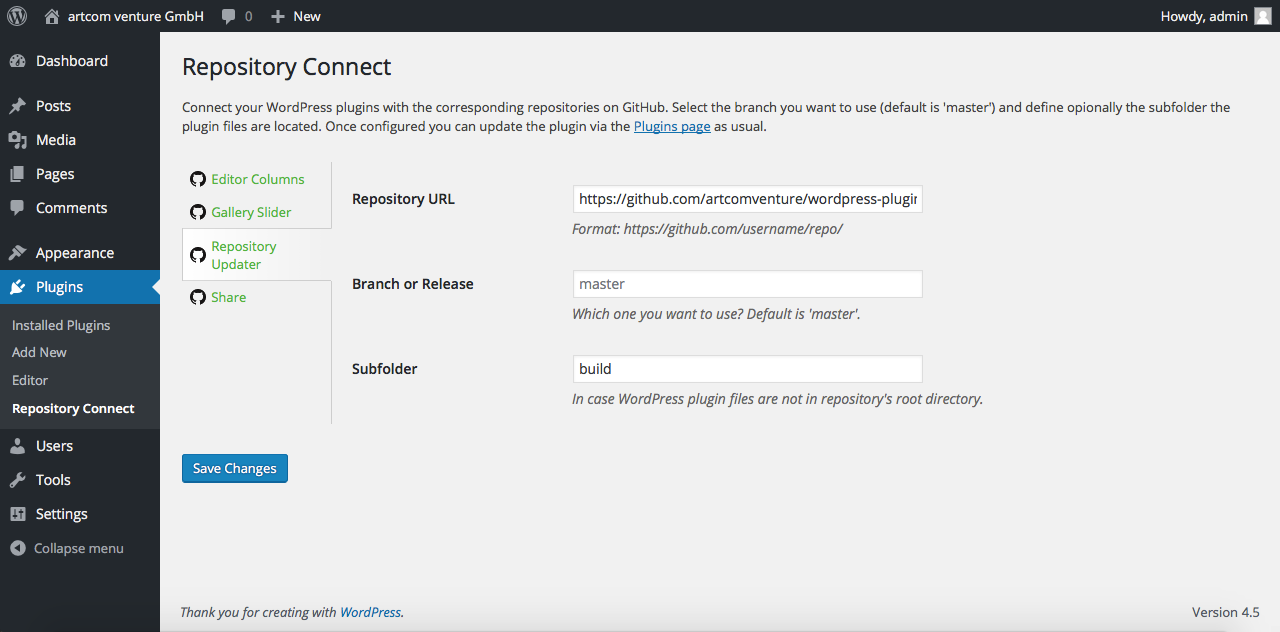
- Choose the plugin which is hosted on GitHub or Bitbucket.
- Enter (at least) the GitHub or Bitbucket Repository URL.
- Optionally enter the Branch or Release to use (default is 'master' (GitHub) or 'tip' (Bitbucket)).
- In case the WordPress files in the repository are not located in the root directory, enter the Subfolder where to find them.
- Click 'Save Changes'. Your data will be validated.
- Go to the 'Plugins' screen, look for updates and proceed as known from WordPress.
Support of ...
Plugin Updates
Although the plugin is not listed on https://wordpress.org/plugins/, you can ... wait! What is this plugin about!? ;)
We test our plugin through its paces, but we advise you to take all safety precautions before the update. Just in case of the unexpected.
Questions, concerns, needs, suggestions?
Don't hesitate! Issues welcome.