AI Visibility Dashboard for Mencoro
Free WordPress plugin that shows how ChatGPT, Claude, Perplexity and Google AI talk about your brand, right in the WP dashboard: Share of Voice, mentions, sentiment, competitors and cited sources. Powered by the Mencoro API. 🇪🇸 Disponible en español.
Install
This is the repository archive. It installs, but the folder name will carry the branch suffix and updates will not flow.
Install straight from GitHub with WP-CLI:
wp plugin install https://github.com/antoniodiazpi/ai-visibility-dashboard/archive/refs/heads/main.zipSee how ChatGPT, Claude, Perplexity and Google AI talk about your brand — right in the WordPress dashboard.
🇪🇸 Leer en español · 📖 Full documentation
A free WordPress plugin that adds an AI visibility widget to the Dashboard, fed by your Mencoro project. Generative Engine Optimization (GEO) numbers usually live in a separate tool nobody opens; this puts them where site owners, editors and clients already look every day.
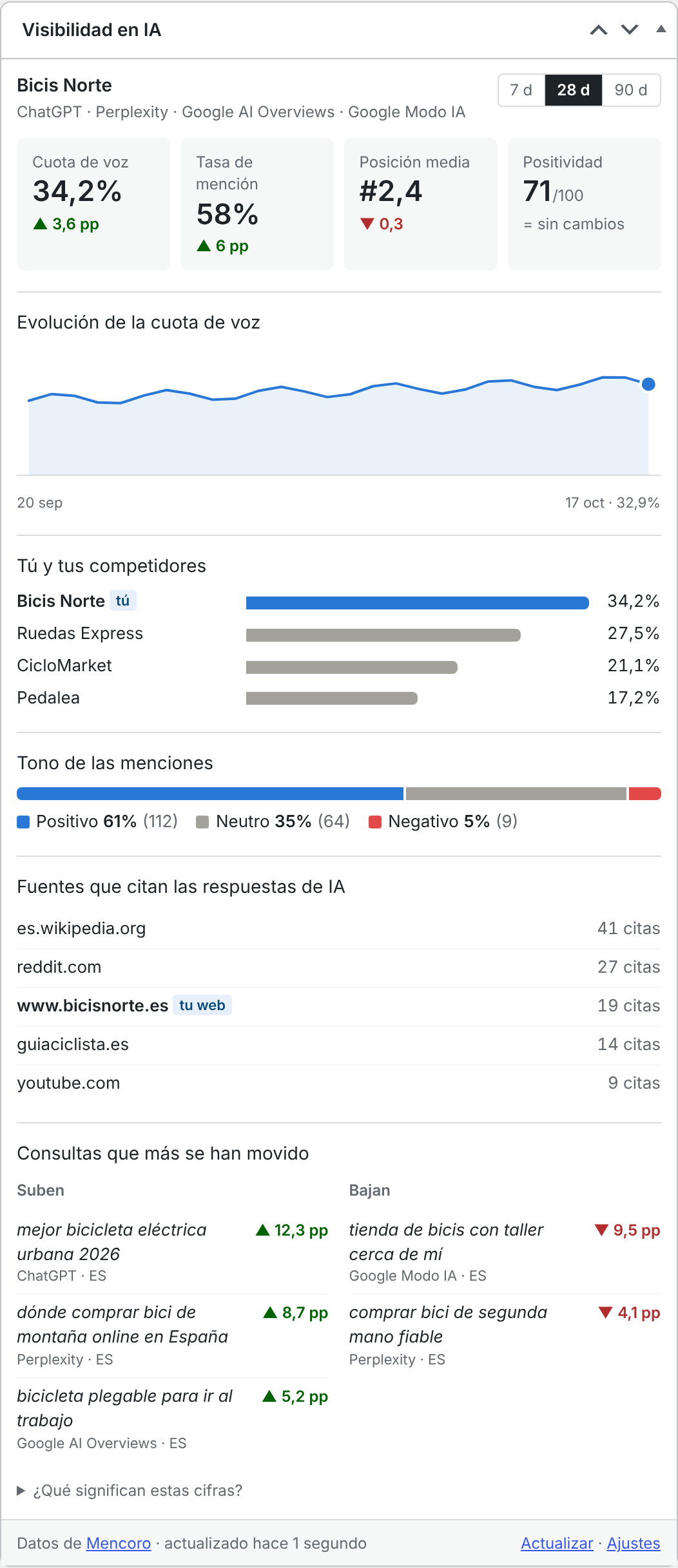
Screenshot with sample data, in Spanish.
What it shows
| Share of Voice | Your share of brand mentions in AI answers, against the competitors you track. |
| Mention rate | Out of every AI answer checked, how many mention your brand. |
| Average position | Where your brand appears inside the answer (lower is better). |
| Positivity | Tone of the mentions, 0–100. |
| Trend | Share of Voice day by day (week by week over 90 days). |
| You vs competitors | Share of Voice side by side. |
| Tone of mentions | Positive / neutral / negative split. |
| Sources the AI cites | The domains AI answers rely on for your topics — your own site is flagged, and you get a nudge when it is missing. |
| Queries that moved most | Tracked prompts gaining and losing Share of Voice. |
Every figure comes with its change against the previous period of the same length (▲ improved, ▼ worse — always shown with a number, never colour alone). Switch between 7, 28 and 90 days from the widget.
Engines: ChatGPT, Claude, Perplexity, Google AI Overviews and Google AI Mode — whichever your Mencoro project tracks. Classic Google results and Shopping are left out on purpose.
Requirements
- WordPress 6.5 or later, PHP 7.4 or later.
- A Mencoro account with a project and an API key (Mencoro → user menu → API keys). The
readcapability is enough.
Install
- Download the latest release zip (or clone this repository into
wp-content/plugins/ai-visibility-dashboard). - In WordPress, go to Plugins → Add New → Upload Plugin, upload the zip and activate it.
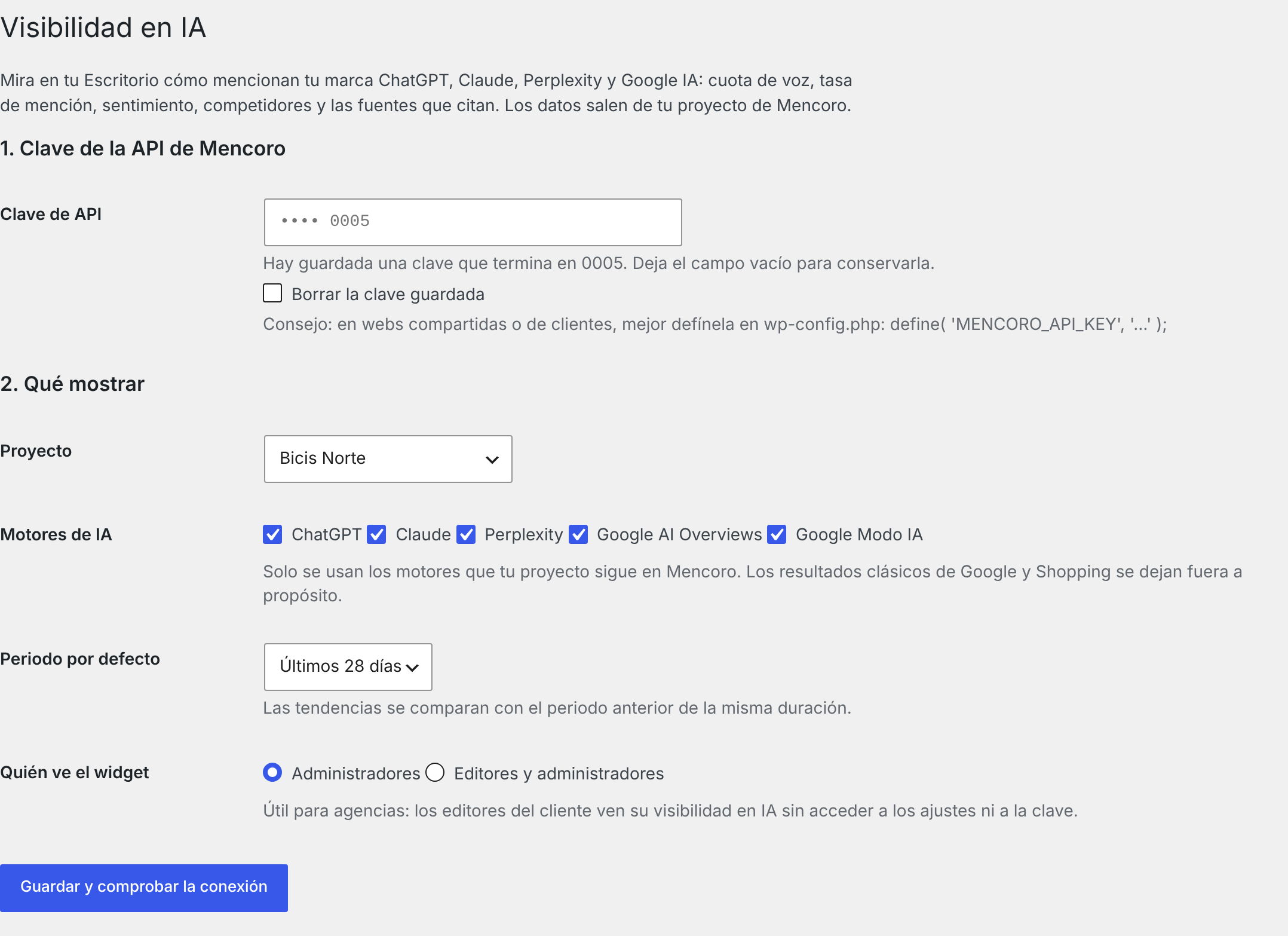
- Go to Settings → AI Visibility, paste your API key and click Save and check connection.
- Choose your project, save, and open the Dashboard.
For agencies
-
Show it to clients without giving them the key. Under Who sees the widget, pick Editors and administrators: the client's editors see their AI visibility, but only administrators reach the settings.
-
Keep the key out of the database. Define it in
wp-config.phpand the field disappears from the settings screen:define( 'MENCORO_API_KEY', 'mencoro_sk_…' );A
MENCORO_API_KEYenvironment variable works too. -
One Mencoro key can read several organizations: the project picker groups projects by organization, so each client site points at its own project.
Privacy and security
- The plugin only talks to
api.mencoro.com, with your key, using read-only requests. It never creates, changes or deletes anything in Mencoro. - It sends nothing about your site or your visitors, adds nothing to the front end and loads no external scripts. The widget is rendered on the server: no JavaScript at all.
- The key is never printed back on the page (only its last four characters), and the option that stores it is not autoloaded.
- Results are cached for 6 hours (Mencoro checks most queries once a day). A refresh costs 7 API requests; failures are cached for 5 minutes so a bad key does not hammer the API.
- Uninstalling removes the settings, the key and the cached data.
For developers
| Hook / constant | Purpose |
|---|---|
MENCORO_API_KEY (constant or env) |
API key, takes precedence over the stored one. |
aivd_widget_capability (filter) |
Capability needed to see the widget. Default manage_options, or edit_others_posts when editors are allowed. |
aivd_cache_ttl (filter) |
Cache lifetime in seconds. Default 6 * HOUR_IN_SECONDS. |
aivd_api_base (filter) / AIVD_API_BASE (constant) |
API base URL, e.g. to test against a mock server. |
Endpoints used (all GET, see the Mencoro API docs): me, organizations, projects, projects/{id}, available-filters, metrics, timeseries, cited-sources, metrics/movers.
Coding standards: phpcs --standard=phpcs.xml.dist (WordPress-Extra + WordPress-Docs) passes clean.
Translations
Bundled: English and Spanish (Spain). The text domain is ai-visibility-dashboard; a .pot template lives in languages/. Pull requests with new languages are welcome.
License
GPL-2.0-or-later. See LICENSE.
Made by TrailSEO. This is an independent plugin built on Mencoro's public API; it is not an official Mencoro product. Mencoro is a trademark of its respective owners.