Install
This is the repository archive. It installs, but the folder name will carry the branch suffix and updates will not flow.
Install straight from GitHub with WP-CLI:
wp plugin install https://github.com/alwaysrichard/category-image-gallery/archive/refs/heads/main.zipCategory Image Gallery is a lightweight, flexible WordPress plugin for displaying image galleries automatically generated from post categories.
It supports multiple layout styles (tiled, collage, grid, masonry), randomization, optional inclusion of draft posts, and dynamic image linking behavior that respects publication state and user login status.
✨ Features
- 📂 Category-based galleries — Automatically pulls featured images or attachments from posts in a chosen category.
- 🧩 Multiple layouts —
tiled(Jetpack-style justified rows)collage(metro-style mosaic)gridandmasonry(optional)
- 🔁 Randomized selection when there are more images than the specified max.
- 🕐 Cycle interval options (
daily,hourly, etc.) to refresh randomized images. - 🧱 Custom row heights, gutter spacing, panorama detection, and intelligent last-row balancing for the
tiledlayout. - 🧑💻 Draft-aware rendering —
- Published posts → image links to post.
- Draft/private posts (visitor) → image shown, no link.
- Draft/private posts (logged-in user) → image links to post.
- 🖼️ Click-menu option to choose between viewing the image or reading its post.
- 🔍 Built-in lightbox — All thumbnail clicks open images in an elegant, keyboard-navigable lightbox that keeps users on your page.
- 📊 EXIF metadata display — Show camera settings, copyright, and other metadata using customizable templates.
- 🏗️ Enhanced category hierarchy — Automatically includes all children and grandchildren categories.
- ⚡ Responsive, lazy-loaded, and SEO-friendly images.
- 🔒 Works with both published and unpublished (private) content when desired.
🧠 Usage
Insert the shortcode in any post, page, or block:
[category_image_gallery
  category_slug="infrared-photography"
  layout="tiled"
  row_height="230"
  tolerance="0.3"
  panorama_thresh="2.6"
  min_per_row="2"
  max_per_row="6"
  last_row="left"
  gutter="4"
  max="20"
  include_draft="true"
  click_menu="true"
  link_thumbnail_to="image"
  display_meta="{Camera} • {Lens} • f/{FNumber} • {ShutterSpeed}s • ISO {ISO}"]
Key Shortcode Attributes
| Attribute | Description |
|---|---|
category_slug |
Slug of the category to pull images from. |
layout |
tiled, collage, grid, or masonry. |
row_height |
Base height (px) for tiled rows. |
tolerance |
Flex factor (0–0.6). Larger = smoother row balancing. |
panorama_thresh |
Aspect ratio (e.g. 2.6) at which an image fills a full row. |
min_per_row, max_per_row |
Soft bounds on images per row. |
last_row |
left (not stretched) or justify. |
gutter |
Horizontal gap between images (px). |
v_gutter |
Optional vertical gap (defaults to same as gutter). |
max |
Maximum number of images to show. |
include_draft |
Include unpublished posts. Non-logged-in visitors see image only; logged-in users can click to the post. |
click_menu |
Adds a small dropdown menu when hovering over images with "Image" and "Post" options. |
link_thumbnail_to |
image (opens lightbox) or post (links to post). Default: post. |
display_meta |
EXIF metadata template (e.g., "{Camera} • f/{FNumber} • ISO {ISO}") shown as image captions in lightbox. |
cycle |
hourly, daily, or blank — randomize refresh frequency. |
🔍 Lightbox & Metadata Features
Built-in Lightbox
All thumbnail interactions open images in a beautiful, full-screen lightbox that:
- Never redirects users away from your page
- Supports keyboard navigation (arrow keys, escape)
- Shows EXIF metadata as captions when configured
- Includes previous/next navigation for gallery browsing
- Works seamlessly with the click menu system
EXIF Metadata Display
Use the display_meta attribute to show camera information and other metadata:
display_meta="{Camera} | {Lens} | f/{FNumber} | {ShutterSpeed} | ISO {ISO}"Available metadata tokens:
{FileName}— Original filename{CameraMake}— Camera manufacturer (e.g., "NIKON CORPORATION"){CameraModel}— Camera model (e.g., "NIKON D810"){Camera}— Combined camera make and model{LensManufacturer}— Lens manufacturer{LensModel}— Lens model{Lens}— Combined lens information{FocalLength}— Focal length in mm (e.g., "38mm" from 380/10){FNumber}— Aperture as f-stop (e.g., "f/8" from 8/1){ShutterSpeedValue}— Shutter speed as fraction (e.g., "1/160s" from 7321928/1000000){ISOSpeedRatings}— ISO sensitivity (e.g., "ISO 100"){DateTimeOriginal}— Original capture date/time{GPSLatitude}— GPS latitude in degrees/minutes/seconds (e.g., "37° 13′ 0″"){GPSLongitude}— GPS longitude in degrees/minutes/seconds (e.g., "112° 59′ 0″"){Copyright}— Copyright information with optional default:{Copyright,John Doe}
Default Value Syntax:
You can specify default values for any metadata token using the format {Token,Default Value}. If the EXIF data doesn't contain that field, the default value will be used instead.
Examples:
{Copyright,© 2025 Your Name}— Shows "© 2025 Your Name" if no copyright in EXIF{LensModel,Unknown Lens}— Shows "Unknown Lens" if lens information is missing{GPSLatitude,Location Unknown}— Shows "Location Unknown" if no GPS data
Category Hierarchy
The plugin now automatically includes images from all descendant categories (children, grandchildren, etc.) when you specify a parent category, giving you comprehensive category-based galleries.
📸 Screenshots
The following screenshots demonstrate the plugin's tiled layout and lightbox functionality using a US National Parks gallery.
Example shortcode configuration:
[category_image_gallery
  category_slug="us-national-parks"
  layout="tiled"
  row_height="230"
  tolerance="0.30"
  panorama_thresh="2.6"
  min_per_row="1"
  max_per_row="3"
  last_row="left"
  gutter="4"
  v_gutter="4"
  include_draft="true"
  click_menu="true"
  display_meta="{FocalLength} | {FNumber} | {ShutterSpeedValue} | {ISOSpeedRatings} -- {Copyright,Richard Cox}"]
Tiled Gallery View
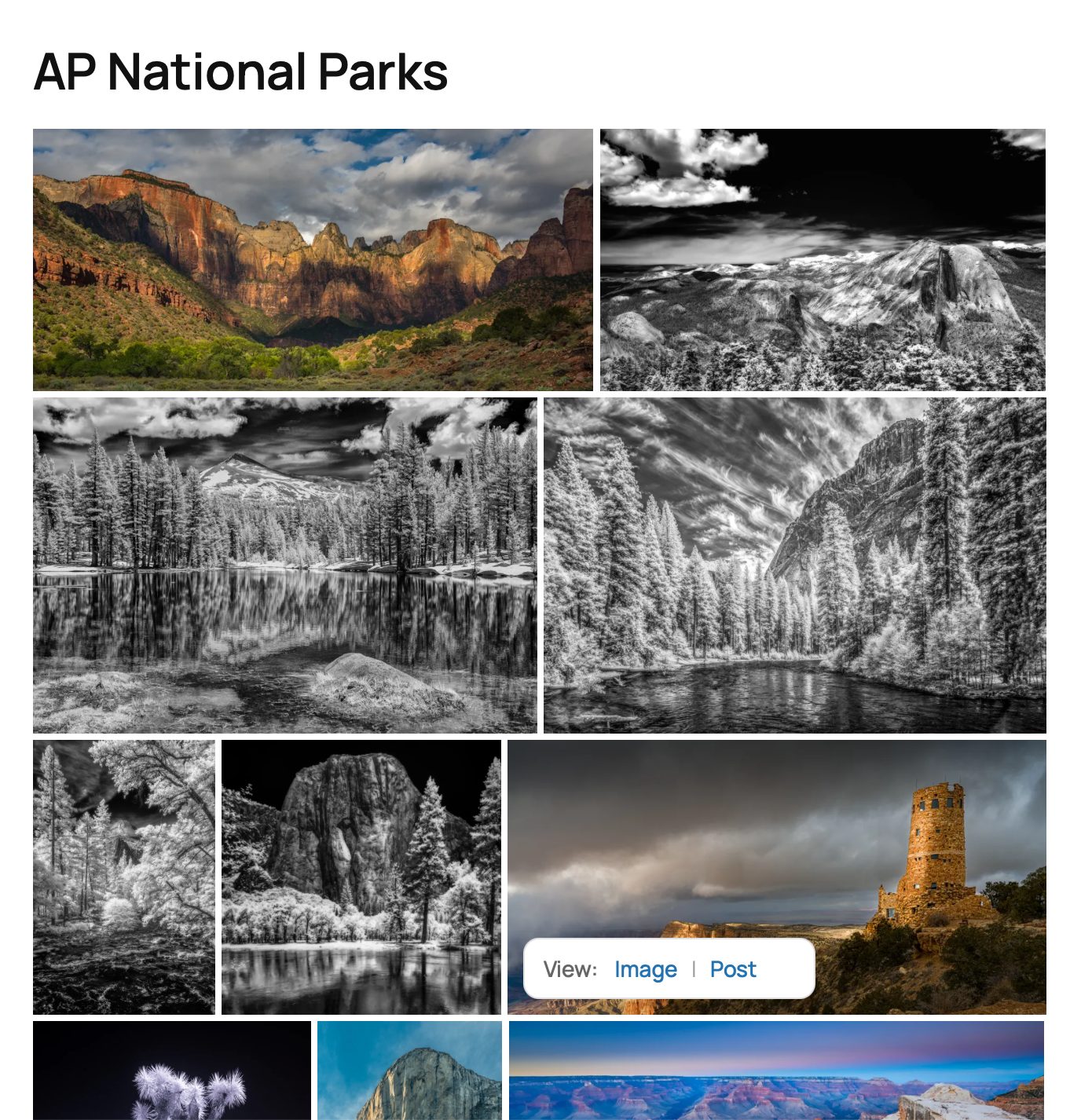 Example of the tiled layout showing a responsive, justified grid of images from the "us-national-parks" category
Lightbox (Lighttable) View
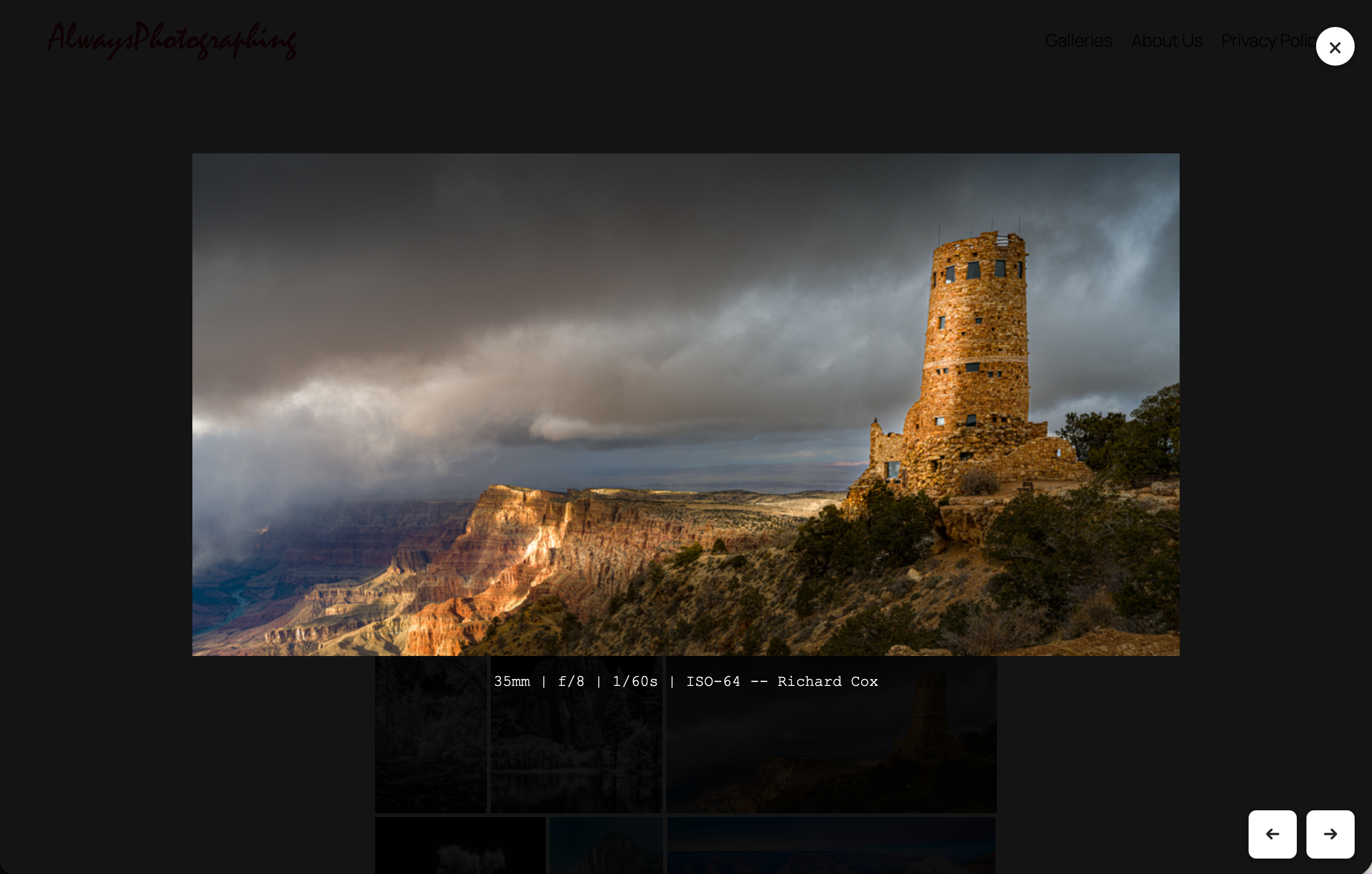 Built-in lightbox displaying full-size images with EXIF metadata, navigation controls, and keyboard support
🧱 Layout Examples
Tiled (Jetpack-style justified layout)
Balances rows automatically based on image aspect ratios.
Collage (Metro layout)
Images span variable columns and rows; excellent for IR or travel galleries.
🔐 Draft and Login Logic
| Post Status | Logged-In User | Behavior |
|---|---|---|
| Published | Any | Thumbnail opens lightbox; click menu shows "Image" (lightbox) and "Post" (link) options |
| Draft / Private | ✅ | Same as published |
| Draft / Private | 🚫 | Thumbnail opens lightbox; click menu shows "Image" (lightbox) only |
Security Note: Direct image URLs are never exposed in the browser address bar or accessible via right-click. All image viewing happens through the secure lightbox system.
🧰 Installation
- Copy the plugin folder into
/wp-content/plugins/category-image-gallery/. - Activate Category Image Gallery from your WordPress admin → Plugins.
- Use the shortcode in any post, page, or block.
⚙️ Developer Notes
- Images are fetched via
WP_Querybased on the category and all its descendants (children, grandchildren, etc.). - When
include_draft="true", attachments from unpublished posts are included in the gallery. - Visibility and linking behavior are determined at render time based on
get_post_status()andis_user_logged_in(). - The JavaScript portion performs live layout adjustments for justified (tiled) and collage modes, plus handles the lightbox functionality.
- Built-in lightbox system prevents direct image URL exposure and keeps users engaged on your site.
- EXIF metadata extraction supports various camera data points with customizable display templates.
- CSS variables (
--ap-gap,--ap-vgap,--ap-cols, etc.) make the layout theme-friendly and easily overridable.
🧩 Example Gallery (US National Parks)
[category_image_gallery
  category_slug="us-national-parks"
  layout="tiled"
  row_height="230"
  tolerance="0.30"
  panorama_thresh="2.6"
  min_per_row="1"
  max_per_row="3"
  last_row="left"
  gutter="4"
  v_gutter="4"
  include_draft="true"
  click_menu="true"
  display_meta="{FocalLength} | {FNumber} | {ShutterSpeedValue} | {ISOSpeedRatings} -- {Copyright,Richard Cox}"]
🧩 Photography Portfolio Example
[category_image_gallery
  category_slug="portfolio"
  layout="collage"
  cols="6"
  max="24"
  click_menu="true"
  display_meta="{Camera} • f/{FNumber} • ISO {ISO} • {Copyright,© AlwaysPhotographing}"]
🪪 License
This project is licensed under the MIT License:
MIT License

Copyright (c) 2025 Richard Cox

Permission is hereby granted, free of charge, to any person obtaining a copy
of this software and associated documentation files (the "Software"), to deal
in the Software without restriction, including without limitation the rights
to use, copy, modify, merge, publish, distribute, sublicense, and/or sell
copies of the Software, and to permit persons to whom the Software is
furnished to do so, subject to the following conditions:

The above copyright notice and this permission notice shall be included in
all copies or substantial portions of the Software.

THE SOFTWARE IS PROVIDED "AS IS", WITHOUT WARRANTY OF ANY KIND, EXPRESS OR
IMPLIED, INCLUDING BUT NOT LIMITED TO THE WARRANTIES OF MERCHANTABILITY,
FITNESS FOR A PARTICULAR PURPOSE AND NONINFRINGEMENT. IN NO EVENT SHALL THE
AUTHORS OR COPYRIGHT HOLDERS BE LIABLE FOR ANY CLAIM, DAMAGES OR OTHER
LIABILITY, WHETHER IN AN ACTION OF CONTRACT, TORT OR OTHERWISE, ARISING FROM,
OUT OF OR IN CONNECTION WITH THE SOFTWARE OR THE USE OR OTHER DEALINGS IN
THE SOFTWARE.🧑💻 Contributing
Pull requests are welcome!
If you’d like to:
- Add new layout types (e.g.
masonryenhancements) - Improve performance
- Add shortcode options or filters
Please fork the repository and submit a PR describing your changes.
🧩 WordPress Plugin Header
/**
 * Plugin Name: AP Category Image Gallery
 * Plugin URI:  https://github.com/richardcox/Category-Image-Gallery
 * Description: Category-based WordPress image gallery with Jetpack-style tiled layout, collage grid, and draft-aware logic.
 * Version:     1.8.2
 * Author:      Richard Cox
 * Author URI:  https://alwaysphotographing.com
 * License:     MIT
 * License URI: https://opensource.org/licenses/MIT
 * Text Domain: ap-category-image-gallery
 */
📦 Composer.json Example
{
  "name": "alwaysphotographing/category-image-gallery",
  "description": "A WordPress plugin for dynamic category-based image galleries with tiled, collage, grid, and masonry layouts.",
  "type": "wordpress-plugin",
  "license": "MIT",
  "authors": [
    {
      "name": "Richard Cox",
      "homepage": "https://alwaysphotographing.com"
    }
  ],
  "require": {
    "php": ">=7.4"
  }
}
Releases
2 releases.
These releases are tags only. The author does not attach a packaged zip, so there are no download counts to report.