WP Manifestindependent plugin directory
manifest / builders / breakdance-global-styles-json-export

Breakdance Global Styles JSON Export WP Registry grade B. Medium-severity findings · 1 findingWP RegistryMedium-severity findings · 1 findingOpen the reportB

Export and Import your Breakdance global styles to JSON file

★ 3stars
152release downloads
≈10active sites
1.0.1latest · 2 years ago

Install

Download breakdance-global-styles-json-export.zip From the 1.0.1 release on GitHub, Dec 20, 2023

Upload it under Plugins → Add New Plugin → Upload Plugin, then activate.

Install straight from GitHub with WP-CLI:

wp plugin install https://github.com/alvindcaesar/breakdance-global-styles-json-export/releases/download/1.0.1/breakdance-global-styles-json-export.zip
No built-in updater. New versions won't appear under Dashboard → Updates. Install new releases yourself, or let Git Updater track the repository.

Breakdance Global Styles JSON Export WordPress Plugin

Overview

The Breakdance Global Styles JSON Export WordPress plugin allows users to export and import their Breakdance global styles configuration in JSON format. This can be useful for backup purposes or when transferring configurations between WordPress installations.

Features

  • Export Global Styles: Easily export your Breakdance global styles configuration to a JSON file.
  • Import Global Styles: Import global styles by uploading a valid JSON file.

Installation

  1. Download the plugin ZIP file here.
  2. Log in to your WordPress admin dashboard.
  3. Navigate to Plugins > Add New.
  4. Click on the Upload Plugin button, select the ZIP file, and click Install Now.
  5. Activate the plugin after installation.

Usage

Export Global Styles

  1. In the WordPress admin dashboard, go to Breakdance > Settings.
  2. Navigate to the Export Global Styles tab.
  3. Click the Export Global Styles button.
  4. A JSON file will be generated and downloaded to your computer.

Import Global Styles

  1. In the WordPress admin dashboard, go to Breakdance > Settings.
  2. Navigate to the Export Global Styles tab.
  3. Choose the JSON file containing your global styles configuration.
  4. Click the Import Global Styles button to import the styles.

Note: Ensure that the Breakdance plugin is installed and activated before using this extension. If the Breakdance plugin is not active, the export/import functionality will not be available.

Support

For any issues, questions, or feature requests, please open an issue on GitHub.

Changelog

1.0.0

  • Initial release.

Contribution

Contributions are welcome! Feel free to submit a pull request.

Screenshots
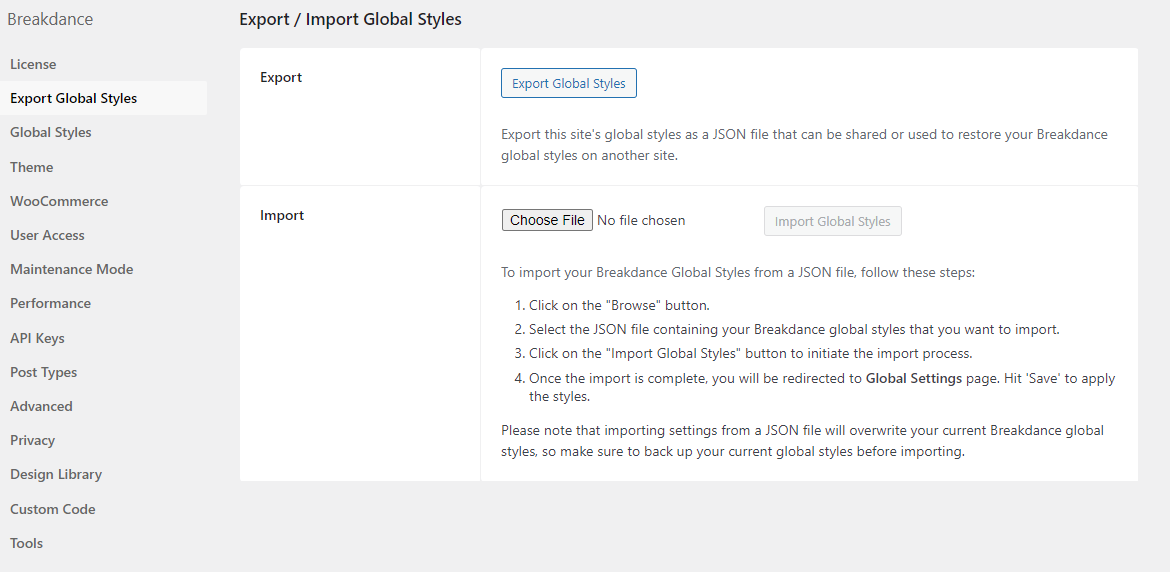
Setting Page

Releases

2 releases. Each count is every asset in that release; expand a row for the breakdown.

Tag
Published
Assets
Downloads
1.0.1 latest
Dec 20, 2023 2 years ago
breakdance-global-styles-json-export.zip
147
Dec 15, 2023 2 years ago
breakdance-global-styles-json-export.zip
5

Active-site estimate ≈10 comes from the median of recent superseded releases. Method.

B grade

Security

Breakdance Global Styles JSON Export 1.0.0 · audited by WP Registry

Medium-severity findings.

1 medium
Audited release
1.0.0
Findings
1
Worst severity
medium
Content hash
11dd841828fa994f835482a9…

Findings

  • medium Any logged-in user can export Breakdance global styles with no capability or nonce check

    missing_capability

    admin_post_bd_export_settings is hooked to BD_Global_Styles_Export::export_settings with no current_user_can() and no nonce. WordPress fires admin_post_{action} for every authenticated request to wp-admin/admin-post.php, including Subscriber and WooCommerce Customer. The settings UI is a Breakdance admin tab and the import sibling correctly requires manage_options plus nonce bd_import_settings, but the export form in settings-page.php posts action=bd_export_settings with neither a nonce field nor a hidden cap gate, and the handler itself never re-checks. A logged-in low-privilege user (or an attacker who CSRF's any logged-in victim, since GET is enough) requests /wp-admin/admin-post.php?action=bd_export_settings. If the option exists, the handler sends Content-disposition: attachment and Content-Type: application/json, then echo $export_setting and exit. Observable: the HTTP body is the raw breakdance_global_settings_json_string value — the site-wide Breakdance global settings blob (colors, typography, and any custom CSS/JS / tracking snippets stored there) that Breakdance uses to generate front-end global styles. This is not unauth, not a write, and not frontend XSS (attachment + application/json). It is a missing-authorization read of administrator-only builder configuration.

    breakdance-global-styles-json-export.php:49-84

    Recommendation

    In export_settings, require current_user_can('manage_options') and check_admin_referer() (or wp_verify_nonce with a dedicated action). Add wp_nonce_field to the export form in settings-page.php. Deny with wp_die() before reading or echoing the option. Keep the existing manage_options + nonce gate on import_settings.

WP Registry hashes the installable build and reports on that exact bytes-for-bytes copy. Embargoed findings are withheld until they are disclosed, so a clean verdict means nothing public is outstanding. WP Manifest does not audit code itself.