Install
This is the repository archive. It installs, but the folder name will carry the branch suffix and updates will not flow.
Install straight from GitHub with WP-CLI:
wp plugin install https://github.com/alvi252/ai-product-descriptions-for-woocommerce/archive/refs/heads/main.zipWrite product descriptions, short descriptions, SEO meta descriptions and tags with OpenAI or Anthropic (Claude). Nothing reaches a product until a person has looked at it. Drafts appear next to the editor or in a review queue, and every call is logged with its tokens and an estimated cost.
It is meant for shops with hundreds of products imported from supplier feeds, where the description is empty, copied from the supplier, or one line long ("Dog food.").
Status: tested live with OpenAI (gpt-4.1-mini) on 25 October 2026, see Live demo results. The Anthropic provider is covered by unit tests but has not been called live yet.
Features
- Two providers behind one interface: OpenAI (Responses API, or Chat Completions for compatible gateways) and the Anthropic Messages API. The defaults are the cheap models,
gpt-4.1-miniandclaude-haiku-5-5, which suit bulk copywriting. You can pick a bigger model in the settings. - The API key is never shown again after you save it. You can also keep it out of the database with a constant in
wp-config.php, which always wins. - Settings for tone of voice, length, language (or "same as the store"), which fields to write, brand guidelines and a "never mention" list.
- A "Generate with AI" box on the product screen puts a draft in a side panel. Each field has Insert, Replace (it asks first) and Discard. It uses what is on the screen, including unsaved changes, and the product only changes when you click Update.
- A "Generate AI drafts" bulk action queues one job per product in Action Scheduler, which ships with WooCommerce. Drafts are saved as post meta, not written to the product.
- A review queue (Products > AI Review Queue) shows each draft next to the current text. You approve or reject one by one or in bulk. Approving replaces the text fields and adds the tags.
- The prompt is built from the product's title, attributes, categories, current text, tags and price range. Its rules forbid invented details, health claims and prices, and the product data is fenced off so text inside it cannot give the model instructions.
- Every request carries a JSON schema (OpenAI strict structured outputs, Anthropic
output_config.format), and every answer is checked. Broken JSON, missing fields or wrong types are reported, not saved. - Errors get a clear message: rate limits (with
retry-after), timeouts, overload, refusals, cut-off answers and invalid JSON. Background jobs retry the ones that can succeed later. Key-like strings in provider error messages are masked before they are logged. - A usage tab with tokens per call and an estimated cost from a price table you can edit, a 30-day summary by model and the latest calls. Failed calls are logged too, with the tokens they still cost.
- The SEO meta description goes into the Yoast SEO, Rank Math or SEOPress field when one of them is active (not tested against those plugins yet), otherwise the plugin prints it on the product page.
- Capability checks and nonces on every action, sanitized input, escaped output, HPOS compatible, translation-ready, clean uninstall, WordPress Coding Standards clean, PHP 8.1+.
Screenshots
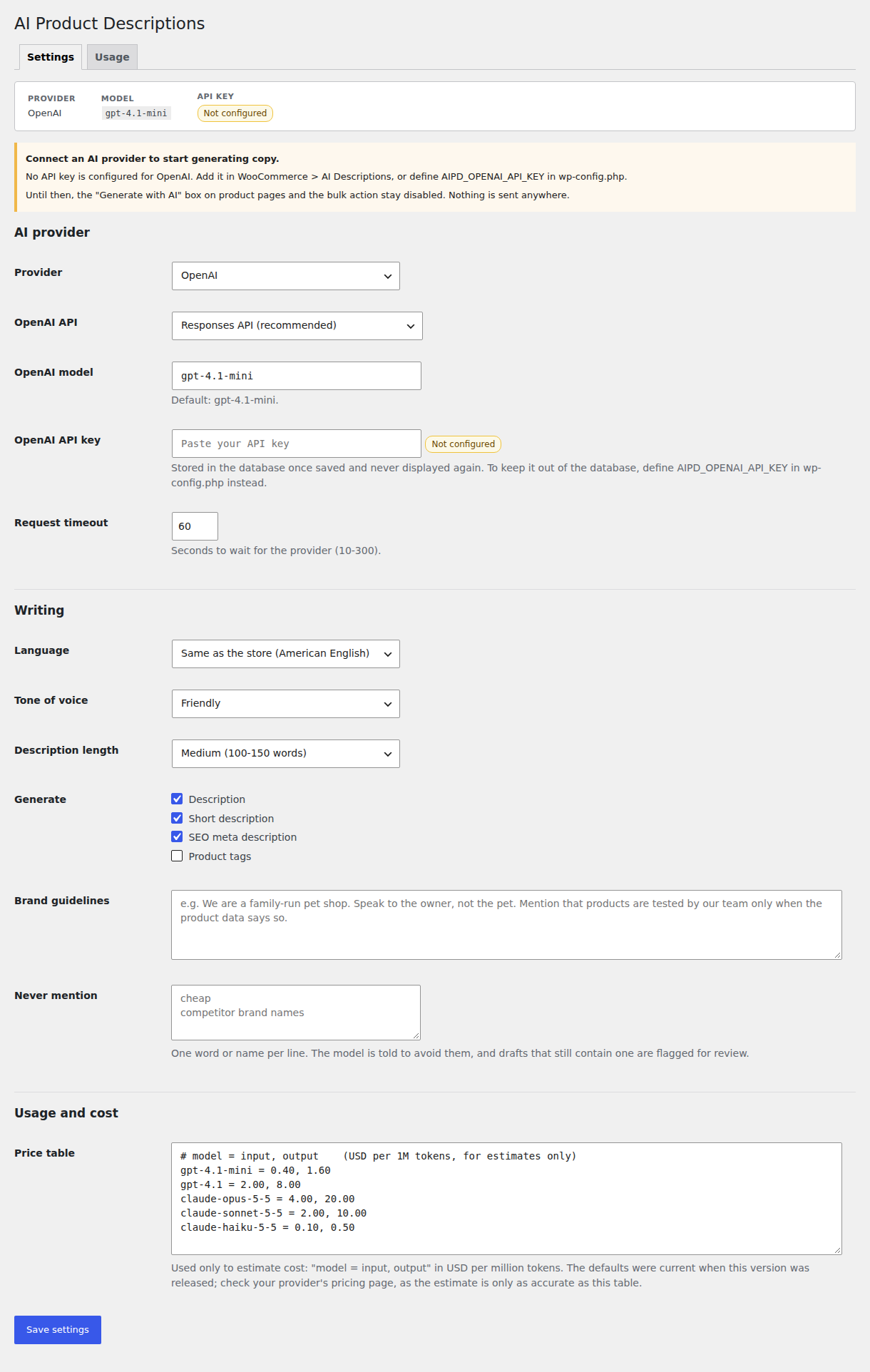
Settings before an API key is configured. The plugin says so and sends nothing anywhere.
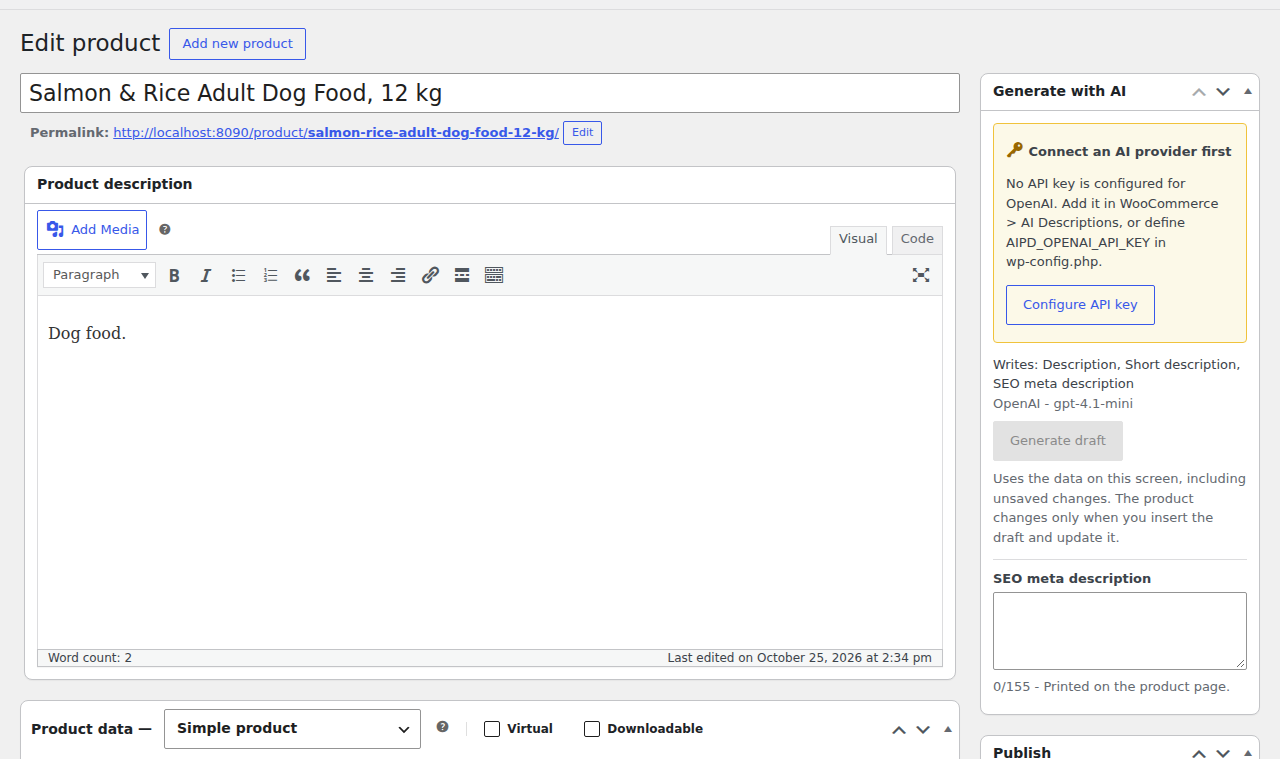
The "Generate with AI" box before a key is configured.
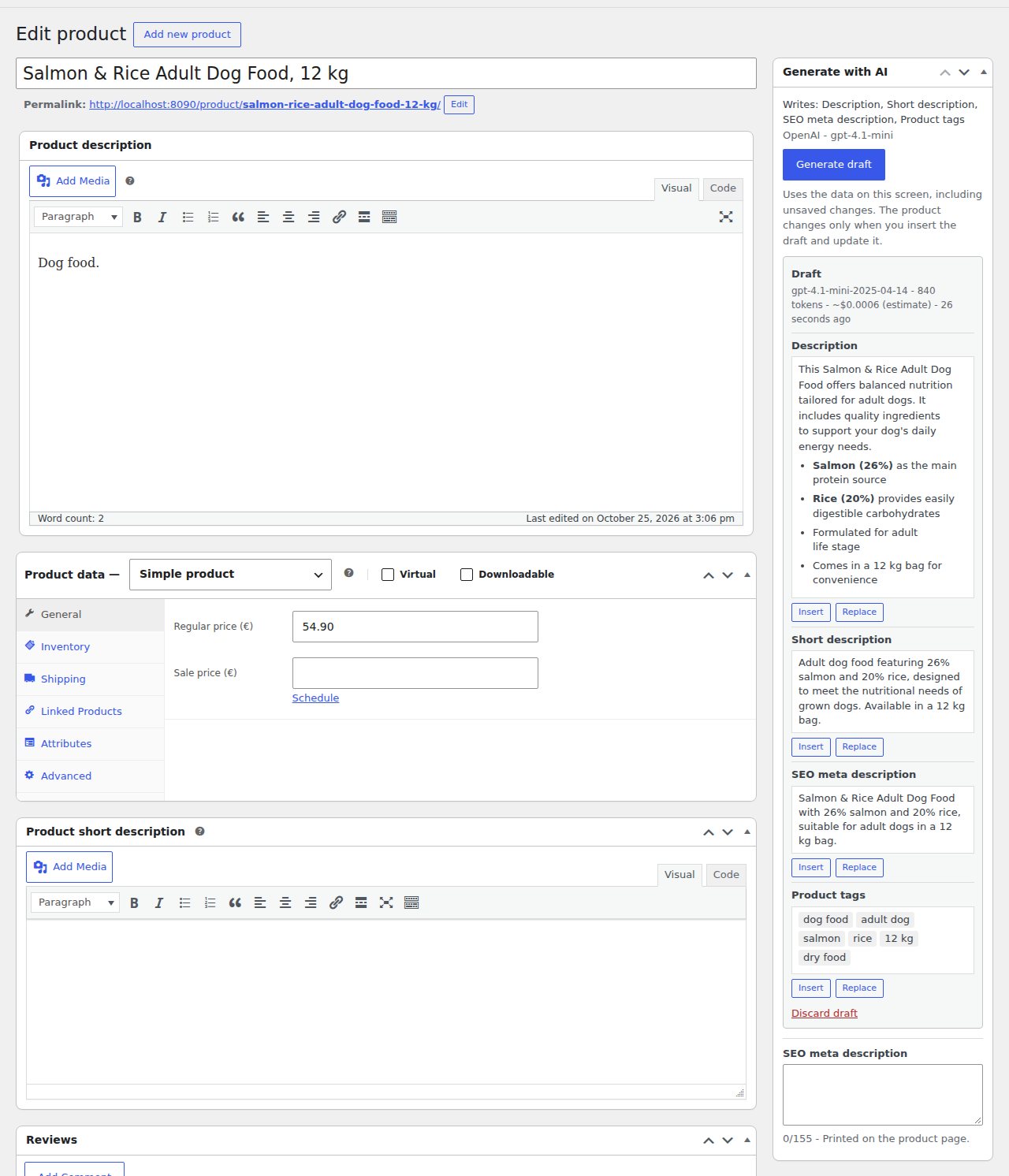
A real draft from the live run, next to the old description "Dog food.".
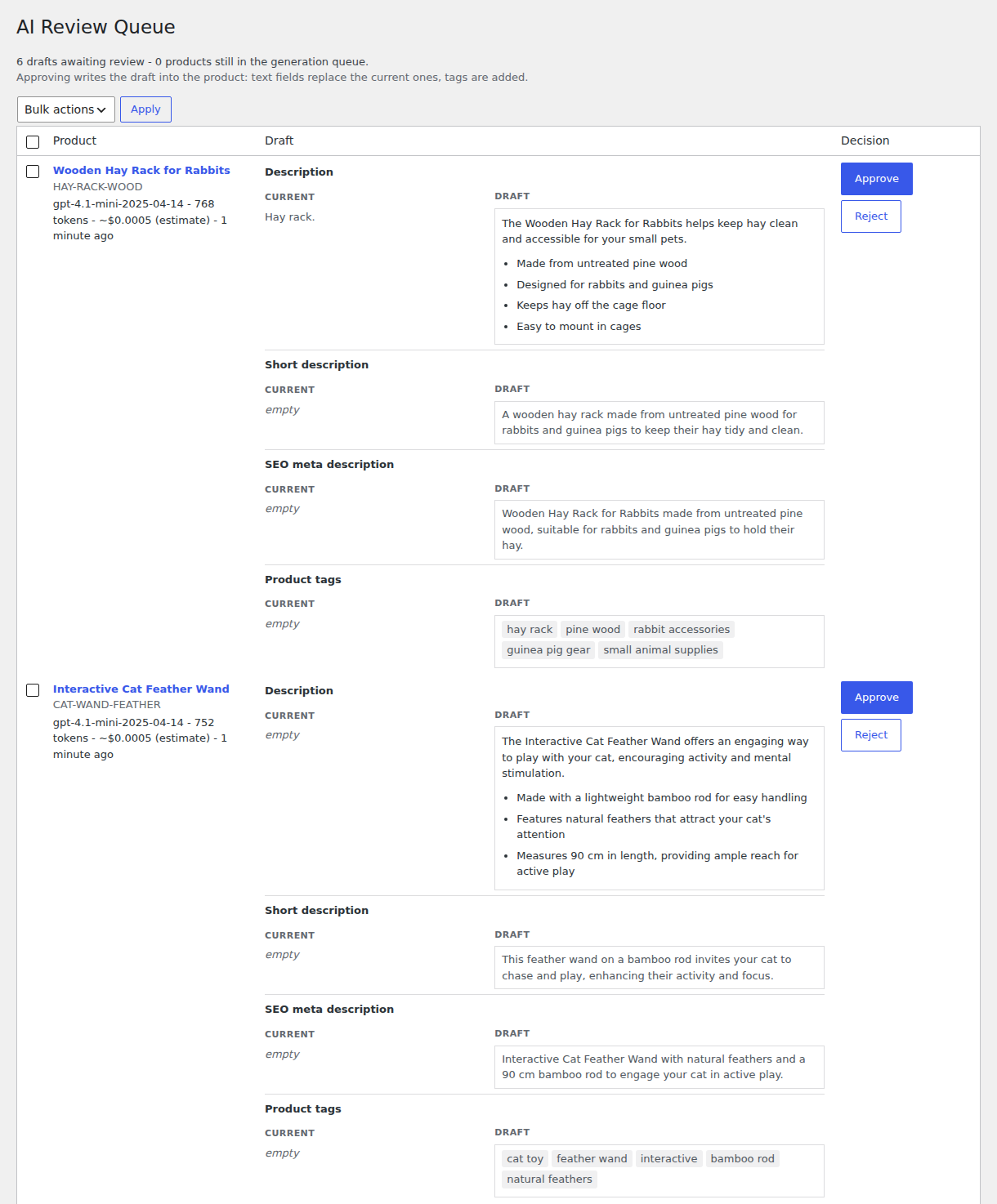
The review queue with real drafts next to the current text.
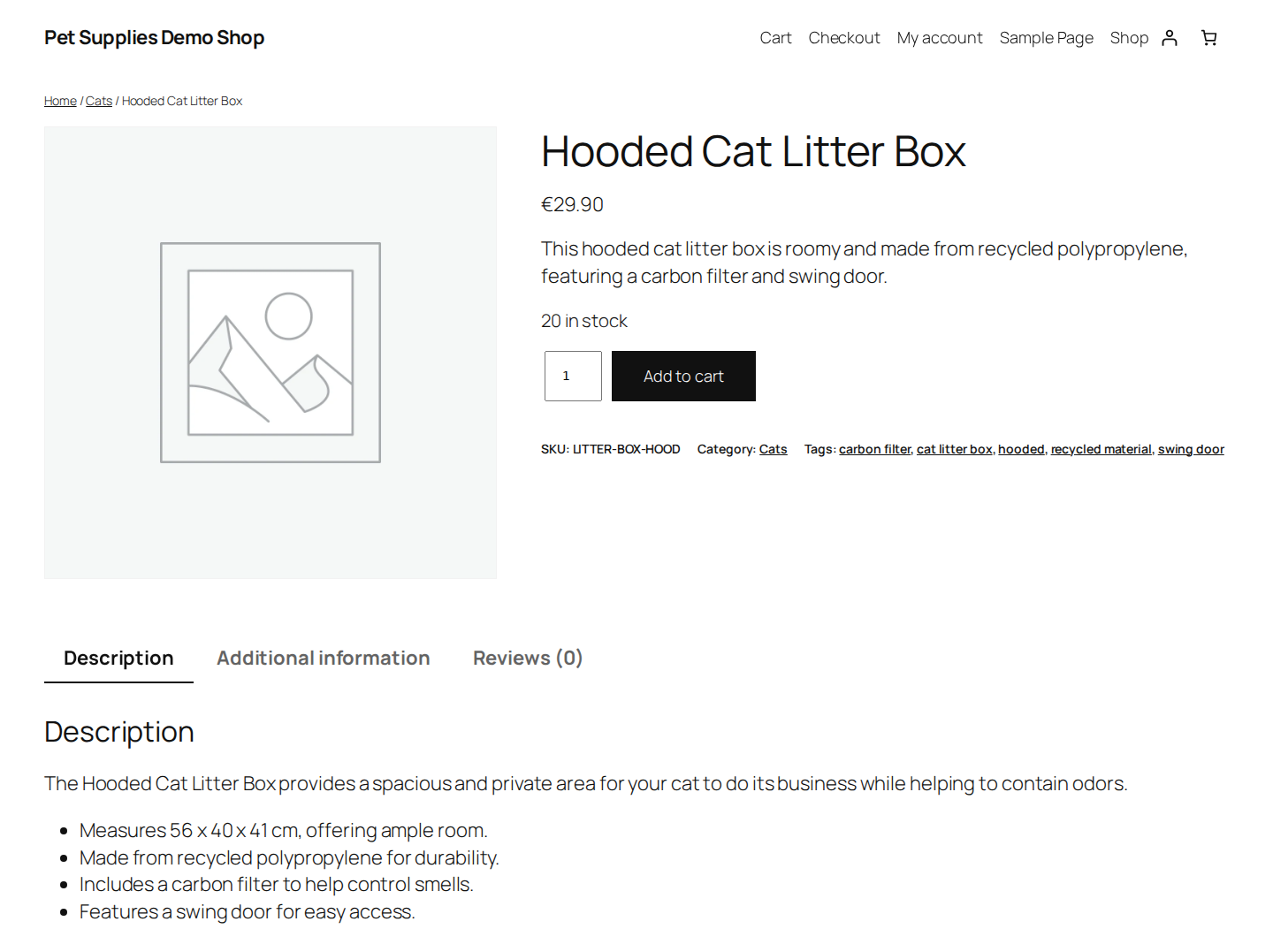
A product page after its draft was approved.
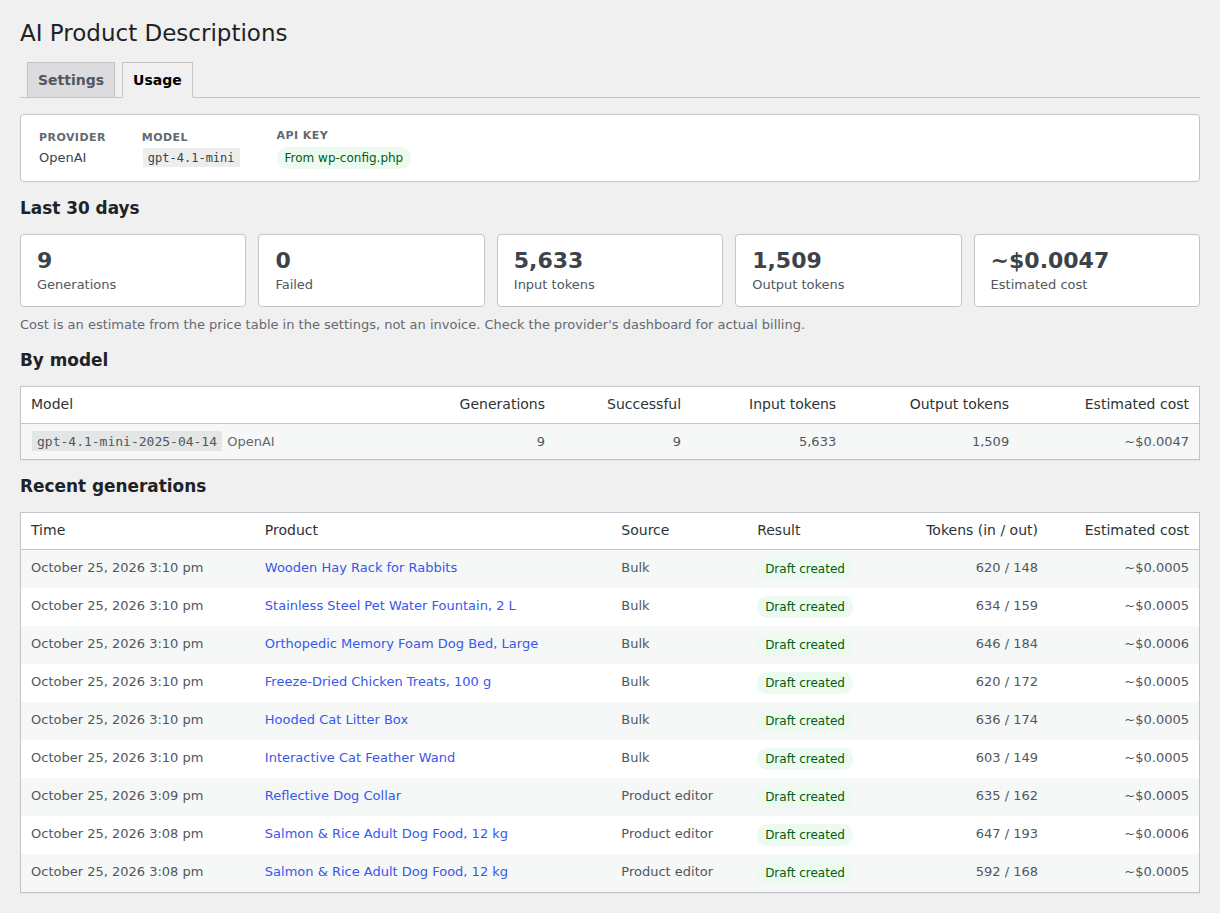
The usage tab after the live run.
Live demo results
I ran the plugin against the real OpenAI API on 25 October 2026. The setup was the demo stand from this repository (WordPress 7.1.3, WooCommerce 11.2.1, PHP 8.2) with gpt-4.1-mini through the Responses API. The key came from an environment variable and only existed inside the web container.
I made nine calls in total. Two came from the product screen for the dog food: the first draft broke a rule (more on that below), so I tightened the prompt and generated again. One more came from the product screen for the reflective collar, and six from the bulk action. All nine returned valid JSON on the first try. The eight calls I timed took 1.5 to 1.9 seconds each. Together they used 5,633 input tokens and 1,509 output tokens. With the default price table that is an estimated $0.0047, about half a cent for nine drafts. That table has gpt-4.1-mini at $0.40 and $1.60 per million tokens; I did not check that price against OpenAI's current price list or compare the estimate with the OpenAI usage dashboard.
The litter box description used to be "Big litter box with lid." This is the draft I approved, word for word:
The Hooded Cat Litter Box provides a spacious and private area for your cat to do its business while helping to contain odors.
- Measures 56 x 40 x 41 cm, offering ample room.
- Made from recycled polypropylene for durability.
- Includes a carbon filter to help control smells.
- Features a swing door for easy access.
The dog bed went from "Comfortable bed" to:
This orthopedic memory foam dog bed offers support and comfort for your dog with its 8 cm thick memory foam filling that conforms to their body.
The model did not always stick to the facts. The first dog food draft said the rice was there "for gentle digestion", while the product data only says 20% rice. I added a rule against implied health effects, with a unit test, and generated again. The second draft still called the rice "easily digestible carbohydrates". The hay rack draft said it is "easy to mount in cages", which nothing in the data supports, so I rejected it. The treats draft added "freeze-dried to preserve flavor and nutrients" and is still waiting in the queue. A small model follows most of the rules most of the time. That is why nothing goes live without a person approving it.
The request format worked as written; it needed no changes. The live run did find two bugs that the unit tests could not see, both now fixed. The first save of the settings dropped the selected fields, because WordPress runs the sanitize callback twice on a new option and the second pass received a plain list instead of the checkbox values. And the Insert button for tags did nothing, because the WordPress tag box reads new tags from an element's text, not from its value. I also moved the current text next to the draft in the review queue, which made the comparison easier to read.
How it works
product data (title, attributes, categories, current copy, tags, price range)
  + settings (language, tone, length, fields, brand guidelines, never-mention list)
  -> PromptBuilder: system rules + <product_data> JSON + output JSON schema
  -> Provider (OpenAI Responses | OpenAI Chat Completions | Anthropic Messages): HTTP request
  -> Transport (wp_remote_post with timeout; a fake in tests)
  -> Provider: response -> text + token usage, or a typed error
  -> ResponseParser: JSON -> validated fields + warnings (meta length, never-mention hits)
  -> draft (post meta) + usage log row (custom table)
  -> person: Insert / Replace in the editor, or Approve / Reject in the review queue
Everything up to and including the parser lives in src/Core, which has no WordPress dependency and is unit tested without WordPress or a network.
Provider details
| OpenAI Responses | OpenAI Chat Completions | Anthropic Messages | |
|---|---|---|---|
| Endpoint | POST /v1/responses |
POST /v1/chat/completions |
POST /v1/messages, anthropic-version: 2026-10-21 |
| JSON output | text.format = json_schema, strict: true |
response_format = json_schema, strict: true |
output_config.format = json_schema on models that support structured outputs; others are asked for JSON and parsed leniently |
| Other | store: false |
No temperature (rejected by this API version); fallbacks: "default" on models that support server-side fallback |
|
| Usage read from | usage.input_tokens / output_tokens |
usage.prompt_tokens / completion_tokens |
usage.input_tokens / output_tokens |
API keys
Paste the key on the settings screen, or define it in wp-config.php:
define( 'AIPD_OPENAI_API_KEY', 'your-key' );
define( 'AIPD_ANTHROPIC_API_KEY', 'your-key' );
The constant takes precedence over a saved key and keeps the key out of the database. An empty constant counts as not defined. A saved key is never printed back into the page: leave the field blank to keep it, or tick "Delete the saved key". To keep the key out of the code as well, read it from an environment variable in wp-config.php; this is how the demo stack does it (docs/live_run.md).
Settings
| Setting | Description |
|---|---|
| Provider, OpenAI API, model | Provider and model; models are free text so new models need no plugin update. |
| API key | Write-only field per provider; the wp-config constant wins. |
| Request timeout | 10-300 seconds, passed to wp_remote_post. |
| Language | "Same as the store" (from the site locale) or a fixed language. |
| Tone of voice | Friendly, professional, playful, premium or technical. |
| Description length | Short (50-80 words), medium (100-150) or long (200-300). |
| Generate | Any of: description, short description, SEO meta description, product tags. |
| Brand guidelines | Free text added to the instructions. |
| Never mention | One word or name per line; avoided in the prompt and flagged when they still appear. |
| Price table | model = input, output in USD per 1M tokens, used only for estimates. Dated model IDs match their family (gpt-4.1-mini-2025-04-14 uses the gpt-4.1-mini line). |
What is sent to the provider
Product data only: name, type, SKU, categories, visible attributes, the current description and short description (truncated beyond 3,000 characters, marked as truncated), existing tags and the price range, plus the instructions built from the settings. No customer or order data. OpenAI requests set store: false.
Hooks
| Hook | Type | Description |
|---|---|---|
aipd_transport |
filter | Replace the HTTP transport (AIPD\Core\Http\TransportInterface), e.g. for a custom HTTP stack or tests. |
aipd_provider_endpoint |
filter | Override the API URL per provider, e.g. for a proxy or an OpenAI-compatible gateway. Receives null and the provider ID. |
Development
# Dev dependencies (PHPUnit 10, WordPress Coding Standards 3)
docker run --rm -v "$PWD":/app -w /app composer:2 composer install

# Unit tests: no WordPress, no network
docker run --rm -v "$PWD":/app -w /app php:8.2-cli php vendor/bin/phpunit

# Coding standards
docker run --rm -v "$PWD":/app -w /app php:8.2-cli php vendor/bin/phpcs
The tests cover the prompt builder, the output schema, response parsing (including malformed JSON, code fences, wrong types and never-mention checks), the price table and cost estimates, request formatting and response parsing for all three provider APIs, HTTP error mapping (401, 429 with retry-after, 5xx, 529) and the end-to-end generator with a fake transport.
Demo environment
bin/demo-setup.sh                      # WordPress + WooCommerce + plugin + 8 pet-supply products with weak copy
# http://localhost:8090/wp-admin  (admin / admin, local only)
docker compose -p aipd-demo down -v    # remove everything
Without an exported key, the stack runs in the "not configured" state. For a live run, follow docs/live_run.md.
Build the plugin zip
bin/build-zip.sh # -> build/ai-product-descriptions-for-woocommerce.zip, from the committed codeProject structure
ai-product-descriptions-for-woocommerce.php   Plugin header, autoloader, hooks
uninstall.php                                 Removes settings, drafts, queued jobs and the usage table
src/
  Core/                    WordPress-independent, unit tested
    Prompt/                ProductData, PromptOptions, PromptBuilder, LanguageNames
    Output/                OutputSchema, ResponseParser, GeneratedContent
    Provider/              OpenAI Responses / Chat Completions, Anthropic, errors
    Http/                  Request, response and transport interface
    Usage/PriceTable.php   Cost estimates
    Generation/            ContentGenerator (prompt -> provider -> parser)
  Wp/                      WordPress side: transport, generator, drafts, queue, usage log, SEO meta
  Admin/                   Settings page, meta box, bulk action, review queue
  Settings.php             Settings API option, sanitizing, API key resolution
views/, css/, js/          Admin templates, styles, small vanilla scripts
tests/                     PHPUnit tests and the fake transport
docs/live_run.md           Procedure for the first live run
Uninstall
Deleting the plugin removes its settings, drafts, error markers, queued jobs, the plugin's own meta description field and the aipd_generations table, on every site of a multisite network. Copy that was approved into products stays, because it is product content.