Modified Date Control WP Registry grade A. No security issues foundWP RegistryNo security issues foundOpen the reportA
Control the modified date for a post in Gutenberg.
Install
This is the repository archive. It installs, but the folder name will carry the branch suffix and updates will not flow.
Install straight from GitHub with WP-CLI:
wp plugin install https://github.com/alleyinteractive/wp-modified-date-control/archive/refs/heads/develop.zipControl the modified date for a post with Gutenberg.
Installation
You can install the package via Composer:
composer require alleyinteractive/wp-modified-date-controlUsage
Activate the plugin in WordPress and you will see a new panel available under the "Summary" section in Gutenberg:
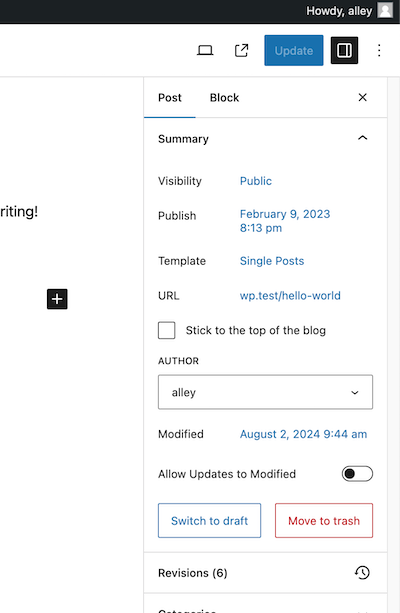
The panel will allow you to set a modified date for a post or allow the modified date to be set to the current date and time upon update. Out of the box, the plugin will continue to allow updates to the modified date unless disabled on a per-post basis.
If you check Allow Updates to Modified, the modified date will be set to the
current date and time when the post is updated. You will be unable to set your
own modified date. If you uncheck the box, you will be able to set your own
modified date. Saving the post will not cause the modified date to be updated,
either, unless you manually updated it.
[!NOTE] This plugin does not have support for non-Gutenberg editors.
Filters
wp_modified_date_control_default_allow_updates
Modify the default state of allowing updates to a post's modified date when saving the post.
Defaults to true. Changing this to false would prevent updates to the modified
date unless the user opts into it.
// Disable updates to the modified date by default.
add_filter( 'wp_modified_date_control_default_allow_updates', fn () => false );
wp_modified_date_control_prevent_updates
Modify the default behavior of the plugin to allow/deny updates to the modified
date. By default, the plugin will prevent updates if the meta to allow updates
is set to 'false'. This filter allows you to override that behavior.
add_filter( 'wp_modified_date_control_prevent_updates', function( bool $prevent, int $post_id, ?\WP_REST_Request $request ) {
    // Always allow updates to the modified date.
    return false;
}, 10, 3 );
Testing
Run npm run test to run Jest tests against JavaScript files. Run
npm run test:watch to keep the test runner open and watching for changes.
Run npm run lint to run ESLint against all JavaScript files. Linting will also
happen when running development or production builds.
Run composer test to run tests against PHPUnit and the PHP code in the plugin.
Unit testing code is written in PSR-4 format and can be found in the tests
directory.
Changelog
Please see CHANGELOG for more information on what has changed recently.
Credits
This project is actively maintained by Alley Interactive. Like what you see? Come work with us.
License
The GNU General Public License (GPL) license. Please see License File for more information.
Releases
4 releases.
These releases are tags only. The author does not attach a packaged zip, so there are no download counts to report.