Experimental Features WP Registry grade A. No security issues foundWP RegistryNo security issues foundOpen the reportA
A feature flags system for beta testing experimental features in WordPress.
Install
This is the repository archive. It installs, but the folder name will carry the branch suffix and updates will not flow.
Install straight from GitHub with WP-CLI:
wp plugin install https://github.com/alleyinteractive/wp-experimental-features/archive/refs/heads/develop.zipOn Packagist as alleyinteractive/wp-experimental-features:
composer require alleyinteractive/wp-experimental-featuresA WordPress plugin that creates a feature flags system for beta testing experimental features in your themes or plugins.
Usage
Defining Feature Flags
Feature flags are defined using a filter:
/**
 * Define available feature flags.
 *
 * @param array $flags Feature flags that have been defined for the Experimental Features plugin.
 *
 * @return array The modified list of feature flags.
 */
function filter_experimental_features_flags( $flags ): array {
    $flags['my-cool-feature'] = __( 'My Cool Feature', 'my-textdomain' );

    return $flags;
}
add_filter(
    'experimental_features_flags',
    __NAMESPACE__ . '\filter_experimental_features_flags'
);
Checking the Value of Feature Flags
The value of a feature flag can be checked by running the feature flag slug
through the experimental_features_flag filter. This allows for plugins and
themes to not break if the Experimental Features plugin is deactivated,
because the filter will simply return the default value.
$is_enabled = apply_filters(
    'experimental_features_flag',
    false,
    'my-cool-feature'
);
If the flag is not enabled, or if the Experimental Features plugin is not
active, then the default value (first parameter, false in the example above)
will be returned.
If you like, you could create a helper function for this in your plugin or theme:
/**
 * A helper function for determining if a feature flag is enabled.
 *
 * @param string $slug The feature flag slug to check.
 *
 * @return bool True if enabled, false if not.
 */
function my_theme_flag_enabled( string $slug ): bool {
    return (bool) apply_filters(
        'experimental_features_flag',
        false,
        $slug
    );
}
Toggling Feature Flags in the Admin
If you navigate to Settings > Experimental Features while logged in to the
WordPress admin as an administrator (or a user with the manage_options
capability) you can turn feature flags on and off via a simple checkbox
interface.
Toggling Feature Flags in the Admin Bar
By default the admin bar will include links to toggle all available feature flags individually. This can be turned off using a filter:
add_action( 'experimental_features_show_admin_bar', '__return_false' )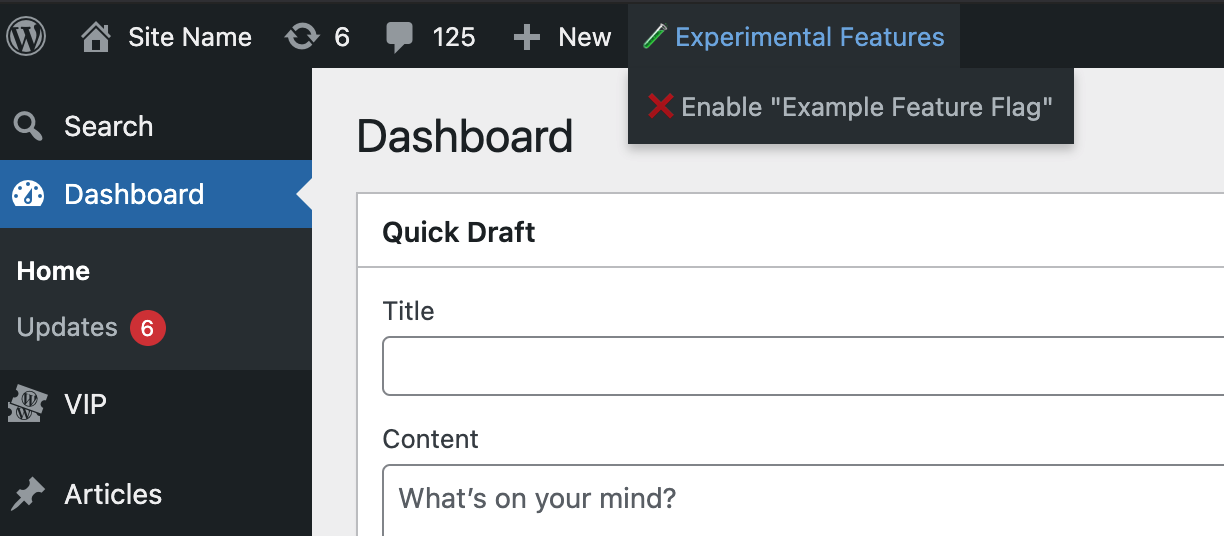
Listening for Flag Changes
WordPress actions are fired when flags are enabled/disabled.
On Any Flag Update
add_action(
    'experimental_features_flags_updated',
    function( $enabled, $disabled ) {
        // ...
    },
    10,
    2,
);
When a Specific Flag is Enabled
add_action( 'experimental_features_flag_enabled_{feature-flag}', function() { ... } );When a Specific Flag is Disabled
add_action( 'experimental_features_flag_disabled_{feature-flag}', function() { ... } );Retrieving Feature Flag Status in the REST API.
The status of feature flags can be retrieved via the REST API. The endpoint
/wp-json/experimental-features/v1/features will return a JSON object with the
status of all feature flags on the site.
{
    "my-cool-feature": {
        "label": "My Cool Feature",
        "status": false
    }
}
By default, this is disabled. To enable it, use the following filter:
add_filter( 'experimental_features_rest_api_enabled', '__return_true' );The default permissions for accessing the REST API endpoint would be for all users. To restrict access you can filter the permissions callback to retrieve it to your needs:
add_filter(
    'experimental_features_rest_permission_callback',
    function () {
        return current_user_can( 'manage_options' );
    },
);
All feature flags will appear on the endpoint by default. This can be filtered
using the experimental_features_rest_api_flags filter:
add_filter(
    'experimental_features_rest_api_flags',
    function ( $flags ) {
        return array_filter(
            $flags,
             function ( $flag ) {
                // Only return the 'my-cool-feature' flag.
                return 'my-cool-feature' === $flag;
            },
            ARRAY_FILTER_USE_KEY
        );
    }
);
Changelog
Please see CHANGELOG for more information on what has changed recently.
Credits
This project is actively maintained by Alley Interactive.
License
The GNU General Public License (GPL) license. Please see License File for more information.
Releases
6 releases.
These releases are tags only. The author does not attach a packaged zip, so there are no download counts to report.