NIVA Guard
See and control every outgoing connection of your WordPress plugins and themes: log with timing, block ads and notices, cache licenses, fast 404, WP-Cron control.
Install
This is the repository archive. It installs, but the folder name will carry the branch suffix and updates will not flow.
Install straight from GitHub with WP-CLI:
wp plugin install https://github.com/ali-mr-23/niva-guard/archive/refs/heads/main.zipSee and control every outgoing connection of your WordPress plugins and themes. Log each connection with its timing, block ads and promotional notices, cache license checks instead of cutting them off, skip unreachable hosts automatically, turn WP-Cron into a real server cron, and answer scanner probes with a fast static 404.
فارسی · Install · Features · Screenshots · FAQ
Requires WordPress 6.0+ · PHP 7.4+ · License GPLv2 or later · Translatable admin UI (LTR and RTL)
Why this plugin exists
Many plugins and themes call home on every page load or in the dashboard: advertising feeds, news widgets, license checks, update checks, usage tracking. On a slow or filtered network (some hosting regions cannot reach many foreign servers at all) each of those calls can wait 5 to 15 seconds and slow down the whole site.
NIVA Guard shows which plugin connects to which address and how much time it costs, then lets you decide for each connection: leave it, block it, or (for licenses) cache the answer.
Screenshots
| Overview | Known connections |
|---|---|
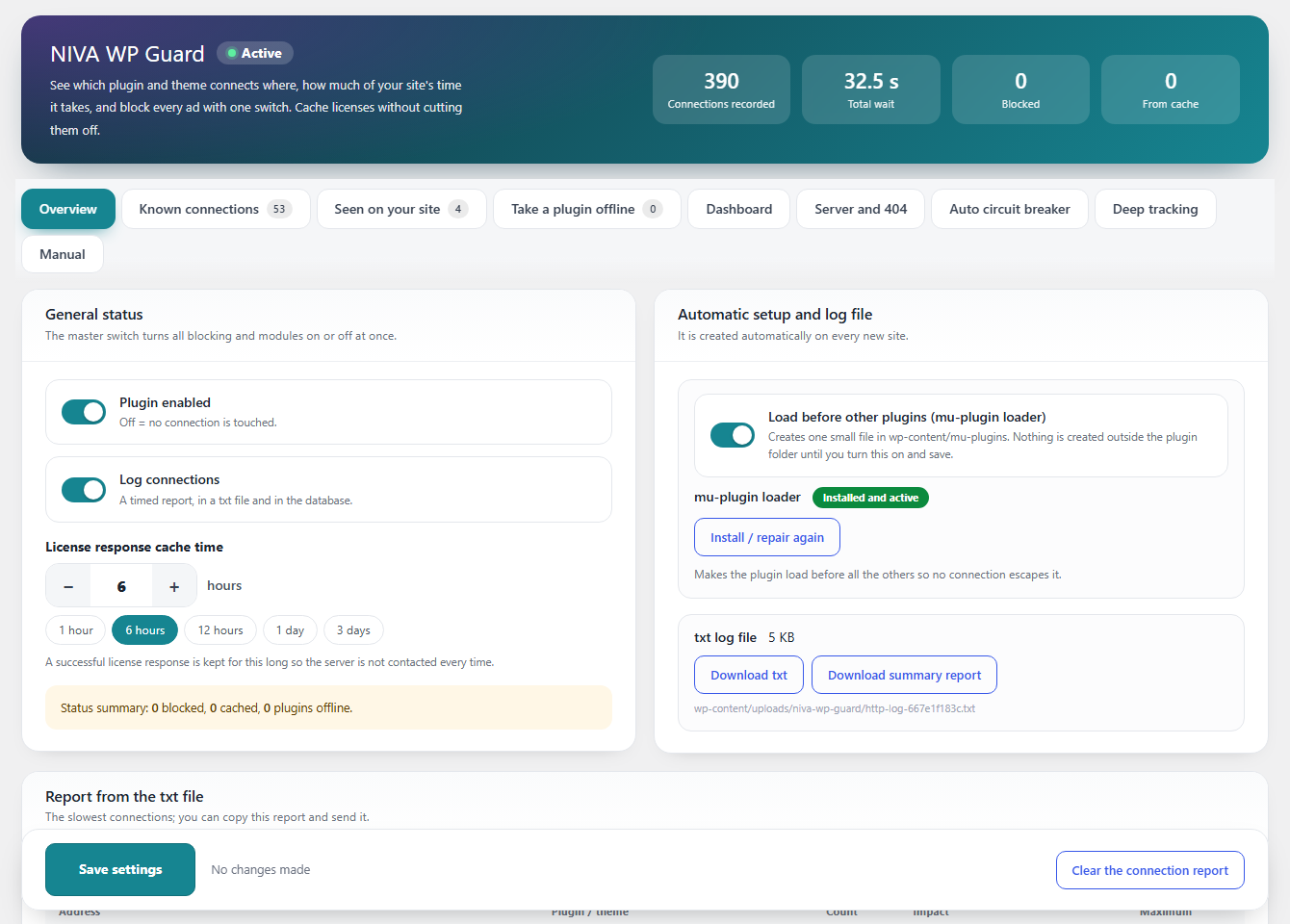 |
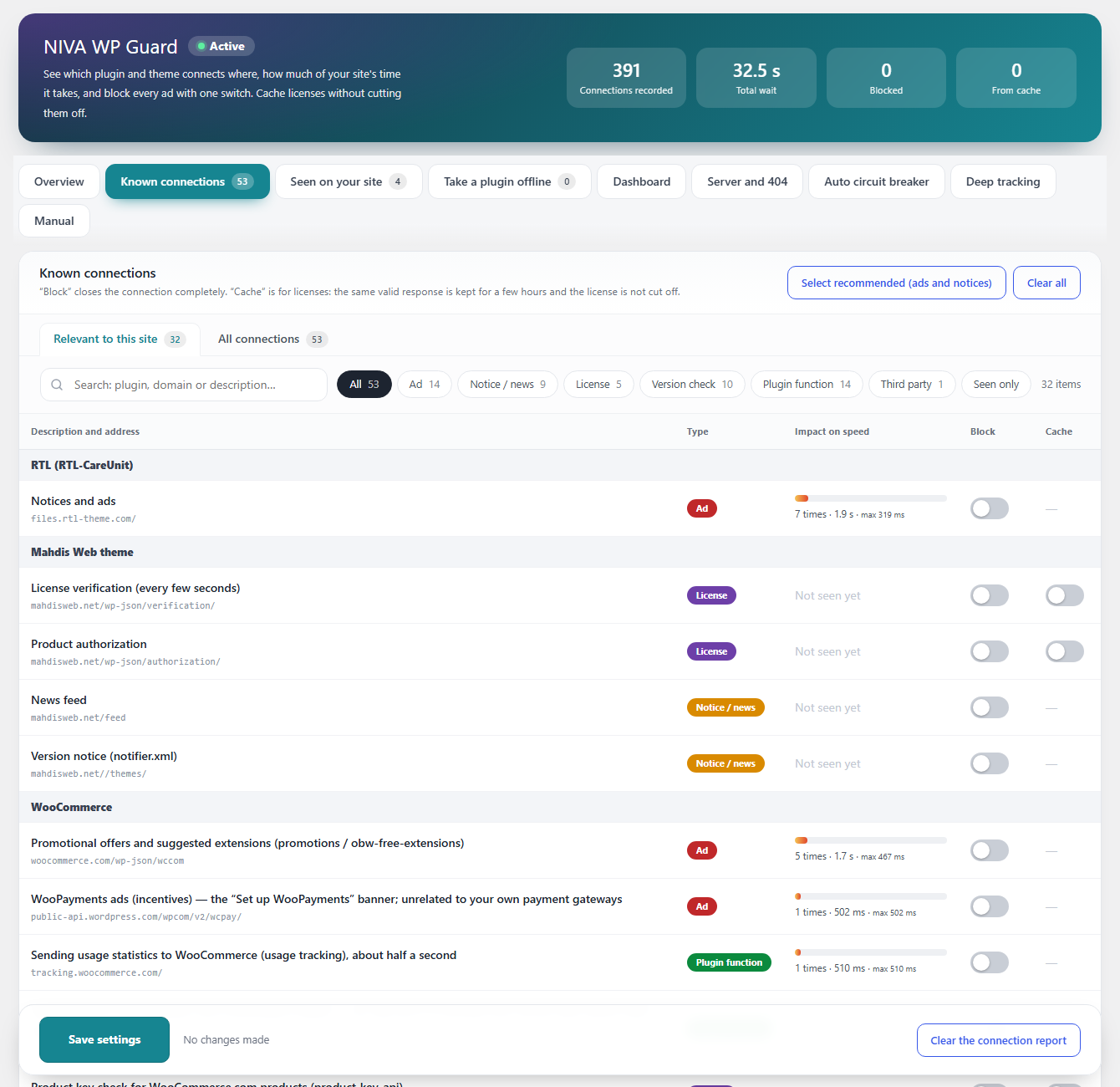 |
| Dashboard clean-up | Server tools and WP-Cron |
|---|---|
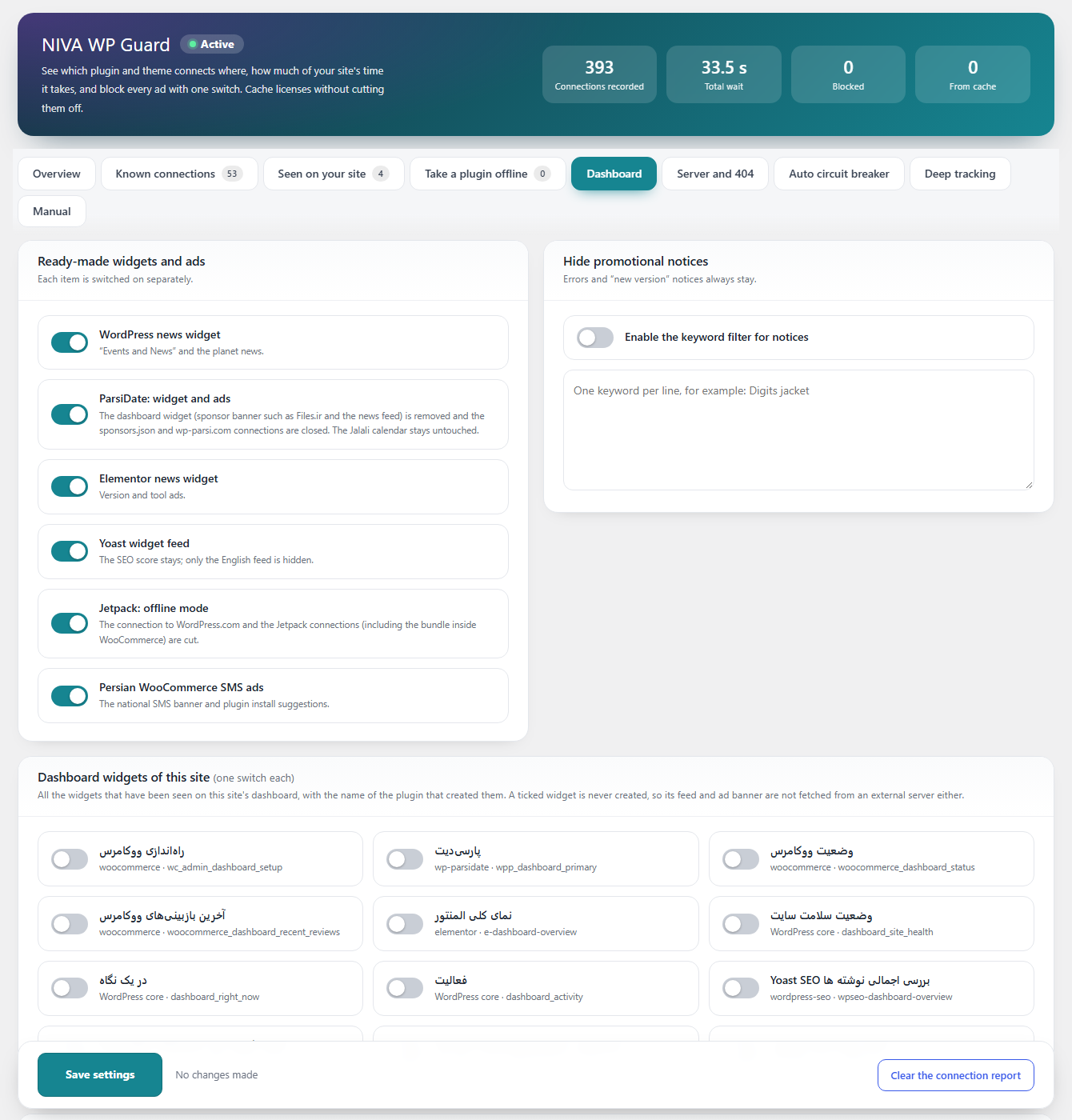 |
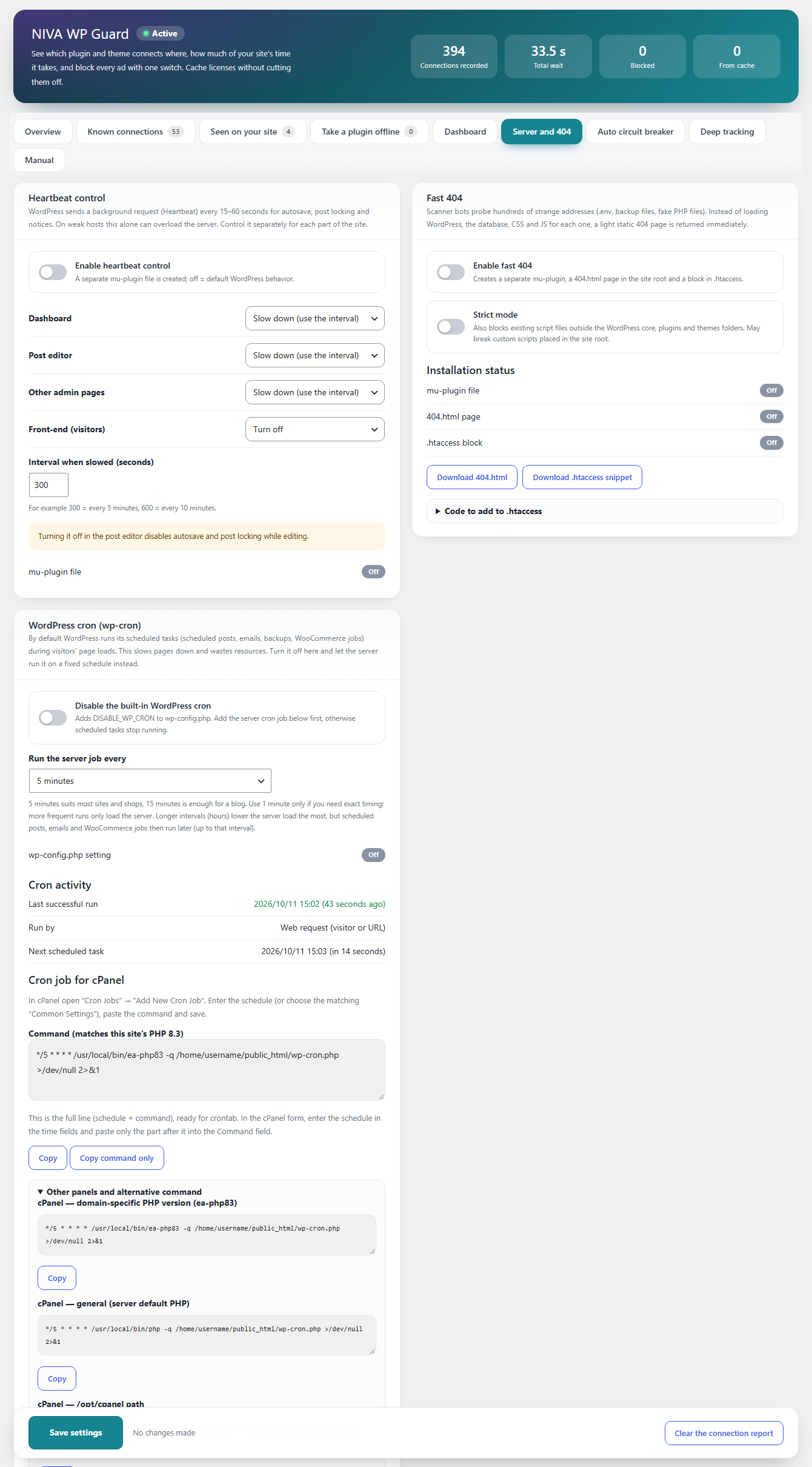 |
| Auto circuit breaker | Deep tracking |
|---|---|
 |
 |
Installation guide
Requirements
- WordPress 6.0 or newer, PHP 7.4 or newer.
- An administrator account (the settings page needs the
manage_optionscapability). - Nothing else. The plugin has no dependencies and makes no external connections of its own.
Option 1: upload the zip from the dashboard (recommended)
- Open the latest release and download
niva-guard-2.6.0.zip(the file under Assets, not "Source code"). - In WordPress go to Plugins → Add New → Upload Plugin, choose the zip and click Install Now.
- Click Activate Plugin.
- Open Settings → NIVA Guard.
Option 2: cPanel / FTP
- Unzip
niva-guard-2.6.0.zipon your computer. You get one folder namedniva-guard. - Upload that folder to
wp-content/plugins/(File Manager or FTP). - Activate the plugin in Plugins.
Option 3: Git or WP-CLI
cd wp-content/plugins
git clone https://github.com/Ali-MR-23/niva-guard.git niva-guard
wp plugin activate niva-guard
First-time setup (about 3 minutes)
- Overview: leave Plugin enabled and Log connections on. Browse your site and the dashboard for a few minutes so the plugin can record connections.
- Overview → Load before other plugins: turn it on and save. This installs one small file in
wp-content/mu-pluginsso no plugin can connect before the logger starts. (Nothing is written outside the plugin folder until you do this.) - Known connections → Relevant to this site: click Select recommended (ads and notices) to block advertising and promotional feeds in one click, review the list, then Save settings.
- License checks: do not block them. Turn on Cache instead (see below).
- Come back after a day, open Overview and read the report of the slowest connections. Slow ones that are not in the list appear in Seen on your site.
Upgrading
Upload the new zip the same way (Add New → Upload Plugin) and WordPress offers to replace the current version. Settings are kept.
Coming from "NIVA HTTP Guard"
Deactivate the old plugin first, then activate NIVA Guard. Your settings, log, report data and menu choices are migrated automatically.
Uninstalling
Deactivate the plugin to remove every file it created outside its own folder (mu-plugin files, 404.html, the .htaccess block and the DISABLE_WP_CRON line). Deleting the plugin also removes its options and log folder.
Troubleshooting installation
- "Plugin file does not exist" / "package could not be installed": you uploaded the wrong zip. Use the zip from the release Assets, or make sure the zip contains one top-level
niva-guardfolder. - Cannot write files: if WordPress cannot write to
mu-plugins,.htaccessorwp-config.php, the settings page shows download buttons and copy-paste instructions instead. - Site shows an error after enabling a server tool: the plugin restores
.htaccess(with backup) andwp-config.phpautomatically when the site answers with a 5xx error. You can also remove the files listed above by hand.
Features in detail
The settings page is Settings → NIVA Guard and is organised in tabs.
1. Overview
- Plugin enabled: master switch. Off means no connection is touched.
- Log connections: every connection is recorded in the database and in a text file (
wp-content/uploads/niva-wp-guard/), with caller, address, context (site, admin, cron, AJAX, REST) and duration. - License response cache time: 1 hour, 6 hours, 12 hours, 1 day, 3 days or any number of hours.
- Load before other plugins (mu-plugin loader): one small file in
mu-pluginsso the guard starts before every other plugin. Shows its status and a repair link. - Report: counters at the top (connections recorded, total wait, blocked, served from cache), a downloadable text log, a downloadable summary report, and a copy-ready list of the slowest connections.
2. Known connections
A built-in registry of 53 known connections with an explanation of what each one does, its type, its measured effect on your site and one switch each.
- Relevant to this site / All connections: the first tab lists only the rules whose plugin or theme is active on your site; the second shows the full list.
- Search and type filters: Ad, Notice / news, License, Version check, Plugin function, Third party, Seen only.
- Impact on speed: for every item that was observed, the number of calls, total time and the slowest call.
- Block: closes the connection completely. The request fails instantly instead of waiting.
- Cache (license and version-check items): a successful response is kept for the chosen number of hours, so the vendor's server is not asked on every request and the license is not cut off.
- Select recommended / Clear all: one click to block all ads and promotional feeds, or to reset.
- Blocking a License or Plugin function item shows a warning first, because it can lock a theme or stop SMS and orders.
Covered sources include WooCommerce (promotions, WooPayments ads, tracking, PayPal IPN, product-key checks), Jetpack and WordPress.com, WordPress core and plugin version checks, LiteSpeed Cache and QUIC.cloud, Solid Security, Rank Math, Elementor, Yoast SEO (including translations feeds, Wincher and the unofficial vip-themes server), WPForms, WP Mail SMTP, Code Snippets, and many Persian plugins and themes (Persian WooCommerce and SMS plugins, Digits, RTL plugins, WP-ParsiDate, Mahdis Web theme, Digify, Ace Plugins, Emalls, Torob, payamak-panel and Niva licenses).
3. Seen on your site
Connections that happened on your site but are not in the built-in list, grouped by plugin or theme, with counts and timing, so you can block or cache them too.
4. Take a plugin offline
Choose one or more plugins and everything they send out is closed except wordpress.org. Useful for a plugin that keeps contacting its own server for no reason you need. The plugin keeps working locally.
5. Dashboard
Clean the admin without deactivating anything.
- Dashboard widgets: the list of widgets detected on your dashboard with the plugin that adds each one; tick to remove. The widget code does not run and its feed is not fetched.
- Admin menu items: tick the items to hide (Dashboard, Settings and Plugins are protected so you cannot lock yourself out). Items are only hidden, not removed: the plugin stays active and its page still opens with a direct link. This includes menus that other plugins add very late.
- Ready-made switches: WordPress news widget, WP-ParsiDate widget and ads, Elementor news widget, Yoast widget feed, Jetpack offline mode, Persian WooCommerce SMS ads.
- Promotional notices by keyword: write words (one per line) and any admin notice containing them is hidden. Error notices and "new version" notices always stay visible.
6. Server and 404
Each tool is optional, off by default and writes files only after you enable it and save.
Heartbeat control
- Separate mode for Dashboard, Post editor, Other admin pages and Front-end: WordPress default, Slow down (use the interval) or Turn off.
- Interval from 1 to 3600 seconds (300 = every 5 minutes).
- Implemented as its own mu-plugin file, so it keeps working if you deactivate other things.
Fast 404
- Scanner bots probe addresses like
.env,backup.sql,wp-config.php.bakor fake.phpfiles. Instead of loading WordPress and the database for each one, the server answers with a light static404.html. - Creates a separate mu-plugin, a designed bilingual
404.html(RTL for Persian, LTR for others, no external fonts) and a marked block in.htaccess. - Safe by design: your real files and redirect plugins are not affected;
?p=IDshort links keep working; old slugs and SEO redirects still redirect. - Strict mode (optional) also blocks existing script files outside WordPress core, plugins and themes.
- Backs up
.htaccessfirst and rolls back automatically if the site returns a server error. Provides an Nginx snippet and downloads for manual installation.
WordPress cron (wp-cron)
- Turns off the built-in cron (it runs inside visitors' page loads) by adding one marked
DISABLE_WP_CRONline towp-config.php. If the site breaks, the file is restored automatically. The line is removed when you switch the option off or deactivate the plugin. - Choose how often the server should run it: 1, 5, 10, 15, 30 minutes or 1 to 6 hours.
- Shows a ready cron job matched to your PHP version and your real path, for cPanel (EasyApache
ea-phpXX, default PHP), CloudLinux alt-php, DirectAdmin, Plesk, any host, WP-CLI, wget and curl. It gives the full crontab line and a Copy command only button for the cPanel form. - Cron activity: last successful run, last failed run (with the error), how it was started (server command or web request) and the next scheduled task. A warning appears if scheduled tasks are overdue.
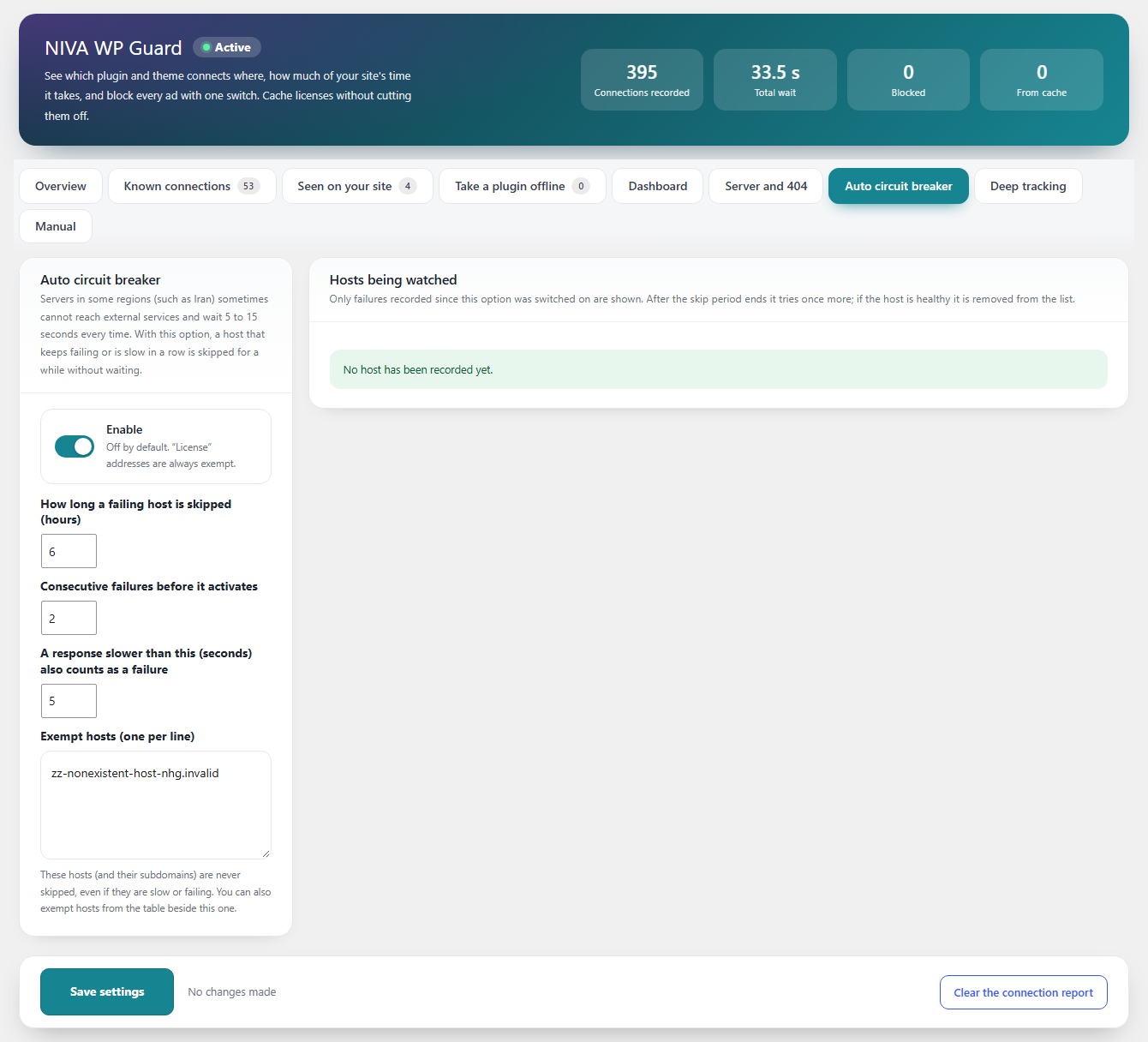
7. Auto circuit breaker
For servers that cannot reach some foreign hosts and wait many seconds every time. A host that fails (or answers slower than a limit) several times in a row is skipped for a while without waiting.
- Configurable skip time (hours), failures in a row, and the "too slow" limit in seconds.
- License addresses are always exempt; you can add exempt hosts.
- A table lists watched hosts, their status, when the skip ends, how many times it activated and the last error, with Release all.
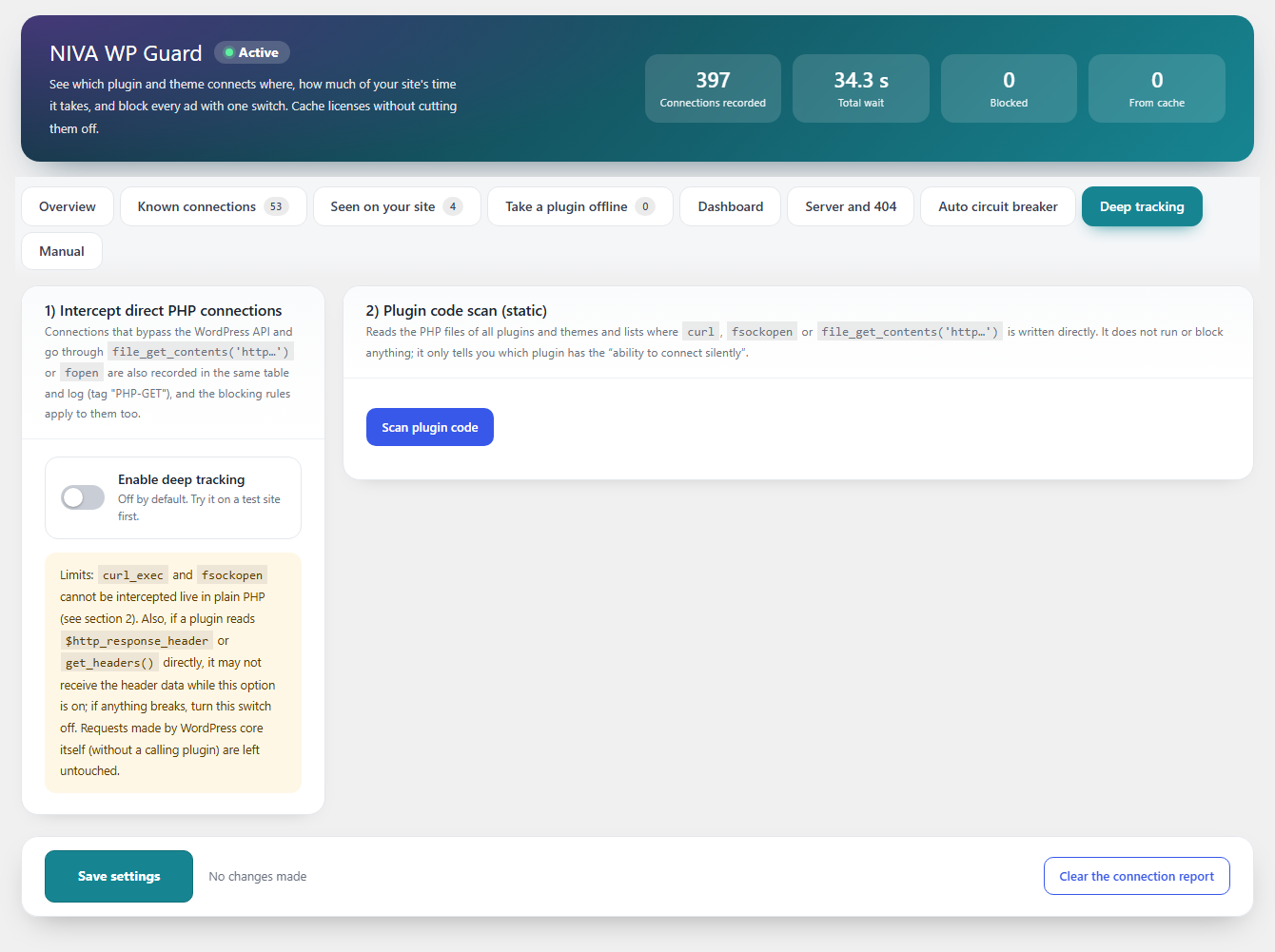
8. Deep tracking
Some plugins bypass the WordPress HTTP API. This optional tab finds them.
- Intercept direct PHP connections:
file_get_contents( 'http…' )andfopenare recorded in the same log and the same blocking rules apply. - Scan plugin code: a static scan lists, per plugin and file, which files use
curl, sockets orfopenand to which host or IP, with library files classified separately. Click a plugin to expand the file list.
9. Manual
Built-in help describing every tab and the type of each connection.
Languages and direction
The settings page is written in English and is fully translatable; it follows the site language and switches between LTR and RTL. Source translation files (Persian, Arabic, Turkish, Russian, German, French, Spanish, Chinese) are kept in translations/ for import into translate.wordpress.org.
Files outside the plugin folder (only when you enable them)
| File | Created by | Removed when |
|---|---|---|
wp-content/mu-plugins/niva-guard-loader.php |
Load before other plugins | option off, deactivate |
wp-content/mu-plugins/niva-guard-heartbeat.php |
Heartbeat control | option off, deactivate |
wp-content/mu-plugins/niva-guard-fast-404.php |
Fast 404 | option off, deactivate |
404.html and a block in .htaccess |
Fast 404 | option off, deactivate |
one line in wp-config.php |
Disable WP-Cron | option off, deactivate |
wp-content/uploads/niva-wp-guard/ |
Logging | uninstall |
FAQ
Does it send my data anywhere? No. It makes no external connections. The log stays on your site.
Can blocking something break my site? Blocking License or Plugin function connections can. Use Cache for licenses and read the warning before blocking a function. Ads, news and tracking are safe to block.
Does it work on Nginx? The logger, circuit breaker, cron control and Heartbeat work everywhere. Fast 404 cannot edit .htaccess on Nginx, so it shows the equivalent Nginx snippet.
Do I need the mu-plugin loader? It is recommended: without it a plugin that loads earlier than this one could connect before the logger starts.
What happens if I disable WP-Cron but forget to add the server cron? Scheduled posts, emails, backups and WooCommerce jobs stop running. The cron card warns you when tasks are overdue. Add the server job first.
Contributing
Issues and pull requests are welcome. All PHP, CSS and JavaScript files are unminified. New text must be written in English with the niva-wp-guard text domain and wrapped in the translation functions.
Author
Ali Mohajer · GitHub · WordPress.org profile
Licensed under the GPL, version 2 or later.
فارسی
NIVA Guard همهی اتصالهای بیرونی افزونهها و قالبهای وردپرس را نشان میدهد و کنترل میکند: ثبت هر اتصال با زمان آن، بستن تبلیغ و اعلان، کش کردن بررسی لایسنس بهجای قطع کردنش، رد شدن خودکار از سرورهای در دسترسنبودنی، تبدیل WP-Cron به کرون واقعی سرور و پاسخ سریع ۴۰۴ به اسکنرها.
چرا ساخته شد
خیلی از افزونهها و قالبها در هر بارگذاری صفحه یا در پیشخوان به سرور سازنده وصل میشوند: فید تبلیغ، خبر، بررسی لایسنس و نسخه، آمار استفاده. روی سرورهایی که دسترسیشان به سرویسهای خارجی ضعیف یا فیلتر است، هر اتصال ۵ تا ۱۵ ثانیه معطل میماند و کل سایت کند میشود. این افزونه نشان میدهد کدام افزونه به کجا وصل میشود و چقدر زمان میبرد، و برای هر اتصال تصمیم با شماست: بگذارید باشد، ببندید، یا (برای لایسنس) پاسخش را کش کنید.
راهنمای نصب
الزامات: وردپرس ۶٫۰ یا بالاتر، PHP نسخهی ۷٫۴ یا بالاتر، حساب مدیر. افزونه هیچ وابستگی ندارد و خودش هرگز به سرویس بیرونی وصل نمیشود.
روش ۱ (پیشنهادی): آپلود از پیشخوان
۱. از صفحهی آخرین Release فایل niva-guard-2.6.0.zip را دانلود کنید (از بخش Assets، نه «Source code»).
۲. در وردپرس: افزونهها ← افزودن ← بارگذاری افزونه، فایل را انتخاب و همین حالا نصب کن را بزنید.
۳. فعالسازی افزونه را بزنید و به تنظیمات ← NIVA Guard بروید.
روش ۲: cPanel یا FTP: zip را روی کامپیوتر باز کنید (یک پوشهی niva-guard میگیرید)، پوشه را در wp-content/plugins/ آپلود و در بخش افزونهها فعالش کنید.
روش ۳: Git یا WP-CLI
cd wp-content/plugins
git clone https://github.com/Ali-MR-23/niva-guard.git niva-guard
wp plugin activate niva-guard
تنظیم اولیه (حدود ۳ دقیقه)
۱. در نمای کلی گزینههای «افزونه فعال» و «ثبت اتصالها» را روشن بگذارید و چند دقیقه سایت و پیشخوان را بگردید تا اتصالها ثبت شوند.
۲. «لود شدن قبل از بقیهی افزونهها» را روشن و ذخیره کنید (یک فایل کوچک در mu-plugins میسازد). تا این کار را نکنید چیزی بیرون از پوشهی افزونه نوشته نمیشود.
۳. در اتصالهای شناختهشده ← مرتبط با این سایت، دکمهی «انتخاب پیشنهادی (تبلیغ و اعلان)» را بزنید و ذخیره کنید.
۴. بررسی لایسنس را مسدود نکنید؛ بهجایش «کش» را روشن کنید.
۵. یک روز بعد گزارش کندترین اتصالها را در نمای کلی ببینید.
بهروزرسانی: zip جدید را به همان روش آپلود کنید؛ تنظیمات حفظ میشود. اگر از «NIVA HTTP Guard» میآیید: اول نسخهی قدیمی را غیرفعال کنید؛ تنظیمات خودکار منتقل میشود. حذف: با غیرفعال کردن افزونه همهی فایلهایی که بیرون از پوشهاش ساخته (mu-plugin، 404.html، بلوک .htaccess و خط DISABLE_WP_CRON) پاک میشود.
اگر نصب خطا داد: پیام «پرونده پیدا نشد» یعنی zip اشتباه آپلود شده؛ فایل Assets را بگذارید. اگر وردپرس اجازهی نوشتن در mu-plugins، .htaccess یا wp-config.php ندهد، صفحهی تنظیمات دکمهی دانلود و راهنمای دستی نشان میدهد.
امکانات بهتفصیل
- نمای کلی: کلید اصلی، ثبت اتصالها، مدت کش لایسنس (۱ ساعت تا چند روز)، لودر mu-plugin، شمارندهها، دانلود لاگ و گزارش خلاصه و فهرست کندترین اتصالها.
- اتصالهای شناختهشده: ۵۳ اتصال آماده با توضیح، نوع (تبلیغ، اعلان/خبر، لایسنس، بررسی نسخه، کارکرد افزونه، شخص ثالث)، میزان اثر روی سرعت، کلید «مسدود» و کلید «کش»؛ تب «مرتبط با این سایت» فقط موارد مربوط به افزونههای فعال را نشان میدهد؛ جستوجو و فیلتر نوع دارد. قبل از مسدود کردن لایسنس یا کارکرد افزونه هشدار میدهد.
- دیدهشده در سایت شما: اتصالهایی که در فهرست آماده نیستند، برای بستن یا کش کردن.
- آفلاین کردن افزونه: همهی ارتباطهای افزونهی انتخابشده بسته میشود، بهجز wordpress.org.
- پیشخوان: حذف ویجتهای پیشخوان، پنهان کردن آیتمهای منو (حتی منوهایی که افزونهها دیر اضافه میکنند؛ پیشخوان، تنظیمات و افزونهها محافظتشدهاند)، کلیدهای آمادهی ویجت خبر وردپرس، پارسیدیت، المنتور، Yoast، Jetpack و تبلیغ پیامک، و پنهان کردن اعلانهای تبلیغاتی با کلیدواژه (اعلانهای خطا و نسخهی جدید همیشه میمانند).
- سرور و ۴۰۴:
- Heartbeat جداگانه برای پیشخوان، ویرایشگر، سایر صفحات ادمین و بخش بازدیدکننده (پیشفرض، کند کردن یا خاموش).
- ۴۰۴ سریع برای اسکنرها با صفحهی ۴۰۴ دوزبانهی زیبا (راستبهچپ برای فارسی، بدون فونت خارجی) و بلوک
.htaccessبا پشتیبان و بازگشت خودکار. لینکهای کوتاه?p=IDو ریدایرکتها خراب نمیشوند. - کرون وردپرس: خاموش کردن wp-cron با یک خط در
wp-config.php، انتخاب فاصلهی اجرا (۱ دقیقه تا ۶ ساعت)، دستور کرون آماده برای cPanel (EasyApache، PHP پیشفرض)، CloudLinux، دایرکتادمین، پلسک، WP-CLI، wget و curl متناسب با نسخهی PHP و مسیر واقعی سایت، و نمایش «آخرین اجرای موفق/ناموفق»، نحوهی اجرا و کار زمانبندیشدهی بعدی. اول کرون سرور را بسازید، بعد wp-cron را خاموش کنید.
- قطعکنندهی خودکار: سروری که چند بار پشت سر هم خطا یا کندی بدهد مدتی بدون انتظار رد میشود؛ آدرسهای لایسنس همیشه مستثنا هستند.
- ردیابی عمیق: ثبت اتصالهای مستقیم PHP (
file_get_contents،fopen) و اسکن کد افزونهها برایcurlو socket، همراه با فایل و آدرس مقصد. - زبان: رابط به انگلیسی نوشته شده و قابل ترجمه است (ترجمهها از translate.wordpress.org میآیند)، با تغییر خودکار راستبهچپ و چپبهراست.
مجوز
GPLv2 یا بالاتر.