Install
This is the repository archive. It installs, but the folder name will carry the branch suffix and updates will not flow.
Install straight from GitHub with WP-CLI:
wp plugin install https://github.com/alfonsovertu/working-with-toc/archive/refs/heads/main.zip
Working with TOC
Table of Contents
- Overview
- Key Features
- Plugin Structure
- Backend Settings
- Frontend Functionality
- SEO Compatibility
- Logging and Debugging
- Quick Start Guide
- Multisite Support
Overview
Working with TOC is a WordPress plugin designed to automatically build a polished, mobile-friendly table of contents (TOC) for posts, pages, and products. The project demonstrates a file structure that follows WordPress conventions (includes/, admin/, frontend/, assets/) and ships utilities for generating structured data recognized by Rank Math and Yoast SEO.
All settings are stored using core WordPress options and post meta, avoiding custom database tables or bespoke version-tracking records.
Key Features
- Sticky accordion TOC pinned to the bottom of the viewport with a modern, touch-ready design.
- Automatic anchor ID generation for
<h2>-<h6>headings with links kept in sync across the TOC. - Custom admin page with toggles to enable the TOC and structured data for posts, pages, and WooCommerce products.
- JSON-LD
ItemListoutput compatible with Rank Math and Yoast SEO schema graphs. - Comprehensive WooCommerce product metadata including GTIN/MPN identifiers, reviews, shipping details, and Open Graph fallbacks.
- Conditional logging keyed off the
WP_DEBUGflag so production sites stay clean.
Screenshots

Plugin Structure
working-with-toc/
├── working-with-toc.php
├── assets/
│   ├── css/
│   │   ├── admin.css
│   │   └── frontend.css
│   └── js/
│       ├── admin.js
│       └── frontend.js
├── includes/
│   ├── admin/
│   │   └── class-admin-page.php
│   ├── frontend/
│   │   └── class-frontend.php
│   ├── structured-data/
│   │   └── class-structured-data-manager.php
│   ├── class-autoloader.php
│   ├── class-heading-parser.php
│   ├── class-logger.php
│   ├── class-plugin.php
│   └── class-settings.php
└── README.md
Maintenance note: Legacy root-level loaders
class-toc-json.phpandclass-toc-product-json.phpwere removed because the PSR-4 autoloader now serves the modern classes from theincludes/directory.
Backend Settings
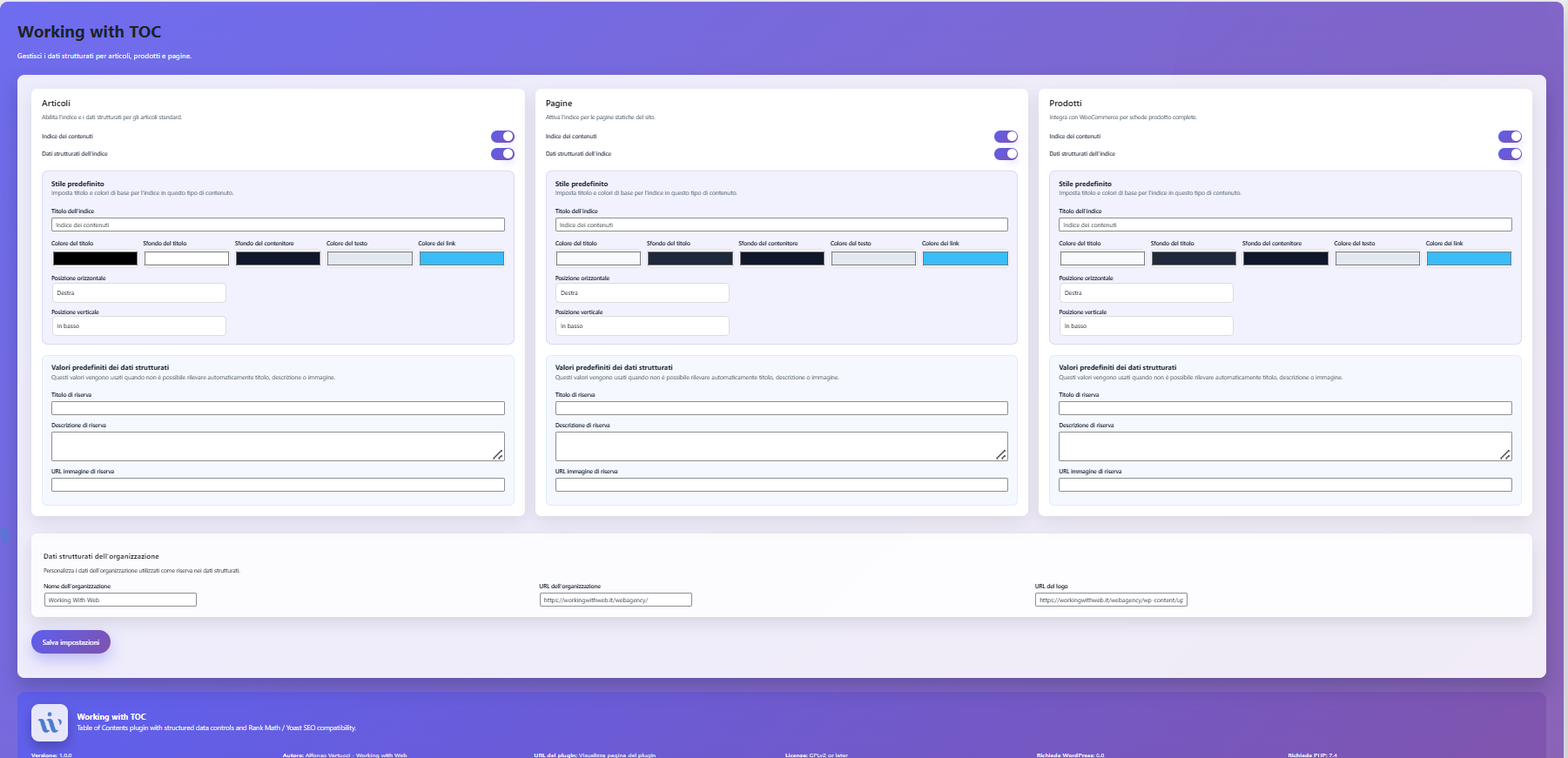
The admin menu gains a Working with TOC screen with three cards dedicated to each content type. Every card provides a modern toggle to enable or disable the TOC and the related structured data. The layout leans on gradients, soft shadows, and micro animations to deliver a premium feel.
Custom capability for the settings page
The plugin registers the custom capability manage_working_with_toc and automatically assigns it to administrators. You can adjust it through the working_with_toc_admin_capability filter. For example, to grant access to editors add the following to your theme or plugin:
add_filter( 'working_with_toc_admin_capability', function ( $capability ) {
    return 'edit_others_posts';
} );
This makes the Working with TOC page available to any user with the edit_others_posts capability (including editors) while preserving the original behavior for other roles.
Frontend Functionality
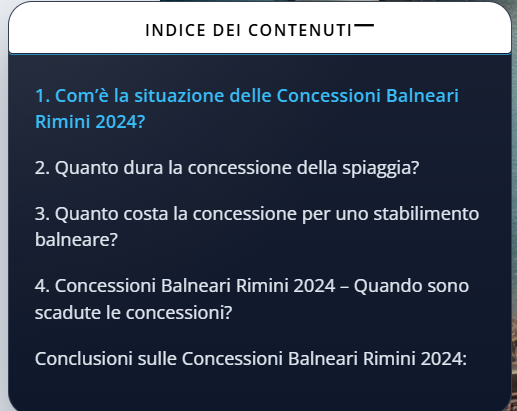
The TOC appears in an accordion anchored to the bottom edge of the viewport. Visitors can open or collapse it instantly; when expanded, the content scrolls inside a slide-up panel with dynamic highlighting powered by IntersectionObserver.
FAQ data attributes
When FAQ mode is enabled for specific headings, the parser annotates the matched elements so JavaScript and CSS can easily target them. Headings receive the wwt-faq-question class along with data-faq="question", while the first matching answer container gains the wwt-faq-answer class and data-faq-answer="true". These attributes replace the legacy data-wwt-faq markers and are applied directly by Heading_Parser::parse() so templates and structured data builders can rely on a consistent contract.
AMP compatibility
The frontend now detects AMP requests (using is_amp_endpoint() or amp_is_request() when available) and renders an accessible, always-on TOC without relying on JavaScript listeners. In AMP mode the plugin skips loading assets/js/frontend.js, swaps the floating container for a <details>-based layout that keeps the toggle keyboard-accessible while remaining open by default, and assigns a deterministic wwt-color-scheme-{hash} class so colors are sourced from the enqueued stylesheet instead of inline attributes. This ensures AMP markup remains valid while preserving the configured palette through CSS custom properties defined in assets/css/frontend.css.【F:includes/frontend/class-frontend.php†L43-L120】【F:includes/frontend/class-frontend.php†L245-L366】【F:assets/css/frontend.css†L1-L120】
Manual regression: Install the official AMP plugin in Transitional mode, load any single post both in canonical and
?ampviews, and verify that the AMP endpoint shows the expanded TOC without enqueued JavaScript or inlinestyleattributes in the TOC markup while the canonical page retains the interactive floating accordion and inline custom properties for JS-driven behavior.【F:includes/frontend/class-frontend.php†L57-L109】【F:includes/frontend/class-frontend.php†L245-L366】
Automation tip: Execute
php tools/amp-lint.phpto assert that the AMP stylesheet stays within Google’s constraints and that the generated markup avoids disallowed tags, inline styles, or JavaScript handlers. The script renders a sample TOC in AMP mode and fails fast if container data attributes for the CSS color tokens are missing.【F:tools/amp-lint.php†L1-L212】
SEO Compatibility
- Rank Math – the plugin registers itself among supported TOCs, preventing the “No TOC plugin installed” warning.
- Yoast SEO – structured data is injected into the existing schema graph through the
wpseo_schema_graphfilter without collisions. - Schema.org – an
ItemListnode is generated with links that match the heading anchors created in the markup.
Structured data fallbacks
When a third-party SEO plugin omits key schema nodes, the TOC integration replays a complete fallback graph that mirrors the data the plugin would have emitted on its own. The manager compares the current graph with the fallback and only injects the missing types—Organization, WebSite, WebPage, Article, Product, BreadcrumbList, ItemList, FAQPage, ImageObject, and VideoObject—leaving any nodes that are already present untouched.【F:includes/structured-data/class-structured-data-manager.php†L430-L514】【F:includes/structured-data/class-structured-data-manager.php†L594-L652】 The fallback graph itself is composed from WordPress settings and content metadata (site title, organization details, post author, publish dates, WooCommerce price data, extracted FAQ blocks, featured images, and embedded media), so the recovered nodes stay in sync with the actual page content.【F:includes/structured-data/class-structured-data-manager.php†L1036-L1292】 This guarantees that every schema type managed by the plugin is available to crawlers even when the host SEO stack omits it.
WooCommerce product coverage
The product builder now normalises shipping destinations with explicit DefinedRegion metadata (countries, regions, and postal codes) and formats all offer prices using WooCommerce’s display helpers. This keeps JSON-LD Offer nodes and Open Graph price tags aligned with storefront tax settings while ensuring OfferShippingDetails exposes the exact regions covered by each zone.【F:includes/structured-data/class-structured-data-manager.php†L1889-L1996】【F:includes/structured-data/class-structured-data-manager.php†L2001-L2075】【F:includes/structured-data/class-structured-data-manager.php†L2223-L2262】【F:includes/structured-data/class-structured-data-manager.php†L2339-L2410】
In the admin, a diagnostics panel highlights the most recent WooCommerce products that are missing critical fields (SKU, price, stock status, brand, or global identifiers). Store managers can jump straight to the product edit screen to fix the gaps before they affect schema output.【F:includes/admin/class-admin-page.php†L303-L427】【F:assets/css/admin.css†L73-L132】
Logging and Debugging
Core operations (initialization, saving settings, rendering schema) are routed to error_log when WP_DEBUG is true, delivering actionable context without polluting production.
Quick Start Guide
- Copy the plugin folder into
wp-content/plugins/and activate it in WordPress. - Visit Settings → Working with TOC to decide where the TOC and structured data should load.
- Edit or create a post/product: the plugin automatically appends the sticky accordion TOC to the bottom of the page.
- Confirm Rank Math or Yoast SEO recognizes the TOC and structured data in their analyses.
Multisite Support
The plugin has been validated in a WordPress multisite (subdirectory mode) with three sites, focusing on the following scenarios:
Multisite QA
- Per-site activation – activating locally adds the dedicated capability via
Plugin::ensure_capability()and exposes the Settings → Working with TOC page. Each site persists its options in thewwt_toc_settingsentry because the plugin usesget_option()/update_option()(noget_site_option()), so preferences stay isolated per blog.【F:includes/class-plugin.php†L39-L92】【F:includes/class-settings.php†L69-L113】 - Network Activate – enabling it from the Network Admin dashboard runs the same bootstrap on every site and ensures administrators automatically receive the
manage_working_with_toccapability, so the settings page is available everywhere without custom roles.【F:includes/class-plugin.php†L61-L92】 - Roles and capabilities – site administrators inherit the capability because
ensure_capability()loops through every role withmanage_options. You can verify it withwp cap list administratoror any network role editor.【F:includes/class-plugin.php†L68-L92】 - Classic and block editors – the metabox registered in
includes/admin/class-meta-box.phploads on bothpost.phpandpost-new.php, enqueueingadmin.cssandadmin.js. Preferences are saved in the_wwt_toc_metaentry with fallbacks per post type, so each site keeps its preferred layout and colors.【F:includes/admin/class-meta-box.php†L33-L198】【F:includes/admin/class-meta-box.php†L212-L311】 - Frontend – on any site, when the TOC is enabled for a content type,
Frontend::enqueue_assets()registersassets/css/frontend.cssandassets/js/frontend.js, whileFrontend::inject_toc()renders the markup with site- and post-level preferences. Visiting sample articles on each blog reveals the accordion TOC rendered with the correct styling.【F:includes/frontend/class-frontend.php†L33-L130】【F:includes/frontend/class-frontend.php†L131-L220】
These checks ensure the multisite compatibility claim is backed by concrete, repeatable verification steps.