Install
This is the repository archive. It installs, but the folder name will carry the branch suffix and updates will not flow.
Install straight from GitHub with WP-CLI:
wp plugin install https://github.com/alex9001/cyber-gallery-mai/archive/refs/heads/main.zipCyber Gallery for Mai Theme is a Mai Engine add-on with ten advanced image gallery layouts. It follows the same dynamic ACF block, responsive columns, image sizes, spacing controls, and Genesis markup APIs used by official Mai add-ons.
Screenshots
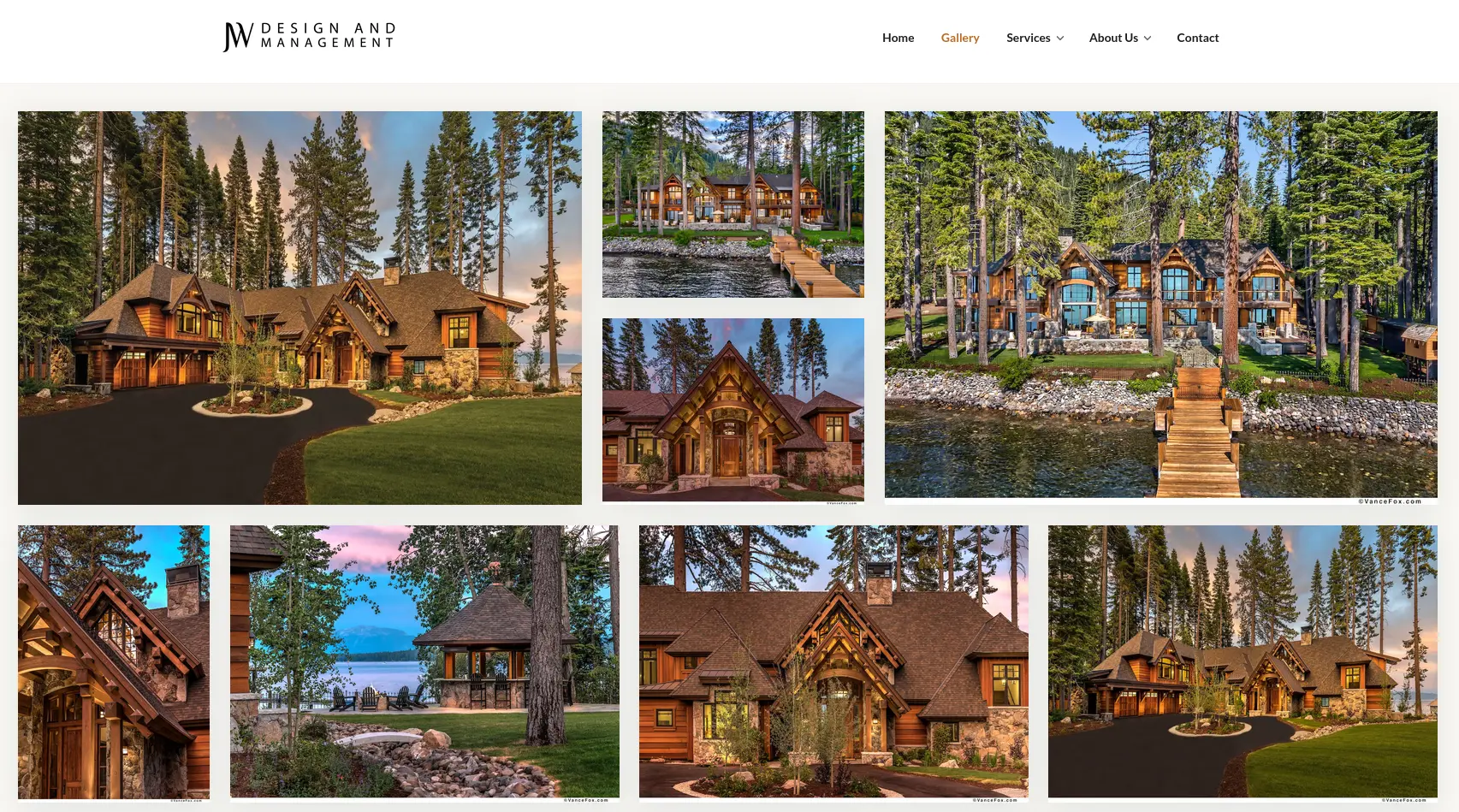
Tiled Mosaic — ratio-aware rows and stacks preserve image order while filling the available canvas. |

Filmstrip for logos — mixed logo proportions align cleanly without forced cropping or empty global padding. |
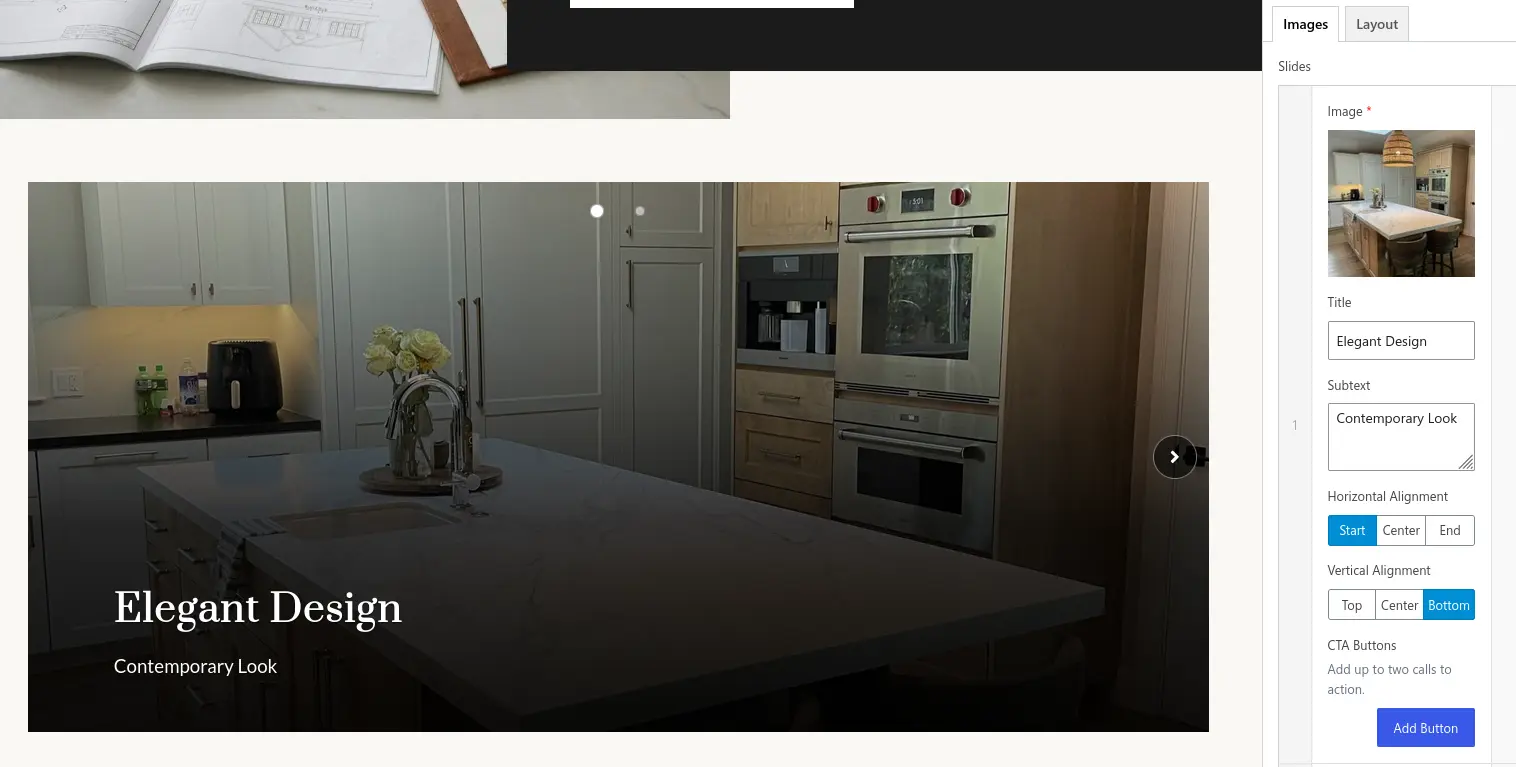
Live Slider editing — structured content controls update alongside the active slide preview. |
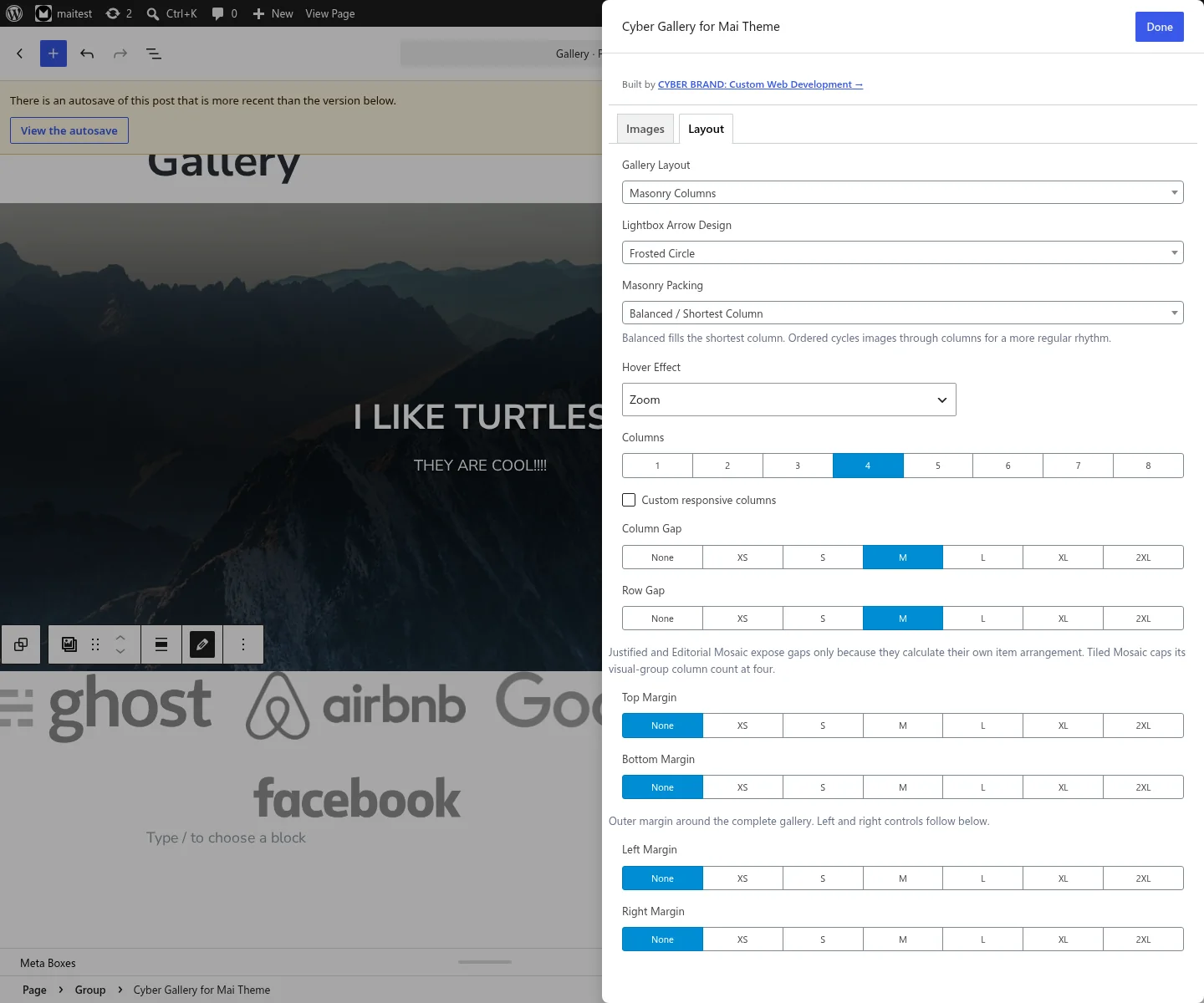
Expanded design controls — packing, responsive columns, alignment, gaps, and four-sided spacing in one focused editor. |
Requirements
- WordPress 7.1 or later
- PHP 8.3 or later
- Genesis Framework
- A Genesis child theme with Mai Engine support
- Mai Engine 2.40.0 or later
Mai Engine is a deliberate, proprietary, separately distributed dependency. It supplies ACF Pro, responsive column controls, image sizes, sanitizers, design tokens, and the Genesis/Mai runtime. It is not available from WordPress.org, so install and activate Mai Engine manually from the Mai Theme distribution or its GitHub project before activating this plugin. WordPress matches the dependency by its installed directory slug; a manually extracted GitHub archive must therefore be installed as wp-content/plugins/mai-engine/, not a versioned directory such as mai-engine-2.40.0/.
Cyber Gallery consumes Mai Engine's supported APIs and remains an independent plugin. It does not vendor, fork, or modify Mai Engine; Mai Engine installation, licensing, and updates remain separate.
Related projects
- maithemewp/mai-engine — the required, separately maintained Mai framework and runtime.
- maithemewp/mai-grid-gallery — the official Mai gallery project whose conventions and legacy block format are relevant to interoperability and migration.
Cyber Gallery for Mai Theme is an independent add-on and is not presented as an official Mai Theme project.
Version 0.4.0 raises the WordPress and PHP minimums for compatibility-safe typing and development tooling. Saved block content, gallery settings, and public PHP API behavior are unchanged, so no content migration is required.
Version 0.4.1 adds Slider width modes and editor-control refinements. Existing content and settings require no migration; choose Contained to retain the previous centered maximum-width presentation.
Version 0.5.0 adds selectable Slider transitions, navigation hover treatments and Mai-aware colors, plus configurable image overlays.
Version 0.5.1 completes a source-level Mai Engine integration audit. ACF color migration/formatting, responsive column calculation and markup, instance indexes, CSS unit formatting, the configured XL breakpoint, control foundations, shadows, icons, typography, palettes, and design tokens delegate to Mai Engine wherever it exposes a supported implementation. Gallery input normalization remains local where Engine's corresponding field helpers are explicitly private.
Version 0.6.0 gives Slider effects true in-place transitions instead of layering them over a horizontal slide, sharpens circle navigation, adds two independently combinable navigation slots, and adds accessible autoplay timing and hover-pause controls.
Version 0.7.0 preserves every layout's image source and dormant settings when layouts change, shares image overlays and hover treatments across layouts, and expands Filmstrip with accessible autoplay, optional and positionable arrows, and purpose-built logo normalization.
Version 0.7.1 moves per-image logo sizing next to the selected image's metadata, uses Mai Icons for lightbox controls when available, and removes the Filmstrip's visual scrollbar while preserving native scrolling.
Version 0.7.2 adds a discreet CYBER BRAND authorship and custom-development link to the block editor without adding settings screens, dashboard advertising, tracking, or front-end output.
Version 0.8.4 adds a native editor transform from the original Mai Gallery block, including its ordinary or custom-linked images and compatible Mai layout settings.
Version 0.9.0 expands Editorial Mosaic into configurable feature groups, adds new Masonry, Justified, and Tiled composition choices, and gives every layout independent margins on all four sides. Existing galleries keep their previous appearance until a new option is selected.
Version 1.0.0 adds an accessible Before / After comparison with dedicated images, editable badges, an RTL-aware native range control, configurable starting position, no-JavaScript and print fallbacks, and Mai orientation/source-size integration.
Version 2.0.0 completes the trademark-safe identity change to Cyber Gallery for Mai Theme, the plugin slug cyber-gallery-mai, and the canonical block name acf/cyber-gallery-mai. It also raises the supported platform to WordPress 7.1, PHP 8.3 or later, and Mai Engine 2.40.0 or later. Existing saved galleries continue to render and edit through a hidden acf/mai-cyber-gallery compatibility block; the former PHP symbols, filters, asset handles, JavaScript globals, ACF field keys, markup selectors, and Genesis contexts remain available as documented aliases or persisted contracts.
Performance and page caching
Public gallery output is deterministic and works with full-page caches. Frontend behavior is natively deferred and divided into packing-layout, carousel, comparison, and lightbox scripts. The renderer requests the enhancement required by each gallery, while an early scan of queried block content—including nested and synced/reusable blocks—queues known requirements during WordPress's normal asset phase. Public behavior scripts print in the footer, so render-time requests made after wp_head remain valid. The scan applies the same layout exclusions as the renderer, so a retained Slider lightbox setting does not request an impossible behavior. Masonry, Justified, and Tiled do not inherently depend on carousel code; Filmstrip and Slider do not inherently depend on the packing algorithms; Comparison has its own small enhancement; and lightbox code is requested for rendered, linkable galleries using the Lightbox action. Dynamic preview and content updates are batched so multiple DOM mutations trigger one focused gallery pass instead of repeated document rescans.
LiteSpeed Cache integrations keep the natively deferred scripts out of interaction-delayed and Guest Mode rewrites, preserve JavaScript-only layout and dialog selectors during UCSS generation, and promote a newly selected Slider image through LiteSpeed's lazy loader before its transition begins. Gallery responses are tagged with their attachment IDs so changing an attachment's alt text or metadata purges only pages that rendered it. LiteSpeed image lazy loading and VPI remain available for untouched and offscreen images.
Cold-cache rendering primes attachment posts and metadata in bulk before building responsive image markup. Standard WordPress image functions remain responsible for dimensions, srcset, sizes, loading hints, and image URLs, retaining compatibility with CDN and WebP/AVIF rewriting.
Building a release
Version 2.0.0 is currently an unreleased release candidate: this repository has no 2.0.0 tag or durable GitHub Release yet. A passing CI artifact is temporary verification output, not a published release.
Run npm run build:zip from a committed, clean checkout. The command rebuilds and validates generated assets, runs the JavaScript and PHP checks, and stages only the files enumerated in scripts/release-manifest.json. Packaging fails if the tracked runtime set differs from that manifest or if an extra, untracked, ignored, special, or symlinked path appears under a distribution directory. A clean build writes build/cyber-gallery-mai-{version}.zip, its sha256sum-compatible .zip.sha256 file, and a .zip.provenance.json sidecar; the ZIP also contains deterministic release-provenance.json. Repository-only development files and CHANGES.md are excluded.
CYBER_GALLERY_MAI_ALLOW_DIRTY_BUILD=1 exists only for local staging. A dirty artifact never receives the canonical filename: its full dirty-tree fingerprint and source revision appear in the filename and both provenance documents. Never publish it. SOURCE_DATE_EPOCH may override the normalized archive time; otherwise the source commit time is used. See docs/RELEASING.md for checksum/provenance verification, protected integration, and publication gates.
Public CI verifies the checksummed WordPress 7.1 and Plugin Check 2.1.0 archives, uses the immutable Mai Engine 2.40.0 commit, runs strict Plugin Check with only the proprietary-dependency and external-updater policy findings excluded, and exercises every self-contained browser fixture in Chromium, Firefox, and WebKit. It does not claim to run the authenticated WordPress editor test. Genesis is separately distributed, so that test and the complete runtime smoke lane run only for a version tag or an explicit release-integration dispatch on a protected, authorized self-hosted runner. The smoke script is intentionally repository-only; from a repository checkout, point WP-CLI at both the staged ZIP and the checkout's absolute test path:
REPOSITORY_PATH=/absolute/path/to/cyber-gallery-mai
WORDPRESS_PATH=/absolute/path/to/disposable-wordpress
wp --path="$WORDPRESS_PATH" plugin install "$REPOSITORY_PATH/build/cyber-gallery-mai-2.0.0.zip" --force --activate
wp --path="$WORDPRESS_PATH" eval-file "$REPOSITORY_PATH/tests/runtime-smoke.php"
The disposable site must contain at least two image attachments. The smoke test fails unless Genesis, an active Mai child theme, Mai Engine 2.40.0 or later, Engine's shared APIs, Cyber's assets, the ACF block and field group, all ten layouts, control-free Filmstrip autoplay, configured Slider title semantics, and the progressive comparison renderer have booted. Do not satisfy this lane with Engine or Genesis stubs.
Mai Engine integration boundary
Cyber Gallery for Mai Theme intentionally treats the externally maintained Mai Engine as its framework rather than merely a compatibility dependency. The plugin consumes Mai's ACF field clones, responsive column attributes, palette/color resolvers, image choices, sanitizers, counters, breakpoint and unit helpers, Genesis markup, buttons, utility classes, and CSS variables without changing Engine itself.
Gallery-specific responsibilities remain local because Mai Engine has no equivalent API: attachment normalization, masonry/justified/tiled placement, slider and filmstrip state, the dialog lightbox, accessibility lifecycle, transitions, and overlays. Cyber's integer --cyber-columns-* values are also intentional: Mai's standard --columns-* values are CSS fractions such as 1 / 3, while CSS column-count and the packing algorithms require whole-number counts.
Layouts
- Mai Grid — the familiar responsive Mai flex-column gallery.
- Masonry Columns — a natural-ratio waterfall with balanced shortest-column or regular source-ordered packing.
- Justified Rows — upload-order rows balanced around a configurable target height, with selectable final-row alignment.
- Tiled Mosaic — a ratio-aware, source-order mosaic with Organic, Calm, and Dense composition presets.
- Editorial Mosaic — configurable feature groups with 1–8 secondary images, deliberate odd-item alignment, selectable feature side, alternation, and tile height.
- Square Tiles — responsive 1:1 cropped tiles.
- Circle Tiles — responsive circular 1:1 tiles.
- Before / After — one full-width comparison pair with editable labels and starting position; its progressively enhanced control supports keyboard, pointer, touch, assistive technology, and RTL.
- Filmstrip — touch-friendly horizontal scroll snap with optional timed movement and optional positioned controls, uniform crop cells, and a no-crop logo mode.
- Slider — a responsive content slider with per-slide titles, subtext, CTA buttons, horizontal and vertical content alignment, selectable transitions and navigation treatments, dimensions, image fit, and color overlays.
The ordinary image layouts use Mai's column/row gap controls; Before / After and Slider ignore them because each presents one full-width stage. Grid, Masonry, Square, Circle, and Filmstrip use Mai's responsive column counts. Tiled Mosaic treats them as a maximum of four visual groups, and Justified Rows uses them for its static pre-enhancement fallback. Editorial Mosaic owns its feature-group composition instead of using a free column count. Every layout has independent top, right, bottom, and left outer margins using Mai's shared spacing scale.
Editor usage
- Install and activate Genesis, a Mai child theme, and Mai Engine 2.40.0 or later. Mai Engine is distributed separately and must be installed manually; WordPress.org cannot install it for this plugin. If installing a GitHub archive directly, ensure its final plugin directory is named
mai-engine. - Activate Cyber Gallery for Mai Theme.
- Add the Cyber Gallery for Mai Theme block.
- Choose a layout and use Open Expanded Editor to add gallery images or structured Slider rows.
Upgrading from 1.x
Install version 2.0.0 in the canonical wp-content/plugins/cyber-gallery-mai/ directory and activate it. WordPress sees a changed directory/main-file pair as a different plugin, so activation deactivates the former mai-cyber-gallery/mai-cyber-gallery.php basename before the canonical runtime starts. If both basenames were forced active by direct option editing, the canonical runtime pauses and displays an administrator notice instead of loading duplicate symbols.
No immediate content rewrite is required. Saved acf/mai-cyber-gallery blocks remain registered as a hidden, non-inserter compatibility block and keep the existing mai_cyber_gallery_* ACF field keys. Select one of those blocks and use the editor Transform menu to replace only its block name with acf/cyber-gallery-mai; its ACF data and supported block attributes remain intact.
For a site-wide migration, back up the database and run the WP-CLI command without flags first. It is deliberately read-only by default and reports affected posts, nested blocks, reusable/synced blocks, templates, and block widgets:
wp cyber-gallery-mai migrate-blocksAfter reviewing the dry-run totals, persist the same recursive conversion with confirmation, or use --yes in an automated deployment:
wp cyber-gallery-mai migrate-blocks --execute
wp cyber-gallery-mai migrate-blocks --execute --yes
Use --post_type=post,page,wp_block to restrict post types or --skip-widgets to omit block widgets. The command is idempotent: it changes only the gallery block's semantic name and attrs.name, preserves ACF data/field keys, verifies every persisted write, and exits nonzero if any record fails. WordPress serializes the complete parsed block document during an update, so attribute-JSON whitespace or equivalent escaping in unrelated block comments may be normalized even though their parsed attributes and rendered content remain unchanged. A repeated migration safely reports zero changes.
Cyber Gallery has never registered a shortcode, so there is no plugin shortcode syntax to convert. The upgrade is exclusively a block-name migration. Third-party code should adopt the canonical PHP API, filters, handles, and JavaScript globals below; the 1.x names remain compatibility aliases in 2.0.0.
2.0 compatibility contracts
| Integration surface | Canonical 2.0 identity | 1.x compatibility behavior |
|---|---|---|
| Saved block | acf/cyber-gallery-mai |
acf/mai-cyber-gallery remains registered without an inserter entry and has a lossless editor transform. |
| Saved ACF schema | Existing mai_cyber_gallery_* field keys |
Keys are intentionally unchanged; renaming them would disconnect serialized field references from their values. |
| Main classes | Cyber_Gallery_Mai_Plugin, Cyber_Gallery_Mai |
Mai_Cyber_Gallery_Plugin and Mai_Cyber_Gallery are class aliases. |
| Bootstrap/render helpers | cyber_gallery_mai_plugin(), cyber_gallery_mai_get_gallery(), cyber_gallery_mai_do_gallery() |
mai_cyber_gallery_plugin(), mai_get_cyber_gallery(), and mai_do_cyber_gallery() are deprecated wrappers. |
| Choice helpers | cyber_gallery_mai_normalize_choices() and the public cyber_gallery_mai_get_*() helpers |
Their former mai_cyber_gallery_*() names are deprecated wrappers. |
| Block callbacks/helpers | Public cyber_gallery_mai_*() registration, rendering, ACF migration, logo-control, and validation functions |
Every corresponding former mai_cyber_gallery_*() function remains a guarded forwarding wrapper. |
| Constants | CYBER_GALLERY_MAI_* |
The six former MAI_CYBER_GALLERY_* constants alias the canonical values. |
| Filters | cyber_gallery_mai_* |
The matching mai_cyber_gallery_* hook runs second with the canonical result. |
| Asset handles | cyber-gallery-mai* |
Matching mai-cyber-gallery* handles are dependency-only aliases and do not load duplicate assets. |
| Browser globals | CyberGalleryMai* |
Matching MaiCyberGallery* names reference the same settings/runtime objects. |
| Public markup/cache contracts | Existing .mai-cyber-gallery*, data-cyber-*, Genesis contexts, and canonical CGM.A.* cache tags |
Markup names remain unchanged; attachment purges also emit the former MCG.A.* tag so pre-2.0 cached pages expire correctly. |
The canonical singleton is inert when first requested. At the earliest plugins_loaded callback, Cyber Gallery checks for the actual former plugin runtime, publishes the 1.x bootstrap aliases and constants before ordinary plugin callbacks, and then starts once after Mai Engine's theme setup. This prevents an early canonical helper call from bypassing the dual-runtime guard.
An existing Core Gallery can be changed to Cyber Gallery for Mai Theme through the block toolbar's Transform menu. Conversion creates a Mai Grid gallery and preserves valid local attachment IDs in source order, columns, supported link behavior, wide/full alignment, anchor, and custom class. An uncropped Core gallery keeps its selected source size; a cropped gallery maps to the nearest Mai orientation and retains its old size only as a dormant value for a later switch to Custom orientation. Core-only data such as external images without attachment IDs, individual captions, focal points, per-image links, styling, and unsupported nested content is intentionally dropped. The original block remains unchanged when it has no convertible local attachments.
For ordinary image layouts other than Slider and Before / After, click actions include no link, the built-in dialog lightbox, the original media file, the attachment page, and per-image custom links. Captions, overlays, and per-image destinations are intentionally unavailable to the dedicated Comparison pair.
For Masonry, Justified, and Tiled Mosaic, choose an uncropped image size such as large. Mai Grid and Filmstrip use Mai's selected image orientation when an oriented size exists.
Before / After uses two dedicated images and never falls back to ordinary Images, Linked Images, or Slides. Choose a Mai orientation to request its large crop, or choose Custom to use the selected source size and the Before image's canvas ratio. The After image covers the same canvas. With JavaScript, the native range works with pointer, touch, keyboard, assistive technology, and RTL layouts. Without JavaScript, the range is not exposed as an inactive control; the configured split remains visible as a static comparison. Print output also keeps that split without the divider control.
Editorial Mosaic treats the first image as a feature, then places the selected 1–8 following images into the complementary mosaic before beginning another feature group. Odd Remainder can let an unpaired final secondary fill its row or align it to Start, Center, or End. You can also choose the first feature side, alternate sides by group, and keep the responsive automatic tile height or set a fixed height. A group of four secondary images with Fill and automatic height is the original five-image design.
Masonry can balance every new image into the currently shortest column or cycle items through columns for a more regular source-order rhythm. Justified Rows can align its un-stretched final row to Start, Center, or End. Tiled Mosaic offers Organic Mix, Calm Bands, and Dense Stacks presets; the responsive column count remains its maximum number of visual groups.
When the click action is Lightbox, choose Frosted Circle, Rounded Square, Minimal Chevron, or Edge Tab navigation arrows. The controls keep a stable hit target across hover, focus, and active states.
Slider uses a dedicated Slides repeater. Every row has a required image plus optional title, plain-text subtext, Start/Center/End horizontal alignment, Top/Center/Bottom vertical alignment, and up to two CTA links. Vertical alignment defaults to Bottom. CTA styles reuse Mai Engine's Primary Button, Secondary Button, Outline Button, and Link Button styles. Slide images are intentionally non-interactive so CTAs remain the only destinations; Media Library captions are replaced by the structured slide content. Editor preview refreshes preserve the currently selected slide, allowing its content and effect to remain visible while fields are edited.
Switching between Slider and another layout is non-destructive. The block keeps ordinary Images, Linked Images, structured Slides, and layout-specific settings serialized while they are hidden. Slider renders only its structured Slides rows, so an empty Slider shows its setup prompt instead of stale content from the previous layout; returning to another layout restores its retained images and settings.
Filmstrip, Slider, and Before / After expose an optional accessibility label so multiple carousel/comparison regions on one page can have distinct assistive-technology names. Slider also provides one title-element setting for all slide titles: Heading 2 through Heading 6, or Paragraph when the visual title should not participate in the page heading outline.
Slider has Primary and Secondary Navigation selectors. Each can use Arrows, Circles, Slide Counter, or None, so combinations such as Arrows + Circles and Circles + Counter are possible. Choosing the same control twice renders it only once, and the editor prevents duplicate selections. Navigation can overlay the images or appear below them, and overlay circles can sit at the top or bottom. Slider controls also set the arrow design, width mode, maximum width, desktop height, mobile height, and whether images crop to fill or fit completely inside the slide. Column, gallery alignment, and gap controls are hidden because a Slider always displays one full-width slide.
Slider transitions include Smooth Slide (native), Fade, Zoom In, Zoom Out, Rise, Soft Focus, Reveal, and Cinematic. Smooth Slide uses native horizontal scrolling. Controls and autoplay render every other preset as an in-place crossfade, with the selected entrance treatment layered into that crossfade instead of exposing an underlying slide. Direct touch and trackpad gestures remain native. The animated presets use Fast, Normal, and Slow speeds, and motion is removed when the visitor requests reduced motion.
Optional autoplay uses a configurable 3–30 second interval and can pause while the pointer is over the Slider. Its Pause/Start control is an independent presentation choice: hiding the button does not disable rotation. Reduced-motion preferences disable rotation and hide its unnecessary toggle. Keyboard focus and manual navigation stop rotation; when the Pause/Start control is visible, the visitor can explicitly start it again.
Navigation hover choices are Color Shift, Grow, Nudge, Glow, Fill, and Ring. Main, border, and inner colors can each be set independently for normal and hover states using the Mai Engine palette or a custom color. Hover treatments preserve the navigation controls' hit targets.
Image overlays are shared by the ordinary image layouts and Slider, and support None, Solid, Gradient Bottom, Gradient Top, Gradient Left, Gradient Right, and Vignette styles. Before / After intentionally omits them so neither side obscures the source comparison. Overlay color uses the Mai Engine palette or a custom color, and opacity can be set from 0 through 100. In Slider this treatment remains separate from the content-legibility scrim used behind slide copy and CTAs.
Hover treatments are shared across the ordinary image layouts and Slider. Before / After forces None so dragging remains its only image interaction. Desaturate removes a configurable 0–100 percent of color at rest and restores full color on mouse-over or keyboard focus. Zoom, Lift, Fade, and None remain available, and reduced-motion preferences suppress movement. Slider defaults to None so existing Sliders do not gain motion until a treatment is deliberately selected; other applicable layouts retain the existing Zoom default.
Filmstrip controls can be hidden as a group, while arrows are opt-in and can be enabled independently. This intentionally supports automatically moving logo rails and similar presentations that do not need visible playback controls. Visible controls can sit over the images or align above/below them at Start, Center, or End. Arrow design, hover treatment, and Mai palette/custom navigation colors are shared with Slider, including the autoplay control. Optional timed movement advances one item by default, supports a configurable items-per-advance value, and wraps at the end even when controls are hidden. Touch swipes and mouse/pen throws use restrained momentum, subtle edge stretch and tilt, and a light elastic snap to the closest item; autoplay, arrows, and keyboard navigation use a calm no-overshoot glide. Rotation suspends for manual interaction, keyboard focus, hidden tabs, offscreen galleries, reduced-motion preferences, and optionally mouse-over.
For mixed logo rows, choose Logo / Contain. Every item receives the same responsive cell height while each source keeps its intrinsic aspect ratio and centers within an explicit rail-height constraint. Shared padding is optional rather than necessary for containment, and any selected hard-cropped preset automatically falls back to the uncropped original. Select an image in the Images field and enable Use a custom size for this image beside its Title, Caption, and other metadata when unusual transparent whitespace makes that logo look optically small or large. Linked Images expose the same checkbox below each image. The setting belongs only to the current gallery; values above 100 percent deliberately zoom within the fixed cell and can clip if pushed too far. Uniform Crop provides equal-height photographic cells, while Natural preserves the original Filmstrip behavior.
Slider width modes are Full, Contained, and Inset. Full is the default and fills the available block or parent canvas. Contained applies Maximum Slider Width and preserves the previous centered presentation. Inset fills the canvas while retaining responsive side gutters. In the compact block inspector, maximum width and the desktop and mobile height fields stack one per row; the expanded editor keeps those three fields together in one row. Their number inputs retain validation but omit browser up/down spinner controls. Button-group choices use equal widths throughout the gallery controls.
Image Quality / Source Size selects the WordPress image source used in the responsive image markup. Choose a source at least as large as the displayed image: larger sources can look sharper but use more bandwidth. Slider dimensions control the display box independently.
Image Corners switches gallery images between Square and Rounded corners. Circle Tiles remain circular.
Converting existing galleries
Select an existing Mai Gallery or Gallery block in the WordPress editor, open the block-type/Transform menu at the left of its toolbar, and choose Cyber Gallery for Mai Theme. The selected block is immediately replaced with a Cyber Gallery using the familiar Mai Grid layout; WordPress Undo can restore the original until the post is saved.
The Mai Gallery conversion preserves the active ordinary-image gallery or custom-linked-image repeater in source order, plus lightbox behavior, shadow, image orientation and custom source size, responsive column counts, column alignment, gaps, margins, wide/full alignment, anchor, and custom class where available. Because the source block has no caption or hover fields, the converted Mai Grid starts with Cyber's Below Captions and Zoom defaults. An old custom URL becomes the corresponding Cyber linked-image URL. The original Mai Galleries plugin must be active while its block is loaded in the editor, but it can remain installed alongside Cyber Gallery.
Core Gallery conversion preserves local attachment order, valid IDs, columns, supported gallery-level link behavior, wide/full alignment, anchor, and custom class. An uncropped gallery keeps its selected source size; a cropped gallery maps to the closest Mai orientation while retaining that size as a dormant value for Custom orientation. Data without a direct Cyber equivalent is intentionally omitted. A source gallery with no valid attachments remains unchanged.
PHP API
echo cyber_gallery_mai_get_gallery(
    [
        'layout'       => 'masonry',
        'images'       => [ 123, 456, 789 ],
        'click_action' => 'lightbox',
        'columns'      => 3,
        'column_gap'   => 'md',
        'row_gap'      => 'md',
    ]
);
cyber_gallery_mai_do_gallery( $args ) is the echoing equivalent. The former mai_get_cyber_gallery() and mai_do_cyber_gallery() functions remain deprecated aliases for 1.x integrations.
Slider uses structured rows rather than the gallery image arrays:
echo cyber_gallery_mai_get_gallery(
    [
        'layout'                       => 'slider',
        'slider_width_mode'            => 'full',
        'slider_transition'            => 'cinematic',
        'slider_transition_speed'      => 'normal',
        'slider_navigation'            => 'arrows',
        'slider_navigation_secondary'  => 'dots',
        'slider_navigation_hover'      => 'glow',
        'slider_autoplay'              => true,
        'slider_autoplay_control'      => false,
        'slider_autoplay_interval'     => 5,
        'slider_pause_on_hover'        => true,
        'slider_overlay_style'         => 'gradient-bottom',
        'slider_overlay_color'         => 'black',
        'slider_overlay_opacity'       => 35,
        'slides'                       => [
            [
                'image'          => 123,
                'title'          => 'Build something memorable',
                'subtext'        => 'A concise supporting message that remains readable at every breakpoint.',
                'align'          => 'start',
                'align_vertical' => 'bottom',
                'buttons'        => [
                    [
                        'link'  => [
                            'url'    => 'https://example.com/',
                            'title'  => 'Start a Project',
                            'target' => '',
                        ],
                        'style' => 'button',
                    ],
                ],
            ],
        ],
    ]
);
Gallery arguments
| Argument | Default | Accepted value |
|---|---|---|
id |
generated | Optional HTML ID; anchor takes precedence. |
anchor |
empty | Block/API anchor ID. |
class |
empty | Space-separated additional classes. |
aria_label |
empty/layout default | Optional plain-text region name for Filmstrip, Slider, and Before / After. Use a distinct value when a page contains multiple such galleries. |
align |
empty | Empty, wide, or full. |
layout |
masonry |
grid, masonry, justified, tiled, mosaic, square, circle, comparison, filmstrip, or slider. |
masonry_flow |
balanced |
balanced places each image in the shortest column; ordered cycles through columns. |
justified_row_height |
240 |
Target pixel height from 100 through 600. |
justified_last_row |
start |
start, center, or end; aligns the un-stretched final row. |
tiled_pattern |
organic |
organic, calm, or dense; controls how frequently Tiled rows use stacked groups. |
mosaic_feature_side |
left |
left or right; positions the first feature tile and sets the starting side. |
mosaic_alternate |
false |
Boolean; swaps the feature side for each configured image group. |
mosaic_items_after_feature |
4 |
Whole number from 1 through 8; secondary images placed after each feature. |
mosaic_odd_alignment |
fill |
fill, start, center, or end; treats the unpaired final secondary in an odd group. |
mosaic_row_height |
0 |
Mosaic row height from 0 through 600 pixels; 0 uses the responsive automatic height. |
click_action |
lightbox |
none, lightbox, media, attachment, or custom. Slider and Before / After never create image links. |
lightbox_arrow_style |
circle |
circle, square, minimal, or edge; used by linkable layouts with the Lightbox click action. Slider and Before / After do not open a lightbox. |
images |
empty array | Ordered attachment IDs used by non-custom galleries. |
images_links |
empty array | Image/link rows used by click_action=custom; schema shown below. |
slides |
empty array | Structured Slider rows and a retained-image fallback for other empty layouts. Each accepts image, title, subtext, horizontal align (start, center, or end), vertical align_vertical (top, center, or bottom; default bottom), and up to two buttons. |
comparison_before_image |
0 |
Dedicated Before attachment ID; both dedicated image IDs are required for comparison output. |
comparison_after_image |
0 |
Dedicated After attachment ID; never falls back to ordinary Images, Linked Images, or Slides. |
comparison_before_label |
Before |
Plain-text badge; an empty string hides the visual badge while retaining an accessible fallback. |
comparison_after_label |
After |
Plain-text badge; an empty string hides the visual badge. |
comparison_position |
50 |
Initial percentage of the Before image visible from logical inline-start, clamped from 0 through 100. |
image_orientation |
landscape |
A Mai image-orientation slug or custom; used by Grid, Before / After, and Filmstrip Natural/Uniform Crop modes, but intentionally ignored by Logo / Contain. |
image_size |
large |
Any registered WordPress image-size slug. Unregistered values fall back to the requested registered size, then large, then full. This controls source dimensions and quality, not the rendered display box; Logo / Contain replaces a registered hard crop with full. |
image_radius |
rounded |
square or rounded. Circle Tiles always remain circular. |
captions |
below |
none, below, or overlay; ignored by Slider and Before / After. |
shadow |
false |
Boolean value sanitized by Mai Engine. |
hover |
zoom (none for Slider when omitted) |
none, zoom, lift, fade, or desaturate; Before / After forces none so dragging remains the sole interaction. |
hover_desaturate_amount |
100 |
Color removal from 0 through 100 percent at rest when hover=desaturate; full color returns on hover or focus. |
filmstrip_autoplay |
false |
Boolean; advances the Filmstrip automatically. |
filmstrip_autoplay_interval |
5 |
Seconds between automatic Filmstrip movements, accepted in 0.1-second increments from 0.1 through 30. |
filmstrip_autoplay_items |
1 |
Positive whole number of Filmstrip items advanced by each automatic movement. |
filmstrip_pause_on_hover |
true |
Boolean; temporarily pauses Filmstrip autoplay while a mouse or pen is over it. |
filmstrip_controls |
true |
Boolean; shows or hides the complete Filmstrip control group without disabling autoplay. |
filmstrip_arrows |
false |
Boolean; opts into Filmstrip previous/next controls. |
filmstrip_arrow_position |
below-end |
Positions Filmstrip controls at overlay, above-start, above-center, above-end, below-start, below-center, or below-end. |
filmstrip_arrow_style |
circle |
circle, square, minimal, or edge. |
filmstrip_image_mode |
natural |
natural, equal-height uniform-cover, or no-crop logo-contain. |
filmstrip_height |
320 |
Desktop cell height in pixels from 120 through 800 for uniform and logo modes. |
filmstrip_height_mobile |
220 |
Mobile cell height in pixels from 100 through 600 for uniform and logo modes. |
filmstrip_logo_padding |
24 |
Legacy shared padding fallback retained for existing galleries and PHP API calls. |
filmstrip_logo_padding_horizontal |
shared padding | Optional left/right breathing room in pixels from 0 through 120. |
filmstrip_logo_padding_vertical |
shared padding | Optional top/bottom breathing room in pixels from 0 through 120. |
filmstrip_logo_overrides |
empty array | Rows containing an image attachment ID and optical scale from 50 through 200 percent, or an attachment_id => scale map; the last value for a repeated ID wins. |
slider_navigation |
arrows |
Primary navigation: arrows, dots, counter, or none. The legacy aggregate arrows-dots value remains accepted and maps to Arrows + Circles. |
slider_navigation_secondary |
dots |
Secondary navigation: arrows, dots, counter, or none. A duplicate of the primary value is reduced to none. |
slider_navigation_position |
overlay |
overlay or below. |
slider_dots_position |
top |
top or bottom; applies to circle navigation when it overlays the image. |
slider_arrow_style |
circle |
circle, square, minimal, or edge; used by navigation modes that include arrows. |
slider_transition |
native |
native, fade, zoom-in, zoom-out, rise, soft-focus, reveal, or cinematic. |
slider_transition_speed |
normal |
fast, normal, or `s |
This README is longer than the copy stored here. Read the rest on GitHub →