Install
This is the repository archive. It installs, but the folder name will carry the branch suffix and updates will not flow.
Install straight from GitHub with WP-CLI:
wp plugin install https://github.com/alahdal262/postcleaner/archive/refs/heads/main.zipNo built-in updater. New versions won't appear under Dashboard → Updates. Install new releases yourself, or let Git Updater track the repository.
Bulk delete WordPress posts and their featured images by category. Multi-category selection, preview before delete, batch processing with progress bar and stop button.
Built for news sites and content-heavy WordPress installations where you need to clean up thousands of posts at once without crashing your server.
Features
- Multi-Category Selection — Pick one or many categories at once with search and select all/none
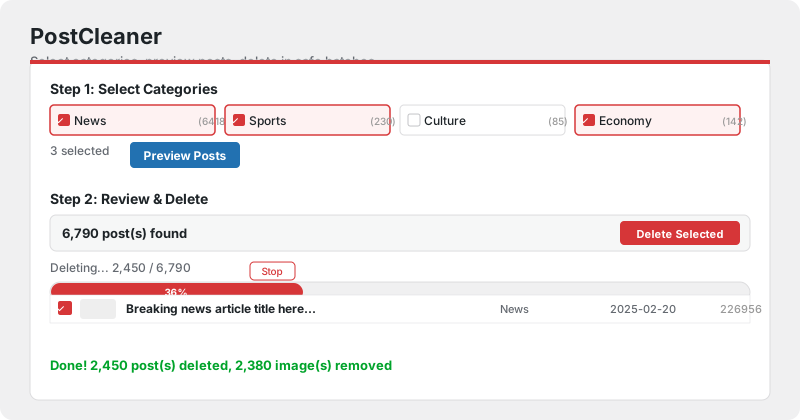
- Preview Before Delete — See every post (with thumbnail, title, category, date, status) before confirming
- Batch Processing — Deletes 5 posts per request to avoid server WAF/timeout blocks
- Progress Bar — Real-time progress with percentage and post count
- Stop Button — Pause deletion at any time, keep what's already deleted
- Image Cleanup — Automatically removes featured images (attachments) along with posts
- Safe & Secure — WordPress nonce verification, capability checks, confirmation dialog
Screenshot
Installation
- Download or clone this repository
- Upload the
postcleanerfolder to/wp-content/plugins/ - Activate PostCleaner in WordPress Plugins
- Go to PostCleaner in the admin sidebar
Usage
Step 1: Select Categories
- Search categories by name
- Check the ones you want to clean up
- Optionally include posts without featured images
- Click Preview Posts
Step 2: Review & Delete
- Browse the post list with thumbnails
- Uncheck any posts you want to keep
- Click Delete Selected Posts & Images
- Confirm the permanent deletion dialog
- Watch the progress bar — click Stop anytime
How It Works
- Posts are deleted in batches of 5 via AJAX to avoid server 403/timeout errors
- Featured images (WordPress attachments) are force-deleted along with their posts
- Failed batches auto-retry once after a 2-second cooldown
- All operations require
manage_optionscapability (admin only)
Requirements
- WordPress 5.0+
- PHP 7.4+
- Admin access (
manage_optionscapability)
License
GPL-2.0-or-later
Author
Yemen TV Media — yementv.tv