Install
This is the repository archive. It installs, but the folder name will carry the branch suffix and updates will not flow.
Install straight from GitHub with WP-CLI:
wp plugin install https://github.com/aimal-dev/user-menu-control-wp/archive/refs/heads/main.zipUser Menu Control is a lightweight, dynamic WordPress plugin designed to give Administrators complete control over what Subscribers and Editors see in the WordPress Admin Dashboard.
By default, WordPress allows certain roles to see specific menus. This plugin flips that logic: it hides everything (except Dashboard & Profile) by default, and lets you selectively allow specific menus for specific users.
It solves the common problem of clients getting confused by too many options or "Admin-only" plugins (like Elementor, WPForms) not being visible to lower-level users even when you want them to be.
🚀 Features
- Dynamic Menu Detection: Automatically detects all installed plugin menus (WooCommerce, Elementor, WPForms, Custom Post Types, etc.) without any hardcoded logic.
- Whitelisting System: Simply tick the checkboxes for the menus you want a specific user to see.
- Smart Capability Handling: Automatically grants the necessary permissions (capabilities) to the user for the specific allowed menus.
- Example: If you allow "Elementor" for a Subscriber, the plugin safely grants them access to view that specific page, even if it normally requires Admin rights.
- Clean Dashboard: Non-admin users see a clean interface with only "Dashboard", "Profile", and your allowed items.
- Login Redirect: (Optional) Set a custom URL to redirect specific users to immediately after they log in.
- Admin Bar Cleanup: Removes unnecessary nodes from the top Admin Bar for a cleaner experience.
📸 Screenshots
Modern User Interface
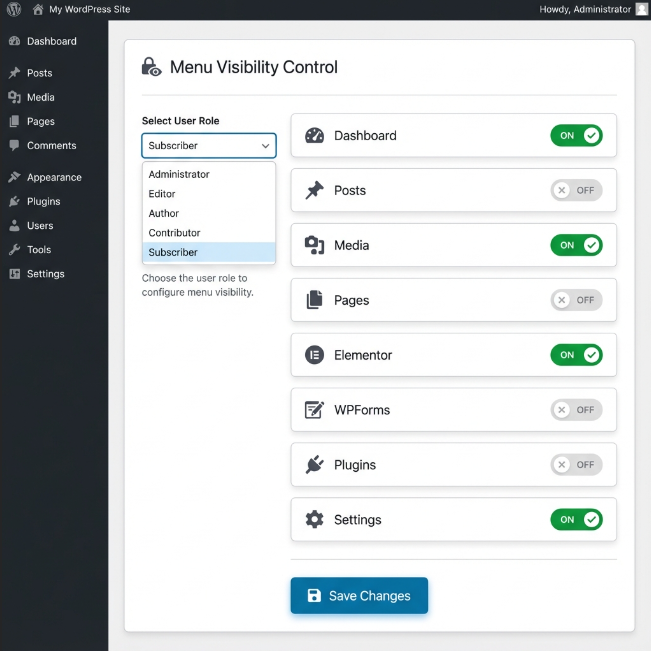
The plugin features a clean, modern interface with:
- Cascading Dropdowns: Select role first, then choose specific user
- Toggle Switches: Easy ON/OFF controls for each menu item
- Card-Based Layout: Clean, organized display of user settings
- Responsive Grid: Menu items displayed in a professional grid layout
🛠️ Installation
- Download the plugin folder/zip.
- Upload it to your WordPress site via Plugins > Add New > Upload Plugin.
- Activate the plugin.
⚙️ How to Use
- Go to your WordPress Dashboard as an Administrator.
- Navigate to the newly added User Menu Control menu item (usually near the bottom).
- You will see a list of all users with Subscriber or Editor roles.
- To Allow Menus:
- Find the user you want to manage.
- Check the boxes for the menus you want them to access (e.g., Posts, Pages, Elementor).
- To Set Redirect (Optional):
- Enter a full URL (e.g.,
https://yoursite.com/wp-admin/edit.php) in the "Login Redirect URL" field.
- Enter a full URL (e.g.,
- Click Save Changes.
Now log in as that user to test! They will only see what you have allowed.
🧠 Technical Details
- Zero Configuration for New Plugins: When you install a new plugin, it automatically appears in the settings list. No code updates required.
- Security: It uses WordPress's native
user_has_capfilter. It does not permanently change user roles in the database. Permissions are granted dynamically on the fly only when standard checks are performed, ensuring security is maintained. - Prevention: It includes checks to ensure Administrators can never accidentally lock themselves out.
📝 License
This project is licensed under the MIT License - see the LICENSE file for details.