NCats Before After Showcase
A premium WordPress plugin that adds a "Before / After" custom post type (ncats) with a draggable image comparison slider, category filtering, and mobile carousel view.
by Nadeem · github.com/aimal-dev/before-after-slider-wp-plugin-
Install
No release zip yet. The repository archive installs, but the folder name will carry the branch suffix and updates will not flow:
wp plugin install https://github.com/aimal-dev/before-after-slider-wp-plugin-/archive/refs/heads/main.zip📸 NCats Before After Showcase - WordPress Plugin
A premium WordPress plugin that adds an interactive "Before / After" image comparison slider with category filtering, draggable split-screen handle, responsive grid, and touch-enabled mobile carousel view.
🖼️ UI Preview / Screenshots
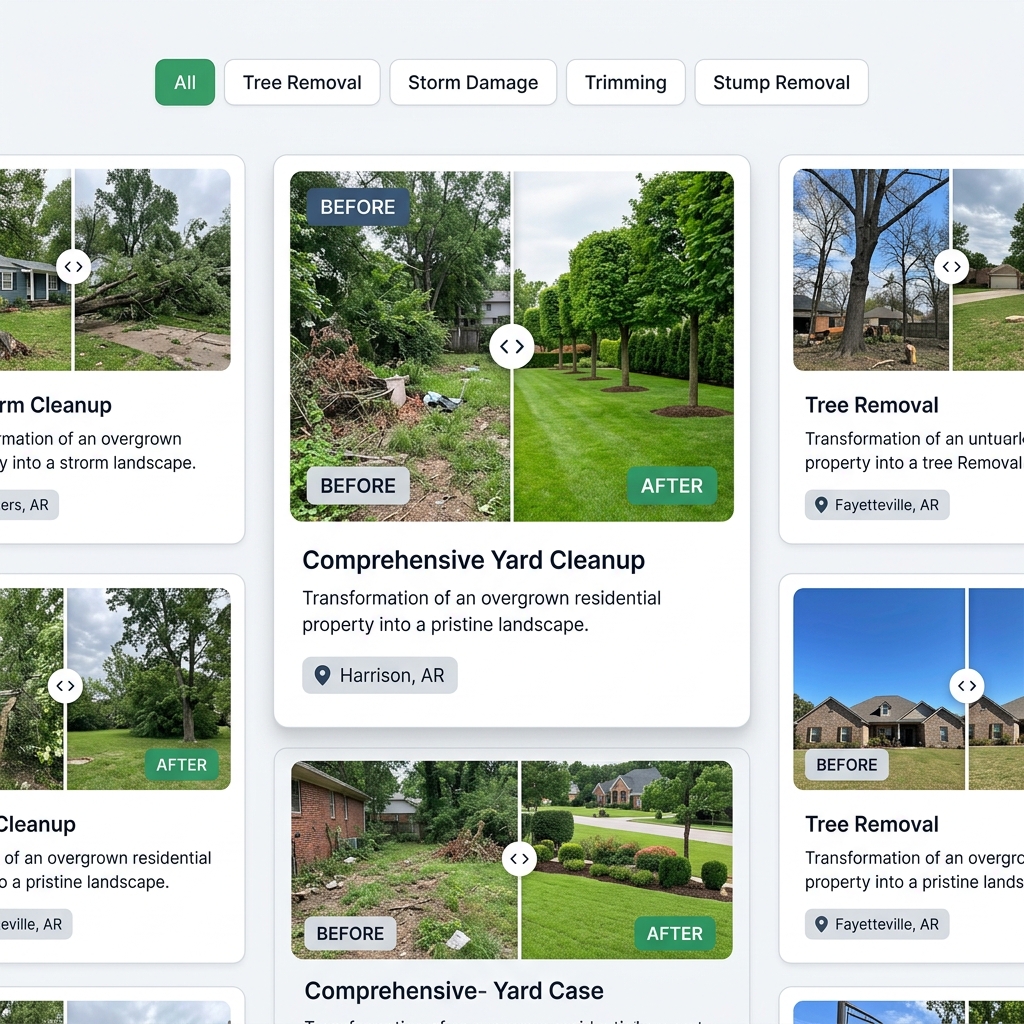
1. Frontend Before/After Comparison & Category Filter
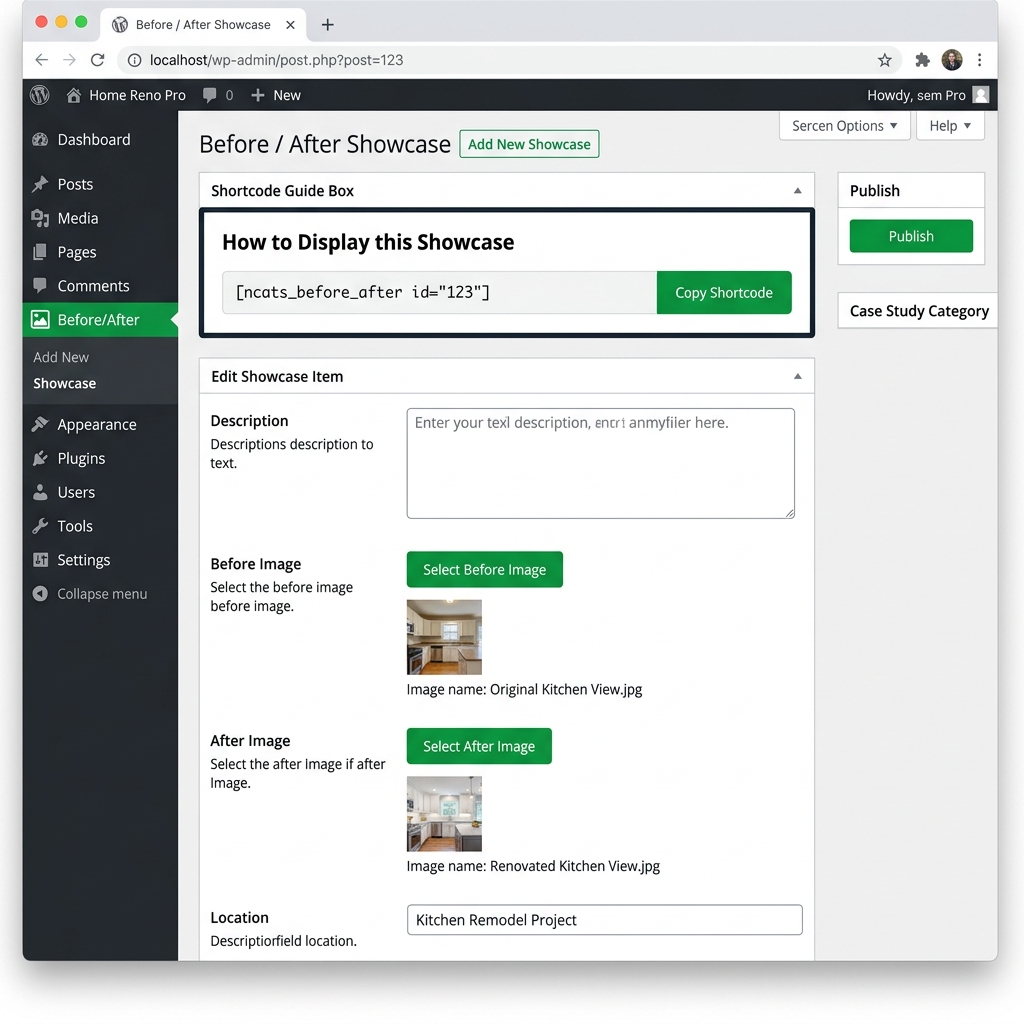
2. Admin Panel & Shortcode Guide
✨ Features (Kiya Kiya Hai Is Plugin Mai)
- 🔀 Interactive Draggable Slider: Smooth split-screen image comparison with a vertical slider handle for side-by-side Before & After viewing (supports drag & touch gestures).
- 🏷️ Category Filtering (Groups): Filter comparison cards seamlessly by groups/categories (e.g., Removal, Storm, Trimming, Stump) without page reloads.
- 📱 Mobile Responsive Carousel: On smaller screens, automatically transforms into an intuitive, touch-swipe carousel with navigation arrows and dot indicators.
- 📋 Shortcode Guide & 1-Click Copy: Includes a dedicated admin page (
Before/After ➔ Shortcode Guide) with a one-click copy button for quick deployment. - ⚙️ Gutenberg-Free Clean Admin Interface: Fast, simplified custom post creation interface for easy management of project descriptions, location tags, and before/after images via the native WP Media Uploader.
- 🔄 Load More Pagination: Smooth client-side pagination with animated loading indicators.
🚀 Shortcode Usage (Kaise Use Karein)
Display the Before/After showcase anywhere on your WordPress site (Pages, Posts, Widgets, or Page Builders like Elementor, Beaver Builder, Divi).
Default Showcase (All Groups & Tabs)
[ncats_before_after]Displays all projects along with category filter tabs at the top.
Filter by Specific Group & Limit Projects
[ncats_before_after group="removal" limit="4"]Displays up to 4 projects belonging exclusively to the removal group.
Shortcode Parameters:
| Parameter | Default | Description |
|---|---|---|
group |
all |
Group slug to display (e.g., removal, storm, trimming, stump, or all). |
limit |
-1 |
Number of projects to display (-1 for all). |
🛠️ Installation & Setup (Install Kaise Karein)
-
Download / Upload Plugin:
- Upload the
ncats-before-afterfolder to the/wp-content/plugins/directory. - Alternatively, zip the plugin folder (excluding
.zipfiles) and upload it via Plugins ➔ Add New ➔ Upload Plugin in WordPress.
- Upload the
-
Activate Plugin:
- Go to Plugins ➔ Installed Plugins in the WordPress admin panel.
- Click Activate under NCats Before After Showcase.
-
Add Projects:
- Go to Before/After ➔ Add New in the admin sidebar menu.
- Enter project title (e.g., Dead oak tree removal).
- Fill in details:
- Description / Paragraph: Project narrative or client background.
- Before Image: Upload or select the "Before" photo.
- After Image: Upload or select the "After" photo.
- Location: Enter location (e.g., Harrison, AR).
- Assign to a Group in the right sidebar.
- Click Publish.
-
Display on Frontend:
- Insert
[ncats_before_after]into any page or post.
- Insert
📂 File Structure
ncats-before-after/
├── admin/
│   ├── admin.css          # Admin styling for meta box & guide
│   └── admin.js           # WP Media uploader handlers
├── assets/
│   ├── preview-admin.png    # Admin UI preview image
│   └── preview-frontend.png # Frontend UI preview image
├── public/
│   ├── css/
│   │   └── public.css     # Frontend grid, slider & carousel styles
│   ├── images/
│   │   └── placeholder.png
│   └── js/
│       └── public.js      # Slider drag logic, filters & mobile carousel
├── .gitignore             # Git ignore rules (ignores .zip files)
├── ncats-before-after.php # Main plugin file & core logic
└── README.md              # Documentation
📋 Requirements
- WordPress: 5.0 or higher
- PHP: 7.4 or higher
- Browser Compatibility: Chrome, Firefox, Safari, Edge, Mobile Browsers (iOS/Android)
📄 License
This plugin is licensed under the GPLv2 or later.