Install
This is the repository archive. It installs, but the folder name will carry the branch suffix and updates will not flow.
Install straight from GitHub with WP-CLI:
wp plugin install https://github.com/adamziel/collage/archive/refs/heads/main.zip
Collage
Turn documents into editable WordPress blocks. Drop in a file, check the preview, and save it as a draft post or page.
Download Collage · Try the importer in Playground · Open a sample draft in Playground
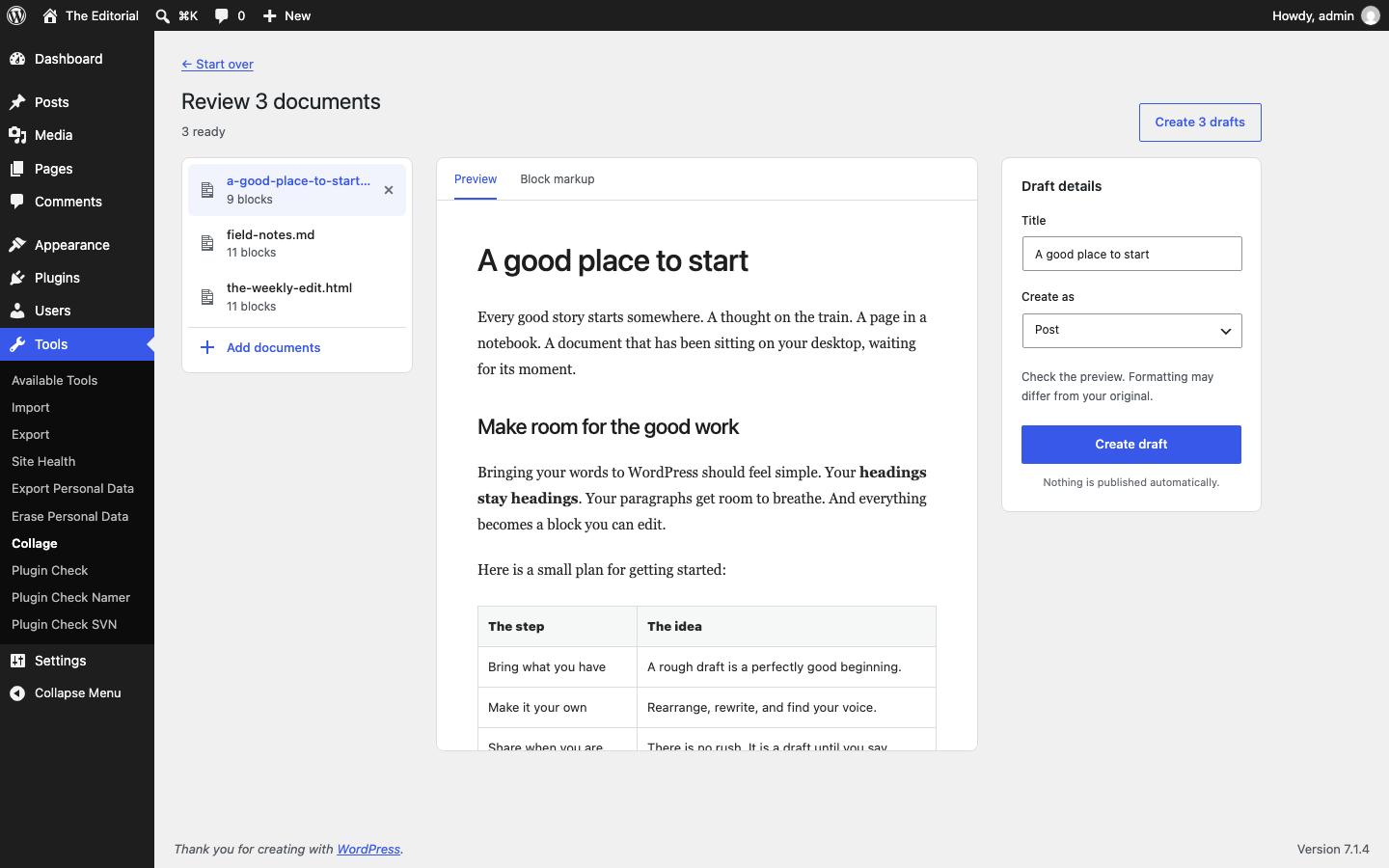
Install and import
- Download
collage.zip. In WordPress, go to Plugins → Add Plugin → Upload Plugin. - Install and activate Collage, then open Tools → Collage.
- Drop one or more documents, or choose try a sample.
- Review the blocks, create a draft, and open it in the editor.
Requires WordPress 6.7+ and PHP 8.2+. Use the release ZIP rather than GitHub's source archive: the release includes the conversion libraries. The readers use DOM, Intl, Mbstring, Zip, and Zlib. GD or Imagick helps WordPress make image sizes.
The first Playground demo opens the dropzone with three bundled examples. The second imports the Word sample as a draft; open A good place to start to edit its headings and table. Playground runs in your browser and the demo starts with a fresh test site.
Run locally
Requirements: PHP 8.2+, Composer, Git, curl, unzip, and the PHP DOM, Intl, Mbstring, Zip, GD, and PDO SQLite extensions.
bash scripts/setup.sh
bash scripts/serve.sh
Open the importer. Local-only login: admin / pandoc-local-only.
The test site, database, downloaded source, and tools live in .local/.
The server listens on loopback only. Do not expose this test site to the internet.
The plugin is linked into the test site, so reloading the page picks up edits.
What works
- A keyboard-accessible file picker and drag-and-drop anywhere on the screen, with file type and size checks.
- Several documents at once. They convert one at a time; each gets its own preview and draft, or all ready documents can be saved as drafts together.
- Word, PDF, Markdown, HTML, EPUB, OpenDocument, RTF, text, PowerPoint, Excel, and CSV.
- One sample link, with two more sample documents in Help.
- Sandboxed document preview and a block-markup view with a copy button.
- A choice of post or page, with a title you can change before saving.
- Embedded PNG, JPEG, GIF, and WebP images added to the Media Library on draft creation.
- The current user’s last 20 imports, linked to the editor.
- WordPress admin styles, responsive layouts, and the user’s admin accent color.
Request model
- One request uploads the complete file, reads it, converts it, and returns a preview.
- After review, a separate request saves the draft and its images.
Conversion cannot pause or resume between requests. If it times out before the preview is saved, the file must be sent and converted again. The one-hour preview record holds the completed result, not progress through an unfinished conversion. Large-file support would need saved input and conversion progress, with bounded steps that can safely run again after a failed request. Splitting only the upload would not remove the conversion’s time and memory limits.
The bundled PDF code has page-range extraction and a layer that combines page results while preserving cross-page context. The plugin does not use that path yet. EPUB has a streaming reader, but its running iterator is not a saved job that another HTTP request can resume. There is no common cross-request resume path for all the supported formats.
Data and limits
Files go to the WordPress server, never to an outside converter. PHP removes the temporary upload after the request. A converted preview, including embedded image bodies, is kept in a user-bound WordPress transient for one hour. Expired database rows are removed by normal WordPress cleanup. Creating a draft replaces that preview with its post ID so a retry can return the same draft.
Previewing creates no post or Media Library item. Creating a draft saves its content and accepted images. The original document is not kept. Existing files on the computer do not change. External image URLs are preserved, but the preview does not load them. Opening the draft in the editor or viewing it on the site may load those external images. Media Library files can also be served by their URLs before their draft is published.
- Source files: at most 8 MB, or the site’s lower upload limit.
- ZIP documents: at most 2,048 entries, 32 MB total unpacked, an overall 100× expansion ratio, and 8 MB per entry. Entries are checked before conversion.
- Images: JPEG, PNG, GIF, and WebP only; at most 5 MB and 20 million pixels each, with 12 MB total image bytes per document. SVG is not imported.
- HTML and block attributes are filtered with WordPress KSES. Unknown or dynamic blocks are rejected. The preview has an empty iframe sandbox and a strict CSP.
- Conversion is never given a server source path. Linked local files are not read.
- The REST API requires a signed-in user with
edit_postsand WordPress’s normal REST nonce. Page creation and image uploads have separate capability checks. - Table column widths are dropped because the native table block cannot save
colgroupwidths. Cells remain editable; the browser sizes the columns.
Current boundaries
This is the first release. Use it with trusted users and documents. Test the formats and documents you rely on before rolling it out to a live site.
PDF import is experimental. Reading order, tables, images, and scanned pages can be incomplete. There is no OCR. A warning is shown for every PDF. Compare the draft against the source before publishing. Other readers also have format-specific limits; support does not mean every feature survives conversion.
Conversion runs in a web request. It has no background worker, per-user request quota, or resumable job. Two concurrent saves of the same preview can create two drafts. The UI is currently in English. The local PHP server sets a 256 MB memory limit and a 45-second execution limit; the plugin itself does not change the host’s resource settings.
Build from source
bash scripts/dependencies.sh
php scripts/build.php
This fetches the pinned conversion source and generates its Composer class map.
No Node build or WordPress install is needed to make the ZIP. The DOCX example
is checked in; php scripts/make-sample.php regenerates it when the example changes.
Check a build
php .local/wp-cli.phar eval-file tests/integration.php --path=.local/wordpress
php tests/http.php                 # requires the local server
node --check assets/admin.js
bash scripts/check-submission.sh
bash scripts/test-playground.sh
The Playground checks require Node 24.18+ and npm 11.16+. See Releasing and submitting for the tag and WordPress.org steps.
The installable ZIP is dist/collage.zip. Upload it on another WordPress
site through Plugins → Add Plugin → Upload Plugin. The ZIP includes the pinned
conversion library. It excludes the local WordPress site, database, and tools.
For native block checks, sign in to the local test site and open the block validation page. It uses the installed WordPress JavaScript parser and block save functions, checks all three samples and your imported drafts, and shows any invalid blocks.
Credits
Collage uses the native PHP Pandoc port and MarkerPDF readers from adamziel/port-libs. Conversion runs in PHP; the Pandoc executable is not required.
See THIRD-PARTY.txt for the library revision and license.