Install
This is the repository archive. It installs, but the folder name will carry the branch suffix and updates will not flow.
Install straight from GitHub with WP-CLI:
wp plugin install https://github.com/aconymouse/owrite-quiz/archive/refs/heads/main.zipEnglish · Bahasa Indonesia
A WordPress plugin for a 16-type personality test. I built it for owrite.id and cleaned it up so anyone running WordPress can use it.
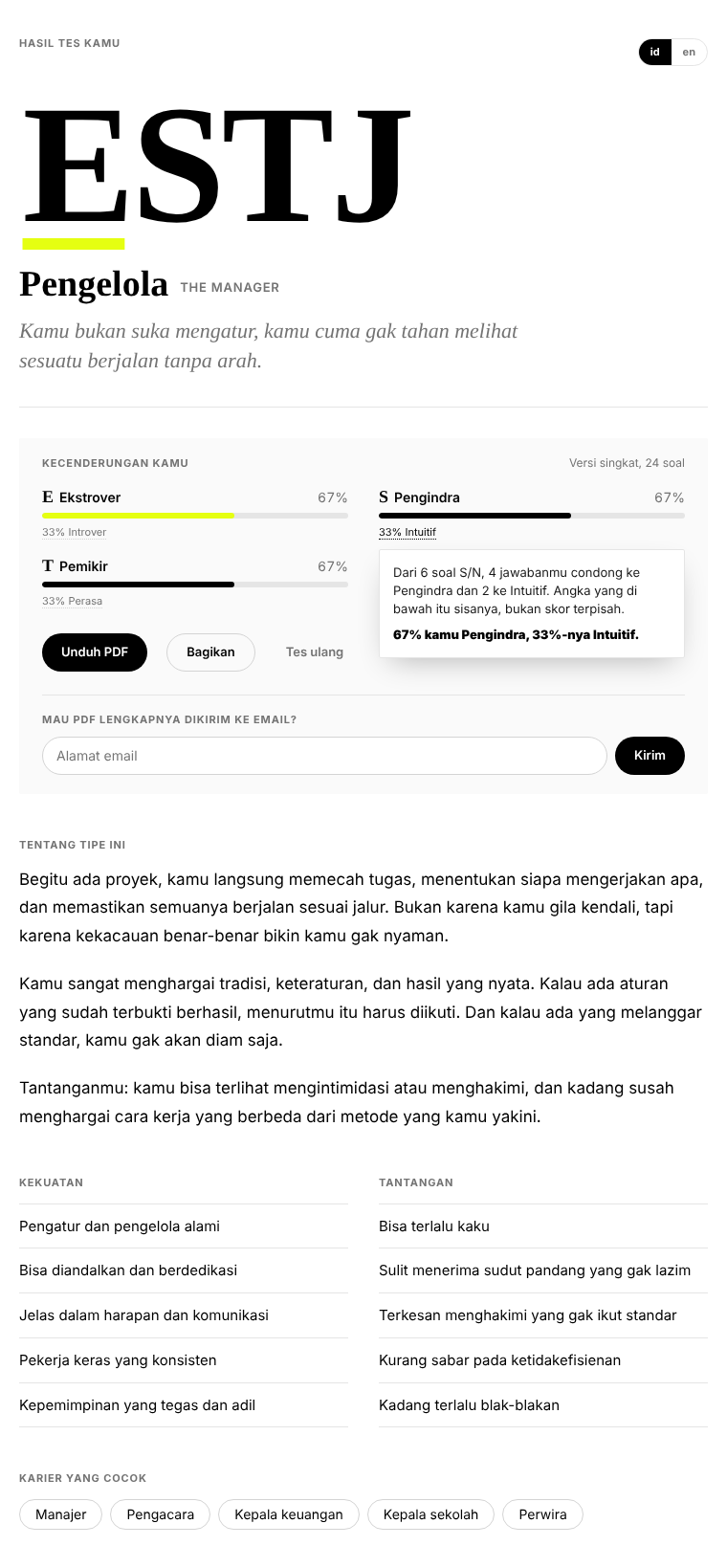
One shortcode, [owrite_mbti], and the page runs the whole test from the first question to the result without asking the reader to sign up or hand over an email. Two languages (Indonesian and English, switchable at any point), two lengths (60 or 24 questions), progress that survives a page refresh, and a result that appears on the same page: the four-letter code, the type name, how strongly each dimension leaned, a description, strengths, challenges, and careers that tend to fit. Readers can download the result as a PDF, or have it emailed if they want.
On the admin side there's a summary: how many people finished, which types come up most, who asked for the PDF, and a CSV export.
Install
Download this repository as a zip, go to Plugins → Add New → Upload Plugin, upload, activate. Put [owrite_mbti] on any page or post. An Owrite Quiz menu appears in the admin sidebar.
Nothing else to configure. The plugin creates one table, {prefix}_omb_results, on activation and grants two capabilities (owrite_manage_quiz, owrite_manage_mbti) to administrators.
How it works for readers
- Pick a language and a length, start.
- Each question is a pair of statements, A or B. Picking one moves to the next question after a short pause; there's a Back button, and nothing is submitted until the end.
- Answers are kept in
sessionStorage, so a refresh or an accidental tab close offers to continue from where they left off. - On the last question the result renders in place. Each dimension shows the winning letter and a percentage; tapping the smaller number underneath explains in plain words how that number came about, including when a pair tied.
- Buttons: download the PDF, share the page (with UTM parameters so you can see the traffic in analytics), or retake. Below that, an optional field to email the PDF.
Admin
Owrite Quiz → MBTI Test lists the last 200 responses with type, language, length and timestamp. The counters above the table show total responses, how many left an email, and the six most common types. Export CSV downloads everything; Delete all truncates the table. Each row can be deleted on its own.
A response is stored the moment someone finishes, with no email. The email column is filled only if the reader later asks for the PDF.
Sending uses wp_mail(), so whatever your site already uses for mail (SMTP plugin, host mailer) applies. The PDF is generated in the reader's browser, posted to the server, written to wp-content/uploads/omb-tmp/ (protected by an .htaccess deny rule), attached, and deleted right after sending. Requests are rate-limited to three per IP per hour.
Changing questions or types
Everything readers see as content lives in assets/mbti-data.js:
soalis the list of 60 questions. Each hasnomor,dimensi(EI,SN,TF,JP),kutubAandkutubB(the letter each answer scores), and the text inidanden.singkatlists the 24 question numbers used by the short version, six per dimension.tipeholds the 16 types, each withidandenblocks:nama,namaLain,tagline,ringkas,deskripsi(paragraphs),kekuatan,tantangan,karier.
Scoring is simple: answer A adds one point to kutubA, B to kutubB; the higher letter in each pair goes into the code. A tie goes to the first letter of the pair (E, S, T, J), and the result page says so when that happens. If you add questions, keep the per-dimension counts balanced or the percentages lose their meaning.
UI strings (buttons, labels, the explanation text) are in the T object at the top of assets/mbti.js.
Styling
The stylesheet is scoped under .omb and uses CSS custom properties for colors, so a theme can override them without touching the file:
.omb {
  --omb-ink: #000;
  --omb-paper: #fff;
  --omb-aksen: #e5ff11;
  --omb-serif: "Crimson Pro", Georgia, serif;
  --omb-sans: Inter, system-ui, sans-serif;
}
Dark mode follows prefers-color-scheme. Headings use the serif stack, everything else the sans stack; if your theme doesn't load Crimson Pro or Inter, it falls back to Georgia and the system font.
Files
owrite-quiz.php        admin menu and summary, shortcode, AJAX endpoints, JSON-LD
assets/mbti-data.js    60 questions and 16 types, both languages
assets/mbti.js         the test flow and the result page
assets/mbti-pdf.js     client-side PDF (jsPDF)
assets/mbti.css        styles, including dark mode
jsPDF is loaded from cdnjs when the shortcode is on the page. If you'd rather self-host it, change the URL in omb_shortcode().
About MBTI
MBTI is a self-reflection tool, not a diagnosis, and "MBTI" is a trademark of The Myers-Briggs Company. This plugin uses the term as the common name for the 16-type framework; the questions and descriptions are written from scratch and are not taken from any official instrument.
The Next.js version
On owrite.id itself the test has since moved to Next.js with a static page per type. What's in this repository is the WordPress version, tidied up to stand on its own. See it running at owrite.id/quiz/mbti-test.
License
GPL-2.0-or-later. Built by Hafidz Nc (Aconymous).