Deep Search WP Registry grade B. Medium-severity findings · 1 findingWP RegistryMedium-severity findings · 1 findingOpen the reportB
Advanced Search plugin for WordPress
Install
Upload it under Plugins → Add New Plugin → Upload Plugin, then activate.
Install straight from GitHub with WP-CLI:
wp plugin install https://github.com/abmsourav/deep-search/releases/download/1.1.0/deep-search.zipSearch plugin for WordPress.
A custom Gutenberg advanced search block for WordPress with multi-filter support (post type, category, tags) and an admin configuration panel.
Download Production ready zip
How It Works
Search Flow
When a user submits a search query, the plugin first attempts a REST API request (/deep-search/v1/search). If the REST API is unavailable (e.g., blocked by a security plugin), it automatically falls back to WordPress AJAX (admin-ajax.php). This dual approach ensures the search works reliably across different hosting environments.
Block Rendering
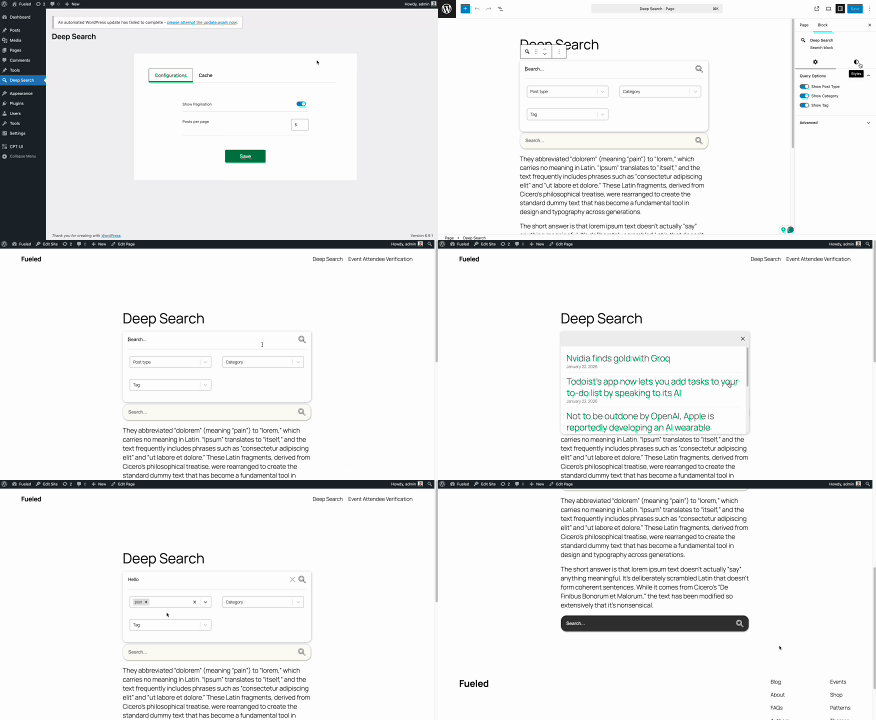
The search block is registered as a dynamic Gutenberg block. On the frontend, it renders a React-powered search interface with optional filters for post types, categories, and tags. In the editor, a settings panel lets users customize colors, font sizes, and toggle filter visibility.
Caching
The plugin uses WordPress transients to cache search results and taxonomy lists (categories, tags), reducing database queries on repeated searches.
- Search results are cached with keys based on the query arguments (
ds_q_{hash}). Cache duration is configurable from the admin panel (default: 15 minutes). - Categories and tags are cached for 1 hour (
ds_categories,ds_tags). - Cache is automatically invalidated when posts are created/updated/deleted or when terms (categories/tags) change.
- Cache can also be manually cleared from the admin settings panel, or disabled entirely.
Admin Configuration
An admin settings page (under the "Deep Search" menu) provides two tabs:
- Configurations — posts per page, pagination toggle.
- Cache — enable/disable caching, set cache duration, and clear cache manually.
Environment Requirements
- PHP >= 8.1
- WordPress >= 6.8
- PHP >= 8.3 (Only for test suite)
- NodeJS >= 22.x (Only for development env)
Plugin Dev Environment Setup
Install composer and npm packages, and build JavaScript.
composer install

npm install

npm run build:admin
npm run build:block
Test
Tests run inside a Docker container (codesvault_phptest) using PHP 8.3 and Pest. The ./test script handles syncing files to the container and executing Pest.
First-time setup
Install test dependencies inside the container:
./test composer-installThis copies composerTest.json into the container as composer.json and runs composer install.
Running tests
./testThis syncs the tests/ and app/ directories to the container, then runs Pest. You can also pass Pest arguments:
./test --filter="search"Other commands
| Command | Description |
|---|---|
./test pest [args] |
Run Pest without syncing files first |
./test copy <path> |
Copy a file/folder from host to the container |
./test pull <path> |
Copy a file/folder from the container to host |
./test exec <cmd> |
Execute any command inside the container |
./test sync-vendor |
Copy vendor/ from the container to vendor-test/ for IDE support |
File Structure
deep-search/
├── app/                               # PHP application code
│   ├── Core.php                       # Plugin core initialization
│   ├── Lib/                           # Library classes
│   │   └── BaseService.php            # Service interface
│   └── Services/                      # Service classes
│       ├── AdminMenu.php              # Admin menu registration
│       ├── AssetsManager.php          # Asset loading management
│       ├── Block.php                  # Block registration, REST API & AJAX search
│       └── SearchConfigs.php          # Search configuration handler
├── resources/                         # Frontend resources
│   ├── admin/                         # Admin panel assets
│   │   ├── src/                       # Admin source files
│   │   │   ├── app.js                 # Admin entry point
│   │   │   ├── Admin.jsx              # Admin React component
│   │   │   └── style.scss             # Admin styles
│   │   ├── build/                     # Compiled admin assets
│   │   └── view.php                   # Admin view template
│   └── block/                         # Gutenberg block assets
│       ├── src/                       # Block source files
│       │   ├── index.js               # Block entry point
│       │   ├── edit.js                # Block editor component
│       │   ├── helper.js              # REST/AJAX request helpers & color utils
│       │   ├── style.scss             # Block styles
│       │   ├── view.js                # Frontend view entry
│       │   ├── editor-components/     # Editor-only React components
│       │   │   └── SettingsControl.jsx # Block settings panel
│       │   └── view-components/       # Frontend React components
│       │       ├── DeepSearch.jsx     # Main search component
│       │       ├── SearchBar.jsx      # Search input component
│       │       ├── SearchOptions.jsx  # Search filter options component
│       │       └── PostList.jsx       # Search results component
│       ├── block.json                 # Block configuration
│       ├── build/                     # Compiled block assets
│       └── view.php                   # Block render template
├── tests/                             # Test files (Pest/PHPUnit)
│   ├── Feature/                       # Feature tests
│   │   ├── AdminMenuTest.php          # Admin menu tests
│   │   ├── BlockTest.php              # Block, REST API & search tests
│   │   └── SearchConfigsTest.php      # Search configs tests
│   ├── Unit/                          # Unit tests
│   │   └── CoreTest.php               # Core class tests
│   ├── MocksAndStubs/                 # Test doubles
│   │   ├── CommonMocks.php            # Shared WordPress function mocks
│   │   ├── WPQueryStub.php            # WP_Query stub
│   │   ├── WPRestStub.php             # WP_REST_Request/Response stubs
│   │   └── WpDieException.php         # Exception for wp_send_json_* mocking
│   ├── Pest.php                       # Pest configuration
│   ├── TestCase.php                   # Base test case class
│   └── _ide_helper.php                # IDE helper for tests
├── vendor/                            # Composer dependencies
├── vendor-test/                       # Test-only dependencies (for IDE)
├── node_modules/                      # NPM dependencies
├── test                               # Test runner script (Docker)
├── search.php                         # Plugin entry file
├── composer.json                      # PHP dependencies
├── composerTest.json                  # Test dependencies config
├── package.json                       # JavaScript dependencies
├── bundler                            # WP Bundler configuration
├── pint.json                          # Laravel Pint config
└── README.md                          # Documentation
Releases
2 releases. Each count is every asset in that release; expand a row for the breakdown.