ClickReach – Social Share Buttons & Counter
ClickReach – Social Share Buttons & Counter is an ultra-fast, lightweight, and privacy-focused social sharing plugin for WordPress. It adds beautiful, responsive social sharing buttons with real-time click and share counters to your posts, pages, and custom post types without slowing down your website.
Install
This is the repository archive. It installs, but the folder name will carry the branch suffix and updates will not flow.
Install straight from GitHub with WP-CLI:
wp plugin install https://github.com/abineshselvarasu/clickreach-social-share-buttons/archive/refs/heads/main.zipFree, fast social share buttons with share counts for WordPress. ClickReach adds WhatsApp, Facebook, X (Twitter), LinkedIn, Pinterest, Reddit, and Copy Link share buttons to your posts, pages, and custom post types, with a live share counter, pure inline SVG icons, no cookies, and Core Web Vitals friendly performance.
Download ClickReach from WordPress.org →
Development Repository
This GitHub repository is the development workspace for ClickReach – Social Share Buttons & Counter. For production sites, install the official release from the WordPress.org plugin directory.
Releases are published to WordPress.org via SVN; this repository is used for version control, issue tracking, and future enhancements.
Description
Unlike heavy commercial alternatives that load bloated libraries, external fonts, and third-party scripts, ClickReach is built from the ground up for speed, simplicity, and privacy. Share counts come from clicks on your own buttons, so there are no social network API keys, access tokens, or external count services to set up.
Screenshot
Key Features
- 100% Free Forever: No locked features, no "Pro" nag screens, and no subscription fees.
- Ultra-Lightweight & Fast: Pure embedded inline SVGs. Zero external HTTP requests, zero webfont downloads, no render-blocking styles, and no jQuery.
- Live Click Counters: Per-network counters and an optional total shares badge that update instantly via AJAX, without a page refresh.
- Accurate, Abuse-Resistant Counts: Each visitor is counted once per post and network per hour, with an hourly cap per visitor, so bots and scripts cannot inflate your numbers.
- Works with Page Caching: Click tracking works on cached pages (WP Rocket, LiteSpeed Cache, W3 Total Cache, WP Super Cache, and others).
- Privacy-Friendly & GDPR Compliant: No cookies, no browser storage, no tracking scripts. Visitors are identified only by a salted, short-lived hash of their IP address.
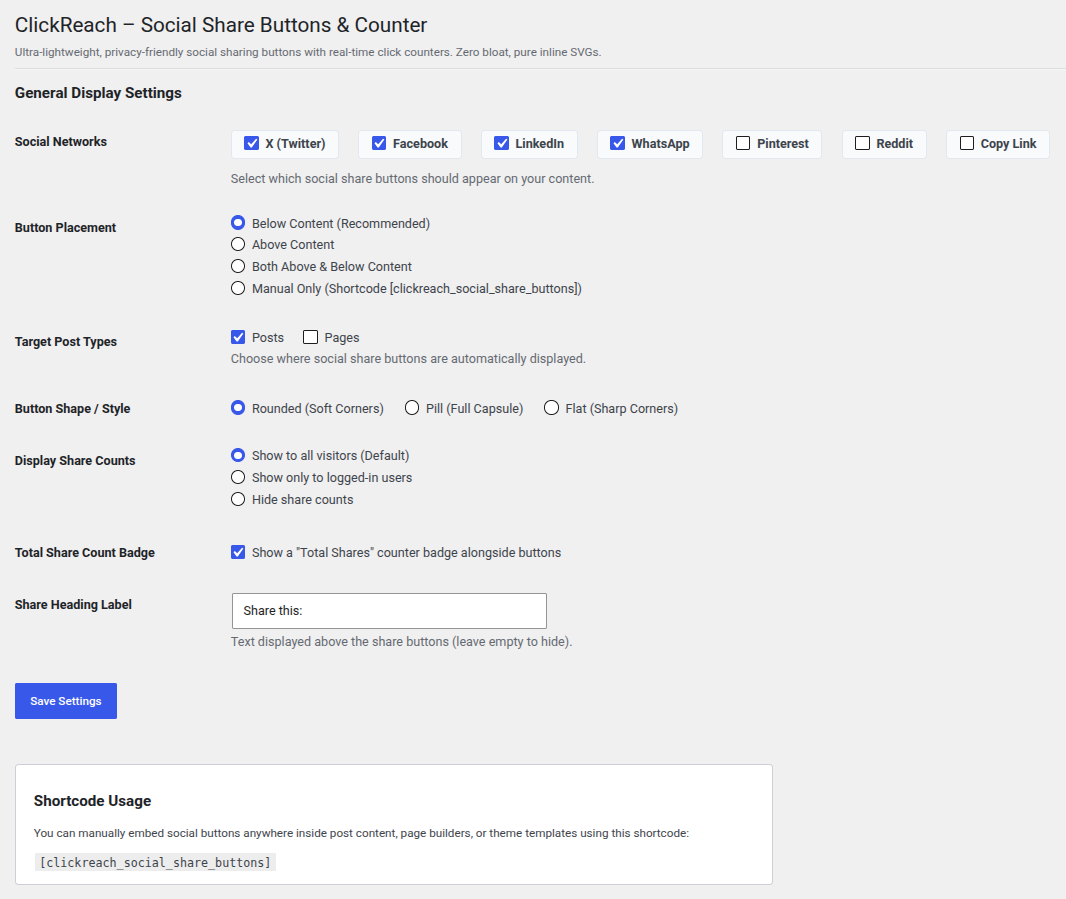
- Supported Networks: X (Twitter), Facebook, LinkedIn, WhatsApp, Pinterest, Reddit, and Copy Link.
- Button Styles: Rounded, Pill, or Flat.
- Flexible Placement: Above content, below content, both, or manually with a shortcode, for any public post type.
- Per-Post Controls: Enable or disable buttons on individual posts and pages from the editor.
Installation
- Clone or download the repository into your WordPress plugins directory:
git clone https://github.com/abineshselvarasu/clickreach-social-share-buttons.git wp-content/plugins/clickreach-social-share-buttons - Activate ClickReach – Social Share Buttons & Counter in WordPress Admin → Plugins.
- Go to Settings → ClickReach Social Share Buttons to choose networks, button style, and placement.
Usage
Automatic placement
Choose Above Content, Below Content, or Both in Settings → ClickReach Social Share Buttons, and select the post types where buttons should appear.
Shortcode
Place the buttons anywhere (posts, pages, blocks, or page builders such as Elementor and Beaver Builder):
[clickreach_social_share_buttons]Per-post override
Use the Social Share & Counter box in the post editor to force buttons on or off for a single post or page.
Developer Hooks
| Hook | Type | Description |
|---|---|---|
ssbc_after_click_tracked |
Action | Fires after a click is counted. Receives $post_id, $platform, $new_count, $total. |
ssbc_client_ip |
Filter | Override the visitor IP used for rate limiting, e.g. behind Cloudflare or a reverse proxy. |
Example for sites behind Cloudflare:
add_filter( 'ssbc_client_ip', function ( $ip ) {
    return isset( $_SERVER['HTTP_CF_CONNECTING_IP'] )
        ? sanitize_text_field( wp_unslash( $_SERVER['HTTP_CF_CONNECTING_IP'] ) )
        : $ip;
} );
Only use a header your proxy sets itself. Headers like X-Forwarded-For can be faked by visitors when no proxy is in front of your site.
Release Process
readme.txt is the WordPress.org readme; this README.md is for GitHub only. Files listed in .distignore (including this file) are excluded from the WordPress.org package.
License
ClickReach – Social Share Buttons & Counter is open-source software licensed under the GPL-2.0-or-later.
Author
Built by Abinesh Selvarasu. Found a bug or have an idea? Open an issue or ask on the WordPress.org support forum.