Install
This is the repository archive. It installs, but the folder name will carry the branch suffix and updates will not flow.
Install straight from GitHub with WP-CLI:
wp plugin install https://github.com/abidarm/quick-admin-login/archive/refs/heads/main.zipA WordPress plugin that displays admin users on the login page for quick, passwordless login. Designed exclusively for local development and testing environments.
Description
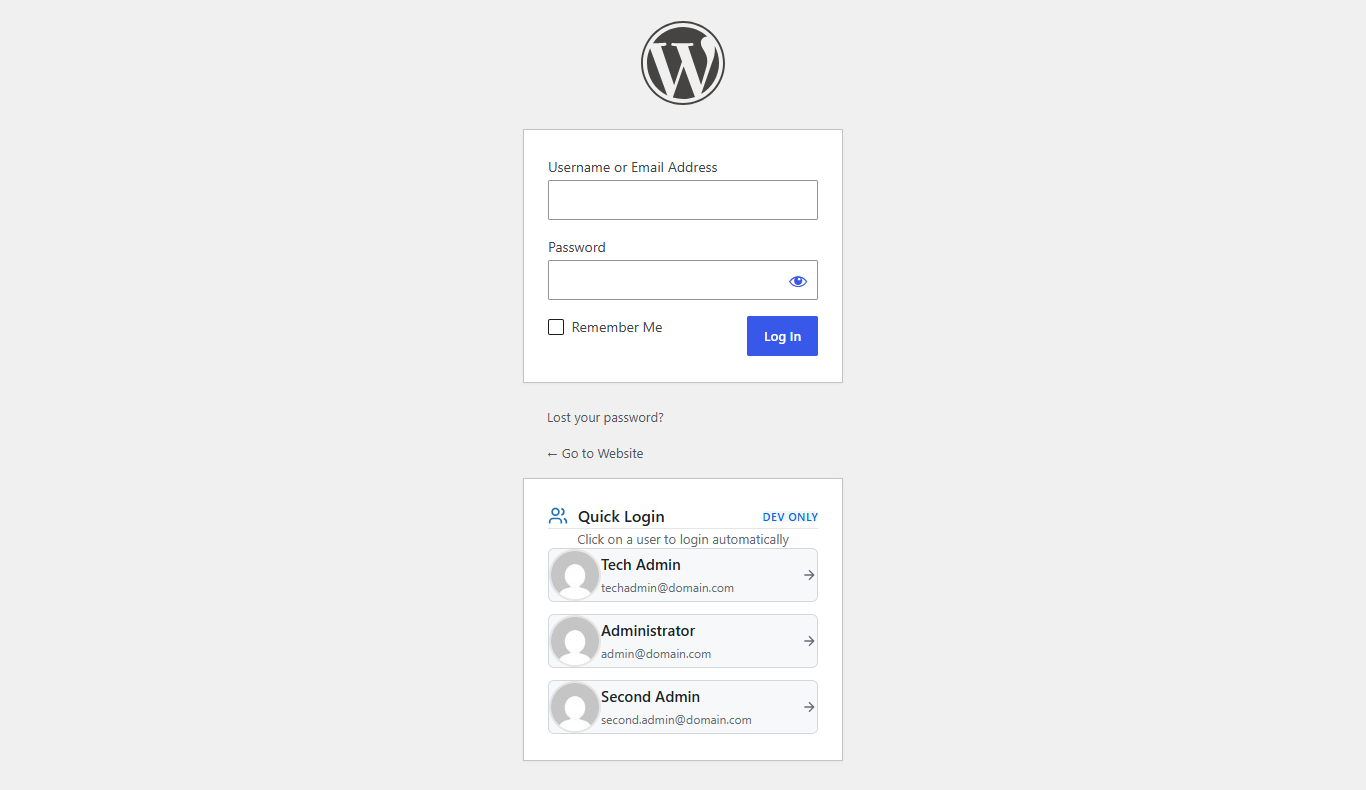
Quick Admin Login simplifies the login process during development by listing up to 3 administrator users directly on the WordPress login page. Simply click on a user to automatically log in without entering a password.
Features
- Quick Login: One-click login for administrator users
- No Password Required: Automatically authenticates selected users
- User List Display: Shows up to 3 admin users with avatars, names, and emails
- Development Only: Automatically disabled in production environments
- Modern Design: Clean, centered interface that matches WordPress admin styling
- Responsive: Works seamlessly on desktop and mobile devices
Requirements
- WordPress: 5.0 or higher
- PHP: 7.0 or higher
- Environment: Local development only (see Security section)
Installation
Standard plugin
- Download or clone this repository
- Upload the
quick-admin-loginfolder to the/wp-content/plugins/directory - Activate the plugin through the 'Plugins' menu in WordPress
Alternatively, you can install it directly:
cd wp-content/plugins
git clone https://github.com/abidarm/quick-admin-login.git
Then activate it from the WordPress admin panel.
Must-use plugin (single file)
This plugin is a single-file plugin, so you can also install it as a must-use (MU) plugin without activation:
- Copy only
quick-admin-login.phpto/wp-content/mu-plugins/ - If the
mu-pluginsfolder does not exist, create it first
MU plugins load automatically on every request, which is handy for local development setups where you always want quick login available.
Usage
Once activated, visit your WordPress login page (/wp-login.php). You'll see a "Quick Login" section below the login form displaying up to 3 administrator users.
- Click on any user in the list
- You'll be automatically logged in and redirected to the WordPress admin dashboard
- No password required!
How It Works
The plugin:
- Detects if you're in a local development environment
- Queries for administrator users (limited to 3)
- Displays them in a styled box on the login page
- Handles authentication when a user is clicked
- Redirects to the admin dashboard
Environment Detection
The plugin automatically detects local development environments by checking for:
WP_DEBUGconstant set totrue- Localhost domains (
localhost,127.0.0.1,.local,.test) WP_ENVIRONMENT_TYPEset to'local'
You can also filter the detection using:
add_filter('quick_admin_login_is_local', function($is_local) {
    // Your custom logic
    return $is_local;
});
Security
⚠️ IMPORTANT: This plugin is designed ONLY for local development and testing environments. It bypasses password authentication, which is a significant security risk.
DO NOT use this plugin on:
- Production websites
- Staging servers accessible from the internet
- Any environment where security is a concern
The plugin includes automatic environment detection to prevent accidental use in production, but you should always verify your environment settings.
Customization
Change User Limit
To change the maximum number of users displayed, you can filter the query:
add_filter('get_users', function($args) {
    if (isset($args['role']) && $args['role'] === 'administrator') {
        $args['number'] = 5; // Change to 5 users
    }
    return $args;
});
Custom Styling
The plugin includes inline CSS that can be overridden. You can add custom styles using the login_enqueue_scripts hook:
add_action('login_enqueue_scripts', function() {
    ?>
    <style>
        .quick-admin-login-box {
            /* Your custom styles */
        }
    </style>
    <?php
}, 20);
Development
File Structure
quick-admin-login/
├── quick-admin-login.php  # Main plugin file
├── screenshot.png         # Plugin screenshot
└── README.md              # This file
Contributing
Contributions are welcome! Please feel free to submit a Pull Request.
Changelog
1.0.0
- Initial release
- Quick login functionality
- Environment detection
- Modern UI design
- Responsive layout
License
This plugin is licensed under the GPL v2 or later.
Copyright (C) 2024 Mohamed Abidar

This program is free software; you can redistribute it and/or modify
it under the terms of the GNU General Public License as published by
the Free Software Foundation; either version 2 of the License, or
(at your option) any later version.

This program is distributed in the hope that it will be useful,
but WITHOUT ANY WARRANTY; without even the implied warranty of
MERCHANTABILITY or FITNESS FOR A PARTICULAR PURPOSE.  See the
GNU General Public License for more details.
Author
Mohamed Abidar
- Website: abidar.dev
- GitHub: @abidarm
Support
For issues, questions, or contributions, please visit the GitHub repository.
Remember: This plugin is for development use only. Never use it on production sites!