Attendance System
A professional WordPress-based employee attendance management system with secure employee login, check-in/check-out tracking, late and absence detection, calendar management, employee administration, and automated attendance workflows.
Install
This is the repository archive. It installs, but the folder name will carry the branch suffix and updates will not flow.
Install straight from GitHub with WP-CLI:
wp plugin install https://github.com/abdullahsoftdev/online-attendance-system/archive/refs/heads/main.zip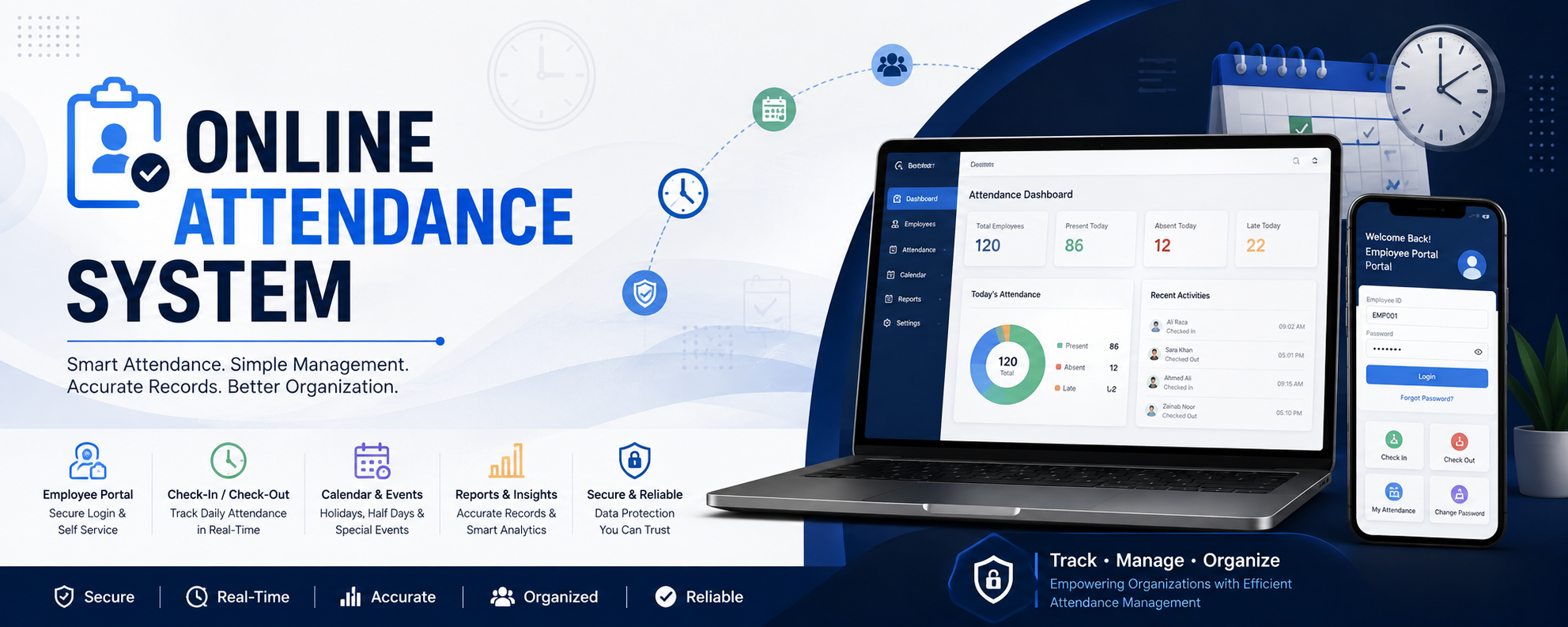
📋 Online Attendance System — Employee Attendance Management Platform
A WordPress-based employee attendance management system for secure check-in/out, attendance tracking, calendar management, employee administration, and automated absence handling.
📌 About
Online Attendance System is a WordPress-based employee attendance management platform designed to digitize daily attendance operations and provide a structured workflow for both employees and administrators.
The system provides separate employee and administrative interfaces, allowing employees to securely log in, check in, check out, view attendance-related information, and manage their credentials.
Administrators can manage employees, monitor attendance records, configure working-day schedules, manage holidays and special events, and maintain the attendance calendar through a centralized WordPress administration interface.
The plugin uses the WordPress MySQL database layer and automatically creates and maintains its required attendance tables when the plugin is initialized or activated.
✨ Key Features
👤 Employee Portal
Employees have access to a dedicated attendance portal with credential-based authentication.
The employee portal supports:
- 🔐 Employee ID and password login
- ⏰ Scheduled working-time information
- 📍 Daily check-in
- 🚪 Daily check-out
- 📊 Attendance tracking
- 🔑 Password reset
- 🔒 Password validation and history checks
- 👋 Employee-specific dashboard
- 🚨 Holiday-aware attendance controls
- 🚪 Secure logout
The employee interface is exposed through the WordPress [attendance_system] shortcode.
⏰ Check-In & Check-Out
The system provides a dedicated workflow for recording employee attendance.
When an employee logs in, the system retrieves the employee's scheduled time and today's attendance record before determining the available attendance actions.
The system tracks:
- Employee ID
- Employee name
- Attendance date
- Scheduled time
- Check-in time
- Check-out time
- Attendance status
- Late status
- Late duration
🕐 Late Attendance Detection
The system compares an employee's current time with their scheduled working time.
If the employee checks in after the scheduled time, the system calculates the number of minutes they are late and records the corresponding late status.
Attendance records support:
| Status | Description |
|---|---|
on_time |
Employee checked in on time |
late |
Employee checked in after scheduled time |
absent |
Employee did not attend within the defined cutoff |
🤖 Automatic Absence Detection
The system includes an automated absence mechanism using WordPress scheduled events.
A daily scheduled task checks employees who have no attendance record for the current day.
If the configured absence cutoff has passed, the employee is automatically recorded as absent.
The current implementation schedules the automatic absence process daily and uses a four-hour cutoff after the employee's scheduled time.
Scheduled Working Time
        │
        ▼
   Employee Checks In?
      /          \
    YES           NO
     │             │
     ▼             ▼
Attendance      Wait for
Recorded        Cutoff
                   │
                   ▼
            Cutoff Passed?
              /       \
            NO         YES
            │           │
            ▼           ▼
          Wait       Mark Absent
📅 Calendar Management
The system includes a dedicated calendar subsystem for controlling attendance availability based on the day.
Supported day types include:
- 🟢 Working Day
- 🔴 Holiday
- 🟡 Half Day
- 🔵 Special Event
Administrators can configure weekly calendar behavior and regenerate calendar data for the current and following year.
🗓️ Holiday & Special Event Management
Administrators can assign custom events to specific dates.
Date-specific events can include:
- Holidays
- Working days
- Half days
- Special events
- Custom notes
The calendar stores event information separately and can update attendance behavior based on the configured day type.
When a date is configured as a holiday, the system can block employee check-ins for that day.
👨💼 Admin Portal
The system provides a dedicated WordPress administration interface for attendance management.
The admin area includes navigation for:
- 📊 Dashboard
- 📅 Calendar Settings
- 👥 Employees
- 🚪 Logout
Administrative operations use WordPress permission checks and nonce validation for protected actions.
👥 Employee Management
The database layer maintains employee information including:
- Employee ID
- Employee name
- Password
- Scheduled working time
- Account creation timestamp
Employee IDs are stored as unique identifiers within the employee table.
🔑 Password Management
Employees can reset their password through the employee portal.
The reset workflow validates:
- Employee ID
- Existing password
- New password
- Password confirmation
- Minimum password length
- Previous password history
The system also prevents a new password from being identical to the previous password and checks previously used passwords.
🔐 WordPress Security Integration
The plugin integrates with WordPress authentication and permission mechanisms.
Administrative AJAX operations perform:
- Permission checks
- WordPress nonce verification
- Input sanitization
- Database validation
For example, protected calendar operations require administrator capabilities and valid WordPress nonces before processing requests.
🏗️ Architecture
The system follows a modular WordPress plugin architecture.
┌─────────────────────────────────────────────────────┐
│              WordPress Application                  │
│                                                     │
│              Online Attendance System               │
└──────────────────────────┬──────────────────────────┘
                           │
                           ▼
┌─────────────────────────────────────────────────────┐
│              AttendanceSystem Core                  │
│                                                     │
│  Shortcodes │ Hooks │ Admin Menu │ Scheduler        │
└─────────────┬──────────────┬──────────────┬─────────┘
              │              │              │
              ▼              ▼              ▼
     ┌──────────────┐ ┌──────────────┐ ┌──────────────┐
     │ Employee     │ │ Admin        │ │ Calendar     │
     │ Portal       │ │ Portal       │ │ System       │
     └──────┬───────┘ └──────┬───────┘ └──────┬───────┘
            │                │                │
            └────────────────┼────────────────┘
                             │
                             ▼
                    ┌─────────────────┐
                    │   MySQLConfig   │
                    │                 │
                    │ Database Layer  │
                    └────────┬────────┘
                             │
                             ▼
                    ┌─────────────────┐
                    │ WordPress MySQL │
                    │    Database     │
                    └─────────────────┘
The main plugin loads the database, admin portal, employee portal, and calendar components and registers the relevant WordPress hooks and shortcode.
🧩 Core Components
attendance-system.php
│
├── MySQLConfig
│      ├── Database Connection
│      ├── Table Creation
│      ├── Employee Records
│      ├── Attendance Records
│      └── Password History
│
├── EmployeePortal
│      ├── Employee Login
│      ├── Password Reset
│      ├── Check-In
│      ├── Check-Out
│      ├── Attendance Actions
│      └── Logout
│
├── AdminPortal
│      ├── Admin Dashboard
│      ├── Employee Management
│      ├── Attendance Management
│      ├── Calendar Settings
│      ├── Date Events
│      └── Administrative Controls
│
└── CalendarSystem
       ├── Working Days
       ├── Holidays
       ├── Half Days
       ├── Special Events
       ├── Monthly Calendar
       └── Calendar Events
🗄️ Database Architecture
The system creates dedicated WordPress database tables for attendance management.
attendance_employees
Stores employee information.
attendance_employees
│
├── id
├── employee_id
├── name
├── email
├── password
├── scheduled_time
└── created_at
attendance_records
Stores daily attendance information.
attendance_records
│
├── id
├── employee_id
├── employee_name
├── date
├── in_time
├── out_time
├── scheduled_time
├── status
├── late_status
├── late_minutes
├── created_at
└── updated_at
employee_password_history
Maintains previous employee passwords for password-history validation.
employee_password_history
│
├── id
├── employee_id
├── password
└── created_at
attendance_calendar
Stores calendar information for individual dates.
attendance_calendar
│
├── id
├── year
├── month
├── day
├── day_type
├── description
└── created_at
attendance_calendar_events
Stores custom date-specific events and notes.
attendance_calendar_events
│
├── id
├── event_date
├── event_type
├── event_note
├── created_at
└── updated_at
🧰 Technology Stack
Backend
- PHP
- WordPress Plugin API
- WordPress Hooks & Shortcodes
- WordPress Cron
- WordPress
$wpdbDatabase API
Database
- MySQL
- WordPress Database
Frontend
- HTML5
- CSS3
- JavaScript
- jQuery
Security & Validation
- WordPress capability checks
- WordPress nonce verification
- Input sanitization
- Session-based employee authentication
- Password history validation
📁 Project Structure
Online-Attendance-System/
│
├── assets/
│   ├── style.css
│   └── calendar-system.css
│
├── includes/
│   ├── admin-portal.php
│   ├── employee-portal.php
│   ├── mysql-config.php
│   └── calendar-system.php
│
├── attendance-system.php
│   └── Main WordPress plugin file
│
├── data.txt
│   └── Project-related data
│
├── notes.md
│   └── Development notes
│
├── LICENSE
│   └── MIT License
│
└── README.md
    └── Project documentation
The current repository contains the assets, includes, main plugin file, documentation files, README, and MIT license.
🚀 Getting Started
Requirements
Before installing the plugin, make sure you have:
- A working WordPress installation
- A web server capable of running PHP
- A MySQL/MariaDB database
- WordPress administrator access
1. Clone the Repository
git clone https://github.com/AbdullahSoftDev/Online-Attendance-System.gitNavigate into the project:
cd Online-Attendance-System2. Install the Plugin
Copy the project directory into your WordPress plugins directory:
wp-content/
└── plugins/
    └── Online-Attendance-System/
3. Activate the Plugin
Open your WordPress dashboard:
WordPress Admin
      ↓
Plugins
      ↓
Online Attendance System
      ↓
Activate
The plugin registers its activation hook and initializes the required database tables.
⚙️ Configuration
After activating the plugin, configure the attendance environment through WordPress.
The system initializes the attendance timezone to:
Asia/Karachi
UTC Offset: +05:00
Employee Configuration
Employee records contain:
Employee ID
Name
Email
Password
Scheduled Time
The default scheduled time in the database schema is:
09:00:00📌 Employee Usage
The employee interface can be embedded using the WordPress shortcode:
[attendance_system]After the shortcode is placed on a WordPress page:
Employee
   │
   ▼
Login
   │
   ▼
Employee Dashboard
   │
   ├── Check In
   │
   ├── Check Out
   │
   ├── Attendance Information
   │
   ├── Password Reset
   │
   └── Logout
📅 Calendar Workflow
The calendar system determines whether a particular date is available for attendance.
              Calendar
                 │
       ┌─────────┼─────────┐
       ▼         ▼         ▼
   Working     Holiday   Special
     Day                  Event
       │         │         │
       ▼         ▼         ▼
  Check-In    Blocked    Configured
   Allowed    Check-In    Behavior
The calendar supports working days, holidays, half days, and special events.
🔄 Attendance Workflow
Employee Login
      │
      ▼
Credentials Verified
      │
      ▼
Check Calendar
      │
      ├───────────────┐
      ▼               ▼
Working Day        Holiday
      │               │
      ▼               ▼
Check-In Allowed   Check-In Blocked
      │
      ▼
Compare Scheduled Time
      │
      ├───────────────┐
      ▼               ▼
   On Time           Late
      │               │
      └───────┬───────┘
              ▼
        Attendance Record
              │
              ▼
           Check-Out
🛡️ Administrative Workflow
WordPress Admin
       │
       ▼
Attendance Dashboard
       │
       ├── Employees
       │
       ├── Attendance
       │
       ├── Calendar
       │
       ├── Date Events
       │
       └── System Controls
Administrative calendar operations use WordPress capability checks and nonce validation before modifying attendance-related data.
🧪 Database Initialization
The plugin automatically initializes its database layer and checks whether the required tables exist.
During initialization, the database component verifies the table structure and can create the required tables when they are missing or outdated.
The main plugin also registers a WordPress activation hook that calls the table creation routine.
📊 Attendance Data Model
The attendance record stores both timing and status information.
Employee
   │
   ├── Employee ID
   ├── Name
   └── Scheduled Time
          │
          ▼
    Attendance Record
          │
          ├── Date
          ├── Check-In
          ├── Check-Out
          ├── Status
          ├── Late Status
          └── Late Minutes
This allows the system to distinguish between employees who are on time, late, or absent.
🔮 Future Improvements
Potential areas for future development include:
- 📥 CSV/Excel attendance export
- 📊 Advanced attendance analytics
- 📈 Employee performance reports
- 📅 Improved calendar visualization
- 📱 Mobile-first employee portal
- 🔔 Email attendance notifications
- 📧 Automated absence notifications
- 👥 Advanced employee management
- 🔐 Stronger authentication mechanisms
- 📊 Monthly and yearly attendance summaries
- 🔎 Advanced attendance filtering
- 📝 Detailed audit logs
- 🌐 REST API integration
- 📤 Automated report generation
⚠️ Security Considerations
This project is intended for legitimate employee attendance management.
Before deploying the system in production:
- Use strong employee passwords.
- Protect administrator accounts.
- Keep WordPress and plugins updated.
- Use HTTPS.
- Review database permissions.
- Avoid exposing sensitive database information.
- Review and harden authentication and session handling.
- Do not commit production credentials or sensitive configuration to GitHub.
🤝 Contributing
Contributions, improvements, bug reports, and feature suggestions are welcome.
Development Workflow
git clone https://github.com/AbdullahSoftDev/Online-Attendance-System.git

cd Online-Attendance-System

git checkout -b feature/your-feature
Make your changes, test them in a WordPress development environment, then commit:
git add .

git commit -m "Add your feature"
Push your branch:
git push origin feature/your-featureThen open a Pull Request.
📜 License
This project is licensed under the MIT License.
See the LICENSE file for complete license information.
👨💻 Author
Muhammad Abdullah
Full-Stack AI Developer | Computer Science Student
Building practical software solutions across:
AI • Full-Stack Development • Web Applications • Software Engineering
📋 ONLINE ATTENDANCE SYSTEM
Track. Manage. Organize.
⭐ If you find this project useful, consider giving it a star.