Install
This is the repository archive. It installs, but the folder name will carry the branch suffix and updates will not flow.
Install straight from GitHub with WP-CLI:
wp plugin install https://github.com/1ayazahmed/wordpress-website-intelligence-dashboard-security-seo-performance-accessibility/archive/refs/heads/main.zipAZ Optimizer — WordPress Intelligence Dashboard
Security · SEO · Performance · Accessibility — All in One Plugin
🚀 Overview
AZ Optimizer is an enterprise-grade WordPress all-in-one optimization plugin that scans, detects, and fixes 35+ common issues across Security, SEO, Performance, and Accessibility. Built for developers and site owners who want a single dashboard to monitor and improve their WordPress site health.
✨ Key Features
| Feature | Details |
|---|---|
| Health Score Engine | Real-time 0–100 score with A–F grading across 4 categories |
| Security Scanner | Headers audit, SSL check, file permissions, XML-RPC, login protection, core integrity |
| SEO Auditor | Meta tags, sitemap, robots.txt, canonical URLs, schema markup, Open Graph |
| Performance Tuner | PHP/MySQL checks, GZIP, caching, CDN, cron health, memory/upload limits, DB bloat |
| Accessibility Fixer | Alt text, color contrast, heading order, touch targets, skip links, landmarks, ARIA |
| One-Click Auto-Fix | Applies 20+ automated fixes with a single button |
| Full Site Optimize | Installs Rank Math + Smush + Asset CleanUp, configures them, runs all fixes, generates sitemap |
| AI Analysis | Connect any OpenAI-compatible API (OpenAI, Groq, Together, Azure, etc.) for smart recommendations |
| Plugin Installer | One-click install of Rank Math SEO, Smush, Asset CleanUp |
| Backup Manager | Create, restore, and delete backups of .htaccess, robots.txt, wp-config.php |
| Database Optimizer | Clean revisions, spam, transients, drafts, trash + optimize all tables |
| Scheduled Scans | Daily or weekly automated scans with email alerts for critical issues |
| CSV Export | Download full scan reports |
| Email Reports | Send summary reports to any address |
| Health Trend Chart | Track score history over time |
| Server Monitor | View PHP, MySQL, WP, memory, SSL, server software at a glance |
📋 What AZ Optimizer Checks
🔒 Security (9 checks)
- Missing Security Headers (CSP, HSTS, X-Frame-Options, X-Content-Type-Options, Referrer-Policy, Permissions-Policy)
- HTTPS Redirect missing/commented
- SSL Certificate expiry check
- Insecure file permissions (wp-config.php, .htaccess)
- Default "admin" username
- XML-RPC enabled (brute force vector)
- WP_DEBUG enabled on production
- No login/brute force protection
- Core file tampering detection
📈 SEO (6 checks)
- Missing robots.txt or missing Sitemap directive
- robots.txt blocking all crawlers (Disallow: /)
- Missing meta description on homepage
- Missing XML sitemap
- Canonical URLs not configured
- No Schema.org markup / Open Graph tags
⚡ Performance (14 checks)
- PHP version outdated
- MySQL version outdated
- WP memory limit too low
- Upload max / post max size issues
- GZIP compression not enabled
- No caching plugin detected
- Excessive cron events
- Heartbeat API running at default
- Database bloat (revisions, spam, transients, auto-drafts, trash)
- Render-blocking resources
- Unused/inactive plugins
- Large unoptimized images
- Excessive external HTTP requests
- Orphaned post meta
♿ Accessibility (8 checks)
- Images missing alt text
- Insufficient color contrast
- Heading order not sequential
- Touch targets too small
- Skip links not focusable
- Missing
<main>landmark - No visible focus indicators
- Interactive elements missing accessible names
- Form elements missing labels
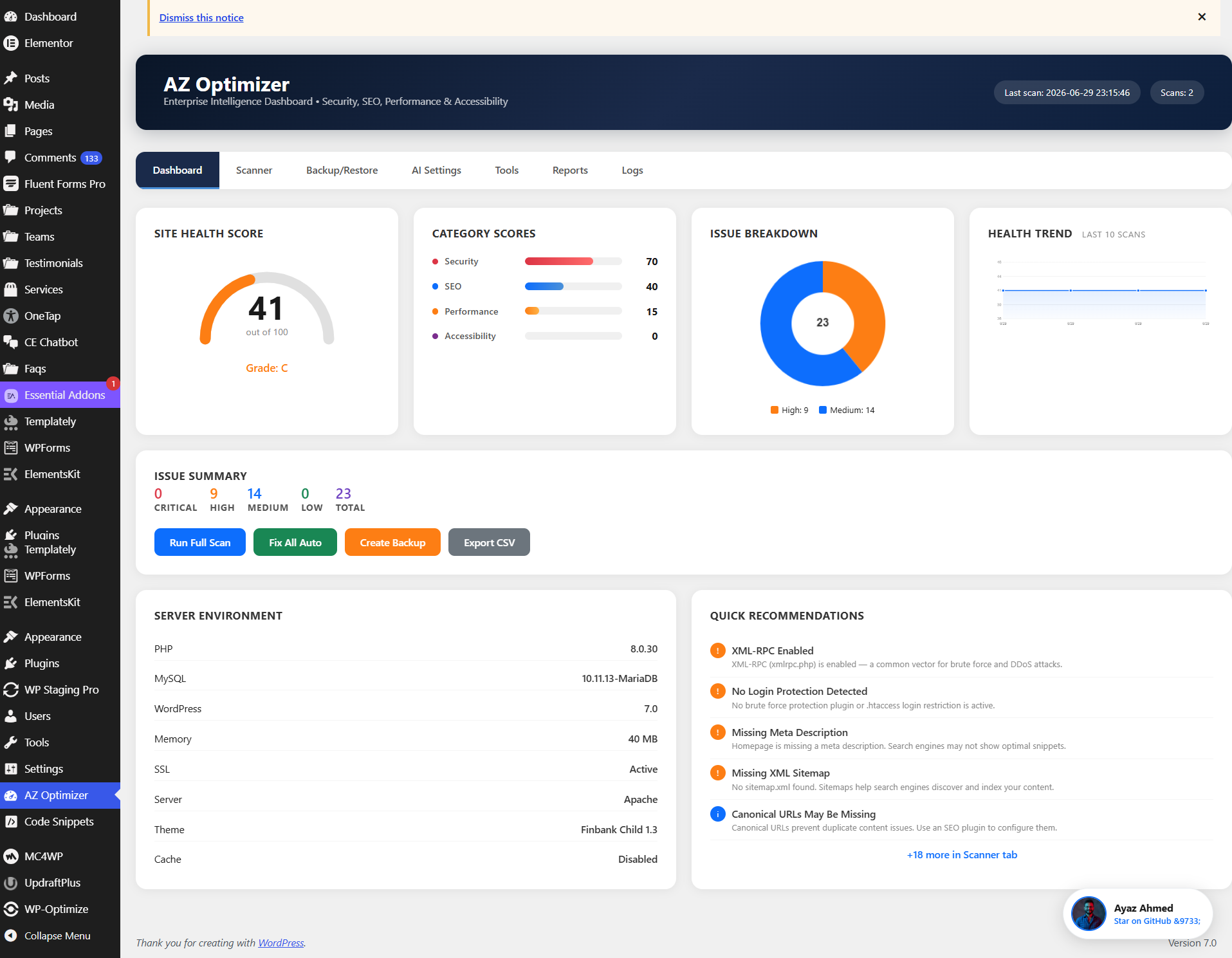
🖥️ Dashboard Preview
The dashboard features:
- Health Score Gauge — live 0–100 score with letter grade
- Category Score Bars — Security, SEO, Performance, Accessibility
- Issue Breakdown Pie Chart — distribution by severity
- Health Trend Line Chart — track score changes over time
- Server Environment Panel — PHP, MySQL, WP, SSL, memory, server
- Quick Recommendations — top 5 issues with severity badges
- One-click actions — Scan, Fix All, Backup, Export
🔧 Installation
Via WordPress Admin
- Download the plugin ZIP
- Go to Plugins → Add New → Upload Plugin
- Upload the ZIP and click Activate
Manual Installation
- Copy the
az-optimizerfolder to/wp-content/plugins/ - Go to Plugins → Installed Plugins
- Activate AZ Optimizer
📖 How to Use
1. Run Your First Scan
Go to AZ Optimizer in the WordPress admin menu. Click Run Full Scan on the Dashboard tab.
2. Review Issues
Switch to the Scanner tab to see all detected issues. Use the Type/Severity filters to narrow down.
3. Auto-Fix Everything
Click Fix All Auto to automatically apply all fixable security headers, rewrite rules, database cleanup, and accessibility improvements.
4. Full Site Optimization (Recommended)
Go to Tools → Run Full Site Optimization. This will:
- Install Rank Math SEO, Smush, and Asset CleanUp
- Configure Rank Math (titles, sitemaps, schema, breadcrumbs)
- Configure Smush (auto-compression, WebP, resizing)
- Apply all 20+ auto-fixes
- Generate XML sitemap
- Clean junk files and optimize database
5. Configure AI Analysis (Optional)
Go to AI Settings, enter your OpenAI API key (or any OpenAI-compatible provider's key + base URL), click Fetch Models to load available models, then analyze your site with AI.
6. Schedule Scans
Go to Reports → Scheduled Scans to enable daily/weekly automatic scans with email alerts for critical issues.
⚙️ Requirements
- WordPress 5.6+
- PHP 7.4+
- MySQL 5.6+
🤝 Contributing
This plugin is open source. Contributions, issues, and feature requests are welcome!
- Fork the repository
- Create your feature branch (
git checkout -b feature/amazing-feature) - Commit your changes (
git commit -m 'Add amazing feature') - Push to the branch (
git push origin feature/amazing-feature) - Open a Pull Request
📄 License
GPL v2 or later — see LICENSE for details.
👨💻 Author
Ayaz Ahmed
If you find this plugin useful, please ⭐ star the repository on GitHub!