WP Supabase Sync
Mirrors published WordPress content into a Supabase Postgres table, with diagnostics that name which permission layer is actually broken.
Install
This is the repository archive. It installs, but the folder name will carry the branch suffix and updates will not flow.
Install straight from GitHub with WP-CLI:
wp plugin install https://github.com/0xclaudi0/wp-supabase-sync/archive/refs/heads/main.zip
WP Supabase Sync
Mirrors WordPress content into a Supabase Postgres table, so a separate frontend — Next.js, a mobile app, anything — can query your content straight from Supabase instead of calling the WordPress REST API.
WordPress stays the source of truth and the editing experience. Supabase becomes the fast, queryable read layer, with row level security on it.
Not affiliated with or endorsed by Supabase. This plugin connects WordPress to Supabase; "Supabase" is a trademark of Supabase, Inc.
Why this exists
Plenty of plugins push data somewhere. The thing this one is actually built around is what happens when it breaks.
Supabase has two independent permission layers that fail in ways which look identical from the outside, and the single most common support conversation is someone debugging the wrong one. So the diagnostics here do not say "connection failed" — they say which layer refused you, quote what Postgres actually returned, and print the exact SQL that fixes it.
The sharpest example: SQLSTATE 42501 means two completely different things.
| What Postgres says | What is actually wrong | The fix |
|---|---|---|
permission denied for table wp_content |
The GRANT is missing. Row level security was never consulted at all, so editing policies changes nothing. | grant select, insert, update, delete on public.wp_content to service_role; |
new row violates row-level security policy |
The grant is fine. A policy's WITH CHECK refused the row. |
Fix the policy, or write with the service role key. |
Both are 42501. Handing someone the second answer when they have the first
problem sends them into the policy editor for an hour. wp supabase doctor tells
them apart, and that distinction is verified by a test that drops the grant and
asserts the wording.
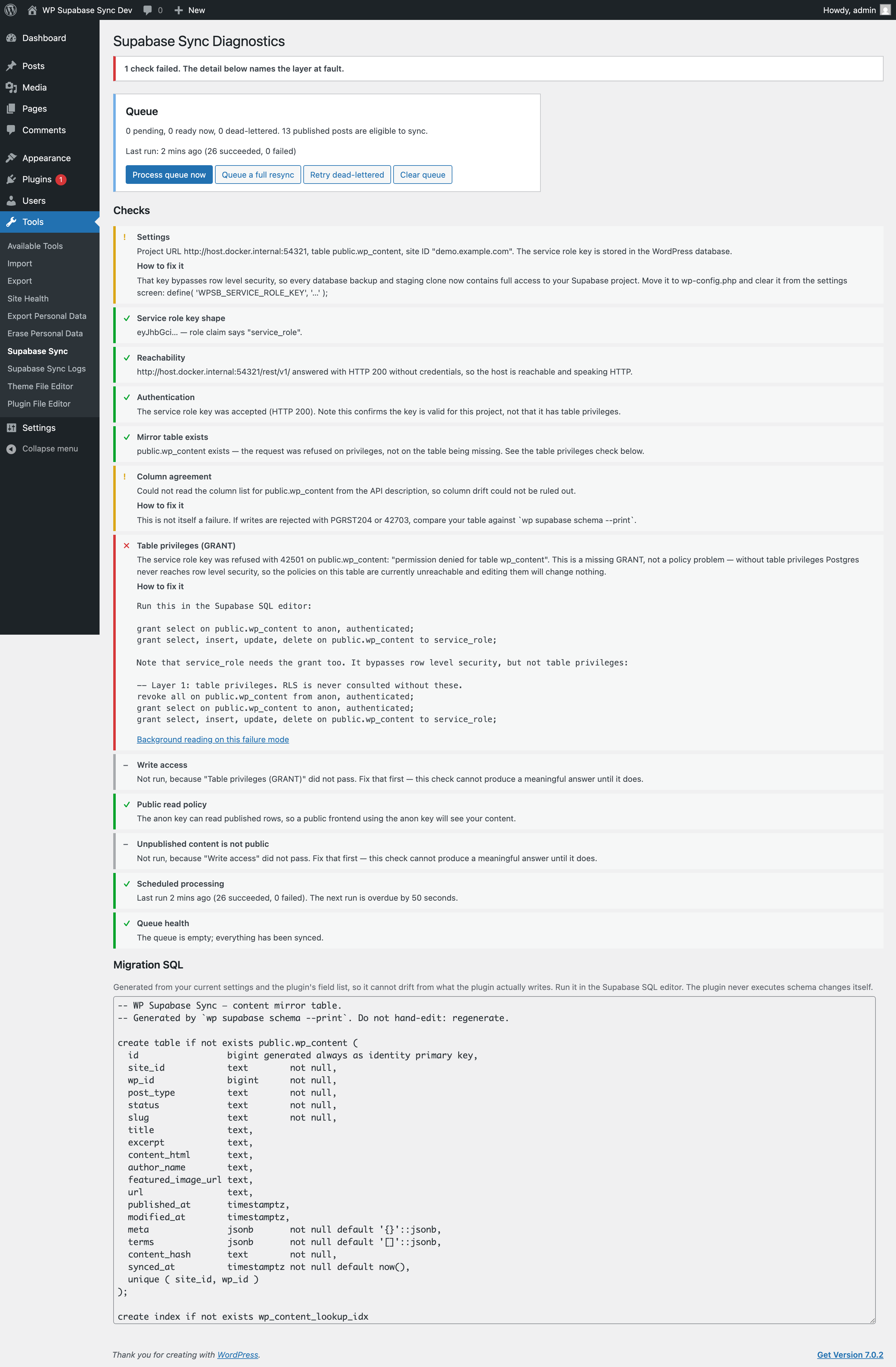
Note what the failing check does not do: cascade. Write access and
Unpublished content is not public are greyed out as skipped, because a
privilege failure upstream makes them unanswerable. One accurate red line beats
eight.
Quickstart
Five steps, about ten minutes.
1. Install
Download the latest release, unzip it into wp-content/plugins/wp-supabase-sync,
and activate it. No Composer, no build step, no npm — the plugin ships as plain
PHP, so there is nothing to compile.
Requires WordPress 6.4+ and PHP 8.1+. Because this is distributed here rather than through the WordPress.org directory, WordPress will not notify you of updates — watch releases on this repo, or star it. Uninstalling never touches your Supabase project.
2. Put your service role key in wp-config.php
define( 'WPSB_PROJECT_URL',      'https://yourproject.supabase.co' );
define( 'WPSB_SERVICE_ROLE_KEY', 'your-service-role-or-secret-key' );
define( 'WPSB_ANON_KEY',         'your-anon-or-publishable-key' );
You can paste these into the settings screen instead, and the plugin works fine that way. It will also warn you, permanently, that you did — because the service role key bypasses row level security, so once it is in the options table it is in every database dump, every backup, and every staging clone made from one.
The anon key is optional and never used for writing. It exists so the diagnostics can prove that the public can read your published content and cannot read anything else.
3. Create the table
Generate the migration from your own settings rather than copying it from here, so it can never drift from what the plugin actually writes:
wp supabase schema --print > supabase/migrations/0001_wp_content.sqlThen run it in the Supabase SQL editor, or supabase db push. The plugin never
executes DDL against your project itself — see Design decisions.
The generated SQL is also shown, copy-pasteably, at the bottom of Tools → Supabase Sync.
4. Check your work before switching anything on
wp supabase doctorOr visit Tools → Supabase Sync. Twelve checks run in dependency order, and they short-circuit: if the project is unreachable, everything downstream is reported as skipped, not failed. One accurate red line beats eight cascading ones.
doctor exits non-zero if anything failed, so it works as a monitoring cron or a
CI step.
5. Turn on syncing and backfill
Syncing is off by default. A plugin that refuses to write until it has verified its own configuration is the whole personality of this thing.
Enable it under Settings → Supabase Sync, then:
wp supabase sync --allQuerying from your frontend
Use the anon key. Only published rows are readable with it.
import { createClient } from '@supabase/supabase-js'

const supabase = createClient(SUPABASE_URL, SUPABASE_ANON_KEY)

// Latest posts
const { data } = await supabase
  .from('wp_content')
  .select('wp_id, title, excerpt, url, published_at')
  .eq('site_id', 'yoursite.com')
  .eq('post_type', 'post')
  .order('published_at', { ascending: false })
  .limit(10)

// One post by slug
const { data: post } = await supabase
  .from('wp_content')
  .select('*')
  .eq('site_id', 'yoursite.com')
  .eq('slug', 'hello-world')
  .single()

// Everything in a category. `terms` is jsonb with a GIN index, so containment
// queries stay fast.
const { data: tagged } = await supabase
  .from('wp_content')
  .select('title, url')
  .contains('terms', [{ taxonomy: 'category', slug: 'news' }])
site_id is on every query because several WordPress installs can share one
Supabase project. It is half of the (site_id, wp_id) uniqueness constraint that
makes upserts idempotent.
What gets mirrored
| Column | From |
|---|---|
site_id |
Plugin setting; defaults to the host of home_url() |
wp_id |
Post ID |
post_type, status, slug |
The post |
title |
post_title, tags stripped |
excerpt |
post_excerpt, or trimmed content if empty |
content_html |
post_content with the_content applied, so blocks and shortcodes are resolved HTML |
author_name |
Author's display name, or null |
featured_image_url |
Full-size featured image URL |
url |
Permalink |
published_at, modified_at |
GMT dates as timestamptz |
meta |
jsonb, allowlist only — empty by default |
terms |
jsonb array of {taxonomy, term_id, slug, name} across public taxonomies |
content_hash |
sha1 of the row, used to skip no-op syncs |
Meta is an allowlist rather than "everything without an underscore" on purpose: post meta routinely holds page-builder blobs, licence keys and third-party plugin state, none of which belongs in a table a public frontend reads.
Only published content is mirrored
| Transition | What happens |
|---|---|
any → publish |
upsert |
publish → draft / pending / private / trash |
delete |
publish → publish |
upsert |
any → auto-draft |
ignored |
| deleted | delete |
Unpublishing removes the row rather than storing it with status = 'draft'.
Leaving unpublished content in the table means it is one bad policy away from
leaking. Deleting is the safer default, and the rls_leak diagnostic exists to
catch the case where that policy is wrong anyway.
Reliability
Content changes go into a queue table, not straight out over HTTP.
- Coalesced. A unique key on
(object_type, object_id)means a newer event replaces the pending one. Editing 100 posts fires several hundred hooks and produces exactly 100 queue rows. - Batched. One HTTP request per action per batch. Default batch size 50.
- Backoff.
2^attemptsminutes, capped at an hour. - Fail fast where retrying cannot help. Only 5xx, 429 and timeouts are retried. A 401, a missing table or a missing grant dead-letters immediately rather than burning eight attempts pretending it might fix itself.
- Dead-letter after 8 attempts, surfaced in diagnostics and retryable with
wp supabase queue retry --all. - Crash recovery. A batch claimed but never finished is reclaimed after ten minutes.
WP-Cron only fires when someone visits your site
This matters more than people expect, and it is not specific to this plugin. On a
low-traffic site the queue can sit untouched for hours while everything looks
healthy. The cron diagnostic checks for exactly that.
For reliable syncing, use a real cron job:
* * * * * cd /path/to/wordpress && wp supabase sync --all --quietand set define( 'DISABLE_WP_CRON', true ); so the two do not overlap.
WP-CLI
wp supabase doctor [--format=table|json]   # 12 checks; exits 1 on any failure
wp supabase status                         # queue depth, last run, dead-letter count
wp supabase sync --all [--post-type=post] [--force] [--dry-run]
wp supabase sync <post_id> [--force]
wp supabase queue list [--dead] [--format=]
wp supabase queue retry [--all|--id=]
wp supabase queue clear
wp supabase schema --print                 # migration SQL for current settings
wp supabase sync <id> --dry-run prints the exact row that would be sent, which
is the fastest way to see what the mapper does with a given post.
Design decisions
Three choices worth explaining, because they are also the answers to the obvious questions.
PostgREST over HTTPS, not a Postgres connection. PHP's request-per-process
model plus shared hosting exhausts a connection pool quickly. pdo_pgsql is also
frequently absent on managed WordPress hosts, and port 443 works behind
restrictive egress firewalls. So the plugin talks to the Data API and holds no
database connections.
The plugin never runs DDL. schema --print emits SQL for you to review and
apply. Handing a WordPress plugin the authority to alter your database schema
with a key that bypasses row level security is more power than it needs.
Syncing defaults to off. It stays off until you have run the diagnostics.
Testing
Everything below was run against a real local Supabase stack, not asserted.
# A local Supabase stack, in any directory with a supabase/ project
supabase start

# WordPress 6.4 / PHP 8.1 at localhost:8888
tests/wp.sh up
tests/wp.sh wp plugin activate wp-supabase-sync

tests/wp.sh verify-all              # 252 checks across three suites
tests/break-and-diagnose.sh         # breaks each layer, asserts the diagnosis
tests/capture-error-fixtures.sh     # re-record the error fixtures
Verified on both ends of the supported range — WordPress 6.4.3 / PHP 8.1.34 and WordPress 7.0.2 / PHP 8.3.33 — 293 checks and an empty error log on each.
The ErrorTranslator is tested against recorded real responses in
tests/fixtures/errors/, captured by deliberately provoking each error against a
live stack. None of them is a string somebody imagined, which is why the 42501
disambiguation can be claimed honestly.
Licence
GPL-2.0-or-later. See LICENSE.