WP GraphQL Lock WP Registry grade A. No security issues foundWP RegistryNo security issues foundOpen the reportA
Enable query locking for WPGraphQL by implementing persisted GraphQL queries.
Install
This is the repository archive. It installs, but the folder name will carry the branch suffix and updates will not flow.
Install straight from GitHub with WP-CLI:
wp plugin install https://github.com/valu-digital/wp-graphql-lock/archive/refs/heads/master.zipOn Packagist as valu/wp-graphql-lock:
composer require valu/wp-graphql-lockThis plugin enables query locking for WPGraphQL by implementing persisted GraphQL queries.
Persisted GraphQL queries allow a GraphQL client to optimistically send a hash of the query instead of the full query; if the server has seen the query before, it can satisfy the request.
Once the server knowns all the possible queries the plugin can lock it down disallowing any unwanted queries that are possibly malicious. This can greatly improve the server security and can even protect against unpatched vulnerabilities in some cases.
Alternatively you can pre-generate the query IDs from your client source code
with the GraphQL Code Generator plugin and load the IDs with the
graphql_lock_load_query filter.
In addition to enabling query locking this saves network overhead and makes
it possible to move to GET requests instead of POST. The primary benefit
of GET requests is that they can be easily cached at the edge (e.g., with
Varnish, nginx etc.).
This plugin requires WPGraphQL 0.2.0 or newer.
Compatibility
Apollo Client provides an easy implementation of persisted queries:
https://github.com/apollographql/apollo-link-persisted-queries#automatic-persisted-queries
This plugin aims to be compatible with that implementation, but will work with
any client that sends a queryId alongside the query. Make sure your client
also sends operationName with the optimistic request.
Implementation
When the client provides a query hash or ID, that query will be persisted in a custom post type. By default, this post type will be visible in the dashboard only to admins.
Query IDs are case-insensitive (i.e., MyQuery and myquery are equivalent).
Installation
If you use composer you can install it from packagist
composer require valu/wp-graphql-lockOtherwise you can clone it from Github to your plugins using the stable branch
cd wp-content/plugins
git clone --branch stable https://github.com/valu-digital/wp-graphql-lock.git
Filters
graphql_lock_load_query
- Load the queries from a custom location
- The query ID is passed as the second parameter
Example:
add_filter( 'graphql_lock_load_query', function( string $query, string $query_id ) {
    $queries = json_decode( file_get_contents( __DIR__ . '/.persisted-query-ids/server.json' ), true );
    return $queries[ $query_id ] ?? null;
}, 10, 2 );
Note: You should prefer using hidden directories / files to avoid exposing the lock file via your webserver.
graphql_lock_post_type
- Default:
'graphql_query' - The custom post type used to persist queries. If empty, queries will not be persisted.
graphql_lock_show_in_graphql
- Default:
false - Whether the custom post type will itself be exposed via GraphQL. Enabling allows insight into which queries are persisted.
query PersistedQueryQuery {
  persistedQueries {
    nodes {
      id
      title
      content(format: RAW)
    }
  }
}
If you'd like to further customize the custom post type, filter
register_post_type_args.
Lock mode
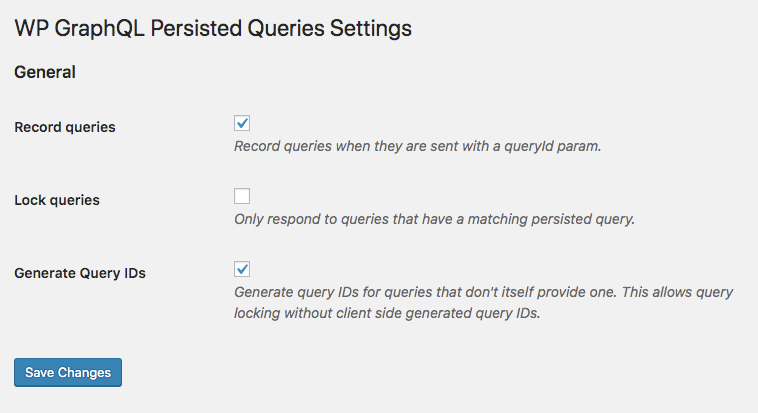
When it's active no new queries can be saved and only the saved ones can be used. This can greatly improve security as attackers cannot send arbitrary queries to the endpoint.
Lock mode can be activated by setting graphql_lock_locked option to true:
update_option( 'graphql_lock_locked', true );add_filter( 'option_graphql_lock_locked', function() {
return 'production' === WP_ENV;
}, 10 , 1 );Settings
There's a settings screen for managing the option
Acknowledgements
This plugin is based on the Quartz persisted Queries plugin.
Contributing
Read CONTRIBUTING.md
Releases
4 releases.
These releases are tags only. The author does not attach a packaged zip, so there are no download counts to report.