upBlock
Monitor, log and block unwanted HTTP API calls in WordPress admin to improve performance.
Install
No release zip yet. The repository archive installs, but the folder name will carry the branch suffix and updates will not flow:
wp plugin install https://github.com/uptools-io/upblock/archive/refs/heads/main.zipReadme
upBlock - Block Unwanted HTTP Requests in WordPress Admin
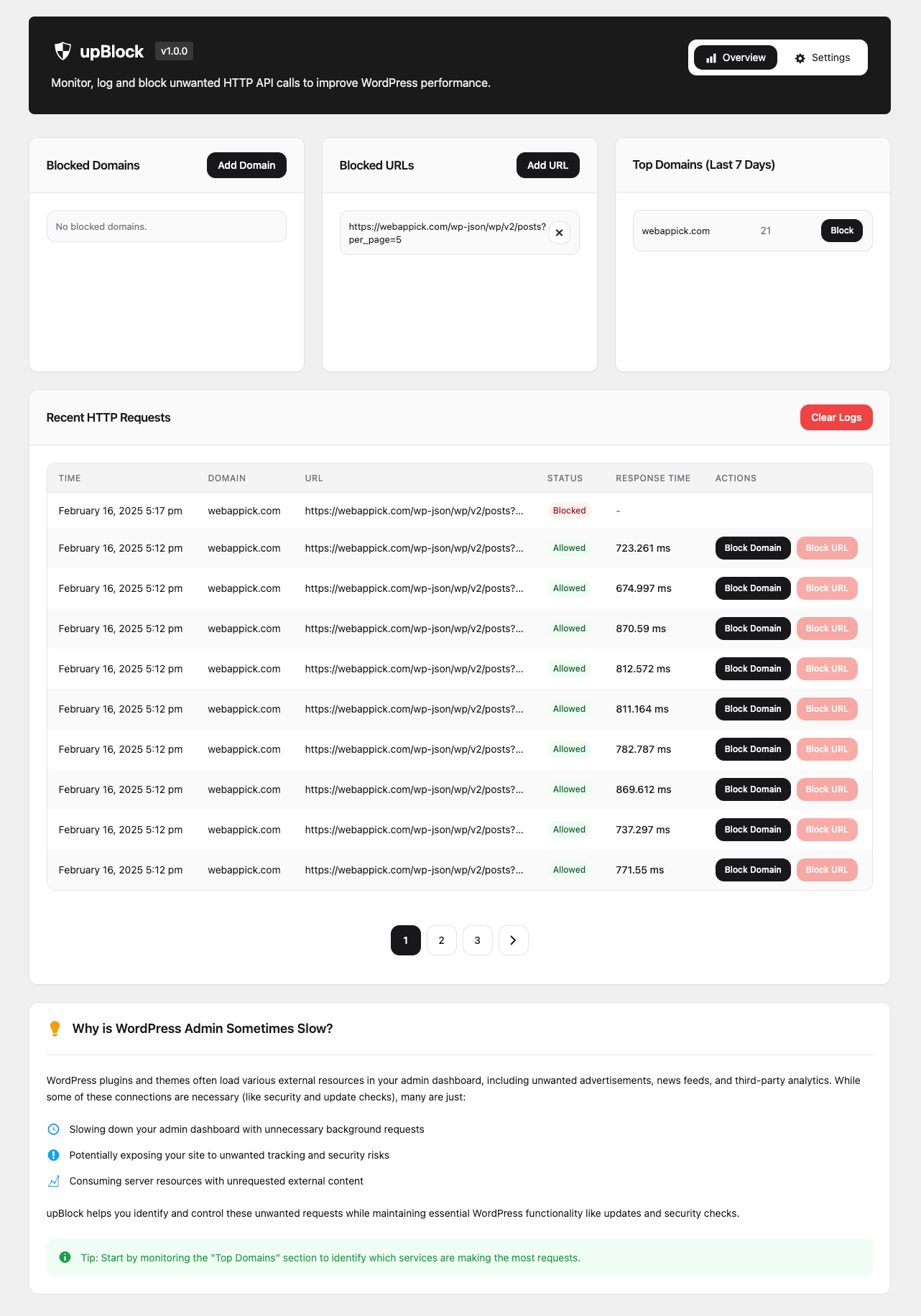
Monitor, log and block unwanted HTTP API calls in WordPress admin to improve performance.
❓ Why is WordPress Admin Sometimes Slow?
WordPress plugins and themes often load various external resources in your admin dashboard, including unwanted advertisements, news feeds, and third-party analytics. While some of these connections are necessary (like security and update checks), many are just:
- 🐌 Slowing down your admin dashboard with unnecessary background requests
- 🔓 Potentially exposing your site to unwanted tracking and security risks
- 🖥️ Consuming server resources with unrequested external content
upBlock helps you identify and control these unwanted requests while maintaining essential WordPress functionality like updates and security checks.
📑 Table of Contents
- Why is WordPress Admin Sometimes Slow?
- Features
- Requirements
- Installation
- Usage
- Configuration
- Contributing
- Support
- License
- Changelog
🚀 Features
- 📊 Monitor all HTTP requests made from your WordPress admin
- 🚫 Block unwanted domains and URL patterns
- 📝 Detailed request logging with response times
- 🔍 View top domains making requests
- ⚡ Improve admin performance by blocking unnecessary requests
- 🛡️ Enhanced security through request monitoring
- 🧹 Automatic log cleanup for optimal database performance
📋 Requirements
- WordPress 5.0 or higher
- PHP 8.0 or higher
- MySQL 5.6 or higher
💽 Installation
- Download the latest release from WordPress.org
- Upload the plugin to your WordPress site
- Activate the plugin through the 'Plugins' menu in WordPress
- Navigate to upTools > upBlock in your admin menu
Or install directly from WordPress:
- Go to Plugins > Add New
- Search for "upBlock"
- Click "Install Now"
- Activate the plugin
🎯 Usage
Monitoring Requests
The main dashboard shows you:
- Recent HTTP requests with their status and response times
- Top domains making requests
- Currently blocked domains and URLs
Blocking Requests
You can block requests in two ways:
- Add domains directly to the blocklist
- Add URL patterns to block specific endpoints
Managing Logs
Configure logging settings:
- Set log retention period (1-365 days)
- Enable/disable logging of blocked requests
- Enable/disable automatic log cleanup
🛠️ Configuration
Hooks & Filters
// Filter blocked domains
add_filter('upblock_blocked_domains', function($domains) {
    $domains[] = 'example.com';
    return $domains;
});

// Filter blocked URLs
add_filter('upblock_blocked_urls', function($urls) {
    $urls[] = 'https://example.com/api/';
    return $urls;
});
🤝 Contributing
We welcome contributions! Here's how you can help:
- Fork the repository
- Create a feature branch (
git checkout -b feature/amazing-feature) - Commit your changes (
git commit -m 'Add amazing feature') - Push to the branch (
git push origin feature/amazing-feature) - Open a Pull Request
Please read CONTRIBUTING.md for details on our code of conduct and the process for submitting pull requests.
📜 License
This project is licensed under the GPL v2 or later - see the LICENSE file for details.
👥 Authors
- upTools Team - Initial work - uptools.io
🙏 Acknowledgments
- WordPress Core Team for the HTTP API
- All contributors who have helped improve this plugin
📞 Support
For support and documentation, please:
- Check our documentation
- Visit our issues page
- Review our discussions
For security issues, please report them directly through our security page.
🗺️ Roadmap
Planned features:
- Advanced analytics dashboard
- API request rate limiting
- Custom blocking rules
- Export/import settings
- Integration with popular security plugins
🔄 Changelog
1.0.0 (Latest)
- Initial release
- Core monitoring functionality
- Domain blocking system
- Logging system implementation
- Admin interface
Development
- See CHANGELOG.md for full version history
🔒 Security
Reporting Security Issues
Please report security issues to security@uptools.io. We take security seriously and will respond promptly.
Best Practices
- Keep the plugin updated
- Regularly review blocked domains
- Monitor logs for suspicious activity
- Use strong WordPress admin passwords
⚡ Performance
The plugin is designed with performance in mind:
- Minimal impact on front-end
- Efficient database queries
- Automatic log cleanup
- Optimized blocking system
🌐 Compatibility
Tested with:
- Popular WordPress themes
- Major page builders
- Common caching plugins
- Security plugins
Made with ❤️ by upTools
Read the full README on GitHub →
Releases
These releases are tags only. The author does not attach a packaged zip, so there are no download counts to report.