Install
This is the repository archive. It installs, but the folder name will carry the branch suffix and updates will not flow.
Install straight from GitHub with WP-CLI:
wp plugin install https://github.com/sheikhrehanseo/wordpress-doc-validation/archive/refs/heads/main.zipA WordPress plugin for issuing and verifying documents online — certificates, ID cards, letters, receipts, contracts, and more. Give every issued document a unique Verification ID, and let anyone confirm its authenticity through a clean, public verification portal on your site.
Version: 1.0.0 Author: TechOrbito Requires: WordPress 5.8+ / PHP 7.4+
What It Does
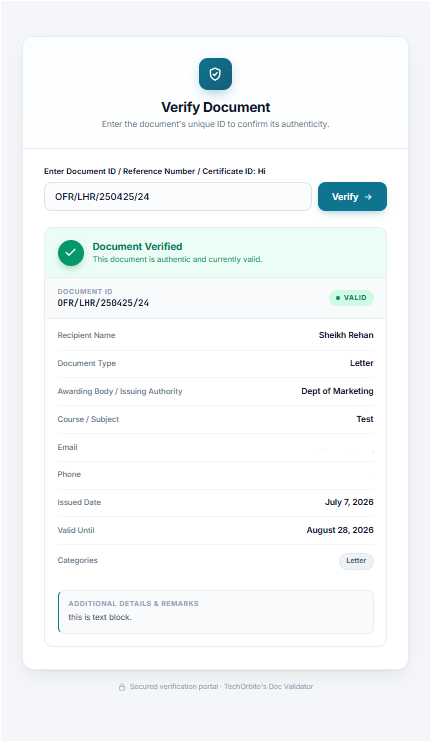
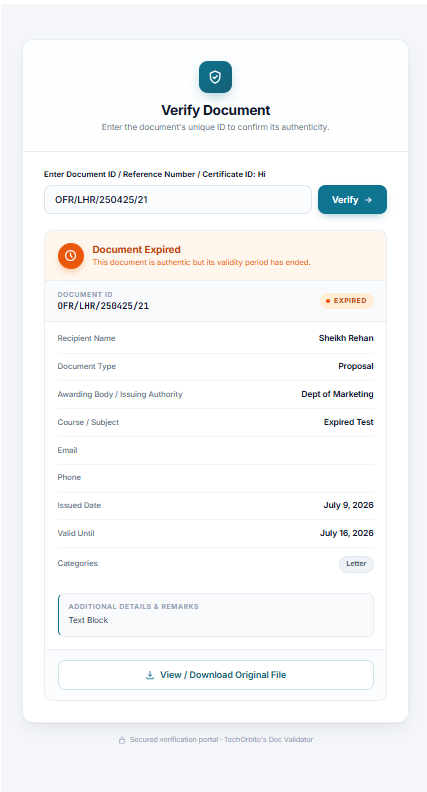
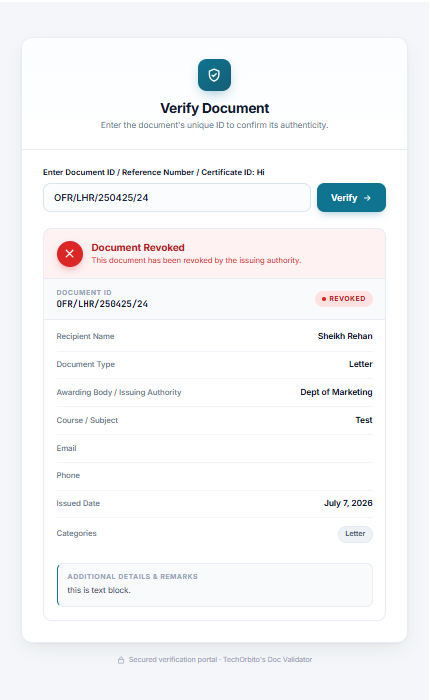
Visitors enter a Document ID into a verification form. The plugin looks up the record and shows a clear result with one of four states:
| State | Meaning |
|---|---|
| ✅ Valid | Document exists and is within its validity period |
| ⏰ Expired | Document exists, but its "Valid Until" date has passed |
| ⛔ Revoked | An admin explicitly revoked the document (overrides expiry) |
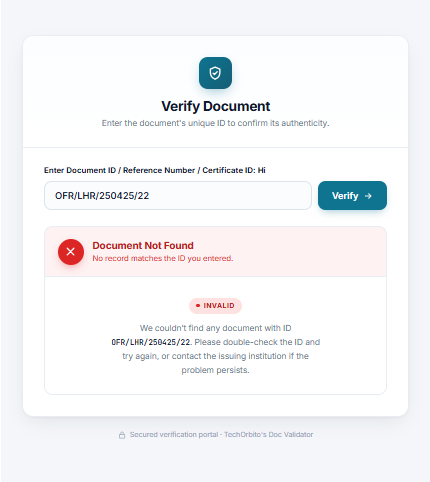
| ❌ Not Found | No record matches the entered ID |
A valid/expired/revoked result displays the full document profile: recipient, document type, issuing authority, course/subject, grade, performance, dates, categories, remarks, contact info, and an optional download link to the original file (PDF/JPG).
Screenshots
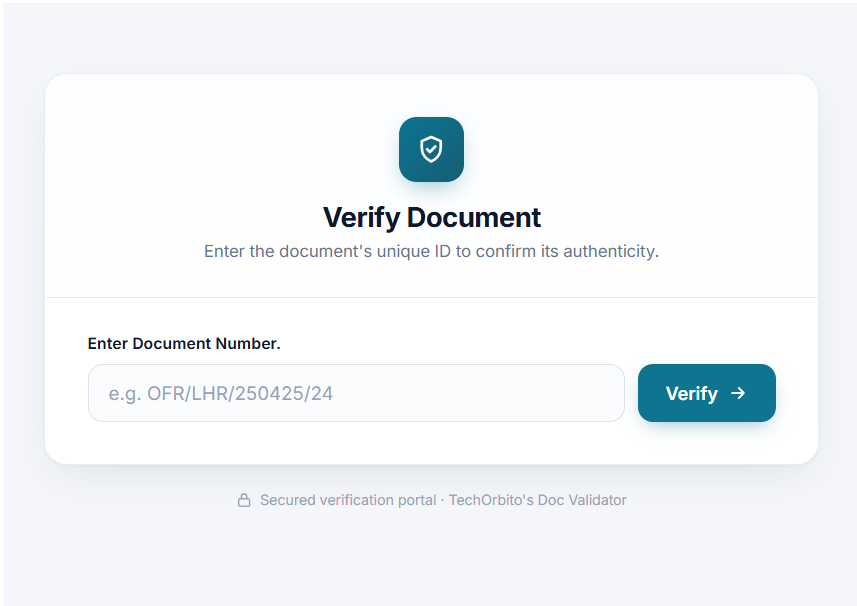
Verification Form
Valid Document
Expired Document
Revoked Document
Document Not Found / Invalid
Key Features
- Modern verification portal — Card-based UI with status banners, monospace ID strip, detail rows, category chips, remarks box, and a file download button. Fully responsive and color-customizable.
- Document management — Dedicated "Documents" custom post type with categories and a rich meta editor (no code needed for the standard fields).
- Custom fields per document type — Define extra fields in Settings (e.g. "Parties Involved" for contracts, "Invoice Total" for invoices). Five field types: text, number, date, textarea, dropdown. Fields appear on the document editor only for the matching type and render automatically on verification results.
- Revoked status — One checkbox on the document editor flags a document as revoked; it shows a red "Document Revoked" banner regardless of expiry date.
- Expiration engine — Optional "Valid Until" date; documents flip to the Expired state automatically once it passes.
- Kill Switch (category access control) — Choose which document categories are publicly verifiable. Enforcement happens at the WordPress layer, not just the search form:
- Restricted document permalinks return a real 404
- Restricted documents are excluded from the archive, category listings, and WordPress search
- They're stripped from core/Yoast sitemaps and get
noindexheaders
- Bulk Add Documents — Add many records at once from a grid-based tool.
- Duplicate ID protection — Verification IDs are checked for uniqueness on save; duplicates are auto-neutralized (
-DUP-xxxx) with an admin warning. A one-time migration scan cleans up legacy duplicates. - Legacy migration engine — Automatically rescues data from older post types/taxonomies/meta keys (
24tt_*,tt_*→ttdvr_*). - Branding controls — Search label, background color, button color, and hover color are configurable from Settings. PDF download link can be toggled globally.
- Role-based access — All management is gated behind the
manage_ttdvr_documentscapability (granted to Administrators on activation). - No third-party tracking — No external SDKs, analytics, or update servers. Fully self-hosted.
Installation
- Upload the plugin folder to
/wp-content/plugins/(or install via Plugins → Add New → Upload). - Activate it through Plugins → Installed Plugins.
- A new "TechOrbito's Doc Validator" menu appears in the admin sidebar.
Quick Start
-
Create categories — Doc Validator → Categories (e.g. "2024 Certificates", "Contracts").
-
Add a document — Doc Validator → Documents → Add New. Fill in the Verification ID (required) and any details. Pick a category, set expiry if needed, attach the original file.
-
Place the form — Put the shortcode on any page:
[ttdvr_verify_document]Optionally restrict the search to one category:
[ttdvr_verify_document category="2024-certificates"] -
Configure security — Doc Validator → Settings: pick which categories are publicly verifiable, set branding colors, and toggle the file download link.
Custom Fields Per Document Type
Go to Settings → Custom Fields per Document Type and add rules:
| Document Type | Field Label | Field Type | Options (dropdowns) |
|---|---|---|---|
| Contract/Agreement | Parties Involved | Text | — |
| Invoice | Invoice Total | Number | — |
| Certificate of Completion | Assessment Result | Dropdown | Distinction, Merit, Pass |
Once saved, any document assigned that type shows those inputs in an "Additional Fields" section of the editor, and entered values appear as detail rows on the public verification result. Field keys are auto-generated from labels and stay stable, so renaming a label doesn't orphan stored values.
Document Data Reference
Standard per-document fields (meta keys under the hood): Verification ID, Recipient Name, Document Type (+ custom "Other" label), Awarding Body, Course/Subject, Grade, Performance %, Issued Date, Valid Until, Document File URL, Phone, Email, Date of Birth, Address, Remarks/Details, Categories, Revoked flag — plus any custom fields you define.
Hooks for Developers
// Fires after every verification attempt (search or direct-access block).
// $status: 'valid' | 'invalid' | 'restricted' | 'restricted_direct_access'
do_action( 'ttdvr_after_verification_attempt', $search_id, $status, $ip );
Use it for logging, rate limiting, or alerting integrations.
Project Structure
24tt-document-verifier/
├── 24tt-document-verification.php   # Plugin bootstrap, constants, activation hooks
├── admin/                           # Admin menu, meta boxes, settings, bulk upload, notices
│   └── partials/                    # Admin page templates (dashboard, settings, bulk)
├── includes/
│   ├── class-ttdvr-core.php         # Hook orchestration
│   ├── class-ttdvr-cpt.php          # Post type + taxonomy registration
│   ├── class-ttdvr-shortcodes.php   # [ttdvr_verify_document] form + result rendering
│   ├── class-ttdvr-access.php       # Kill Switch enforcement (404s, query/sitemap filters)
│   ├── class-ttdvr-fields.php       # Custom field definitions & helpers
│   ├── class-ttdvr-migration.php    # Legacy data rescue + duplicate cleanup
│   └── class-ttdvr-loader.php       # Hook registry
├── public/                          # Frontend style/script enqueueing
├── assets/
│   ├── css/frontend-style.css       # Verification portal styles
│   └── js/ttdvr-admin.js            # Admin JS (media uploader, field builder, toggles)
└── languages/                       # Translations (.pot)
Notes
- The plugin intentionally suppresses WordPress.org update notifications for itself (the directory slug collision with the old listing would otherwise offer an unrelated "2.2.0" update).
- Restricted-category rules are bypassed for logged-in users with
manage_ttdvr_documents, so you can always preview your own documents. - Deleting the plugin via the admin removes its data (see
uninstall.php).
License
GPL-2.0+ — see readme.txt for the plugin header metadata.