Role Restriction Coupons for WooCommerce
WooCommerce plugin to restrict the usage of WooCommerce coupons based on user roles.
by runthingsdev · github.com/runthings-dev/runthings-wc-coupons-role-restrict · website
Install
No release zip yet. The repository archive installs, but the folder name will carry the branch suffix and updates will not flow:
wp plugin install https://github.com/runthings-dev/runthings-wc-coupons-role-restrict/archive/refs/heads/master.zipReadme
Coupons Role Restriction for WooCommerce
Restrict the usage of WooCommerce coupons based on user roles.
Description
This plugin allows you to restrict the usage of WooCommerce coupons based on user roles, including guest users. You can specify which roles (including guests) are allowed or excluded from using a coupon, providing more control over your discount strategies.
Available in the WordPress.org Plugin Directory.
Features
- Restrict coupon usage based on user roles.
- Option to specify both allowed and excluded roles.
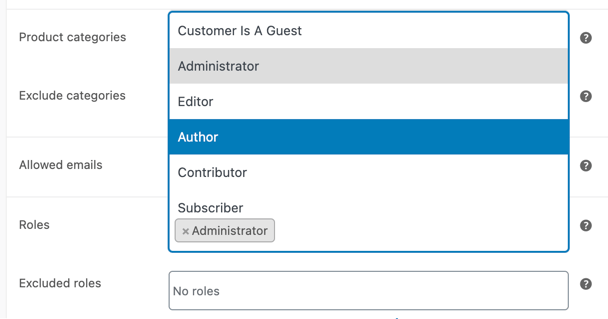
- Support for guest users with a "Customer Is A Guest" pseudo-role.
- Customize the error message via a filter.
Installation
- Upload the plugin files to the
/wp-content/plugins/runthings-wc-coupons-role-restrictdirectory, or install the plugin through the WordPress plugins screen directly. - Activate the plugin through the 'Plugins' screen in WordPress.
- Go to WooCommerce area of the admin panel, and look under Marketing > Coupons and edit or create a coupon.
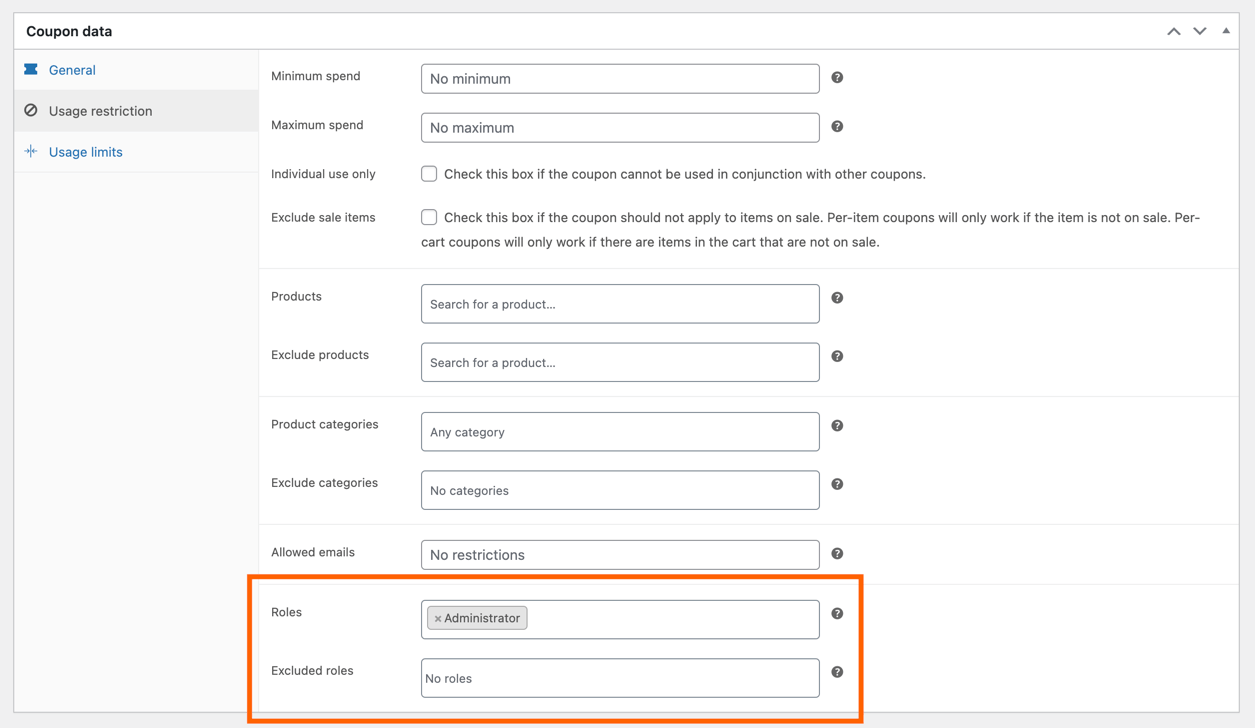
- In the "Usage restriction" tab, you will see the options to select allowed and excluded roles for the coupon, including the "Customer Is A Guest" pseudo-role.
Filters
runthings_wc_coupons_role_restrict_error_message
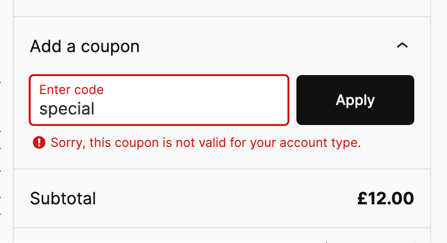
This filter allows customization of the error message shown when a coupon is not valid for the user's account type.
Parameters:
| Parameter | Type | Description |
|---|---|---|
$message |
string |
The default error message, e.g., "Sorry, this coupon is not valid for your account type.". |
$context |
array |
An associative array providing additional context for the error. See table below for details. |
$context object format:
| Key | Type | Description |
|---|---|---|
coupon |
WC_Coupon |
The coupon object being validated. |
is_guest |
bool |
Whether the current user is a guest (not logged in). |
guest_role_id |
string |
The role id for the guest pseudo-role |
user |
WP_User |
The current user object. For guests, this will be an empty user object. |
allowed_roles |
array |
Roles explicitly allowed to use the coupon. See Roles arrays format. |
excluded_roles |
array |
Roles explicitly excluded from using the coupon. See Roles arrays format. |
effective_allowed_roles |
array |
The set of roles that can actually use the coupon, determined by subtracting excluded roles. See Roles arrays format. |
Roles arrays format:
The roles arrays (allowed_roles, excluded_roles, and effective_allowed_roles) share a common format:
- Key: The role ID (
role_id), such asadministrator,editor, orcustomer. - Value: The public-facing name for the role (
role_name), such as "Administrator" or "Editor".
Example:
[
   'administrator' => 'Administrator',
   'editor' => 'Editor',
   'subscriber' => 'Subscriber',
]
Usage example:
A simple static message replacement:
add_filter('runthings_wc_coupons_role_restrict_error_message', 'custom_coupon_error_message');

function custom_coupon_error_message($message) {
    return __('Custom error message for invalid coupon.', 'your-theme');
}
Advanced usage:
Use the $context object to dynamically customise the message based on the user's role and coupon restrictions:
add_filter('runthings_wc_coupons_role_restrict_error_message', function ($message, $context) {
    // Extract context
    $excluded_roles = $context['excluded_roles'];
    $effective_allowed_roles = $context['effective_allowed_roles'];
    $is_guest = $context['is_guest'];
    $guest_role_id = $context['guest_role_id'];

    if ($is_guest) {
        // Custom message if guests are excluded
        if (array_key_exists($guest_role_id, $excluded_roles)) {
            return __('Sorry, this coupon is not valid for guests.', 'your-theme');
        }

        // Custom message if logging in might help
        if (!array_key_exists($guest_role_id, $effective_allowed_roles) && count($effective_allowed_roles)) {
            return __('Please log in to use this coupon.', 'your-theme');
        }

        // No non-guest roles are allowed, logging in won't help
        return $message;
    }

    // For logged-in users, fallback to the default error message
    return $message;
}, 10, 2);
Frequently Asked Questions
Why was this plugin created?
This plugin was created to provide a more secure option for restricting coupon usage. The default email usage restriction for coupons in WooCommerce is based on the unverified billing email address field, which can be freely set by users. By using role restrictions, you can ensure that only verified and authorized users in specific roles—or guests, when appropriate—can use certain coupons, making it a secure option.
My personal motivation was to have 100% discount coupons that could be used only be staff or developers, without the possibility of this being exploited by somebody putting a fake staff email into the billing email address field.
How do I restrict a coupon to specific roles?
Edit the coupon and go to the "Usage restriction" tab. In the "Roles" section, select the roles allowed to use the coupon. If you want to exclude specific roles, select them in the "Excluded roles" section. For guest users, select or exclude the "Customer Is A Guest" pseudo-role.
What happens if a role is both allowed and excluded?
If a role is both allowed and excluded, the exclusion will take precedence, and users with that role will not be able to use the coupon.
How do I allow a coupon for guests only?
To restrict a coupon to guests only, select the "Customer Is A Guest" pseudo-role in the "Roles" section and leave all other roles unselected.
Can I use this plugin with other WooCommerce coupon restrictions?
Yes, this plugin works alongside other WooCommerce coupon restrictions such as minimum spend, maximum spend, and product restrictions.
Screenshots
-
Coupon settings page with role restriction fields.
-
Coupon role selection field.
-
Example denied coupon usage due to invalid role.
Changelog
1.1.3 - 6th January 2026
- Fixed missing "And" separator in the coupon usage restriction panel to match WooCommerce core styling.
- Move plugin directory assets to .wordpress-org/ folder.
1.1.2 - 17th December 2025
- Bump tested up to 6.9.
1.1.1 - 24th June 2025
- Bump WordPress tested up to field to support 6.8 branch.
1.1.0 - 17th November 2024
- Introduced "Customer Is A Guest" pseudo-role, enabling role restrictions to target guest users.
- Fixed a bug which would auto exclude the guest when any role was set as excluded.
- Add support for passing a context object to the
runthings_wc_coupons_role_restrict_error_messagefilter. - Context includes additional information such as
coupon,is_guest,user,allowed_roles,excluded_roles, andeffective_allowed_roles. - Improve documentation for filters, including usage examples and detailed context information.
- Updated screenshots
1.0.1 - 15th July 2024
- Fix code snippet formatting in documentation
1.0.0 - 11th July 2024
- Initial release
- Restrict coupons by role
- Allow coupons by role
- Filter
runthings_wc_coupons_role_restrict_error_messageto customise error message
License
This program is free software; you can redistribute it and/or modify it under the terms of the GNU General Public License as published by the Free Software Foundation; either version 3 of the License, or (at your option) any later version.
This program is distributed in the hope that it will be useful, but WITHOUT ANY WARRANTY; without even the implied warranty of MERCHANTABILITY or FITNESS FOR A PARTICULAR PURPOSE. See the GNU General Public License for more details.
You should have received a copy of the GNU General Public License along with this program; if not, see http://www.gnu.org/licenses/gpl-3.0.html.
Icon - Discount by Gregor Cresnar, from Noun Project, https://thenounproject.com/browse/icons/term/discount/ (CC BY 3.0)
Icon - restriction by Puspito, from Noun Project, https://thenounproject.com/browse/icons/term/restriction/ (CC BY 3.0)