Install
This is the repository archive. It installs, but the folder name will carry the branch suffix and updates will not flow.
Install straight from GitHub with WP-CLI:
wp plugin install https://github.com/progressplanner/wp-agent-surface-auditor/archive/refs/heads/main.zipWhat can an AI agent actually do to your WordPress site — and is any of it gated properly?
WordPress 6.9 shipped the Abilities API; the MCP Adapter exposes those
Abilities to AI agents (Claude, Cursor, ChatGPT, …). An agent authenticating
with an application password executes Abilities as that WordPress user —
if the user can delete posts, the agent can too. The only access control is
each Ability's permission_callback; annotations like readonly are
self-reported hints. Core ships no tooling that answers "what am I actually
handing to agents?"
Agent Surface Auditor is a read-only plugin that answers it:
- Inventories every registered Ability with its full descriptor.
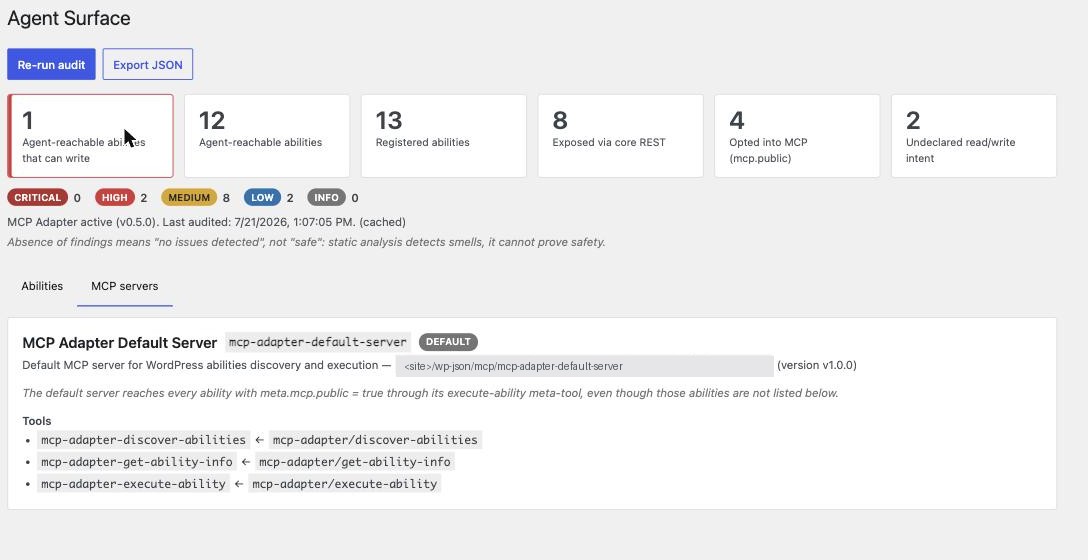
- Resolves exposure across both channels — the core
wp-abilities/v1 …/runREST endpoint (meta.show_in_rest) and MCP (the adapter's default server viameta.mcp.public, plus custom servers' explicit ability lists). - Evaluates an 11-rule catalog — missing/unconditional/auth-only permission gates, exposed write/destructive abilities, annotation mismatches ("claims read-only, appears to write" — WP 7.0 sends such a call over GET), loose input schemas, broad capabilities on destructive ops, meta-tools that proxy the whole registry, and more.
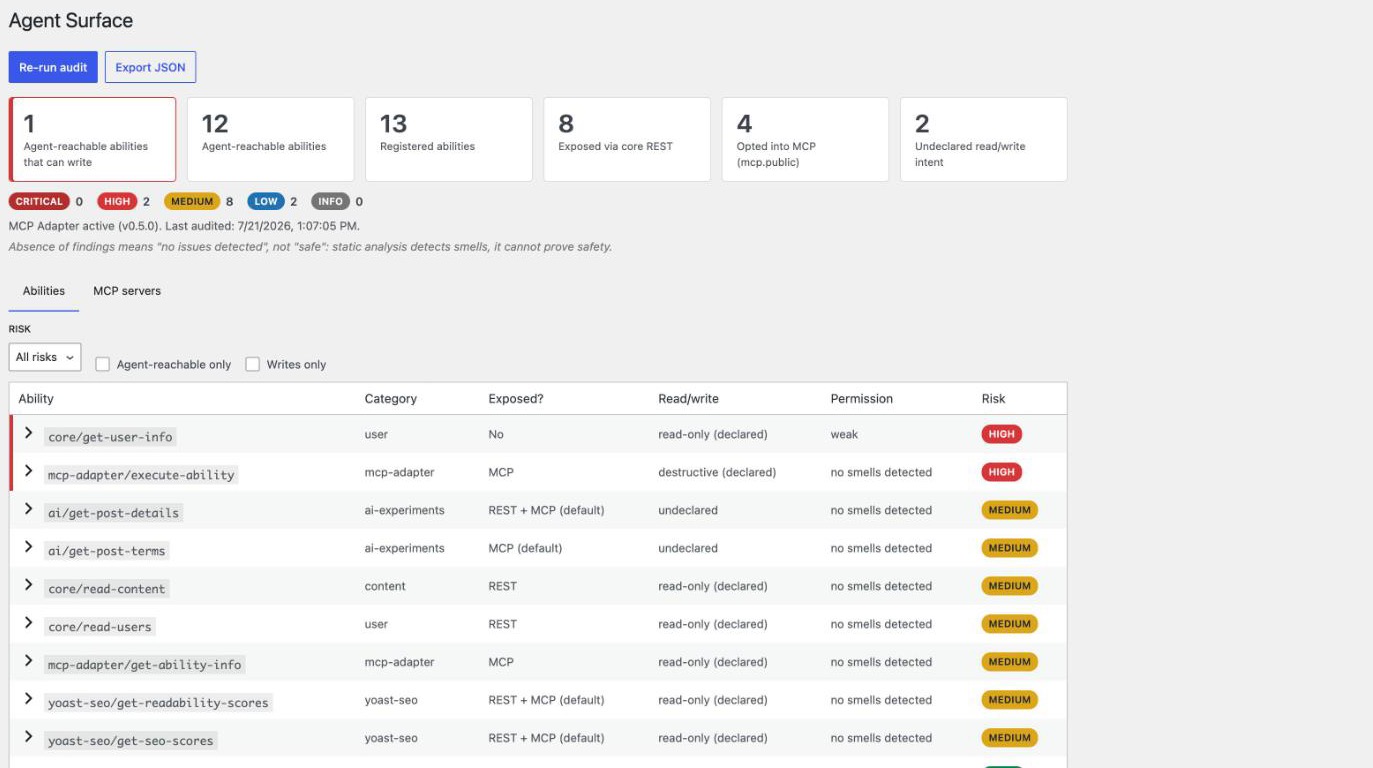
- Scores and reports — a Tools → Agent Surface dashboard and a JSON export for CI or diffing.
What it surfaces
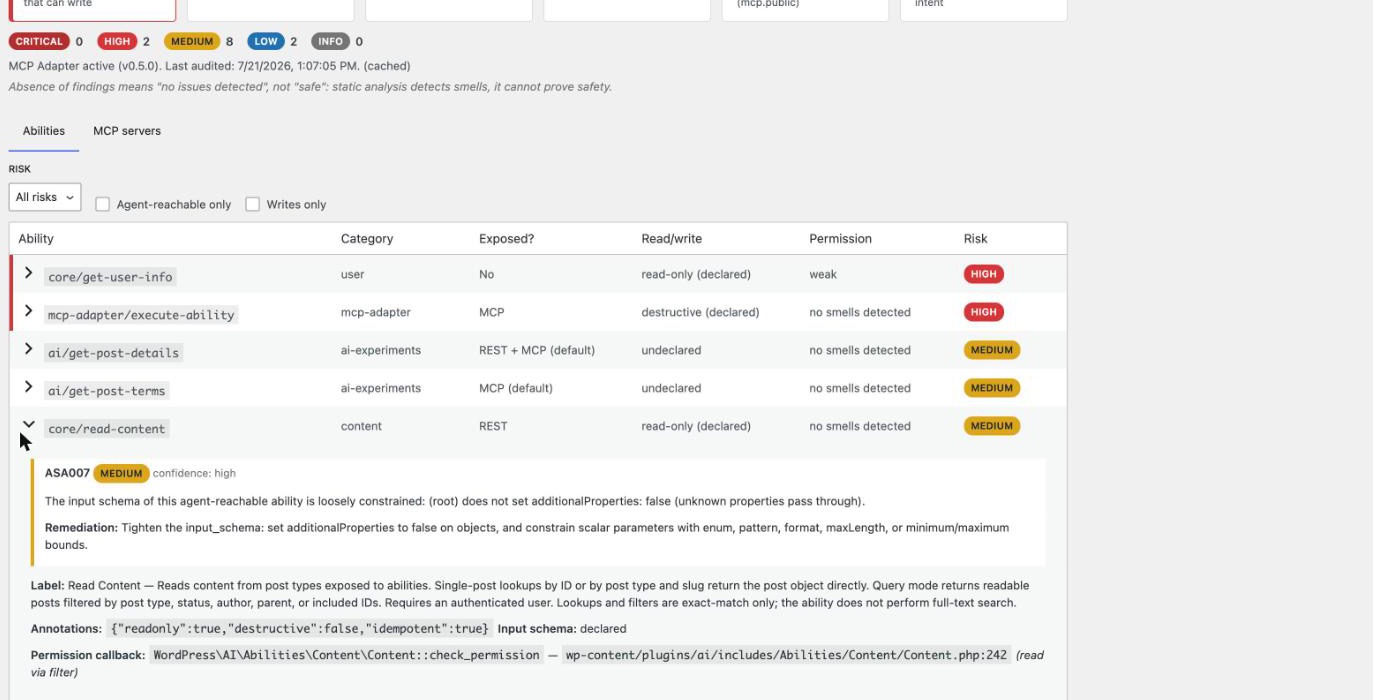
On a normal WordPress 7.0 site with Yoast SEO and the AI plugin active, the
auditor surfaces real posture facts: which abilities are agent-reachable
today, that core/get-user-info is gated only by authentication, and that the
MCP Adapter's own execute-ability meta-tool is a reachable destructive
surface.
Safety guarantees (asserted in tests)
- Read-only. It never invokes an Ability's execute or permission callback; the only thing it ever writes is a 5-minute report cache transient.
- Fails safe. Analysis of a broken Ability degrades to a "could not analyze" finding, never a fatal.
- Least privilege. The dashboard and all REST routes require
manage_options. - No new attack surface. It registers no Abilities and exposes nothing via MCP.
- Honest about limits. Static analysis detects smells; the report says
"no issues detected", never "safe", and every finding carries a
confidence tier (
high= read from flags,medium= source heuristic,low= weak signal). The server-side audit reads the PHP registry only, so it cannot analyze WordPress 7.0 client-side (JavaScript) abilities; a standingcoveragenote states that limit, and the dashboard additionally lists any client-side abilities it can read live from the browser store (labelled "not analyzed") — staying silent, never showing a misleading "0", when that store is absent.
Install
Requires WordPress 6.9+ (Abilities API in core) and PHP 7.4+. The MCP Adapter is optional — without it the report shows intended MCP exposure from the meta flags and says so.
composer install --no-dev
npm install && npm run build
Copy the plugin into wp-content/plugins/agent-surface-auditor, activate,
then open Tools → Agent Surface.
REST API
All routes require manage_options (filter: asa_capability):
GET /wp-json/asa/v1/report— full report (?fresh=1bypasses the cache)GET /wp-json/asa/v1/abilities— abilities projectionGET /wp-json/asa/v1/servers— MCP server inventory + adapter stateGET /wp-json/asa/v1/export— report as a download attachment
Fleet summary
The report carries a compact fleet_summary — a one-glance digest of this
site's agent-surface posture, meant for fleet tooling that needs "how exposed is
this one site?" without the full per-ability report:
"fleet_summary": {
  "sev": "crit",
  "highest_severity": "critical",
  "agent_reachable": 19,
  "agent_reachable_write": 3,
  "findings_by_severity": { "critical": 3, "high": 7, "medium": 9, "low": 6, "info": 1 },
  "analysis_errors": 0
}
sev (ok/warn/crit) is derived conservatively from the highest finding
severity present (critical/high → crit, medium/low → warn, info or none →
ok) and, like the rest of the report, means "no issues detected", never
"safe". It is a pure projection of the audit — no extra analysis — and is
consumed as a fleet-health signal (e.g. by a MainWP Fleet Health Monitor via its
fhm_extra_signals filter). Treat the field as optional: a report cached before
an upgrade may briefly omit it.
WP-CLI & CI
The plugin registers wp asa audit (read-only, like everything else):
wp asa audit                       # human-readable summary
wp asa audit --format=table        # per-ability table
wp asa audit --format=json         # full report as JSON
wp asa audit --fresh               # bypass the cached report
wp asa audit --fail-on=high        # exit non-zero if any high+ finding exists
Regression gate. Export a baseline, commit it, then diff against it in CI — the build fails only when a newly appeared finding crosses your threshold, so pre-existing findings don't block you:
# once, to capture the current surface:
wp asa audit --fresh --format=json > asa-baseline.json

# in CI:
wp asa audit --baseline=asa-baseline.json --fail-on-new=high
The diff reports new findings, resolved findings, per-ability risk changes, and abilities added to or removed from the surface.
Development
Quality gates: composer lint · composer check-cs (WPCS) · composer phpstan (level 10) · composer test (unit, no WP needed) · composer test-integration (wordpress-tests-lib) · npm run lint:js · npm run lint:css · npm run build.
License
GPL-2.0-or-later.