sellercontrol
Plugin elaborado con Antonella Framwork, para controlar costos y agregar elementos para poder sincronizarlos con Amazon, Mercadolibre y ClaroShop
by Gerardo Gabriel González Velázquez · github.com/gergab00/sellercontrol · website
Install
No release zip yet. The repository archive installs, but the folder name will carry the branch suffix and updates will not flow:
wp plugin install https://github.com/gergab00/sellercontrol/archive/refs/heads/master.zipReadme
Sellercontrol WP Plugin
This is a plugin developed with Antonella Framework, it is intended to be the UI, of the software sellercontrol-node-v1. This plugin is designed to work together with Woocommerce, extending the amount of information in each product, such as EAN, material, manufacturer; and being able to select the marketplaces in which they appear; It currently has 3 marketplaces (Amazon, Mercadolibre and Claroshop).
It also has a dashboard, to manage this information without having to enter wp-admin. On the other hand, it has a section to be able to register the purchase of products, add them to the inventory and calculate the cost of the product giving a suggested price.
This plugin is still in development.
Este es un plugin desarrollado con Antonella Framework, esta pensado para ser la UI, del software sellercontrol-node-v1. Este plugin esta pensado para funcionar junto con Woocommerce, extendiendo la cantidad de información en cada producto, como EAN, material, fabricante; y poder seleccionar los marketplaces en los que aparecen; actualmente cuenta con 3 marketplaces (Amazon, Mercadolibre y Claroshop).
También cuenta con un dashboard, para adminsitrar esta información sin tener que entrar al wp-admin. Por otro lado cuenta con una sección para poder registrr comprar de productos, agregarlas al inventario y que calcule el costo del producto dando un precio sugerido.
Este complemento continua en dasarrollo.
Instalación 🔧
Installation 🔧
- Descarga el archivo .zip del plugin de este enlace
- Ingresa a tu panel de WordPress y ve a Plugins -> Agregar Nuevo.
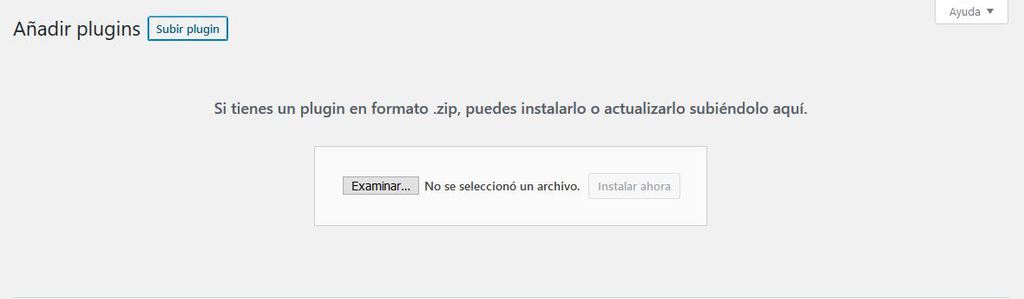
- Agregar un plugin manualmente
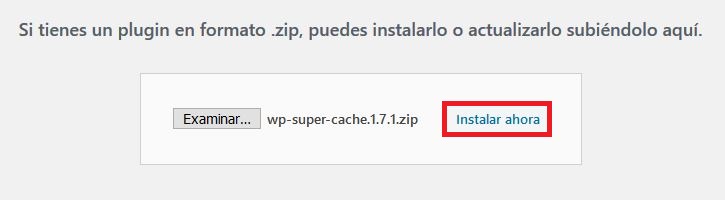
- Haz clic en el botón Subir Plugin en la parte superior de la página.
- Instalar un plugin de WordPress
- Haz clic en Examinar y selecciona el archivo del plugin de tu ordenador.
- Presiona Instalar ahora.
- Una vez terminada la instalación, haz clic en Activar Plugin.
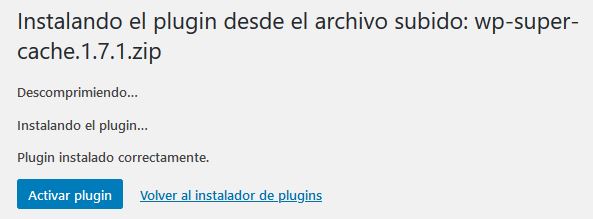
- Download the plugin .zip file from this link
- Login to your WordPress dashboard and go to Plugins -> Add New.
- Add a plugin manually
- Click the Upload Plugin button at the top of the page.
- Install a WordPress plugin
- Click Browse and select the plugin file from your computer.
- Click Install Now.
- Once the installation is complete, click Activate Plugin.
Pre-requisitos 📋
Pre-requirements 📋
Construido con 🛠️
Built with 🛠️
- Antonella Framework - Framework
- Composer - Manejador de dependencias. Dependency handler.
- NPM - Manejador de dependencias. Dependency handler.
Autores ✒️
Authors ✒️
- Gerardo Gonzalez - Developer - Gergab
Licencia 📄
License 📄
Este proyecto está bajo la Licencia GPLv2 - mira el archivo LICENSE.md para detalles
This project is licensed under the GPLv2 License - see the file LICENSE.md for details