WP Shopify
A WordPress plugin to easily integrate Shopify into any site.
Install
No release zip yet. The repository archive installs, but the folder name will carry the branch suffix and updates will not flow:
wp plugin install https://github.com/funkhaus/wp-shopify/archive/refs/heads/master.zipReadme
wp-shopify (WPS) is a Vuepress plugin that integrates the Shopify Storefront API with Vuepress for fast and powerful store construction.
You'll need both this and the Vue plugin to use WP-Shopify.
Table of Contents
Installation
-
Set up Shopify:
-
Set up a Shopify store and create a new private app.
- Go to your Shopify admin panel (
your-store.myshopify.com/admin). - Click "Manage Private Apps" at the bottom of the screen. You'll end up on
your-store.myshopify.com/admin/apps/private. - Click "Create a new private app."
- Keep the default API permissions and make sure
Allow this app to access your storefront data using the Storefront APIat the bottom of the screen is checked. - Hit Save to continue.
- Go to your Shopify admin panel (
-
Note the Storefront Token on the bottom of the next page:
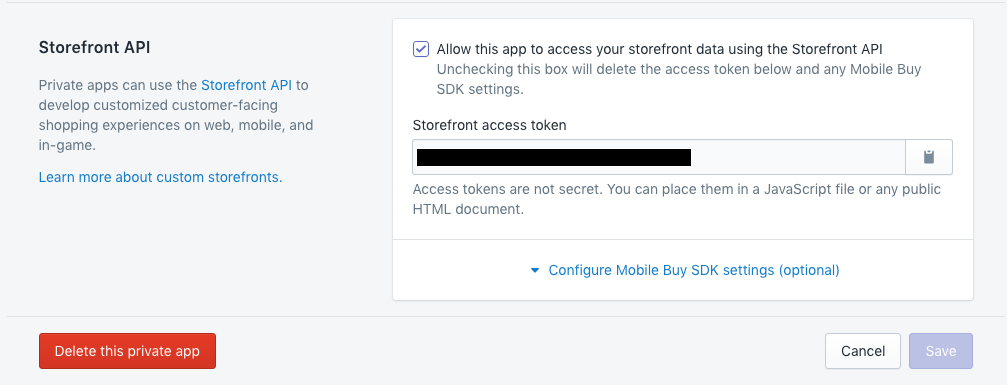
This page is accessible any time from
your-store.myshopify.com/admin/apps/private. -
-
Set up Vuepress:
- Install Vuepress.
- Download this repo and drop it into your plugins folder. Enable it through your plugin settings and then navigate to
Settings > WP-Shopify. - Put your Shopify domain (ie
your-store.myshopify.com) and Storefront Token from earlier into the WPS settings. - Save your changes, then click Refresh Products. Your products and collections will auto-populate from your Shopify store.
Dividing Responsibilities
WP-Shopify assumes that you'll be splitting up your shop's responsibilities.
-
Shopify will be the source of truth for:
- Product names
- Variants
- Prices
- Availability
- Collections
- Vendors
-
WordPress will be the source of truth for:
- Product descriptions
- Images
- Other metadata
Syncing
TL;DR Go to "Settings -> WP-Shopify" and hit "Refresh Products" whenever you want to sync your shop's products.
More detail:
Your Wordpress site will now be synced to your Shopify Products and Collections. Products are stored as a custom post type called wps-product.
The product ID meta field (stored under the key _wshop_product_id on a wps-product) connects a product to its data on Shopify.
The only times you need to manually refresh your store (Settings > WP-Shopify > Refresh Products) are when:
- You want to add or remove Products from your Wordpress site after setting them up on Shopify, or
- You want to update your Collections information.
Basically, it's a good rule of thumb to refresh your store manually after making any significant changes on Shopify.
Collections
Collections are a custom taxonomy for products that are managed automatically when syncing products.
WPS imports Collections as a custom taxonomy called wps_collection. Each Collection in Shopify becomes a term in the wps_collection taxonomy.
Front-End
Once you've installed this plugin and synced your Shopify data to your WordPress site, head over to the front-end Vue plugin to display data to the end user.
Advanced
Permalink Structure Slug
You'll see this option under Settings > WP-Shopify. Changing its value will rewrite the store's parent directory:
// Permalink Structure Slug set to 'store'
your-site.com/store/product-1

// Permalink Structure Slug set to 'xyz'
your-site.com/xyz/product-1
Convenience Functions
General
WPS comes with some convenience functions:
get_wshop_collections_slug()- Get the slug of the Collections archive pageget_wshop_shop_slug()- Get the slug of the wps-product archive pageget_wshop_domain()- Get the Shopify domainget_wshop_api_key()- Get the Shopify API key
Single wps-product
WPS comes with PHP convenience functions to check for, fetch, and display product IDs. Note that $post is optional in all of these functions and defaults to the current post.
has_product( $post )returnstrueif the page has a product ID set,falseif not.get_the_product_id( $post )is returns the product ID of a given page, as defined in the 'Product ID' metadata. If there is no product ID attached to a page, it returns a blank string.the_product_id( $post )echoes the return value ofget_the_product_id().
wp-shopify
Version: 3.0
Requires at least WP 3.8
Read the full README on GitHub →
Releases
| Tag | Published |
|---|---|
| 1.2 | Jun 28, 2017 |
These releases are tags only. The author does not attach a packaged zip, so there are no download counts to report.