Install
Upload it under Plugins → Add New Plugin → Upload Plugin, then activate.
Install straight from GitHub with WP-CLI:
wp plugin install https://github.com/dknauss/two-factor-enrollment/releases/download/0.1.0/two-factor-enrollment-0.1.0.zipAn add-on for the Two Factor plugin that enrolls policy-covered users in two-factor authentication before an auth cookie is issued.
Implements the onboarding flow described in WordPress/two-factor#813.
What it does
When a covered user logs in without a second factor configured, this plugin adds the Email provider to their account at runtime. Two Factor's existing login challenge then emails them a one-time code and withholds the auth cookie until they enter it. Confirming the code proves mailbox control and completes enrollment in a single step.
Enrollment is only made permanent — written to the user's enabled providers —
once they actually pass the emailed challenge. If a covered user never logs in
after this plugin is installed, or if it's deactivated first, nothing is written
and no trace is left. Once enrollment does complete, an account-change
notification is emailed (see two_factor_enrollment_notify below), and they're
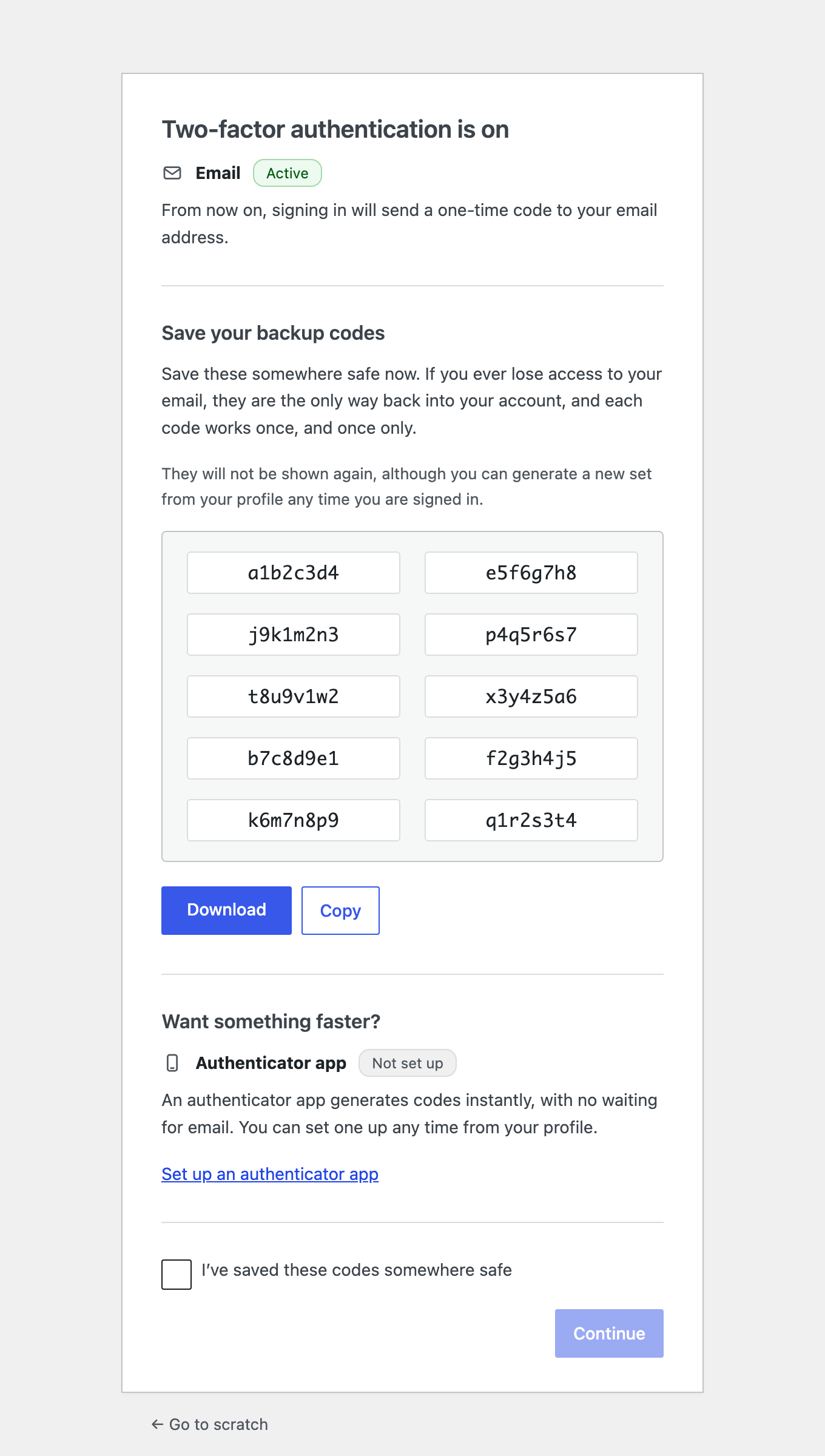
redirected to a one-time onboarding screen, where backup codes are generated
and enabled for them and they're offered a link to set up an authenticator
app.
In the ordinary case that redirect happens within the same login, right after
they enter the emailed code and before they reach the dashboard. It is driven
by the login_redirect filter, so it does not happen on an interim login
— the small re-authentication modal WordPress shows when a session expires
mid-edit. Two Factor returns before login_redirect on that path. The user
stays enrolled either way; they simply meet the onboarding screen at their
next full login instead.
A user who is both required and marked deferrable is skipped entirely on that login — Email is not injected, and they proceed normally. This plugin stores no counters or deadlines for deferral; it only asks the policy layer's filter and honors the answer each time.
Onboarding is scoped to users this plugin enrolled
The onboarding screen only ever appears for a user this plugin itself enrolled.
Internally this is tracked with a tri-state user meta value
(_two_factor_enrollment_onboarded: absent, pending, or done) rather than a
boolean, specifically so that "never enrolled by this plugin" and "already saw
the screen" are both distinguishable from "owed the screen." A user who
configured TOTP (or any other provider) before this plugin was ever installed
is never diverted to a screen they never asked for.
The onboarding screen enables backup codes, not just displays them
If the user has no backup codes yet, the onboarding screen generates a set and
appends Two_Factor_Backup_Codes to their enabled providers, so the codes it
shows are immediately usable as a real login method — not a preview. They can
be downloaded as a text file from the screen. Their primary provider stays
Email. If an administrator has disabled the Backup Codes provider site-wide,
this section is skipped.
That particular set of codes is shown once and not again, but this is not the
user's last chance at recovery codes: anyone who is signed in can generate a
fresh set from profile.php whenever they like.
The onboarding screen is authorized by a one-time token
Rendering the screen changes state — it generates backup codes, enables the
provider, and consumes itself — so the link carries a one-time token, minted
with the pending marker and destroyed when the screen completes. A request
without the matching token is passed straight through to the user's
destination, generating nothing and consuming nothing. (A WordPress nonce
cannot do this job: wp_create_nonce() folds the session token into its hash,
and wp_set_auth_cookie() does not populate $_COOKIE within the request that
mints the link, so such a nonce would fail verification every time.)
Security
The property this design rests on is where the auth cookie sits in the login
sequence: Two_Factor_Core validates the emailed code first and only calls
wp_set_auth_cookie() after that succeeds — never on the strength of the
password alone. (The permanent record of enrollment — appending Email to the
user's enabled providers — is written a moment later in that same request,
once the code has already been proven; it plays no part in gating the
cookie.)
- No password-only session is ever created for a covered user. There is nothing to lock down between "password verified" and "second factor set up," because that window doesn't exist — the auth cookie is never issued until the emailed code is entered and validated.
- This closes the enrollment race: an attacker who has obtained only a
user's password cannot pass that validation, because they cannot receive the
emailed one-time code. Passwords alone stop being sufficient to take over an
account through the login form, including an account that had no second
factor configured yet. That qualifier matters: this covers interactive
logins only, and an application password remains sufficient on its own
for the REST and XML-RPC surface — Two Factor governs those separately, via
two_factor_user_api_login_enable. - The required path deliberately offers no provider chooser. If a user could pick a method other than Email, an attacker could try to steer enrollment toward a factor that doesn't depend on the mailbox. Removing the choice is what makes the mailbox requirement actually load-bearing.
What it does not do
It owns no enforcement policy. It has no settings screen and no role
targeting. Both contract filters (two_factor_enrollment_required and
two_factor_enrollment_deferrable) default to false, so installing it alone
changes nothing. Something else decides who must enroll — for example a
companion policy plugin, or a few lines in a theme or mu-plugin.
Usage
The plugin does nothing until something answers two_factor_enrollment_required.
By default no one is required to enroll and no one may defer, so an install with
no policy callback registered is a permanent no-op.
Where the policy lives
Put it in wp-content/mu-plugins/. Must-use plugins cannot be deactivated from
the admin, which matters when the whole point is that covered users cannot opt
out.
<?php
/**
 * Plugin Name: Two-Factor Enrollment Policy
 * Description: Decides who must enroll in two-factor authentication.
 */

add_filter( 'two_factor_enrollment_required', function ( $required, $user ) {
    return user_can( $user, 'edit_posts' );
}, 10, 2 );
That covers everyone who can publish — administrators, editors, authors, contributors — and leaves subscribers and customers alone.
Other predicates follow the same shape:
| Who must enroll | Predicate |
|---|---|
| Everyone | true |
| Administrators only | user_can( $user, 'manage_options' ) |
| Specific roles | (bool) array_intersect( array( 'administrator', 'editor' ), (array) $user->roles ) |
| Everyone except a service account | 'svc-integration' !== $user->user_login |
Staged rollout
This is what the deferral filter is for: require enrollment for everyone, but let most people defer it until a later date while a smaller group enrolls immediately.
add_filter( 'two_factor_enrollment_required', '__return_true', 10, 2 );

add_filter( 'two_factor_enrollment_deferrable', function ( $allowed, $user ) {
    // Admins enroll now; everyone else can defer until the deadline.
    if ( user_can( $user, 'manage_options' ) ) {
        return false;
    }
    return time() < strtotime( '2026-09-01' );
}, 10, 2 );
A user who is currently allowed to defer logs in entirely normally — no challenge, no screen, nothing to notice — and enrolls on their next login once the condition flips. This plugin stores no deferral state of its own, which is exactly why the condition can be a date, a login count, or per-user meta without it knowing anything about it.
Before switching it on
Mail must work, because the second factor is the email: if transactional mail is broken, every covered user is locked out at their next login. Test delivery to a real mailbox first, and keep a known-good administrator session open while you roll out. If Require Email 2FA is also active on the site, deactivate it or scope the two so they do not overlap — running both means neither one's rollout logic actually runs.
Observing enrollment
two_factor_enrollment_enrolled fires once per user, the moment this plugin
permanently enrolls them — see the Filters table below for its full
signature. During a rollout that is a convenient hook for a log line or a
dashboard counter:
add_action( 'two_factor_enrollment_enrolled', function ( $user, $provider ) {
    error_log( sprintf( 'Enrolled %s via %s', $user->user_login, $provider->get_key() ) );
}, 10, 2 );
Filters
| Filter | Default | Purpose |
|---|---|---|
two_factor_enrollment_required |
false |
Does this user have to enroll |
two_factor_enrollment_deferrable |
false |
May this user skip enrollment on this login |
two_factor_enrollment_notify |
true |
Send the enrollment notification email |
two_factor_enrollment_onboarding_header |
'' |
Markup rendered above the onboarding card |
two_factor_enrollment_onboarding_header is presentation, not policy. The
onboarding screen carries no WordPress logo — the default one links to
wordpress.org from directly above one-time recovery codes, and the screen is
consumed before it renders, so following any outbound link from it destroys
those codes permanently. This filter is the space that removal left, for a site
that wants its own mark there:
add_filter( 'two_factor_enrollment_onboarding_header', function () {
    return '<img src="' . esc_url( 'https://example.com/logo.png' ) . '" alt="Example" width="120">';
} );
The value is run through wp_kses_post(), so `
Releases
1 release. Each count is every asset in that release; expand a row for the breakdown.