Install
This is the repository archive. It installs, but the folder name will carry the branch suffix and updates will not flow.
Install straight from GitHub with WP-CLI:
wp plugin install https://github.com/breakfastco/pmpro-plugin-licensing/archive/refs/heads/main.zipPlugin Licensing for Paid Memberships Pro
WordPress plugin. Add-on for Paid Memberships Pro. Helps sell plugin downloads, issue customer license keys, and deliver automatic updates to customer WordPress sites.
Screenshots
Screenshot 1
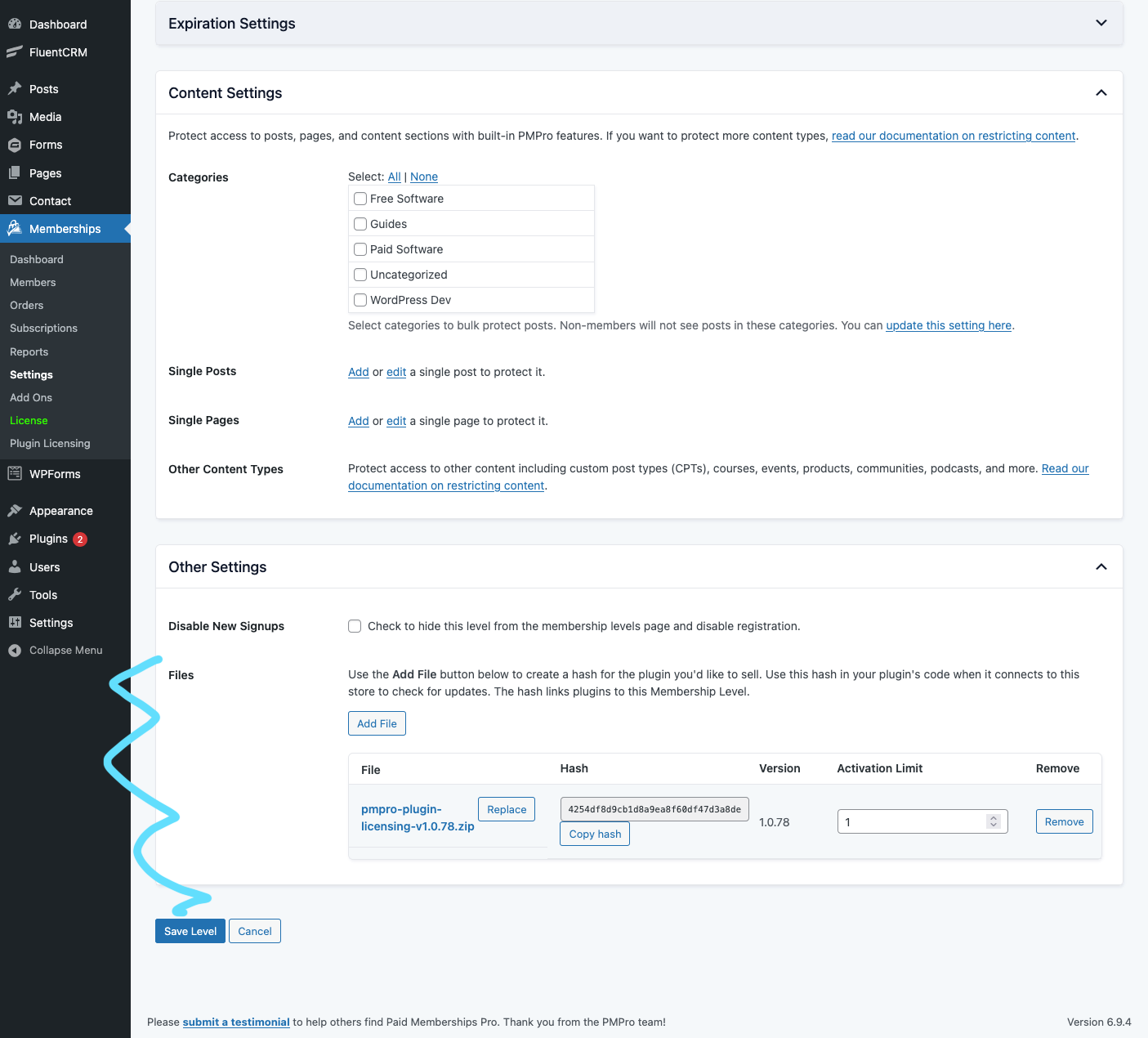
When editing a Membership Level, the Other Settings manages file downloads and activation limits associated with membership.
Screenshot 2
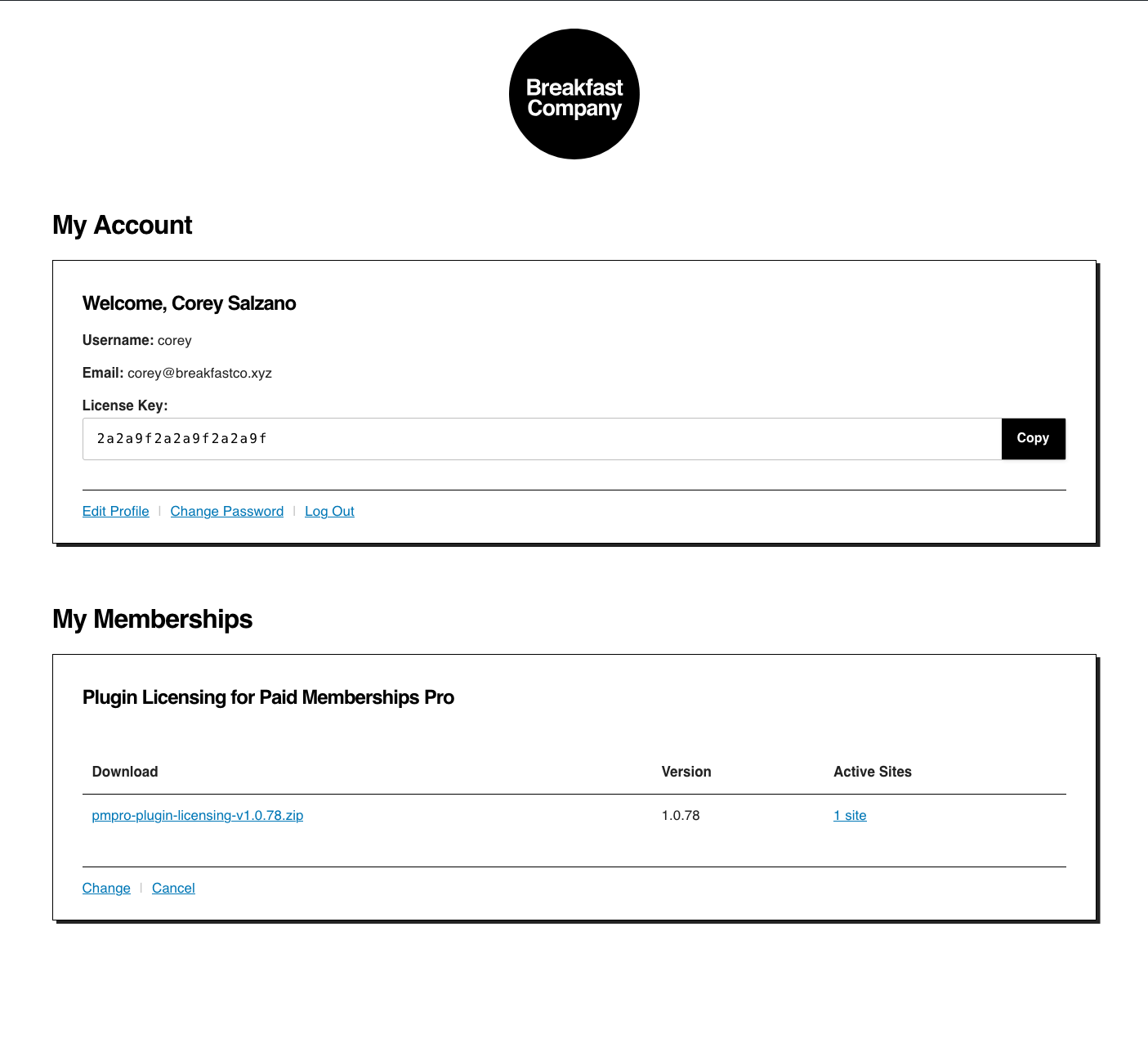
A single license key manages all license and update requests to the store per user.
Screenshot 3
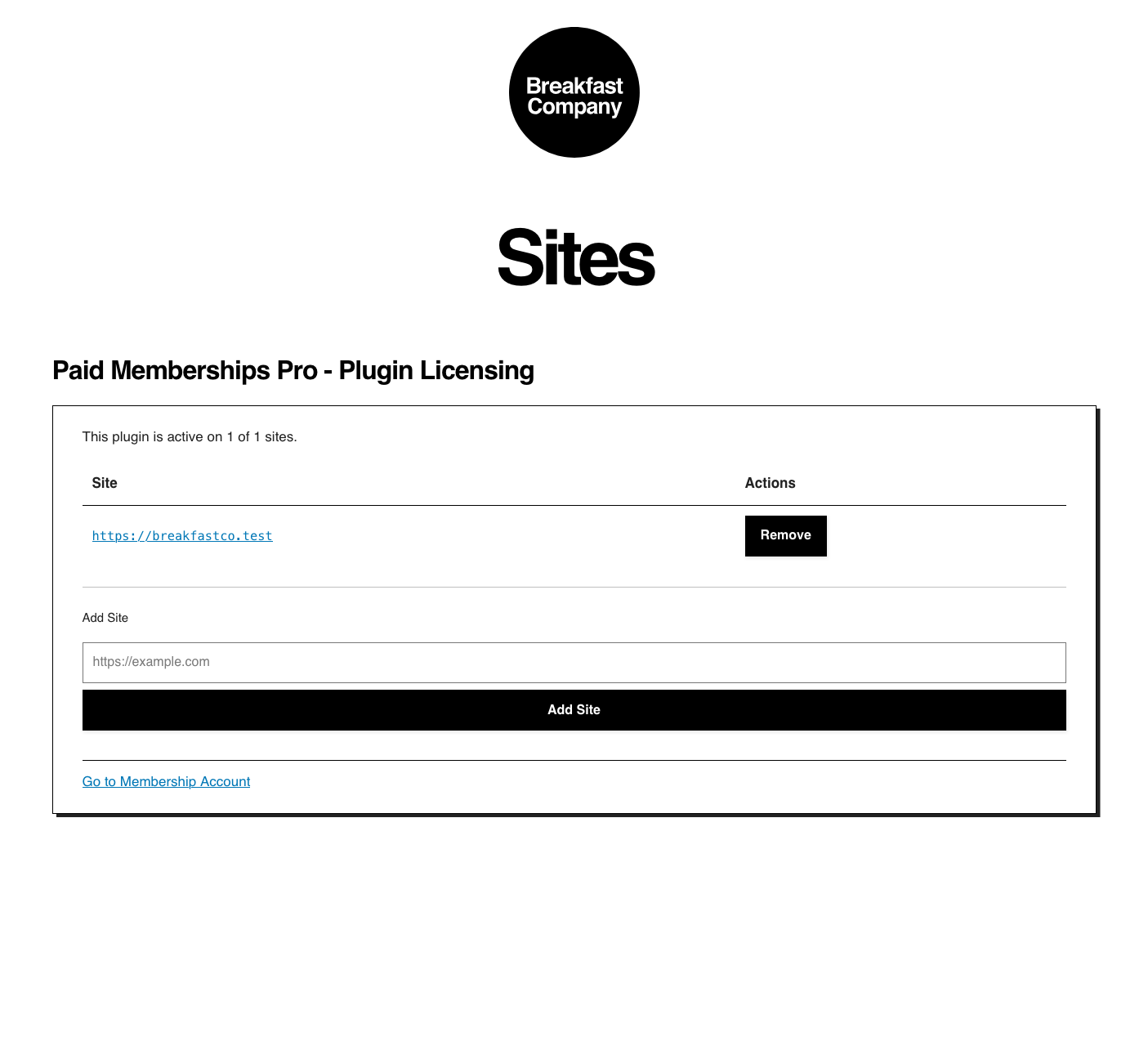
Users can add and remove sites from their licenses.
What it does
- attach plugin
.zipfiles to Paid Memberships Pro membership levels - generate one reusable license key per customer
- validate whether a customer can download and update a given plugin
- expose REST endpoints that client plugins use for update checks and license activation
- give customers a membership account screen where they can manage active sites
How it works
- Upload a plugin zip file and attach it to a membership level.
- When a customer purchases or is granted access to that level, the plugin issues a license key if needed.
- The customer installs a client plugin that knows your store URL and file hash.
- That client plugin calls your store's REST endpoints to check for updates and activate sites.
The companion sample client plugin lives here:
Setup
- Install and activate Paid Memberships Pro.
- Install and activate this plugin, Plugin Licensing for Paid Memberships Pro.
- Edit a membership level at Memberships → Settings → Levels.
- Find and expand the Other Settings section.
- Use Add File to upload or attach a plugin zip. Use the Replace button to provide users with an updated version.
- Copy the generated file hash into the client plugin that should receive updates. Use the sample plugin as a guide to integrate the updater into your plugin.
- Instruct customers to enter their license key in the client plugin's settings screen. License keys are found on the PMPro Membership Account page.
Operational notes
Downloads and access control
The plugin creates protected download URLs under:
membership-account/download/<hash>
Those links check whether the current logged-in user still has access to the file before serving the download.
The uploaded zip files themselves still live inside your WordPress uploads directory at wp-content/uploads/pmpro-plugin-licensing/, so you should treat upload delivery as part of your hosting/security setup too. In particular:
- protect
wp-content/uploads/pmpro-plugin-licensing/from direct access at the server level - make sure your uploads directory is not being exposed by a CDN or edge cache in a way that bypasses WordPress access checks
- use the protected WordPress download URLs instead of raw upload URLs when sending customers download links
Example Nginx rule:
location ^~ /wp-content/uploads/pmpro-plugin-licensing/ {
    deny all;
    return 403;
}
Multiple plugin purchases
If you want customers to buy multiple plugin products, place those membership levels in a Level Group that allows multiple selections. Otherwise a new purchase can replace access to an earlier level instead of adding to it.
Invalid or expired licenses
An invalid or expired license does not remotely disable a customer's plugin code. This project is primarily enforcing:
- update eligibility
- license/site activation status
- access to protected downloads from the store
If you want a client plugin to gate features locally, that logic must live in the client plugin itself.
REST API
Client plugins typically use these endpoints:
GET /wp-json/pmpro/v1/files/<hash>?site=<url>&license=<key>— update metadataGET /wp-json/pmpro/v1/files/<hash>/download?site=<url>&license=<key>— plugin zip download for automatic updatesPOST /wp-json/pmpro/v1/activatePOST /wp-json/pmpro/v1/deactivateGET /wp-json/pmpro/v1/status?file=<hash>&license=<key>&site=<url>
Development notes
License statuses
invalid: the license key was not found or the requested file is unknownexpired: the license is associated with a customer who no longer has accessinactive: the license is valid, but this site cannot be activated for the requested fileactive: the license is valid and the current site is active for that file
Force update checks
WordPress stores plugin update data in the update_plugins site transient. To force a fresh check:
wp transient delete update_plugins --networkwp option delete _site_transient_update_plugins
If you are testing the sample client plugin, also clear its cached store response:
wp option delete pmpro_pl_sample_plugin_update_response
Useful database queries
List all file hashes
SELECT p.ID AS attachment_id, p.post_title AS title, p.post_name AS slug, p.guid AS file_url, pm.meta_value AS file_hash, p.post_date AS created_date, p.post_modified AS modified_date
FROM wp_posts p
INNER JOIN wp_postmeta pm ON p.ID = pm.post_id
WHERE p.post_type = 'attachment'
  AND p.post_status = 'inherit'
  AND pm.meta_key = 'pmpro_pl_hash'
  AND pm.meta_value != ''
ORDER BY p.post_title ASC;
List all license keys
SELECT id, user_login, user_email, meta_value
FROM wp_users
LEFT JOIN wp_usermeta ON id = user_id
WHERE meta_key = 'pmpro_plugin_licensing_license_key'
ORDER BY id ASC;